
82% Off – Rocket Typist: Pro Lifetime License | Text Expander, Snippet Manager, AI Smart Snippets – for Mac

Stop repeating yourself—start using snippets that paste perfectly formatted text, images, and smart templates in seconds across Mac, iPhone, and iPad. Get Rocket Typist With a Pro Lifetime License at a 82% Discount today and start typing less tomorrow.
✔ Lifetime License. ✔ Free Product Updates ✔ 24×7 Customer Support
Rocket Typist Review at a Glance
If you write the same greetings, answers, links, addresses, code blocks, or signatures every day, the “small” retyping adds up to hours each month—and it also invites typos, inconsistent wording, and missed details. Rocket Typist fixes that problem by turning your most-used content into ready-to-insert snippets you can call up instantly.
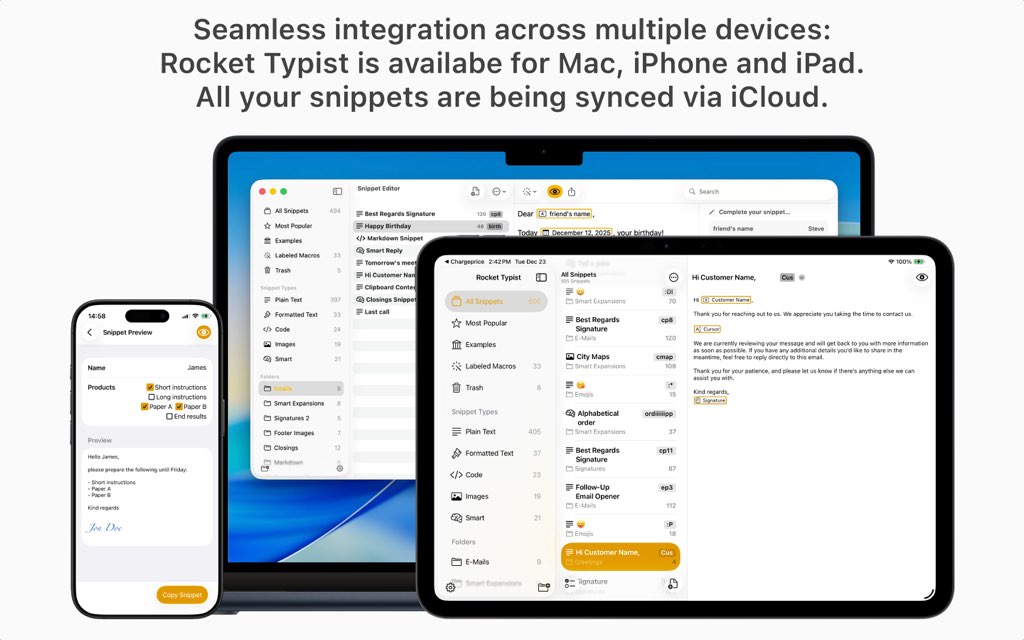
What is Rocket Typist
Rocket Typist is an Apple-first text expander that stores your reusable content (snippets) and inserts it on demand in almost any app on macOS, iOS, and iPadOS. Think of it as a personal library of ready-to-use text, images, templates, and smart responses—available through shortcuts, abbreviations, search, and a dedicated keyboard on mobile. Your snippets become a toolkit you can rely on every day.

At the center is the snippet editor: a single place to create, edit, and maintain everything. Organize snippets into folders, use search and filters to handle large collections, and preview output before insertion so you know exactly what will land in your email, form field, or chat. This reduces second-guessing and helps keep your communication consistent.
Rocket Typist includes dynamic macros that turn static templates into flexible ones. You can insert a current date in a chosen format, ask for quick input via placeholders, pull in clipboard or selected text, combine snippets, and position your cursor for fast completion. On Mac, you can also automate certain actions with key macros, giving you control over repetitive steps.
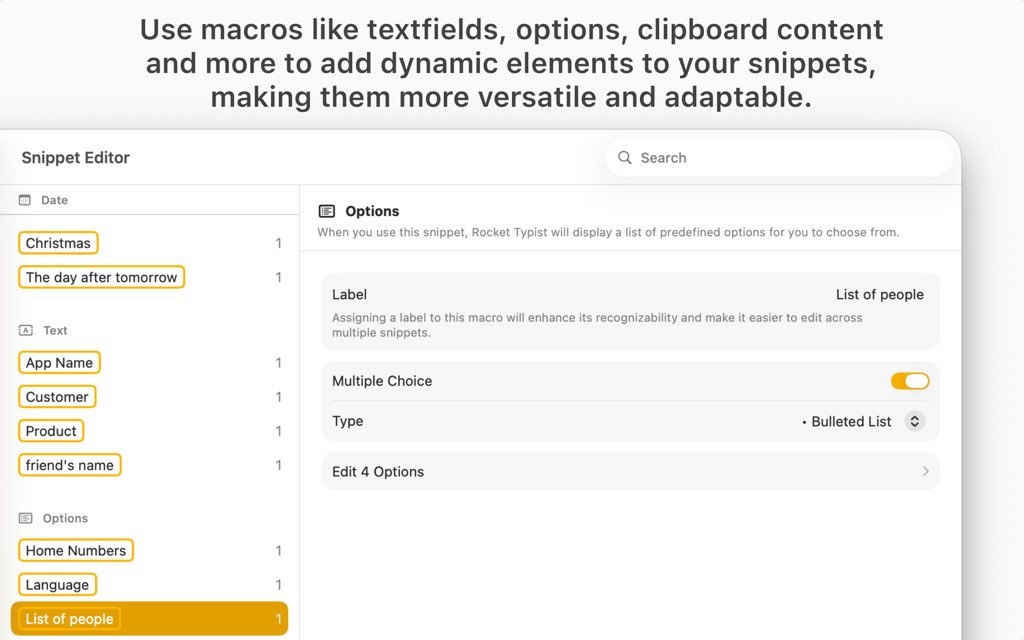
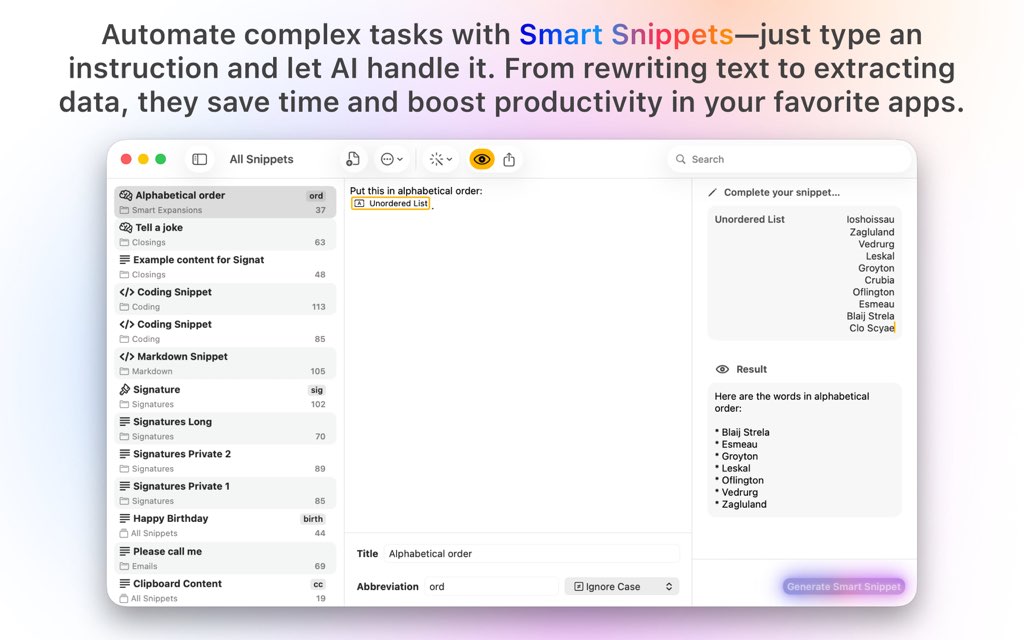
Finally, Rocket Typist supports AI-powered smart snippets (using OpenAI technology) that generate text from your custom instructions. Instead of manually drafting, you define what you want (for example: “rewrite in a friendlier tone” or “summarize this paragraph”), and Rocket Typist inserts the result right where you’re working. It’s automation aimed at writing tasks you already do.
Key Benefits
Rocket Typist is designed to remove friction from everyday typing, so you spend more time finishing work and less time repeating it. These benefits focus on speed, consistency, and convenient access across Apple devices, all driven by a snippet library that stays organized as it grows. Expect less retyping and more reliable output.
- Save time by reusing your best phrases, templates, and responses
- Reduce mistakes by inserting consistent, proofed content
- Keep everything organized using folders, search, and filters
- Work across Mac, iPhone, and iPad with iCloud sync
- Insert snippets your way: abbreviations, shortcuts, menu bar search, or mobile keyboard
- Build flexible templates using macros (dates, placeholders, cursor position, and more)
- Create richer content with formatted text, code snippets, and images
- Standardize team language by exporting/importing snippet sets for shared terminology
Rocket Typist is a text expander and snippet manager built specifically for the Apple ecosystem, so your snippet library follows you from Mac to iPhone to iPad with iCloud sync. Save plain text, rich text, formatted code (including optional JavaScript execution), images, and AI-powered smart snippets, then insert them using abbreviations, shortcuts, search, the menu bar, or the Rocket Typist keyboard. The result is speed you can feel in email, chat, documents, support tools, and browser forms.
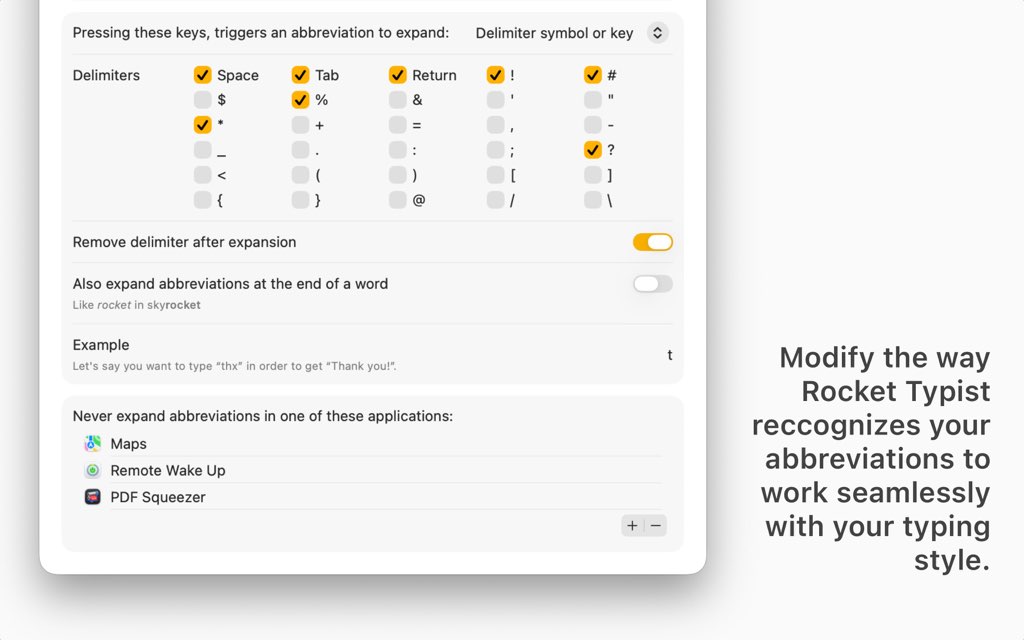
Instead of building your workflow around copy/paste chaos, Rocket Typist gives you a central editor for collecting, organizing, and refining reusable content. Folders keep large libraries tidy, advanced search helps you find the right item fast, and preview shows the final output (with macros applied) before you insert—so your content stays accurate.
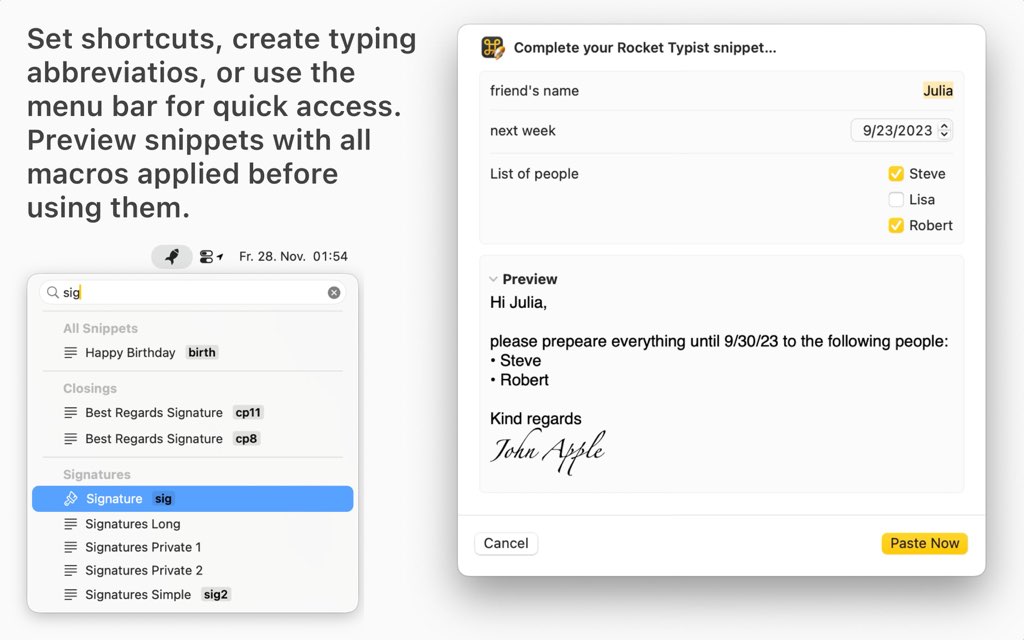
Rocket Typist also shines when you need templates that change each time you use them. Macros let you insert dates, prompt for fill‑in text, reuse other snippets, place the cursor exactly where you want, and even automate key presses on Mac. Add in optional AI smart snippets for rewriting, summarizing, translating, or generating text from your instructions, and you get a practical system for consistent messaging and productivity.
Who benefits most? Anyone who types repeatedly: customer support agents, sales reps, recruiters, developers, marketers, founders, students, legal teams, and anyone who wants consistent wording across devices. If you value faster replies, fewer errors, and reusable templates, Rocket Typist is built for you.
How Rocket Typist Fits Real Work
Most people don’t just need faster typing—they need repeatable responses that stay accurate across apps, devices, and contexts. Rocket Typist helps by turning “things you type often” into a library you can keep improving over time. That keeps your tone, terminology, and formatting stable.
Example: a customer support reply template can include a greeting, a troubleshooting checklist, a closing signature, and a date macro for the follow-up. Add an Options macro to pick the product model, and a Cursor macro to place your caret where you need one custom sentence. You get the speed of a template, plus the flexibility to personalize the last mile. That’s practical automation, not rigid copy/paste.
Developers and technical writers also benefit from formatted code snippets and optional JavaScript execution for transformations or simple logic. Save common HTML/CSS blocks, API responses, or reusable comments, then insert them consistently. For writers and managers, smart snippets can generate drafts, summaries, or alternative phrasings based on your instructions, helping you move from blank space to first draft faster with fewer interruptions.
Teams can use export/import to distribute a shared snippet pack so everyone uses the same wording, disclaimers, brand terms, and support policies. This reduces “version drift” across departments and helps keep corporate language consistent in emails, chat, and documents. It’s a straightforward path to uniformity.
Features
Below is a comprehensive list of the key features that make the software a valuable addition to your needs:
- Snippet Management — Create, edit, and organize reusable text, images, and code in one place.
- Folders — Group snippets into folders for clean structure and faster access.
- Multiple Snippet Types — Support for plain text, rich text, code, images, JavaScript, and AI smart snippets.
- Advanced Search & Filters — Quickly find snippets even in large collections.
- Preview Before Insert — See the final output of a snippet before using it.
- Instant Snippet Access — Insert snippets quickly wherever you type.
- Abbreviations — Expand custom shortcuts automatically as you type.
- Keyboard Shortcuts — Trigger snippets or folders using configurable shortcuts.
- Menu Bar Search (Mac) — Find and insert snippets directly from the menu bar.
- Snippet Keyboard (iOS & iPadOS) — Access snippets anytime using a custom keyboard.
- Touch Bar Support (Mac) — Select snippets directly from the Touch Bar.
- Dynamic Macros System — Add flexible, interactive elements to snippets.
- Clipboard Macro — Inserts the current clipboard content automatically.
- Text Macro — Prompts for user input when inserting a snippet.
- Option Macro — Choose from predefined options when using a snippet.
- Date Macro — Inserts dates and times with offsets and custom formats.
- Snippet Macro — Embeds one snippet inside another for modular content.
- Cursor Macro — Places the cursor at a defined position after insertion.
- Key Macro (Mac) — Simulates key presses or shortcuts for automation.
- Selection Macro — Inserts currently selected text without copying.
- Labeled Macros Hub — Manage and reuse macros consistently across snippets.
- Central Macro Editing — Update a macro once and apply changes everywhere.
- Consistent Application — Use the same macro logic across multiple snippets.
- Smart Snippets (AI-Powered) — Generate text automatically using AI prompts.
- Custom Prompts — Define instructions for rewriting, summarizing, or transforming text.
- Text Analysis & Transformation — Proofread, translate, summarize, or rephrase content.
- Context Awareness — Use selected text or clipboard content as AI input.
- Code & Automation Support — Create advanced snippets for technical workflows.
- Formatted Code Snippets — Store and insert code with preserved formatting.
- JavaScript Execution — Run scripts for calculations, logic, or text processing.
- Cross-Platform Availability — Use Rocket Typist on all Apple devices.
- Mac Support — Full-featured desktop experience with system-wide access.
- iPhone Support — Use snippets anywhere with the custom keyboard.
- iPad Support — Optimized experience for larger screens and multitasking.
- iCloud Sync — Keep snippets up to date across all devices automatically.
- Real-Time Syncing — Changes appear on all devices without manual action.
- Always Available Content — Access your snippet library wherever you are.
- Sharing & Portability — Maintain consistency across teams and systems.
- Snippet Import & Export — Easily move snippets between devices or users.
- Team Sharing — Share standardized snippets for consistent communication.
Requirements
Before installing, confirm you have the basics in place so sync and smart features work as intended. These requirements keep setup simple and predictable across your Apple devices.
- Compatible Apple devices: Mac, iPhone, and/or iPad
- Supported operating systems: macOS, iOS, iPadOS (use current versions supported by the app)
- iCloud account (recommended) for cross-device sync
- Internet connection for iCloud sync and AI smart snippet generation
- OpenAI access for AI smart snippets (may require an account and could involve usage costs based on provider terms)
Downloads
Try Rocket Typist at no cost to see how a snippet library changes your daily typing, then decide if you need the Pro feature set. Get started with the free edition, build a handful of core templates, and measure the time you save in real tasks like email replies and form filling—then move to Pro when you want more power.
Download Rocket Typist (Free) to test snippet creation, insertion flows, and your preferred access method (keyboard, shortcuts, or search). When you’re ready, you can upgrade inside the app to access the full Pro experience.
BUY NOW
Rocket Typist Pro is normally $19.99—but for a limited time, you can unlock an exclusive discount of up to 82% OFF—act now if you want the Pro license for less and start cutting repetitive typing this week. This purchase is designed to pay back quickly in time saved.

" />
Text Expander for Mac, iPhone & iPad — Snippet Manager with iCloud Sync, Keyboard Shortcuts, Macros & AI Smart Snippets for Faster Productivity
- Please Notes:
- You may be directed to the bundle page, but it is possible to purchase the software individually.
- If you're having difficulty locating the product on the bundle page, please utilize the browser's search feature.
- Get an additional $3 discount on all orders more that $30.
- LEGITIMATE: All apps are authentic and have original licenses obtained directly from the creators via contracts.
- INSTANT ACCESS: Fully activated macOS Apps & Windows Software with instant downloads & license key access.
- Device Activation: 5 Devices
- Minor Updates Included Only
- Lifetime License
Platforms: Mac OS X

" />
Get Rocket Typist and over 260 other Mac apps with a subscription starting at just $9.99 per month.
- Full access to Rocket Typist and over 260 other Mac apps
- Install as many apps as you want
- Every Mac and iOS app you need
- Ever-growing collection, same price
- Free updates. No ads
- 7-day Free Trials, Easy cancellation
Platforms: Mac OS X

Fluent Mac App BEST OFFER
TextSniper: Lifetime License BEST OFFER

VibeSonic Pro BEST OFFER

Keyboard Maestro BEST OFFER

Typinator BEST OFFER
Rocket Typist Pro Key Giveaway
Unavailable at this moment!

To access the giveaway, kindly provide your email address. Please refrain from closing this page after signing in to receive instructions on how to access the offer at no cost.
NOTES:
– All prices shown here are in listed USD (United States Dollar).
– Such promotional programs are subject to change without notice, from time to time in our sole discretion.
– Data may vary based on different systems or computers.
User & Media Reviews
What are their users saying about #THE SOFTWARE? Why they loved it?
I have really enjoyed Rocket Typist on the Mac for a long time. I was excited to see it come to mobile devices and have enjoyed having the sync between the two! It’s a great start with a responsive developer.
 ⭐⭐⭐⭐⭐" class="author_image">TDawg_07
⭐⭐⭐⭐⭐
⭐⭐⭐⭐⭐" class="author_image">Kevin⭐⭐⭐⭐⭐
I loved this app before, it made my life easier in so many small ways, just adding a bunch of small macros for stuff like current date, frequent email templates etc. With the new AI stuff, I can supercharge this even more!
⭐⭐⭐⭐⭐" class="author_image">Oana⭐⭐⭐⭐⭐
⭐⭐⭐⭐⭐" class="author_image">Enrique⭐⭐⭐⭐⭐
⭐⭐⭐⭐⭐" class="author_image">Dustin Ebaugh⭐⭐⭐⭐⭐
Thanks for reading Rocket Typist Review & Enjoy the discount coupon. Please Report if Rocket Typist Pro Discount Coupon/Deal/Giveaway has a problem such as expired, broken link, sold out, etc while the deal still exists.