Giveaway – GiMeSpace KMShare 1.2.5: Free license Key | Keyboard Mouse Sharing Software

Control Multiple Computers with One Keyboard & Mouse — No Extra Hardware Needed. Get GiMeSpace KMShare, the Smoothest KVM Software Experience, with a license key for free Today and Boost Your Multi-PC Productivity Instantly!
Free Full Verison!
GiMeSpace KMShare and KVMShare Pro Review at a Glance
If you regularly work across two or three computers — a desktop and a laptop, a main workstation and a secondary machine, or even an old repurposed PC — you already know the frustration. You reach for the wrong keyboard, you plug in USB drives just to move a file, you copy text on one screen and then manually retype it on another. You waste minutes every hour just switching between machines, losing your flow and cutting into your productivity. Traditional hardware KVM switches are bulky, expensive, and often lag behind. Remote desktop tools hog bandwidth and introduce noticeable delay.
There has to be a smarter solution — and GiMeSpace KMShare and KVMShare Pro deliver exactly that.
What Is GiMeSpace KMShare / KVMShare Pro?
GiMeSpace KMShare and its more powerful sibling KVMShare Pro are lightweight, software-based KVM (Keyboard, Video & Mouse) sharing tools for Windows that let you control 2 or 3 computers using a single keyboard and mouse, all over your local network — with no physical switch hardware required. Developed by GiMeSpace, the software works on all Windows versions from XP through Windows 11, making it compatible with virtually any machine you own, including older laptops you want to put back to good use.
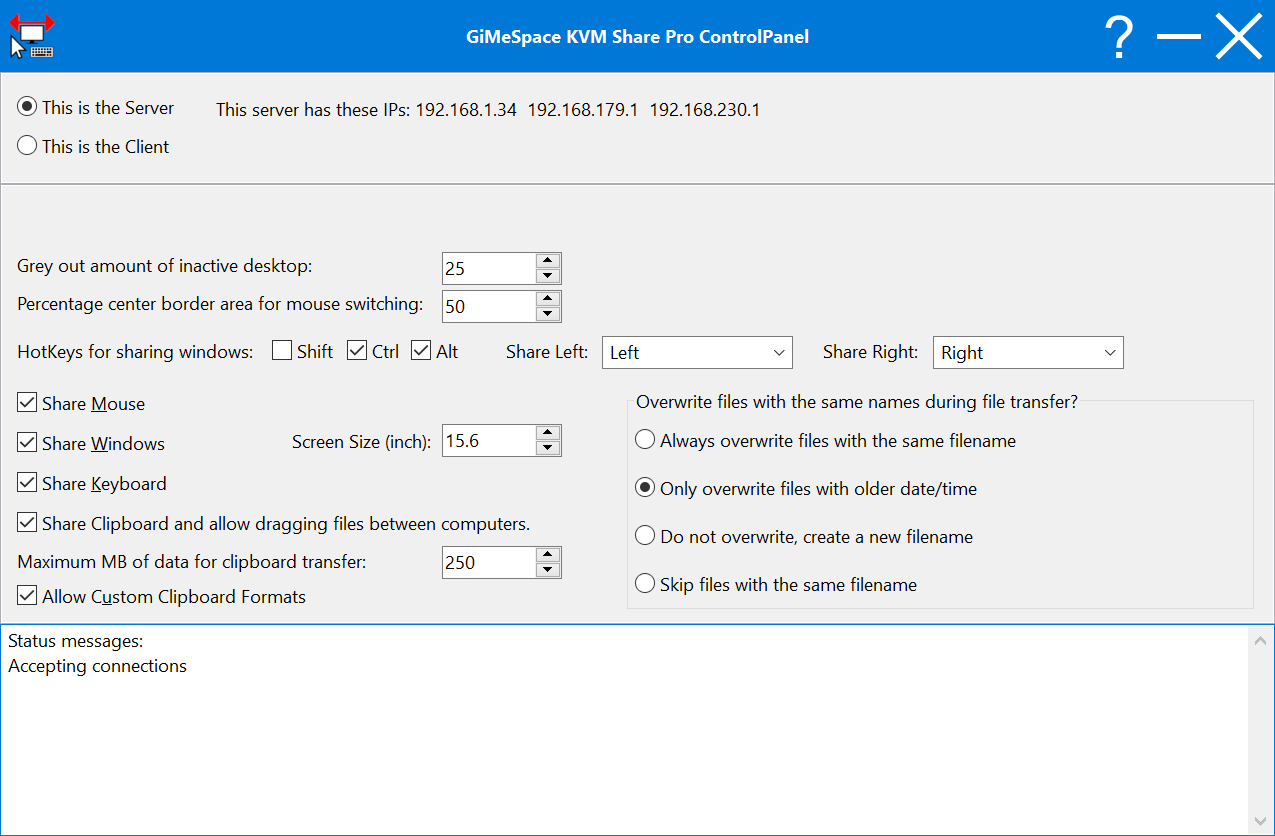
The way it works is simple: one computer is designated as the server (typically the one in the middle if you have three screens), and the others act as clients. Once connected over your local Wi-Fi or Ethernet network, you move your mouse cursor to the edge of the screen and it flows seamlessly to the next computer — just like moving between two monitors.
The keyboard follows automatically, and so does your clipboard. KVMShare Pro takes this further by letting you display application windows from one computer directly on the screen of another, a feature rarely seen in competing products at this price point.
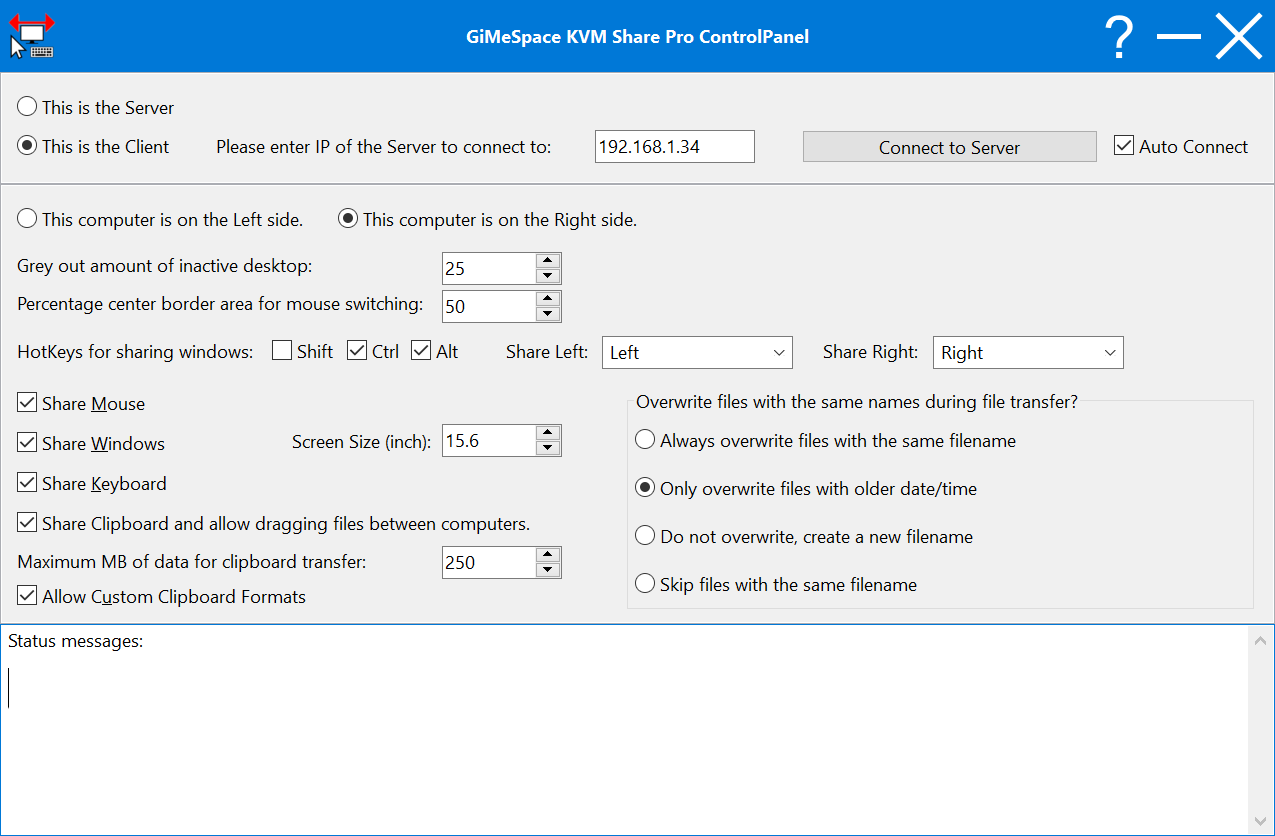
Compared to similar programs, GiMeSpace KMShare and KVMShare Pro deliver noticeably smoother and more responsive mouse movements, much higher data transfer rates, and a practical window-sharing capability that most alternatives simply do not offer. Whether you are a developer testing across machines, a designer balancing workloads, a creative professional managing large file transfers, or an IT professional administering multiple systems, this software cuts through the clutter and puts you in full control.
Key Benefits
GiMeSpace KMShare and KVMShare Pro bring a set of concrete, measurable advantages to anyone managing more than one computer. Here is what makes this software a standout choice for multi-PC users:
- Eliminate desk clutter — No extra keyboards, mice, or USB hubs needed; one set of peripherals controls all your connected computers.
- Smoother, faster mouse control — The cursor movement between computers is significantly more responsive than competing KVM software, reducing friction during intensive work sessions.
- High-speed file and clipboard transfers — Move files of any size and clipboard content up to 250MB between machines instantly, far exceeding the 15MB limit of the basic KMShare version.
- Share application windows across screens — In the Pro version, send any running program window to another computer’s display with a single hotkey press, scaled automatically to the correct resolution.
- Revive old hardware — Put that unused laptop or secondary desktop back to work as a functional second or third screen with its own processing power.
- Low bandwidth and CPU usage — Unlike full remote desktop solutions, KVMShare Pro shares only what is necessary, keeping your network and processors free for actual work.
- Local network security — Only computers on your own local network can connect, and every connection attempt shows the IP address and computer name before access is granted.
- One-time purchase, no subscription — Pay once and own it forever, with no recurring fees eating into your budget.
- Compatible with GiMeSpace Desktop Extender — If you also use GiMeSpace’s desktop extension tools, KVMShare Pro integrates seamlessly and pauses scrolling automatically when you switch to the other computer.
Features
Below is an authoritative breakdown of every capability built into GiMeSpace KMShare and KVMShare Pro, covering both the standard and Pro editions so you can choose the right fit for your workflow:
- Multi-Computer Connection Setup — Quickly connect 2 computers (KMShare) or up to 3 computers (KVMShare Pro) over a local Wi-Fi or Ethernet network.
- Server/Client Role Assignment — Designate one machine as server and the others as clients for clean, organized control.
- Auto-Connect on Startup — Enable auto-connect so that the link between computers is re-established automatically every time you start the program, with no manual intervention.
- IP Address Display — The server displays its active IP address (Wi-Fi or Ethernet) so client computers can connect quickly and without guesswork.
- Connection Memory — Once a client is approved, it is remembered on the server, eliminating the need to reconfirm the connection on future sessions.
- Seamless Mouse Sharing — Move your mouse cursor smoothly from one screen to another by simply pushing it to the screen’s edge, just like using a multi-monitor setup.
- Configurable Portal Zone — Only the center of the left and right screen borders act as passthrough zones, and you can adjust how large this area is to prevent accidental cursor switches.
- Screen Position Assignment — Specify the physical position (left, center, or right) of each computer so cursor movement direction matches your real-world desk layout.
- Inactive Screen Greying — The screen you are not actively using can be visually dimmed to make it immediately clear which computer has control, with an adjustable grey intensity level.
- Keyboard Sharing — Keyboard input automatically follows the mouse cursor, so whichever computer the mouse is on receives all keystrokes without any extra button press.
- Clipboard Sharing — When the mouse moves to another computer, the clipboard contents are transferred along with it automatically.
- Configurable Transfer Limit — Set a maximum clipboard data size to prevent accidental large transfers; supports up to 250MB in the Pro version (versus 15MB in KMShare).
- Custom Clipboard Format Support — The Pro version can transfer custom clipboard formats used by specialized applications, though compatibility depends on the receiving program.
- File and Folder Transfer — Copy any number of files or folders between computers by simply copying them to the clipboard and switching computers, triggering an instant save-dialog on the destination machine.
- No File Deletion — The software never removes source files, keeping your originals safe regardless of the outcome of the transfer.
- Conflict Resolution Options — Before copying, select the desired behavior when files with the same name already exist in the destination folder.
- No Transfer Size Limit — There is no cap on the total volume of files you can transfer in a single session.
- Window Sharing (Pro Version) — Send any active application window to the screen of a connected computer using an assigned hotkey.
- Auto-Scaled Resolution — Shared windows are automatically scaled to fit the resolution and screen size of the receiving computer.
- Resizable Shared Window — You can resize the shared window directly on the receiving screen.
- Dynamic FPS Adjustment — The refresh rate shifts automatically between the selected FPS and up to 8x lower depending on content change activity, conserving bandwidth and CPU usage; the recommended setting is 25 FPS for balanced performance.
- Overlay Control Buttons — Three control buttons appear in the top-right corner of shared windows; the close button sends the window back to the originating computer rather than closing the program.
- DesktopFusion Upgrade Path — Upgrade for free to KVMShare DesktopFusion (which uses a virtual display plug to overcome the window-sharing limitations of the standard Pro version) and revert anytime.
- Security and Access Control — Only local network connections are permitted, with no exposure to external internet traffic.
- Connection Confirmation Prompt — Every new connection attempt displays the incoming IP address and computer name, giving the server user full control over who connects.
- No Encryption Overhead — Encryption is intentionally excluded to maintain maximum speed; security relies on the integrity of your local network, which can be hardened further with direct Ethernet cables.
- Port Usage — The software uses port 24800 with both TCP and UDP protocols, making it easy to configure firewall rules.
- Connectivity Options — Beyond standard Wi-Fi or router-based Ethernet, the software supports crossover Ethernet cables for maximum transfer speed and USB KM data link cables (with OTI device activation) for flexible direct connections.
- Administrator Mode Support — Run the program as Administrator to enable keyboard and mouse emulation in elevated Windows areas such as Task Manager, UAC prompts, and installer screens.
- Windows Version Compatibility — Fully supported on Windows XP, Vista, 7, 8, 8.1, 10, and 11, covering legacy machines as well as modern systems.
- GiMeSpace Desktop Extender Integration — When used alongside a GiMeSpace Desktop Extender, KVMShare Pro recognizes the extension and automatically pauses the scrolling feature when focus shifts to the connected computer.
Requirements
To run #THE SOFTWARE with optimum reliability and performance, your system should match the following requirements:
| Feature | KMShare (v1.x) | KVMShare Pro (v2.x) |
|---|---|---|
| Max computers connected | 2 | 3 |
| Window sharing | No | Yes |
| Max clipboard transfer | 15MB | 250MB |
| Custom clipboard formats | No | Yes |
| Transfer speeds | Standard | Significantly higher |
| All options toggleable | No | Yes |
| Price | $19.00 | $25.00 |
Downloads
Experience firsthand how GiMeSpace KVMShare Pro redefines multi-computer productivity in your own workspace.
Click the button below to download the free trial of KVMShare Pro version 2.4.0 now.
The full-featured software is available as a free trial for a maximum of 30 days with no payment required — giving you ample time to test every feature, including window sharing, high-speed file transfers, and seamless mouse movement across all your machines. No credit card is needed to start your trial. Simply download, install on each computer, and see the difference for yourself.
BUY NOW
GiMeSpace KVMShare Pro is regularly priced at $25.00, and GiMeSpace KMShare is available at $19.00 — both representing outstanding one-time value with no subscription fees ever. Right now, you can secure your permanent license for KVMShare Pro at a special discounted price through our exclusive coupon offer — but this promotion is available for a limited time only, so act before it expires.
Software Giveaway: You can also get GiMeSpace KMShare v1.2.5 full version with a license key for free in the Giveaway tab below.

Share Your Keyboard/Mouse/Windows Between Multiple Computers
- After you purchase GiMeSpace KVM Share Pro it may be used indefinitely.
- GiMeSpace KVM Share Pro is licensed per user, so if more people are going to use
- GiMeSpace KVM Share Pro you will need to purchase additional copies.
- Each license allows installation on 3 computers, and GiMeSpace KVM Share Pro may be used at exactly the same time on each of them.
- Transfer of a license to another owned computer is not allowed.
- Online license activation is required without a hardware footprint. what's this?
- You can install/register the software at any time.
- License can be used for Commercial and Personal use.
- Upgrades to future versions of the software will be free for minor versions only. For versions after that, upgrades will require additional payment, which will be discounted by 50%. It will be discounted only if you've purchased the last major version.
- Support is provided for this version and any minor versions that are released later.
- No return policy.
- Review the Full License details for downloading and installing this software.
- Prices do not necessarily include taxes, which will vary by country.
Platforms: Windows
Mouse Axis Locker Pro BEST OFFER
![[SOLO KEY #2] Giveaway – AnyViewer 5 Solo Edition: Free License Key | A Comprehensive Remote Access, Remote Control, and Remote Support Software – for Windows](https://thesoftware.shop/wp-content/uploads/thumbs_dir/AnyViewer-Pro-review-download-Key-Giveaway-247kvhsh0ax8o4hdghz2seib24857cbrnyy79q49kgpg.png)
AnyViewer Professional GIVEAWAY

Vovsoft Auto Mouse Clicker GIVEAWAY

Keyboard Layout Indicator GIVEAWAY

GiMeSpace Cam Control Pro GIVEAWAY
GiMeSpace KMShare Giveaway
Available now: Free License Key for a Limited Time!
To access the giveaway, kindly provide your email address. Please refrain from closing this page after signing in to receive instructions on how to access the offer at no cost.
NOTES:
– All prices shown here are in listed USD (United States Dollar).
– Such promotional programs are subject to change without notice, from time to time in our sole discretion.
– Data may vary based on different systems or computers.
Thanks for reading GiMeSpace KMShare Review & Enjoy the discount coupon. Please Report if GiMeSpace KMShare Discount Coupon/Deal/Giveaway has a problem such as expired, broken link, sold out, etc while the deal still exists.