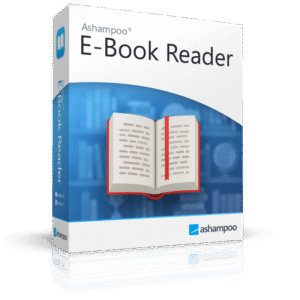
Giveaway – Ashampoo® E-Book Reader: Free Full Version | eBook PDF Reader – for Windows

Read Smarter, Stay Organized — Get Ashampoo E-Book Reader for Free Today and Take Full Control of Your Digital Library!
You can also get Ashampoo® E-Book Reader that includes free support at a 50% Discount!
✔ Lifetime License. ✔ Free Product Updates ✔ 24×7 Customer Support ✔ 30-day Money-back Guarantee.
BUY NOW
Ashampoo E-Book Reader is available at its standard retail price: $15.00, but right now you can get your official license at a significantly reduced rate using our exclusive 50% discount offer. This special pricing is only available for a limited time, so acting now means locking in the best possible deal on a software that will serve your digital reading needs for years to come.
By purchasing Ashampoo E-Book Reader, you receive:
- A full, permanent software license — pay once and own it, with no subscription fees
- Free lifetime updates within the current major version, keeping your software current and fully functional
- Priority customer support from the Ashampoo support team, available to help with any questions or technical issues
- Immediate download and activation — start reading within minutes of your purchase
- Access to all features with no limitations, including split-screen mode, library management, full annotation tools, and all display customization options
Software Giveaway: You can also get a full version of Ashampoo E-Book Reader for free in the Giveaway tab below

Desktop App for Reading & Managing E-Books and PDFs with Customizable Display, Library Management, Split-Screen, Full-Text Search & Bookmarks
- Download version,
- One-time payment,
- No time limit
Platforms: Windows

UPDF Pro: Lifetime Deal BEST OFFER

PDNob PDF Editor BEST OFFER
Vovsoft OCR Reader: lifetime License GIVEAWAY

Epubor Reader GIVEAWAY

Sososofty Archive Mate GIVEAWAY
Ashampoo® E-Book Reader Giveaway
Available now: Free Full Version for a Limited Time!
To access the giveaway, kindly provide your email address. Please refrain from closing this page after signing in to receive instructions on how to access the offer at no cost.
NOTES:
– All prices shown here are in listed USD (United States Dollar).
– Such promotional programs are subject to change without notice, from time to time in our sole discretion.
– Data may vary based on different systems or computers.
Ashampoo E-Book Reader Review at a Glance
Most people who read e-books and PDF documents on their desktop PC know the frustration all too well. Generic PDF viewers are cluttered, slow, and offer little to no reading comfort. Browser-based readers lack the tools needed for serious study or leisure reading. Font sizes are too small, backgrounds are too harsh, and there is no proper way to organize a growing library of books and documents. Finding a specific passage in a large document becomes a tedious manual process, and switching between two references requires juggling multiple windows. For anyone who reads regularly on a computer — whether for research, study, or pleasure — the experience is rarely what it should be.
Ashampoo E-Book Reader was built to solve exactly these problems. It brings a calm, focused, and fully configurable reading environment directly to your Windows desktop, handling everything from casual novel reading to in-depth technical research with confidence and reliability.
What Is Ashampoo E-Book Reader?
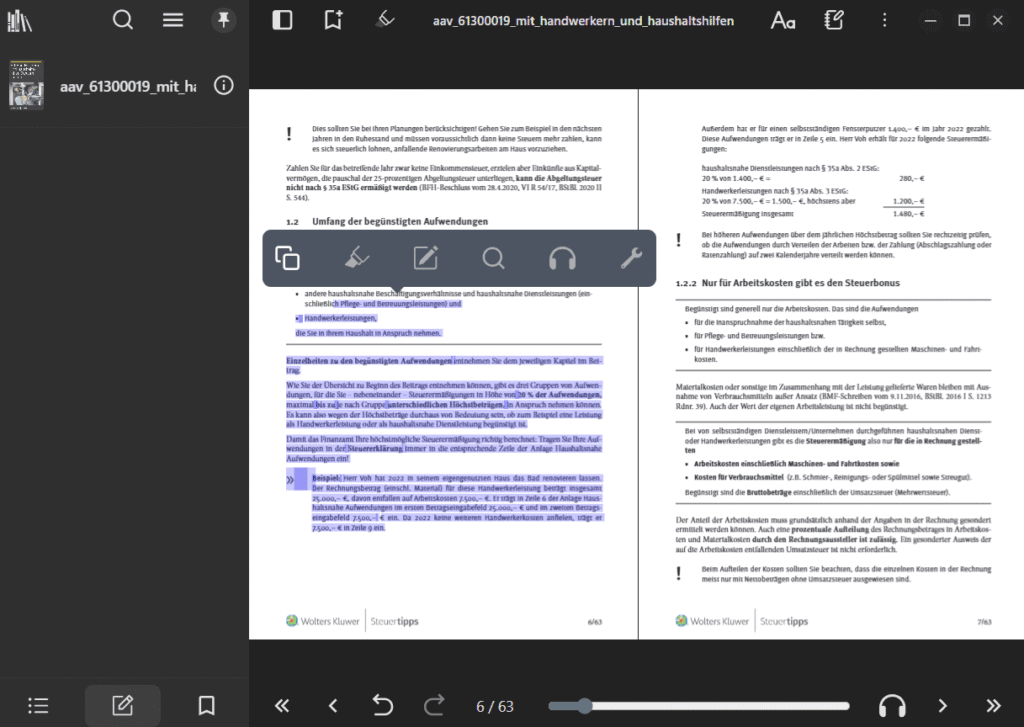
Ashampoo E-Book Reader is a dedicated desktop application for Windows designed specifically for reading and managing digital books and documents. Unlike general-purpose document viewers, this software is purpose-built for the reading experience — giving users fine-grained control over how content looks, how their library is organized, and how they interact with the text.
The software supports common e-book formats as well as PDF files, making it a single, unified solution for virtually any digital reading material you own. Its interface is clean and calm by design, keeping the focus on the text rather than on toolbars and menus. The result is a reading environment that feels natural, intentional, and genuinely comfortable for extended sessions.
Beyond basic reading, Ashampoo E-Book Reader functions as a proper digital library manager. You can build and organize your personal collection, search across your entire library using full-text search, and annotate books with bookmarks, highlights, and notes. A built-in split-screen mode lets you place two books or documents side by side simultaneously, making it ideal for comparison reading, academic research, or cross-referencing technical material. Accessibility features and full keyboard navigation round out the package, ensuring that the software is comfortable and practical for all types of users.
Key Benefits
Choosing the right reading software can significantly change how enjoyable and productive your time with digital books becomes. Ashampoo E-Book Reader delivers a range of meaningful benefits that make it a standout choice for anyone who reads regularly on a Windows PC.
- Genuinely comfortable reading experience: The interface is designed with reading in mind — clean, minimal, and free of distractions. Extended reading sessions feel natural rather than fatiguing, thanks to flexible display settings that put you in control of how text and layouts appear.
- One app for all your digital reading: With support for common e-book formats and PDF files, you no longer need multiple apps to handle different file types. One reliable application covers your entire digital library.
- Flexible personalization for every reader: Fonts, font sizes, line spacing, margins, and color schemes are all individually adjustable. This means the software adapts to you — not the other way around — whether you prefer a bright white page, a warm sepia tone, or a dark night-mode style.
- Smooth performance even on large files: Large e-books and extensive PDF documents are rendered smoothly and reliably, so you never deal with lag, stuttering, or slow page transitions during your reading sessions.
- Powerful tools for finding and annotating content: Full-text search, bookmarks, highlights, and inline notes make it easy to locate important passages quickly and keep track of the ideas and sections that matter most to you.
- Smart split-screen for researchers and students: The ability to view two books or documents side by side is a practical and time-saving feature for anyone doing comparative reading, academic work, or consulting technical references while writing or studying.
- Accessible and keyboard-friendly: Built-in accessibility features and full keyboard navigation mean that the software is comfortable to use regardless of your physical setup or individual accessibility needs.
- Immediate usability with no learning curve: The modern, clearly structured interface means you can open the software and start reading right away. No complicated setup, no overwhelming menus — just a reliable environment for focused reading.
Key Features
Below is a detailed breakdown of the core features that make Ashampoo E-Book Reader an exceptionally well-rounded tool for digital reading and library management. Each feature has been thoughtfully designed to serve everyday reading needs as well as more demanding use cases.
- Comfortable Reading Interface: A clean, calm, and distraction-free reading environment built specifically for extended on-screen reading sessions.
- Minimal UI design: The interface keeps toolbars and menus unobtrusive so that content always remains the primary focus.
- Optimized screen layout: Content is displayed with thoughtful spacing and proportions to reduce visual strain during long sessions.
- E-Book Format Support: Full support for common e-book file formats, providing maximum compatibility with your existing digital library.
- Multiple format compatibility: Handles the most widely used e-book formats without requiring file conversion or third-party tools.
- PDF document display: Reads and renders PDF files clearly and accurately alongside e-book formats in the same unified application.
- Customizable Display Settings: Every major aspect of how text and content appear on screen can be adjusted individually to match your personal reading preferences.
- Font selection and font size adjustment: Choose the typeface and size that is most comfortable for your eyes and reading style.
- Line spacing and margin control: Fine-tune the amount of space between lines and around the edges of the reading area for a personalized layout.
- Color scheme options: Switch between light, dark, sepia, or other color arrangements to suit different lighting conditions or personal preferences.
- High-Performance Rendering: Even the largest e-books and most complex PDF documents are displayed smoothly and without delay.
- Smooth page transitions: Moving through pages feels immediate and fluid, with no lag or visual stuttering regardless of document size.
- Reliable rendering of large files: Extensive documents load and scroll consistently, maintaining reading comfort throughout long sessions.
- Library Management: A clear and organized system for building, sorting, and managing your personal collection of digital books and documents.
- Digital book collection overview: All your e-books and PDFs are accessible from a central, organized library view.
- Collection sorting and organization: Arrange your library in a way that makes it easy to browse and locate specific titles.
- Full-Text Search: Quickly locate any word, phrase, or topic across the content of your books and documents without manual page-by-page scanning.
- In-book content search: Search within a currently open book or document to jump directly to relevant passages.
- Fast search results: Results are delivered quickly, even in large documents, saving significant time during research or review.
- Bookmarks, Highlights, and Notes: A complete set of annotation tools for marking, saving, and commenting on passages directly within your reading material.
- Bookmarks: Save your reading position or mark key sections to return to them instantly at any time.
- Text highlights: Mark important sentences or paragraphs with visual highlighting so they stand out at a glance.
- Inline notes: Add personal comments or annotations directly to specific parts of the text for reference, study, or review purposes.
- Split-Screen / Parallel Reading Mode: Open and display two books or documents simultaneously in a side-by-side layout within a single application window.
- Dual document view: Place any two files from your library next to each other for simultaneous reading.
- Useful for comparisons and research: Particularly valuable when cross-referencing sources, comparing editions, or consulting reference material while reading a primary text.
- Accessibility Features: Built-in support for users with accessibility needs, making the software practical and comfortable for a wider range of readers.
- Full keyboard navigation: Every core function of the application can be operated using keyboard shortcuts, removing the need for constant mouse use.
- Accessibility-conscious design: The software’s layout and interaction model support comfortable use for readers with varying physical or visual needs.
Requirements
To run Ashampoo E-Book Reader on your system, please ensure your computer meets the following minimum specifications:
- Operating System: Windows 10 or Windows 11 (32-bit or 64-bit)
- Processor: 1 GHz or faster
- RAM: Minimum 512 MB (1 GB or more recommended)
- Storage: At least 100 MB of free disk space for installation
- Display: 1024 × 768 pixels or higher resolution
- Internet connection: Required for activation and updates
Free to Try
Experience Ashampoo E-Book Reader for yourself before making any purchase decision. The best way to know if a reading application truly fits your workflow is to use it with your own books and documents. You can get full access to a free trial version of Ashampoo E-Book Reader at no cost — no commitment required. Put every feature through its paces, from the customizable display settings and library management to split-screen reading and full-text search, and see firsthand how it changes the way you read on your PC.
Thank you for reading the Ashampoo E-Book Reader review, and enjoy the discount coupon. If you notice any issues with the Ashampoo E-Book Reader discount coupon, deal, or giveaway—such as an expired offer, broken link, or sold‑out promotion—please let us know while the deal is still available.
Ashampoo E-Book Reader, e-book reader for PC, desktop e-book software, PDF reader Windows, digital book manager, e-book viewer Windows 10, e-book reader desktop app, PDF and e-book reader, e-book library manager, customizable e-book reader, split screen e-book reader, full text search e-book, e-book annotation software, bookmarks and highlights e-book, Windows e-book application, comfortable reading software PC, e-book reader with notes, digital library software Windows, PDF viewer desktop, e-book reader dark mode, e-book reader with library, best e-book software Windows, e-book reader large files, keyboard navigation e-book reader, Ashampoo reading software