Giveaway – Bitwar Cleaner: Free 1-year License Key | PC Cleaner, Duplicate File Finder, C Drive Cleanup, Privacy Cleaner and System Optimizer – for Windows

Clear Junk, Remove Duplicates and Restore Peak Windows Speed in Minutes – Get a Full Version of Bitwar Cleaner 1.2.9 with a License Key For FREE now!
You can also get a lifetime license for Bitwar Cleaner, including free upgrades and support, at 50% off!
✔ Lifetime License. ✔ Free Product Updates ✔ Customer Support
BUY NOW
Bitwar Cleaner is available for $39.00 per month. But, you can now get Bitwar Cleaner with a Lifetime license with our exclusive 50% discount sale. This offer is available for a limited time!
Software Giveaway: You can also get Bitwar Cleaner 1.2.9 with a 1-year license key for free through the Giveaway tab below.

One-time Payment
PC Cleaner, Duplicate File Finder, C Drive Cleanup, Privacy Cleaner and System Optimizer to Free Disk Space and Speed Up Your Computer
- Lifetime License
- Unlock All Features
- Install on 1 PC
- Ongoing Free Updates
- Ongoing Free Support
Platforms: Windows
Auto-Renew, Cancel at Any Time
PC Cleaner, Duplicate File Finder, C Drive Cleanup, Privacy Cleaner and System Optimizer to Free Disk Space and Speed Up Your Computer
- 1-year License
- Unlock All Features
- Install on 1 PC
- Ongoing Free Updates
- Ongoing Free Support
Platforms: Windows
Auto-Renew, Cancel at Any Time
PC Cleaner, Duplicate File Finder, C Drive Cleanup, Privacy Cleaner and System Optimizer to Free Disk Space and Speed Up Your Computer
- 1-month License
- Unlock All Features
- Install on 1 PC
- Ongoing Free Updates
- Ongoing Free Support
Platforms: Windows
System Mechanic Ultimate Defense BEST SELLER

IObit Advanced SystemCare Ultimate 18 with Gift Bundle BEST SELLER
O&O Defrag 31 Professional Edition: Perpetual License BEST SELLER

Wise Registry Cleaner 11 Pro: 3-PC 1-Year License BEST SELLER

IObit Advanced SystemCare 20 PRO with Super Valur Pack: 6 Items included! BEST SELLER

AWZ PC Cleaner BEST OFFER
Ashampoo WinOptimizer Pro 29 BEST SELLER
Wise Care 365 PRO: Lifetime Upgrade License, 3 PCs BEST SELLER
Bitwar Cleaner Key Giveaway
Available now: Free license Key for a Limited Time!
To access the giveaway, kindly provide your email address. Please refrain from closing this page after signing in to receive instructions on how to access the offer at no cost.
NOTES:
– All prices shown here are in listed USD (United States Dollar).
– Such promotional programs are subject to change without notice, from time to time in our sole discretion.
– Data may vary based on different systems or computers.
Bitwar Cleaner Review at a Glance
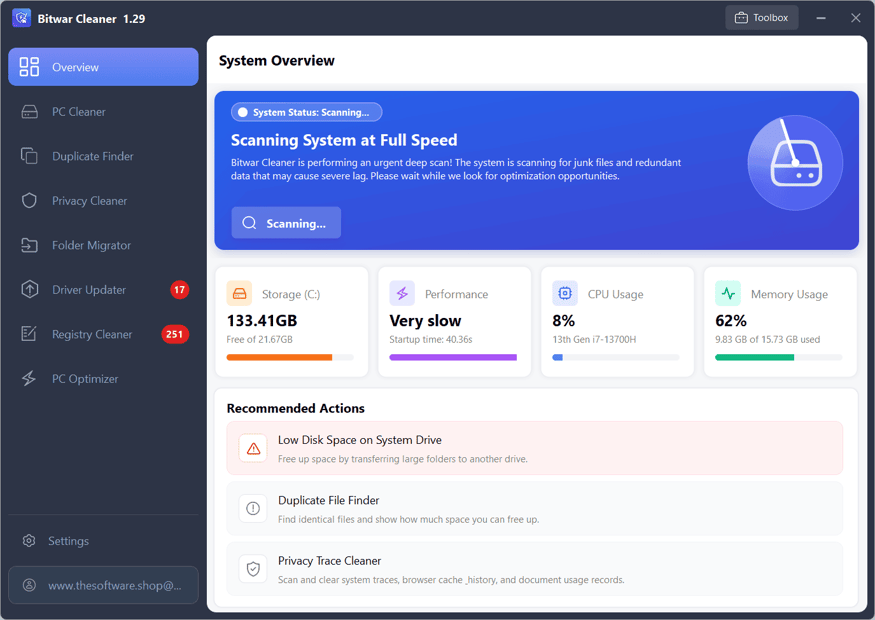
A slow Windows PC rarely has just one cause. Application leftovers, system cache, crash dumps and temporary files pile up on the C drive until free space runs out. Duplicate photos, videos and archives take up gigabytes without anyone noticing. Too many startup apps and background services make boot times drag. Browser traces and document histories also sit on the disk and weaken your privacy. Cleaning all of this by hand takes hours and risks deleting something important.
Bitwar Cleaner is a professional-grade system optimizer built to solve these problems in one place. It deep-cleans Windows, finds duplicate files, moves large folders safely and trims system overhead. Each module is simple enough for a beginner, and the tool still gives experienced users control over what is removed.
What Is Bitwar Cleaner?
Bitwar Cleaner is an easy-to-use Windows PC cleaner and optimizer. It removes junk files, clears privacy traces and improves computer performance. It combines six modules in a single interface: Smart C Drive Cleanup, Duplicate File Finder, Privacy Guard, Large Folder Migrator, System Optimizer and Hardware Monitor.
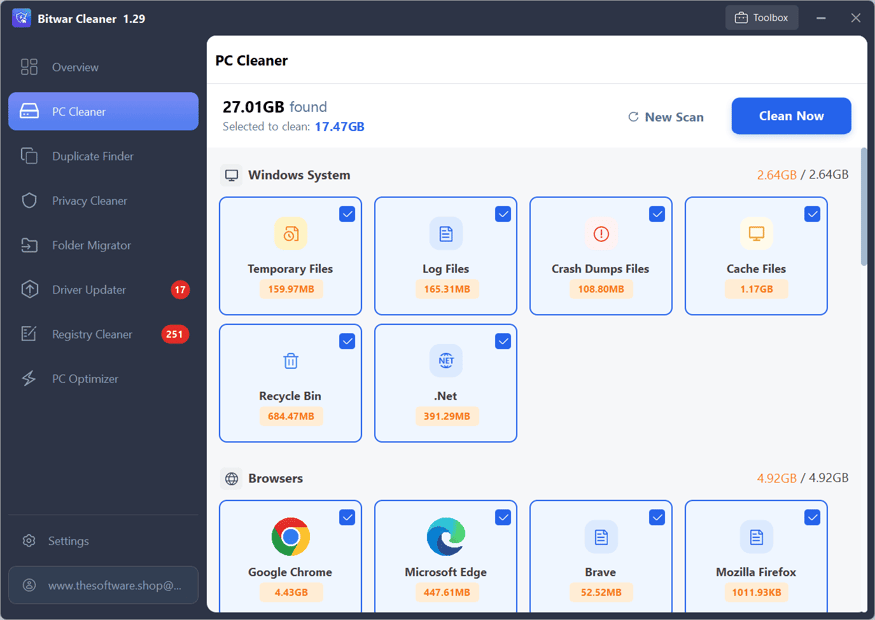
Instead of installing separate tools for each job, you get a unified workspace. You scan, review the results and clean with a few clicks. The program targets application leftovers, system cache, crash dumps and temporary files. It compares files at the byte level using MD5 hash comparison, so it finds true duplicates and not just files with similar names. It also moves system folders such as Desktop, Downloads and Documents from C: to D: without breaking shortcuts or paths.
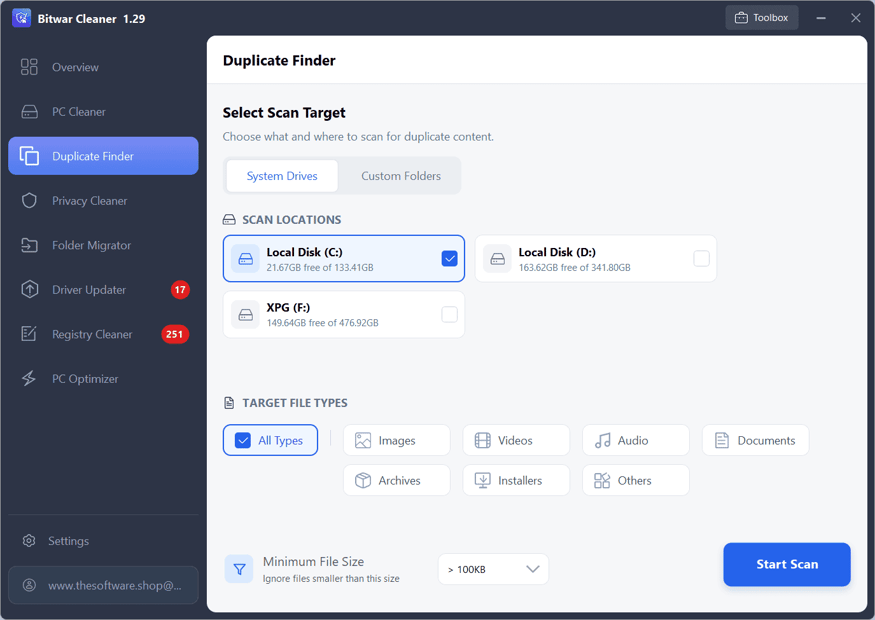
The software suits freelancers, designers, video editors, gamers, office workers and small agencies. Anyone whose storage fills quickly or whose PC feels sluggish can use it. It supports Windows 11, 10, 8 and 7 in both 32-bit and 64-bit editions, so it also works on older machines. A Microsoft Store listing for the app also exists.
Key Benefits
Choosing the right maintenance tool saves time and protects your data. The benefits below show what Bitwar Cleaner delivers in daily use.
- Recover disk space quickly: removing cache, crash dumps and temporary files frees room on a crowded C drive.
- Faster, more responsive PC: fewer startup apps and background services mean shorter boot times and smoother multitasking.
- Accurate duplicate removal: MD5 byte-level comparison avoids deleting files that only look alike.
- Better privacy: clearing search histories, document traces, offline cookies and browser cache reduces your digital footprint.
- Safe folder relocation: moving Desktop, Downloads and Documents to another drive keeps shortcuts working.
- Live performance awareness: real-time CPU and RAM monitoring helps you spot resource spikes before they cause slowdowns.
- One tool for many jobs: you avoid buying and learning several separate utilities.
- Broad compatibility: it runs on Windows 11, 10, 8 and 7, in 32-bit and 64-bit.
Why Choose Bitwar Cleaner?
Many cleaners only delete temporary files and leave the real storage hogs untouched. Bitwar Cleaner goes further by combining cleanup, duplicate detection, folder migration, startup control and monitoring. The one-click approach to C drive cleanup saves time. Previews let you check results before anything is deleted. You also get a clear separation between safe actions, such as scanning, and cleaning actions, so you stay in control.
Who Can Benefit?
- Content creators and editors whose project files, caches and exports fill the system drive.
- Gamers who want fewer background services and more free RAM during play.
- Office and remote workers who need a fast, tidy PC for daily tasks.
- Small agencies and freelancers who manage many client files and duplicate assets.
- Owners of older PCs running Windows 7 or 8 who want to extend the life of their hardware.
- Privacy-conscious users who regularly want to erase traces from browsers and documents.
Key Features
Below is a detailed breakdown of the modules and tools that make Bitwar Cleaner a practical addition to any Windows setup:
- Smart C Drive Cleanup – Deep-cleans the system drive to recover valuable space safely.
- Application Leftover Removal – Deletes remnants that uninstalled programs leave behind.
- System Cache Cleaning – Clears cached data that grows over time and wastes storage.
- Crash Dump Removal – Erases large dump files created after system or app failures.
- Temporary File Cleanup – Removes short-lived files that no longer serve a purpose.
- One-Click Cleaning – Starts the full cleanup routine with a single action.
- Duplicate File Finder – Locates identical files across folders or entire drives.
- MD5 Hash Comparison – Verifies duplicates at the byte level for accurate matches.
- Folder and Drive Scanning – Lets you choose a single folder or a complete drive to inspect.
- Multi-Format Detection – Finds duplicate files, images, videos and archives.
- Instant Removal – Deletes the unwanted copies once you confirm the selection.
- Privacy Guard – Protects personal information by wiping usage traces.
- Search History Erasure – Clears recent search records stored on the device.
- Document Trace Cleaning – Removes records of recently opened documents.
- Offline Cookie Removal – Deletes stored cookies that track browsing behavior.
- Browser Cache Cleaning – Empties cached web data to save space and protect privacy.
- Large Folder Migrator – Relocates bulky system folders to free the C drive.
- Desktop, Downloads and Documents Support – Moves the folders that grow fastest.
- C: to D: Transfer – Shifts data from the system drive to a secondary drive.
- Shortcut and Path Protection – Keeps links and file paths working after the move.
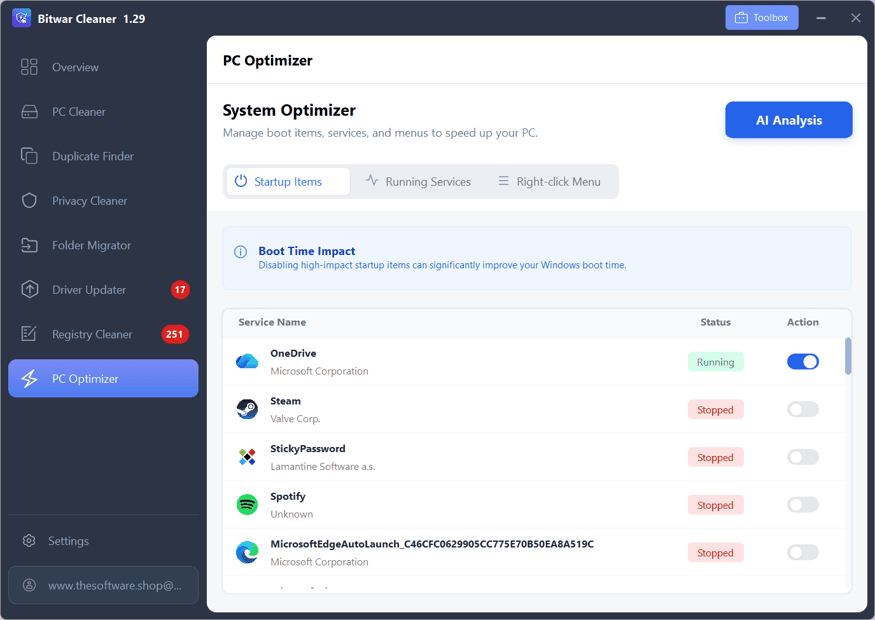
- System Optimizer – Reduces system overhead for quicker startup and smoother use.
- Startup App Control – Disables programs that launch automatically and slow boot time.
- Background Service Management – Turns off heavy services that are not needed.
- Context Menu Cleanup – Removes bloated right-click entries added by installed software.
- Hardware Monitor – Watches system resources as they change.
- Real-Time CPU Tracking – Shows processor load so you can spot spikes.
- Real-Time RAM Tracking – Displays memory use to help prevent slowdowns.
- Resource Spike Management – Helps you act on usage surges before performance drops.
- Wide Windows Support – Works across several generations of the operating system.
- Windows 11 / 10 / 8 / 7 – Covers current and legacy versions.
- 32-bit and 64-bit Editions – Fits both older and newer hardware.
Requirements
Before installing, check that your computer meets the basics below. Bitwar Cleaner is light on resources, so most Windows PCs qualify.
- Operating system: Windows 11, Windows 10, Windows 8 or Windows 7
- Architecture: 32-bit or 64-bit
- Storage: A small amount of free disk space for installation and scan results
- Permissions: Administrator rights are recommended for system-level cleaning and optimization
- Secondary drive (optional): A D: drive or other partition for the Large Folder Migrator
Free to Try
Test Bitwar Cleaner on your own PC before you commit. Download the free edition and click the button below to see how it handles your files. The free edition gives full access to Privacy Cleaner and PC Optimizer. For the other features, you can scan and preview results.
A PRO license is required to clean junk files, remove duplicate files, migrate folders and use advanced actions. The trial lets you see how much space you could recover before you buy.
or
Buy now, the price start from:
Thank you for reading Bitwar Cleaner review, and enjoy the discount coupon. If you notice any issues with Bitwar Cleaner discount coupon, deal, or giveaway—such as an expired offer, broken link, or sold‑out promotion—please let us know while the deal is still available.