77% Off – QR Wizard: Lifetime License | QR Code Generator & Designer – for Mac

QR Wizard puts full-featured, beautifully styled QR code generation right on your Mac. Grab it at a 77% Discount now and make every QR code a branded masterpiece.
✔ Lifetime License. ✔ Free Product Updates ✔ Customer Support
BUY NOW
QR Wizard is available for $12.99 as a one-time purchase. But right now, you can grab your QR Wizard license at an exclusive discount of up to 77% OFF — no recurring fees, no hidden charges, just full, permanent access to one of the most capable QR design tools on macOS. This deal will not last, so act now before it expires!

Mac QR Code Generator & Designer | Custom Colors, Logos, Shapes | Export PNG SVG PDF | macOS 13+ Compatible with M1 M2 M3 M4
- Please Notes:
- You may be directed to the bundle page, but it is possible to purchase the software individually.
- If you're having difficulty locating the product on the bundle page, please utilize the browser's search feature.
- Get an additional $3 discount on all orders more that $30.
- LEGITIMATE: All apps are authentic and have original licenses obtained directly from the creators via contracts.
- INSTANT ACCESS: Fully activated macOS Apps & Windows Software with instant downloads & license key access.
- Device Activation: 2 Devices
- Minor Updates Included Only
- Lifetime License
Platforms: Mac OS X

VOVSOFT Retail Barcode BEST SELLER

QR Code And Barcode Reader GIVEAWAY

Vovsoft Bulk Barcode Generator GIVEAWAY

Veshort Lifetime Deal GIVEAWAY
DRPU Barcode Label Maker Software BEST SELLER
QR Wizard Giveaway
Unavailable at this moment!
To access the giveaway, kindly provide your email address. Please refrain from closing this page after signing in to receive instructions on how to access the offer at no cost.
NOTES:
– All prices shown here are in listed USD (United States Dollar).
– Such promotional programs are subject to change without notice, from time to time in our sole discretion.
– Data may vary based on different systems or computers.
QR Wizard Review at a Glance
Every business owner, designer, marketer, or content creator eventually faces the same frustrating challenge: you need a professional-quality QR code, but every tool you try is either too limited, too complicated, or locked behind a costly subscription. You settle for a plain black-and-white square that looks like an afterthought — when what you really need is something that reflects your brand, works perfectly at every size, and exports cleanly to whatever format your project demands. Meet QR Wizard for Mac now!

What Is QR Wizard?
QR Wizard for Mac is a dedicated Mac application developed by InSili.co that solves this problem completely. It is a native macOS QR code styling and generation tool built from the ground up for Mac users who want full creative control over every aspect of their QR codes, without relying on a web browser or an internet connection. From the moment you launch the app, everything is intuitive, fast, and designed to fit naturally into your creative workflow.
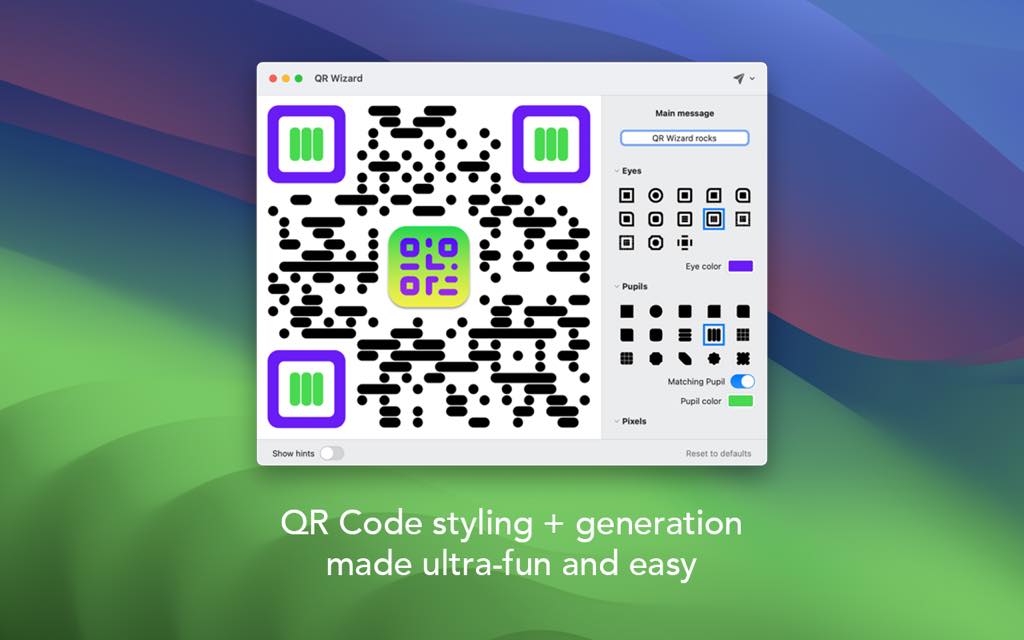
Unlike generic online generators that offer little more than a basic square code, QR Wizard gives you a rich toolkit of design options — customizable shapes for eyes and pixels, embedded logos, full color control with HEX input, multiple error-correction levels, and an extensive library of built-in design presets. Whether you are producing materials for print, digital publishing, marketing campaigns, packaging design, or personal projects, QR Wizard delivers professional results in just a few clicks.

The application runs natively on macOS 13.0 and above and is fully compatible with Apple Silicon chips including M1, M2, M3, and M4, as well as the latest macOS Tahoe. This means you get a snappy, responsive experience on any modern Mac — no lag, no loading screens, no compromises.
Key Benefits
QR Wizard is not just a QR code generator — it is a complete creative tool for anyone who takes branding and visual communication seriously. Here is why thousands of Mac users choose QR Wizard over every other option:
- Designed exclusively for Mac — QR Wizard is a native macOS application, which means it behaves exactly the way you expect a Mac app to behave. The interface is clean, fast, and fully integrated with your macOS environment, giving you a seamless experience from start to finish.
- No subscriptions, no limitations — Unlike web-based QR generators that place their best features behind monthly paywalls, QR Wizard gives you a one-time purchase with full access to every feature from day one. Your license is perpetual, meaning you own the software and can use it indefinitely.
- Total creative freedom — From the shape of every pixel module to the color of each eye element, QR Wizard gives you granular control over the visual appearance of your QR codes. You can match your brand palette precisely by typing HEX values directly, or keep things clean with a unified single-color lock.
- Brand-ready output — Embed your company logo directly into the center of any QR code to create a professional, branded asset that reinforces your identity every time someone scans it. Combined with the built-in design preset library, you can maintain visual consistency across all your QR code materials effortlessly.
- Speed without sacrifice — QR Wizard is built for productive workflows. You can generate, style, and export a fully customized QR code in a matter of minutes — not hours. Its lightning-fast export engine supports the widest range of formats available in any desktop QR tool.
- Works for everyone — Whether you are a freelance graphic designer, a small business owner, a marketing professional, a developer, a photographer, or simply someone who needs clean, scannable QR codes for personal use, QR Wizard scales perfectly to your level of expertise. Its Basic and Advanced layout modes mean beginners feel at home while power users get all the depth they need.
Key Features
Below is a carefully assembled overview of the powerful capabilities packed into QR Wizard. Each feature is built with real-world use in mind, ensuring that what you see in the app is exactly what you get in your final output:
- Easy-to-Use Interface — A clean, distraction-free design that gets you from idea to finished QR code with minimal friction.
- Basic Layout Mode — A simplified view ideal for newcomers or quick jobs where speed is the priority.
- Advanced Layout Mode — A fully expanded workspace that surfaces every option for users who want complete control over their output.
- Smart Content Types — Dedicated input formatters that structure your data correctly for each use case, so your QR codes scan reliably on every device.
- URL Formatter — Ensures web addresses are properly encoded for maximum compatibility.
- Email Formatter — Automatically structures mailto data so email clients open directly on scan.
- Phone Number Formatter — Encodes tel: links so phone apps trigger instantly.
- SMS Formatter — Pre-populates messaging apps with the correct recipient and optional message body.
- Wi-Fi Credentials Formatter — Encodes SSID, password, and encryption type so devices connect to Wi-Fi in one tap.
- Contact Card (vCard) Formatter — Bundles name, phone, email, and address into a single scannable contact file.
- Tons of Style Options — An extensive palette of visual customization tools that make every QR code uniquely yours.
- Eye Shape Customization — Modify the three corner “eye” elements of the QR code independently for a distinctive branded look.
- Pupil Shape Customization — Adjust the inner pupil shape within each eye to add another layer of visual personality.
- Inner Pixel Module Styles — Choose from multiple shapes for the inner data modules — squares, dots, rounded, and more.
- Custom Logo Embedding — Upload any image or logo to sit at the center of your QR code for instant brand recognition.
- Pixel-Perfect Color Control — Precise color management tools that give designers the accuracy they need for professional output.
- Visual Color Picker — Choose colors intuitively using the built-in macOS color wheel for quick adjustments.
- HEX Value Input — Type exact HEX color codes to match your brand colors down to the last digit.
- Unified Single-Color Lock — Pin the entire design to one consistent color for a minimal, clean aesthetic.
- Design Presets — Save and reuse your favorite styles across every QR code project with zero extra effort.
- Built-In Preset Library — Start from a collection of professionally designed presets that look great out of the box.
- Custom Preset Saving — Define your own style once and apply it to any future QR code in a single click.
- Error Correction Level Control — Dial in the exact redundancy level your application requires, from minimal data to maximum fault tolerance.
- Level L (Low) — Approximately 7% data recovery; ideal for clean, unobstructed digital displays.
- Level M (Medium) — Approximately 15% data recovery; a solid general-purpose default for most use cases.
- Level Q (Quartile) — Approximately 25% data recovery; recommended when the code may be partially obscured.
- Level H (High) — Approximately 30% data recovery; essential for printed materials or codes with an embedded logo.
- Lightning-Fast Multi-Format Export — Export your finished QR code in virtually any format your project demands.
- PNG Export — High-quality raster format ideal for web graphics, social media, and digital assets.
- JPG Export — Compressed raster format for use in email, web content, and general image contexts.
- SVG Export — Fully scalable vector format for print production, branding materials, and large-format output.
- PDF Export — Print-ready document format suitable for professional publishing and press workflows.
- TIFF Export — High-fidelity raster format favored by print professionals and archival workflows.
- ASCII Art Export — A creative text-based export for terminal output, developer documentation, or novelty projects.
- macOS Native Performance — Built specifically for Mac, running natively on all modern Apple hardware.
- Apple Silicon Support — Fully optimized for M1, M2, M3, and M4 chips for maximum speed and battery efficiency.
- macOS Tahoe Compatibility — Tested and confirmed compatible with the latest macOS release.
- macOS 13.0+ Requirement — Supports Ventura, Sonoma, Sequoia, and Tahoe for broad device coverage.
Requirements
Your system must meet the following specifications to run QR Wizard:
- Operating System: macOS 13.0 (Ventura) or later
- Compatible macOS versions: Ventura, Sonoma, Sequoia, macOS Tahoe
- Processor: Compatible with Intel-based Macs and Apple Silicon (M1, M2, M3, M4)
- Platform: Mac only — this is a dedicated macOS desktop application
- Internet Connection: Not required after installation — works fully offline
Downloads
Curious about what QR Wizard can do before you commit? Take it for a spin and see firsthand how effortlessly it fits into your creative routine. Put it through real projects — whether that is a branded restaurant menu code, a portfolio link card, or a custom Wi-Fi QR for your workspace — and judge the results for yourself. Click the button below to download the free trial or demo edition of QR Wizard and start creating beautiful QR codes today.
or
Buy now, the price start from:
Thank you for reading QR Wizard Mac App review, and enjoy the discount coupon. If you notice any issues with QR Wizard discount coupon, deal, or giveaway—such as an expired offer, broken link, or sold‑out promotion—please let us know while the deal is still available.