
80% Off – HazeOver: Lifetime License | Distraction Dimmer™ – for Mac

Regain Your Focus in Seconds — Get HazeOver at a 80% Discount Now and Stop Letting Background Windows Steal Your Attention!
✔ Lifetime License. ✔ Free Product Updates ✔ Customer Support
BUY NOW
HazeOver is available for $5.99 on the Mac App Store as a one-time purchase with no recurring subscription. You can now get your HazeOver license with our exclusive discount of up to 80% OFF — this offer is available for a limited time, so act now before the price returns to full.
By purchasing HazeOver, you receive:
- Lifetime software license — A single one-time payment with no subscription fees, ever.
- All future updates — Receive ongoing improvements, new macOS compatibility updates, and new features at no extra cost, including the latest HazeOver 1.9.7 update with macOS Tahoe and Liquid Glass compatibility.
- Family Sharing included — Share the app with up to 6 family members under a single purchase.
- Developer support — Direct access to Maxim Ananov’s support team for any questions or issues.
- Privacy guarantee — Zero data collection, no account needed, no tracking of any kind.

Distraction Dimmer™ for Mac – Automatically Dim Background Windows, Boost Focus, Reduce Eye Strain, Multi-Monitor Support, macOS Productivity App
- Please Notes:
- You may be directed to the bundle page, but it is possible to purchase the software individually.
- If you're having difficulty locating the product on the bundle page, please utilize the browser's search feature.
- Get an additional $3 discount on all orders more that $30.
- LEGITIMATE: All apps are authentic and have original licenses obtained directly from the creators via contracts.
- INSTANT ACCESS: Fully activated macOS Apps & Windows Software with instant downloads & license key access.
- Device Activation: 1 Device
- For personal use. Includes at least 1 year of updates.
- Minor Updates Included Only
- Lifetime License
Platforms: Mac

Get HazeOver and over 260 other Mac apps with a subscription starting at just $9.99 per month.
- Full access to HazeOver and over 260 other Mac apps
- Install as many apps as you want
- Every Mac and iOS app you need
- Ever-growing collection, same price
- Free updates. No ads
- 7-day Free Trials, Easy cancellation
Platforms: Mac OS X

Firetask BEST OFFER

TaskPaper BEST OFFER

1min AI Lifetime Deal BEST OFFER

Drime Secure Cloud Storage BEST OFFER

HT Work Focus BEST OFFER
HazeOver Giveaway
Unavailable at this moment!
To access the giveaway, kindly provide your email address. Please refrain from closing this page after signing in to receive instructions on how to access the offer at no cost.
NOTES:
– All prices shown here are in listed USD (United States Dollar).
– Such promotional programs are subject to change without notice, from time to time in our sole discretion.
– Data may vary based on different systems or computers.
HazeOver Review at a Glance
Every Mac user knows the feeling: you sit down to get work done, and within minutes, a browser tab here, a chat window there, and a cascade of overlapping app windows turns your screen into a chaotic wall of noise. Background distractions silently drain your concentration, pulling your eyes away from the task that actually matters. The more windows you manage manually — hiding them, minimizing them, closing and reopening them — the less mental energy you have left for the work itself. If this describes your daily Mac experience, HazeOver was built exactly for you.
What Is HazeOver?
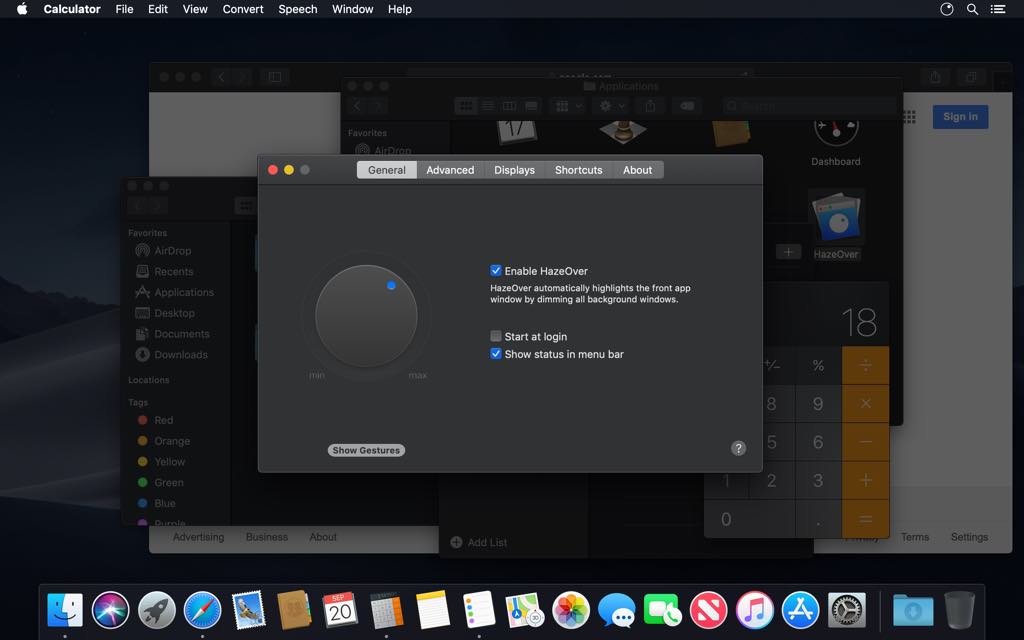
HazeOver – Distraction Dimmer™ is a lightweight macOS utility that automatically highlights the active, front-facing window on your screen by gently dimming all background windows the moment you switch focus. Developed by Maxim Ananov and available on the Mac App Store, it has been featured by Apple, praised by top tech publications including 9to5Mac, CNET, MacWorld, Engadget, LifeHacker, and Product Hunt, and has earned over 3,064 ratings and reviews from Mac users worldwide.
The app works silently in the background — you simply install it, and it immediately starts doing its job. No complex configuration, no learning curve. One small app, one powerful change to the way you work.
HazeOver is not about forcing you into full-screen mode or limiting what you can have open. You keep all your apps running, all your windows accessible — they just fade respectfully into the background when they’re not in use, so the window you’re working in always stands front and center.
It’s the digital equivalent of turning off the lights around your desk and shining a spotlight on exactly what needs your attention.




Key Benefits
Working on a Mac with multiple open apps can feel like being in a crowded room where everyone is shouting at once. HazeOver acts as a noise filter for your screen — it doesn’t remove anything, it simply makes the important thing obvious. Here is why thousands of Mac users consider it an essential part of their daily workflow, and who stands to gain the most from it:
- Writers, developers, and researchers who work in a single document or app for extended periods benefit from a clean, visually calm workspace that keeps their flow state intact.
- Students and academics managing multiple sources, note-taking tools, citation managers, and browsers at once use HazeOver to stay oriented and avoid losing focus mid-task.
- Professionals with large or ultra-wide displays who find full-screen mode wasteful and prefer to work with multiple windows side by side can use HazeOver to maintain visual hierarchy without tiling windows.
- Multi-monitor users who need to instantly identify which screen and which window is currently active get an immediate, effortless visual cue.
- Night workers and low-light users benefit from reduced screen glare without losing the color accuracy or legibility of the window they’re actively using.
- Anyone with attention difficulties — including those with ADHD or focus-related challenges — gains a structured, visually quieter environment that makes it significantly easier to stay on task.
The core benefit is simple: less visual clutter means less mental effort wasted, and more of your cognitive energy goes into the work that matters. HazeOver doesn’t change what you do — it changes how clearly you can see what you’re doing.
Key Features
Below is a thorough breakdown of every major capability HazeOver brings to your Mac, along with the specific sub-features that give you full control over your focus environment:
- Automatic Background Window Dimming — The central feature that makes HazeOver indispensable: every window except the active one fades out automatically whenever you switch focus.
- Dynamic focus tracking — As you click from one window to the next, the dimming shifts in real time, always highlighting exactly where your attention is.
- Supports all macOS apps — Works with every app you use, from browsers and editors to terminals and creative tools, without any per-app configuration.
- Adjustable Dimming Intensity — You are in full control of how subtle or dramatic the background fade is, from a gentle grey tint to a near-black overlay.
- Gesture-based intensity adjustment — Adjust the dimming level on the fly using a trackpad or mouse gesture directly from the menu bar icon.
- 0–100% intensity range — Fine-tune the level of background suppression to exactly match your comfort and focus needs.
- Smooth Animation Control — HazeOver transitions between active windows with a configurable fade animation so the shift never feels jarring or abrupt.
- Custom animation speed — Set the transition from instant to slow and deliberate, based on your personal preference.
- Graceful drag-mode fade — When dragging content between apps, pressing the Fn key causes HazeOver to temporarily fade out so you can see all windows clearly.
- Dark Mode & Light Mode Integration — HazeOver is built to complement macOS’s native appearance settings and makes Dark Mode even more powerful.
- Separate settings for Dark and Light appearance — Save independent dimming intensity and color profiles for each macOS appearance mode.
- Automatic switching — When macOS switches between Light and Dark appearance (including Auto mode), HazeOver’s settings update automatically to match.
- Night-use optimization — Reduces ambient screen brightness in the background without affecting the front window’s legibility or color fidelity.
- Multi-Monitor Support — HazeOver is built for Mac users who work across more than one display, making multi-screen workflows more organized and intuitive.
- Per-monitor focus indication — Instantly see which screen is currently active with clear visual dimming applied across all connected monitors.
- Window highlighting on each monitor — Option to highlight the active window individually on each screen for granular multi-display awareness.
- Desktop Auto-Reveal — When you click on or interact with the desktop itself, HazeOver automatically lifts the dim so you can access files, folders, and widgets without interruption.
- Seamless transition — The reveal happens smoothly and reverts as soon as you return to an app window.
- Keyboard Shortcut Toggle — Turn HazeOver’s dimming on or off in an instant without touching your mouse, keeping your keyboard-driven workflow uninterrupted.
- Fully customizable shortcut — Assign any key combination you prefer through the app’s preferences panel.
- Menu bar quick toggle — Access on/off control and intensity slider directly from the macOS menu bar icon.
- Automation & Scripting Support — HazeOver integrates deeply with macOS’s automation ecosystem for power users who want total control over their productivity setup.
- Apple Shortcuts app — Build multi-step automation routines that include HazeOver actions, such as turning on dimming when switching to a Work focus.
- Focus Filters integration — Automatically activate or configure HazeOver based on your active macOS Focus mode (Work, Study, Personal, etc.).
- AppleScript support — Write custom scripts to control every aspect of HazeOver’s behavior from any automation workflow.
- Privacy-First Design — HazeOver collects absolutely no user data whatsoever. The developer has confirmed that zero data is collected or transmitted from this app, making it safe for professional, academic, and personal use.
- No account required — Install and use immediately with no sign-in, subscription setup, or data sharing.
- Minimal system footprint — The app is only 1.5 MB in size and runs efficiently in the background without impacting Mac performance.
- Family Sharing — A single purchase of HazeOver on the Mac App Store supports Family Sharing, allowing up to six family members to use the app under one license.
- Broad Language Support — HazeOver has been fully localized into 33 languages, making it accessible to Mac users worldwide.
- Multilingual interface — Supports English, French, German, Spanish, Japanese, Korean, Chinese (Simplified and Traditional), Arabic, Portuguese, and 23 more languages.
Why HazeOver Is Worth Every Penny
As noted by John Gruber of Daring Fireball: “What HazeOver does is highlight the active window by dimming all background windows. That’s it. But it does this simple task with aplomb, and it makes a significant difference in the day-to-day usability of MacOS.” That precision — doing one thing exceptionally well — is exactly what separates a truly useful utility from a gimmick. HazeOver has been featured by Apple itself in App Store editorial stories for macOS Ventura and Sonoma, cited specifically as a tool for taking Focus further and for producing cleaner screen recordings and screenshots.
Mac users managing large displays find that going full screen is rarely practical when working across multiple apps simultaneously, and HazeOver fills that gap with an elegant visual solution that full-screen mode simply cannot provide. Users managing attention difficulties have called it life-changing, with one Graduate school student noting it helped them “take back control” of their focus while working on a 42-inch display.
Requirements
Before purchasing, confirm that your Mac meets the following requirements to ensure full compatibility with the latest version of HazeOver:
- macOS 12 Monterey or later (required for the current version from HazeOver.com)
- macOS 11 Big Sur or later (for the Mac App Store version)
- Compatible Mac hardware: Any Mac model running a supported macOS version, including Apple Silicon (M-series) and Intel-based Macs
- Storage: 1.5 MB available disk space
- Display: Works with single monitors, large/ultra-wide displays, and multi-monitor setups
- Internet connection: Not required after installation
Downloads
HazeOver is available to test before committing to a purchase, so you can see exactly how it changes your focus and workflow on your own Mac with your own apps. Download the free trial edition directly from HazeOver.com and run it for as long as you need to evaluate it — the trial is available with an unlimited trial period so you are never rushed into a decision. The trial gives you full access to the app’s features so the experience you test is the same experience you purchase. Click the button below to get the free trial from the official HazeOver website.
or
Buy now, the price start from:
Thank you for reading the HazeOver review, and enjoy the discount coupon. If you notice any issues with the HazeOver discount coupon, deal, or giveaway—such as an expired offer, broken link, or sold‑out promotion—please let us know while the deal is still available.
HazeOver Mac app, distraction dimmer macOS, dim background windows Mac, Mac productivity app, focus tool for Mac, window manager Mac, reduce screen distractions, macOS focus utility, highlight active window Mac, multi-monitor Mac app, Dark Mode productivity Mac, minimize distractions Mac, Mac App Store productivity, attention management Mac, deep focus Mac software, background window fade Mac, macOS Monterey productivity, Mac window dimmer, reduce visual clutter Mac, HazeOver distraction dimmer, Mac focus app, screen dimmer Mac utility, HazeOver review, best Mac productivity tools, HazeOver Sequoia compatible