92% Off – Firetask 5: Lifeitme License | GTD Task Manager & Productivity Planner App – for Mac

Get More Done With Focus and Clarity — Firetask Is Your All-in-One GTD Task Manager. Grab 92% Off Today Before This Limited-Time Deal Expires!
✔ Lifetime License. ✔ Free Product Updates ✔ Customer Support
BUY NOW
Firetask 5 is regularly priced at $39.99, but right now you can secure your lifetime license for just $3.00 — that is an incredible 92% savings that will not last forever. This is a one-time purchase with no recurring subscription fees, giving you permanent access to the current version of Firetask at a fraction of its usual price.
By purchasing Firetask at this exclusive discounted price, you receive:
- Lifetime License for Firetask 5 (current version), valid for 1 device activation
- Minor updates included to keep your app running smoothly on supported OS versions
- One-time payment with no hidden fees, no subscriptions, and no renewal charges
- Secure iCloud sync across your Apple ecosystem at no additional cost
- Priority support access to help you get the most out of your productivity system from day one
This limited-time offer saves you $36.99 — but once the promotional window closes, the price returns to $39.99. Act now to lock in your lifetime license at the lowest price available and start building a productivity system that actually works.

GTD Task Manager & Productivity Planner App for iPhone, iPad & Mac | Kanban, Pomodoro, iCloud Sync, Focus & Organization Tool
- Please Notes:
- You may be directed to the bundle page, but it is possible to purchase the software individually.
- If you're having difficulty locating the product on the bundle page, please utilize the browser's search feature.
- Get an additional $3 discount on all orders more that $30.
- LEGITIMATE: All apps are authentic and have original licenses obtained directly from the creators via contracts.
- INSTANT ACCESS: Fully activated macOS Apps & Windows Software with instant downloads & license key access.
- Device Activation: 1 Device
- Minor Updates Included Only
- Lifetime License for current version.
- LICENSE. The developer grants you a non-exclusive, non-transferable license to install and use the application on any number of devices owned or controlled by you, for your personal use.
- SCOPE. This license is granted to you as an individual purchaser. You may not: share, sublicense, sell, rent, or distribute the app to others, or allow use by multiple unrelated users under a single purchase.
- OWNERSHIP. The application is licensed, not sold. All rights, title, and interest in the software remain with the developer.
- RESTRICTIONS. You agree not to: reverse engineer, decompile, or attempt to extract source code (except where legally permitted), modify or create derivative works, or circumvent licensing or security mechanisms.
- UPDATES. Updates may be provided at the developer’s discretion and may be subject to additional terms.
- DISCLAIMER. The software is provided “as is”, without warranty of any kind, express or implied, including but not limited to fitness for a particular purpose and non-infringement.
- LIABILITY. To the maximum extent permitted by law, the developer shall not be liable for any damages arising from the use or inability to use the software.
- TERMINATION. This license terminates automatically if you violate its terms. Upon termination, you must cease use of the software and delete all copies.
- GOVERNING LAW. This agreement is governed by the laws of Austria, excluding conflict-of-law rules.
Platforms: Mac
ClearCRM BEST OFFER
MindManager Professional EXCLUSIVE
DoneIt BEST OFFER
Taskade: 1-year Subscription BEST OFFER
BeforeSunset AI BEST OFFER
Firetask 5 Giveaway
Unavailable at this moment!
To access the giveaway, kindly provide your email address. Please refrain from closing this page after signing in to receive instructions on how to access the offer at no cost.
NOTES:
– All prices shown here are in listed USD (United States Dollar).
– Such promotional programs are subject to change without notice, from time to time in our sole discretion.
– Data may vary based on different systems or computers.
Firetask 5 Review at a Glance
Every day, millions of professionals, students, and creatives face the same invisible enemy: mental overload. You have too many tasks scattered across sticky notes, apps, and your own head. Important deadlines get missed. Delegated work falls through the cracks. You sit down to work and spend the first 30 minutes just figuring out what to work on. The result? Wasted time, rising stress, and a constant feeling that you’re always behind — no matter how hard you work.
What you need is not just another to-do list. You need a trusted, structured system that captures everything, helps you prioritize clearly, and keeps you in full control of your day. Meet FireTask 5 for Mac!

What is Firetask?
Firetask is a modern, intelligent task management application built for iPhone, iPad, and Mac that helps you focus on what matters most. Unlike generic to-do apps, Firetask is built on the proven GTD® (Getting Things Done®) methodology — the globally respected productivity framework developed by David Allen — and enriches it with powerful modern methods including Kanban boards and the Pomodoro® Technique. The result is a clean, flexible, and deeply functional productivity system that fits naturally into your daily workflow.

At its core, Firetask is structured around four key productivity stages: Capture, Focus, Organize, and Engage. Each stage is thoughtfully designed to guide you through the full cycle of managing your work — from the moment an idea enters your mind to the moment a task is completed and reviewed. With its seamless iCloud sync, your tasks are always available and up to date across all your Apple devices — no third-party accounts, no privacy compromises, and no extra subscriptions required.

Firetask is designed for anyone who wants to work with greater clarity, intentionality, and control. Whether you are a freelancer managing multiple client projects, a student juggling coursework and personal goals, a team lead delegating work and tracking progress, or a busy professional trying to stay on top of daily responsibilities — Firetask gives you the structure and tools to make it all manageable.
Key Benefits
Firetask is not just a task list — it is a complete productivity operating system for your Apple devices. The benefits go far beyond simple task tracking, offering you a fundamentally better way to work, plan, and stay focused.
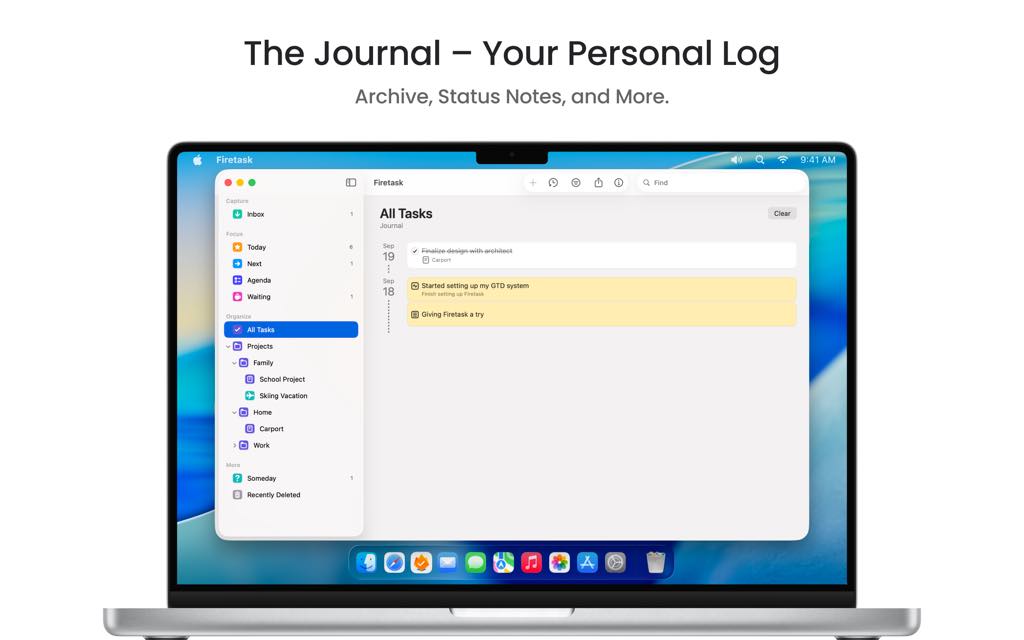
The first and most immediate benefit is mental freedom. By giving you a reliable system to capture every task, idea, and reminder, Firetask Mac App removes the mental burden of trying to remember everything. When your mind knows that nothing will fall through the cracks, you can focus all your cognitive energy on actually doing the work — not managing it.
The second major benefit is clarity of priorities. Firetask’s smart priority system uses color-coded highlights for high and low priority tasks while keeping medium-priority items visually neutral, so your attention is always drawn to what genuinely needs it. This simple yet powerful approach prevents decision fatigue and keeps your focus sharp throughout the day.
Third, Firetask gives you full accountability over delegated work. With the built-in Waiting For list, you can assign tasks to colleagues, family members, or clients and track their progress in one dedicated view — automatically grouped by assignee. No more awkward follow-up emails or forgotten handoffs.
Fourth, Firetask supports deep, focused work sessions through its integrated Pomodoro® Technique. You can estimate task effort, run timed focus intervals, and track your Pomodoro count for in-focus tasks — all without leaving the app.
Fifth, the privacy-first architecture means your data lives exclusively on your own devices and iCloud account. There are no third-party servers, no data mining, and no subscription required to use the sync features. Your productivity data stays yours, always.

Finally, Firetask supports long-term planning through its calendar views, project portfolios, and repeating task management — making it equally effective for daily task management and multi-week project planning.
Key Features
Below is a thorough breakdown of the core features that make Firetask a powerful and indispensable productivity tool for your Apple devices. Each feature has been designed with real-world workflows in mind, offering both depth and simplicity in equal measure:
- Inbox & Capture System — A dedicated inbox that serves as your central capture point for all incoming tasks, ideas, and reminders, keeping your mind clear.
- Smart Badge Count — Visual badge reminders notify you when items are waiting in your inbox so nothing gets overlooked.
- Share Extension — Add tasks directly from any app on your iPhone, iPad, or Mac using the native iOS and macOS Share menu.
- Global Quick-Create Hotkey (Mac) — Create tasks instantly from anywhere on your Mac with a single global keyboard shortcut, without switching apps.
- Command Tagging — A fast, keyboard-driven tagging system that lets you add due dates, priorities, and assignees while typing a task, with no extra taps or clicks needed.
- Date Commands — Type /tomorrow, /today, or custom date shortcuts to set due dates instantly during task entry.
- Priority Commands — Use /+ or /- to assign high or low priority to a task in real time as you type.
- Delegation Commands — Type @Name to assign a task to a specific person and automatically route it to the Waiting For list.
- In Focus List — A dedicated, curated list of tasks you have chosen to tackle today or as soon as possible, giving you a distraction-free daily action view.
- Start Date & Due Date Scheduling — Assign start and due dates to tasks so Firetask automatically surfaces them in your In Focus list at the right time.
- Waiting For List — A GTD-inspired list dedicated to tracking all tasks you have delegated to others, automatically organized by assignee for effortless follow-up.
- Someday / Maybe List — A safe storage space for ideas and tasks you are not ready to act on yet, keeping them out of your active workflow without losing them.
- Projects & Portfolios — A full project management layer that lets you group related tasks into projects and organize multiple projects under portfolios for high-level overview.
- Project Templates — Save any project structure as a reusable template to instantly kick off recurring workflows without rebuilding them from scratch.
- Subtasks (To-Dos) — Break large, complex tasks into smaller, actionable steps at the task level to make progress visible and momentum easier to maintain.
- Categories & Context Tags — GTD-style categories enhanced with color-coded symbols that let you instantly recognize the type of action a task requires — such as calls, emails, meetings, or decisions.
- Kanban Boards — Visual, drag-and-drop Kanban boards that let you see and manage your tasks by Status, Focus, Due Date, or Priority, combining GTD principles with Kanban methodology.
- Drag-and-Drop Support — Quickly move tasks between Kanban columns with simple drag-and-drop gestures on both touch and desktop.
- Smart Priorities — A simplified, color-highlighted priority system that surfaces high-priority tasks clearly while keeping medium-priority tasks visually quiet to reduce distraction.
- Task Calendar Views — Dedicated monthly and weekly calendar views built specifically around tasks rather than calendar events, making scheduling and rescheduling intuitive.
- Repeating Tasks — Set repeating due dates for habits, recurring deadlines, or scheduled reviews, with full support for custom recurrence patterns.
- Drag-and-Drop Rescheduling — Move tasks across dates directly from the calendar view using drag-and-drop for fast, frictionless planning.
- Built-in Pomodoro® Technique — Integrated Pomodoro timers and effort estimation tools that help you maintain focus and measure productivity during work sessions.
- Effort Estimation — Assign estimated Pomodoro counts to tasks before starting, giving you a realistic sense of workload before committing.
- In-Focus Pomodoro Count — Track your completed Pomodoro intervals per task directly within the In Focus list view.
- Today View — A clear, unified daily view showing all due, scheduled, and in-focus tasks at a glance, with an optional toggle to include in-progress and completed tasks.
- Widgets — Two home screen and lock screen widgets that keep your most important tasks visible without opening the app.
- Focus Widget — Displays tasks from your Today, Next, Agenda, and Waiting views for at-a-glance productivity tracking.
- List Widget — Shows tasks from your Inbox, specific projects, or other custom lists directly on your home screen.
- Seamless iCloud Sync — Automatic, encrypted sync across all your Apple devices using Apple’s iCloud infrastructure — no separate account, no server setup, and no subscription fees.
- Privacy by Design — All your task data remains exclusively on your personal devices and iCloud account, with no third-party server access of any kind.
- Integrations & URL-Scheme API — Native integration with Apple’s Calendar and Reminders apps, plus a URL-scheme API for power users who want to automate workflows or connect Firetask to other tools.
Requirements
Firetask is compatible with the following Apple platforms and operating system versions:
- iPhone — Requires iOS 17.0 or later
- iPad — Requires iPadOS 17.0 or later
- Mac — Requires macOS 14.0 (Sonoma) or later
- iCloud Account — Required for cross-device sync functionality
- Apple ID — Required for App Store purchase and download
Downloads
Experience the full power of Firetask firsthand before making any commitment. The best way to understand how a productivity system fits your workflow is to actually use it — and Firetask makes that easy. Download the free version directly from the App Store to test its core features across your iPhone, iPad, or Mac, and see for yourself how a structured GTD-based system can change the way you work. No credit card required, no time pressure — just click the button below to get started.
or
Buy now, the price start from:
Thank you for reading FireTask review, and enjoy the discount coupon. If you notice any issues with FireTask discount coupon, deal, or giveaway—such as an expired offer, broken link, or sold‑out promotion—please let us know while the deal is still available.