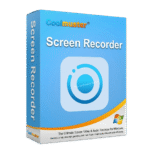
Giveaway – Coolmuster Screen Recorder: Free License Key | 2-in-1 HD Screen Recording & Screenshot Capture – for Windows

Record Smarter. Capture More. Stay Private — Get a Full Version of Coolmuster Screen Recorder with a 1-year License Key For Free!!
You can also get your own license of Coolmuster Screen Recorder that includes updates and support at a 50% Discount!
✔ Full License. ✔ Free Product Updates ✔ Customer Support
BUY NOW
Coolmuster Screen Recorder is regularly priced at $25.95 per year or $35.95 for a lifetime license — but right now, you can secure your license at an exclusive 50% discount, making this one of the most cost-effective professional screen recording solutions available for Windows. This offer is available for a limited time only, so act now before the price returns to full retail.
Software Giveaway: You can also get Coolmuster Screen Recorder with a 1-year license key for free in the Giveaway tab below.
Instant Delivery by Email | 30-Day Money Back Guarantee | VAT Excluded on All Prices Shown | Free Customer Support
LIFETIME LICENSE

2-in-1 HD Screen Recording & Screenshot Capture for Windows | No Watermark, No Time Limit, Local Processing, MP4 Video, PNG/JPEG/BMP Images
- One License for 1 PC
- All Features for Lifetime
- One-time Price
- Lifetime Free Upgrades
Platforms: Windows
2-in-1 HD Screen Recording & Screenshot Capture for Windows | No Watermark, No Time Limit, Local Processing, MP4 Video, PNG/JPEG/BMP Images
- One License for 5 PCs
- All Features for Lifetime
- One-time Price
- Lifetime Free Upgrades
Platforms: Windows
2-in-1 HD Screen Recording & Screenshot Capture for Windows | No Watermark, No Time Limit, Local Processing, MP4 Video, PNG/JPEG/BMP Images
- One License for 10 PCs
- All Features for Lifetime
- One-time Price
- Lifetime Free Upgrades
Platforms: Windows
1-YEAR LICENSE
2-in-1 HD Screen Recording & Screenshot Capture for Windows | No Watermark, No Time Limit, Local Processing, MP4 Video, PNG/JPEG/BMP Images
- One License for 1 PC
- All Features for 1 Year
- Auto-renewal
- Cancel at Any Time
- 1 Year Free Upgrades
Platforms: Windows
2-in-1 HD Screen Recording & Screenshot Capture for Windows | No Watermark, No Time Limit, Local Processing, MP4 Video, PNG/JPEG/BMP Images
- One License for 5 PCs
- All Features for 1 Year
- Auto-renewal
- Cancel at Any Time
- 1 Year Free Upgrades
Platforms: Windows
2-in-1 HD Screen Recording & Screenshot Capture for Windows | No Watermark, No Time Limit, Local Processing, MP4 Video, PNG/JPEG/BMP Images
- One License for 10 PCs
- All Features for 1 Year
- Auto-renewal
- Cancel at Any Time
- 1 Year Free Upgrades
Platforms: Windows

Coolmuster Mobile Transfer BEST OFFER
Coolmuster PDF Converter Pro: Lifetime License BEST OFFER

Coolmuster PDF Image Extractor: Lifetime BEST OFFER
Coolmuster Android Eraser BEST OFFER

Coolmuster iOS Assistant BEST OFFER
Coolmuster Screen Recorder Giveaway
Available now: Free License Key For a Limited Time!
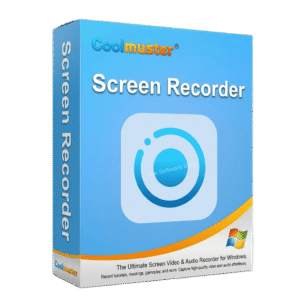
To access the giveaway, kindly provide your email address. Please refrain from closing this page after signing in to receive instructions on how to access the offer at no cost.
NOTES:
– All prices shown here are in listed USD (United States Dollar).
– Such promotional programs are subject to change without notice, from time to time in our sole discretion.
– Data may vary based on different systems or computers.
Coolmuster Screen Recorder Review at a Glance
Every day, professionals, educators, content creators, and everyday Windows users face the same frustrating reality: screen recording tools are either too complex, too expensive, or too invasive. Many popular options force you to deal with intrusive watermarks on every video, rigid recording time caps that cut off your sessions at the worst moments, and worst of all — mandatory cloud uploads that send your sensitive screen activity to external servers you do not control. For anyone handling confidential business data, personal content, or simply wanting a clean, reliable recording without jumping through hoops, these shortcomings are not minor inconveniences — they are deal-breakers.
Coolmuster Screen Recorder is a dedicated 2-in-1 screen recording and screenshot capture solution built exclusively for Windows. It was engineered from the ground up to solve exactly these problems: delivering high-definition MP4 video recording with no watermarks after registration, no time restrictions, and no performance drag — alongside a fully capable screenshot tool that lets you capture, annotate, and export images in multiple formats. Everything it does happens entirely on your local machine, with zero cloud dependency and zero data exposure.
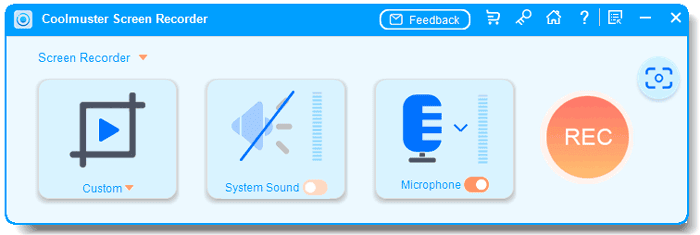
What Is Coolmuster Screen Recorder?
Coolmuster Screen Recorder is a Windows-based 2-in-1 utility that combines a full-featured HD screen recorder with an integrated screenshot and image editing tool in a single, lightweight application. Whether you are recording a full-screen gaming session, capturing a specific application window for a tutorial, or snapping and annotating a screenshot for a client report, this software handles it all from one clean, accessible interface. It supports MP4 video output in HD quality and image exports in PNG, JPG/JPEG, and BMP formats, making it compatible with virtually any downstream workflow.
Designed for Windows 11, 10, 8, and 7, Coolmuster Screen Recorder is built to run efficiently even on modest hardware — requiring as little as 256 MB of RAM and a 1GHz processor — so you are not forced to upgrade your system just to get a capable recording tool. Its 100% local processing architecture means your recordings, screenshots, and personal data never leave your device. No cloud account. No external server. No third-party access — ever.
Key Benefits
Coolmuster Screen Recorder is not just another screen capture tool — it is a privacy-first, performance-optimized recording solution built to meet the real needs of Windows users across a wide range of use cases. Here is why it stands apart:
- No watermark after registration — Your finished videos and screenshots are clean and professional, with no branding stamps obscuring your content after you activate your license.
- No recording time limit — Run sessions of any length, from a quick two-minute demo to a multi-hour live event capture. Your recordings are never cut short.
- HD quality output — Videos are saved as crisp, clear MP4 files. Screenshots are exported at lossless image quality in PNG, JPG/JPEG, or BMP — exactly what you captured, preserved perfectly.
- 100% local processing — All recording, editing, and file saving happens directly on your Windows PC. Nothing is uploaded, synced, or shared. Your data is yours alone.
- Lightweight and lag-free — Minimal system resource usage means smooth recording even on older machines, without the stuttering or frame drops that plague heavier alternatives.
- Flexible audio control — Choose to record system audio, your microphone, or no audio at all, giving you precise, interference-free audio in every session.
- Built-in screenshot editing — Add shapes, text, arrows, and more directly within the app before saving, eliminating the need for a separate image editor.
- One-click simplicity — A handy on-screen toolbar keeps recording controls instantly accessible without interrupting your active workflow.
Who benefits most from Coolmuster Screen Recorder?
- Content creators and YouTubers who need clean, watermark-free video captures for tutorials, gameplay, and reviews
- Business professionals and remote workers who handle confidential screen content and require guaranteed local-only processing
- Educators and trainers producing instructional materials and step-by-step visual guides
- Customer support teams creating visual documentation or recording issues for escalation
- Students and researchers capturing reference material, online lectures, and annotated screenshots
Features
Below is a detailed breakdown of every core capability built into Coolmuster Screen Recorder, giving you a clear picture of exactly what this tool delivers:
- HD Screen Recording — Record your Windows desktop in high-definition MP4 format with no quality compromise.
- Full Screen Mode — Capture your entire desktop display in a single recording session with no cropping or configuration needed.
- Custom Region Recording — Drag to define any specific area of your screen for precise, targeted captures.
- App Window Recording — Focus recording on a single application window, keeping your capture clean and relevant.
- Unlimited Sessions — Start and stop recording as many times as needed — no session caps, no time limits imposed.
- No Watermark After Registration — Activate your license and all video output is completely free of any watermarks or branding overlays.
- Lag-Free Performance — Optimized for minimal CPU and memory usage, ensuring smooth recordings without stuttering even on modest hardware.
- Smart Area Selector — An intuitive region-selection tool with real-time pixel dimension readout for precise screen targeting.
- Real-Time Pixel Dimensions — See the exact pixel width and height of your selected region as you drag, so you get the precise capture area every time.
- Drag-and-Define Interface — Simply click and drag to set your recording or screenshot region — no complicated menus or keyboard shortcuts required.
- Flexible Audio Capture — Full control over which audio source is included in your recording.
- System Audio Recording — Capture internal playback audio such as game sounds, video streams, or application output.
- Microphone Recording — Record your voice or external microphone input for narration, commentary, or voiceover tutorials.
- No Audio Option — Disable audio entirely for silent screen demos, privacy-sensitive captures, or presentations where audio is not needed.
- Single-Source Clarity — Audio is captured from one source at a time, eliminating feedback loops, mixing issues, or interference between inputs.
- Screenshot Capture Tool — A fully integrated screen capture utility with support for full-screen and custom region shots.
- Full-Screen Capture — Instantly grab your entire display with a single action.
- Custom Region Capture — Select any portion of your screen to capture exactly the area you need.
- Lossless Image Quality — Screenshots are saved at full quality with no compression artifacts, preserving every detail of the original content.
- Built-in Image Editing — Annotate and mark up screenshots directly inside the application before exporting.
- Shape Tools — Add rectangles (boxes), circles, and other geometric shapes to highlight or frame specific content areas.
- Arrow and Line Tools — Draw directional indicators or connecting lines to guide viewers’ attention.
- Text Annotation — Insert custom text labels directly onto screenshots for context, labels, or instructions.
- Instant Save After Editing — Save your annotated screenshot immediately in your chosen format without switching to an external editor.
- Multi-Format Image Export — Save screenshots in the format that fits your project or platform requirements.
- PNG Export — Lossless format ideal for documentation, presentations, and web use.
- JPG/JPEG Export — Compressed format suitable for sharing, email attachments, or web-optimized content.
- BMP Export — Uncompressed bitmap format for workflows requiring raw image data.
- 100% Local Processing — All recording, editing, and file management happens entirely on your Windows PC.
- No Cloud Uploads — Your recordings and screenshots are never transmitted to any external server or cloud storage service.
- No Third-Party Access — No external entities, advertisers, or services ever have visibility into your screen content or output files.
- Full File Ownership — Every file you create is stored where you choose on your local machine, under your complete control.
- One-Click Recording Control — Start and stop recordings instantly with a single click from a floating toolbar.
- Draggable Toolbar — The control bar can be repositioned anywhere on your screen so it never obstructs your active application.
- Non-Intrusive Interface — The toolbar stays accessible without overlapping your content in the final recording output.
- Lightweight System Footprint — Designed to run on a wide range of Windows hardware without demanding high-end specifications.
- Minimum 256 MB RAM — Runs on systems with limited memory, with 1024 MB recommended for optimal performance.
- 1GHz CPU Support — Compatible with both 32-bit and 64-bit processors running at 1GHz or above.
- 200 MB Disk Space — A compact install footprint that does not consume significant drive storage.
Requirements
Coolmuster Screen Recorder is compatible with a broad range of Windows systems. Before installing, confirm your machine meets the following minimum specifications:
- Operating System: Windows 11, Windows 10, Windows 8, or Windows 7
- Processor: 1GHz or above (32-bit or 64-bit)
- RAM: 256 MB minimum (1024 MB recommended for best performance)
- Hard Disk Space: 200 MB or more of available free space
- Output Video Format: MP4
- Output Image Formats: PNG, JPG/JPEG, BMP
Downloads
Before committing to a purchase, take Coolmuster Screen Recorder for a test run and see firsthand how it performs on your own Windows system. The free trial gives you direct, hands-on access to the core recording and screenshot features so you can evaluate the HD output quality, audio capture options, screenshot editing tools, and the lightweight performance — all on your own terms, on your own machine. Download the free trial edition of Coolmuster Screen Recorder by clicking the button below and experience a no-compromise screen recording tool that keeps your data fully private from the very first session.
or
Buy now, price start from:
Your Screen. Your Files. Your Control.
Coolmuster Screen Recorder is the practical, privacy-focused screen recording tool that Windows users have been waiting for. It does exactly what it promises — HD video recording with no watermark, no time limit, flexible audio options, built-in screenshot editing, and absolute local-only data privacy — without the bloated interfaces, expensive subscriptions, or cloud dependencies that compromise both performance and security in competing tools. Whether you are a content creator, a business professional, or simply someone who values clean, reliable screen capture without strings attached, Coolmuster Screen Recorder delivers on every front.
Thank you for reading Coolmuster Screen Recorder review, and enjoy the discount coupon. If you notice any issues with Coolmuster Screen Recorder discount coupon, deal, or giveaway—such as an expired offer, broken link, or sold‑out promotion—please let us know while the deal is still available.