Giveaway – Runstead: Free Lifetime License | Windows Process Supervisor – for Windows 11/10

Keep Every Background Service Running – Automatically, Locally, Without Watching the Clock. Get a full verison of Runstead with a lifetime license for free!
Free Full Version!
BUY NOW
Runstead is available for $14.99. But, you can now get the full version of Runstead with a lifetime license for free through the Giveaway tab below. This offer is available for a limited time!
PC Game Booster 8 Pro: 1 Year License, 1 PC BEST SELLER
PC Services Optimizer 5 PRO BEST SELLER

Ashampoo WinOptimizer Pro 29 BEST SELLER

System Mechanic Ultimate Defense BEST SELLER

Wise Care 365 PRO: Lifetime Upgrade License, 3 PCs BEST SELLER

PC Fresh 2026: Full Version BEST SELLER

SUPERAntiSpyware PRO BEST OFFER

FastestVPN Lifetime Deal BEST OFFER

AdGuard: Lifetime Subscription BEST SELLER
O&O DiskImage Professional Edition: 5-PC License (Perpetual) BEST SELLER

80% Off – DriverMax 16 PRO Lifetime: Free Daily Health Check Tool & Advanced Task Manager | Make Sure You Get Your Lifetime Upgrade! BEST OFFER
Runstead Giveaway
Available now: Free Full Version for a Limited Time!

To access the giveaway, kindly provide your email address. Please refrain from closing this page after signing in to receive instructions on how to access the offer at no cost.

NOTES:
– All prices shown here are in listed USD (United States Dollar).
– Such promotional programs are subject to change without notice, from time to time in our sole discretion.
– Data may vary based on different systems or computers.
Runstead Review at a Glance
Anyone who has run a local development server, a homelab dashboard, a bot, a background sync tool, or any long-lived script on Windows knows the frustration: the process quietly dies, and you only notice hours later when a service is unresponsive, a scheduled job never ran, or a monitoring dashboard has gone blank. Windows does not offer a built-in, reliable way to keep an arbitrary executable or script alive without turning to clunky batch-file loops, third-party Windows service wrappers, or writing your own watchdog logic. That gap is exactly what Runstead was built to close.
What is Runstead
Runstead is a local Windows process supervisor application. In practical terms, it is a small utility that sits between you and the applications, scripts, or commands you rely on to run continuously in the background. Rather than launching a program and hoping it stays alive, you register it with Runstead, and Runstead becomes responsible for starting it, tracking whether it is still running, and automatically restarting it according to a policy you configure if it exits unexpectedly.
The application is designed to run quietly in the system tray, meaning you can close its main window and it will keep working in the background without cluttering your taskbar or interrupting your workflow. It only needs your attention when you want to check on something or adjust a setting, and you can quit it entirely from the tray icon when you are finished.
Runstead does not require an internet connection to function, does not ask you to sign up for an account, and does not phone home with usage data. Every setting you configure and every log entry it produces is stored locally on your device. This local-first design distinguishes Runstead from many modern utilities that quietly tie basic functionality to a cloud account or a subscription-based backend.
Key Benefits
Below is an overview of the practical advantages Runstead brings to anyone who depends on background processes running reliably on a Windows PC.
- Uninterrupted background services: Your scripts, servers, and tools stay online because Runstead restarts them automatically the moment they stop, minimizing downtime you would otherwise only notice after the fact.
- Reduced manual monitoring: You no longer need to periodically check a terminal window or task manager to confirm a process is still alive; the live dashboard gives you that information at a glance.
- Protection against restart storms: The smart backoff policy prevents a persistently crashing app from consuming your CPU and disk resources in an endless restart loop, protecting overall system stability.
- Full data privacy: Because Runstead requires no account and sends no telemetry, your process names, command lines, and output logs never leave your computer, which matters for anyone running sensitive or proprietary tools.
- Low resource footprint: As a lightweight, tray-based supervisor, Runstead is built to stay out of the way, running in the background without demanding noticeable system resources of its own.
- Simple, focused workflow: There is no complicated service configuration language to learn; you add an executable or script, choose a restart policy, and Runstead takes care of the rest.
- Flexibility across use cases: Because Runstead can supervise any executable, script, or command, it fits development servers, homelab dashboards, automation bots, sync utilities, and many other background tasks equally well.
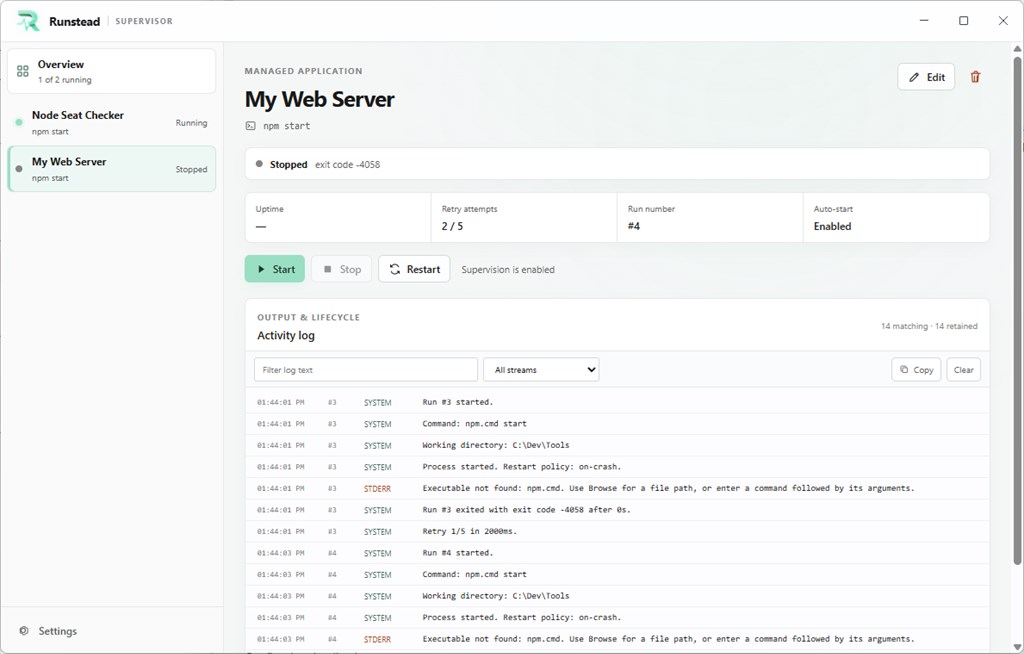
Runstead is a lightweight Windows process supervisor developed by Form And Element. You point it at any executable, script, or command line instruction, and it takes over the job of starting that process, watching it while it runs, and restarting it the instant it exits unexpectedly. Instead of babysitting a terminal window or checking on a service manually throughout the day, you get a small, always-on supervisor sitting quietly in your system tray, keeping a constant eye on every app you have registered with it.
What makes Runstead particularly useful is how it handles failure. A naive restart-on-crash script can make things worse: if a process fails immediately every time it starts, a dumb restart loop will hammer your CPU, flood your disk with logs, and potentially make your machine unusable. Runstead avoids this with smart backoff logic, spacing out restart attempts with exponential delays and applying configurable limits on consecutive retries and per-minute restart bursts. The result is a supervisor that is aggressive enough to recover quickly from a one-off crash, but disciplined enough to back off and protect your system when something is fundamentally broken.
Runstead is aimed squarely at developers, homelabbers, and power users who run background services on their personal computers rather than in a managed cloud environment. If you run local API servers during development, self-hosted dashboards, media server companions, file sync utilities, custom automation scripts, Discord or Telegram bots, or any other long-running process that has no business crashing silently, Runstead gives you the kind of resilience normally reserved for production server infrastructure – but on your own desktop, with zero setup complexity.
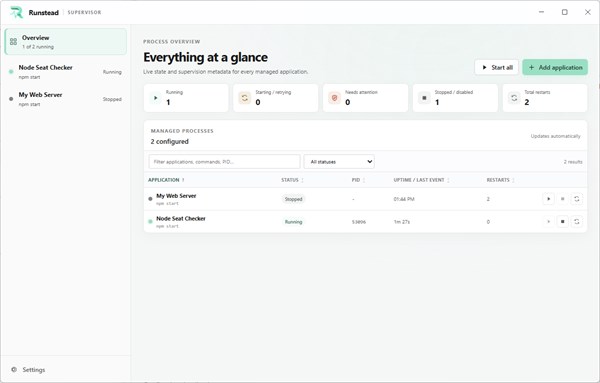
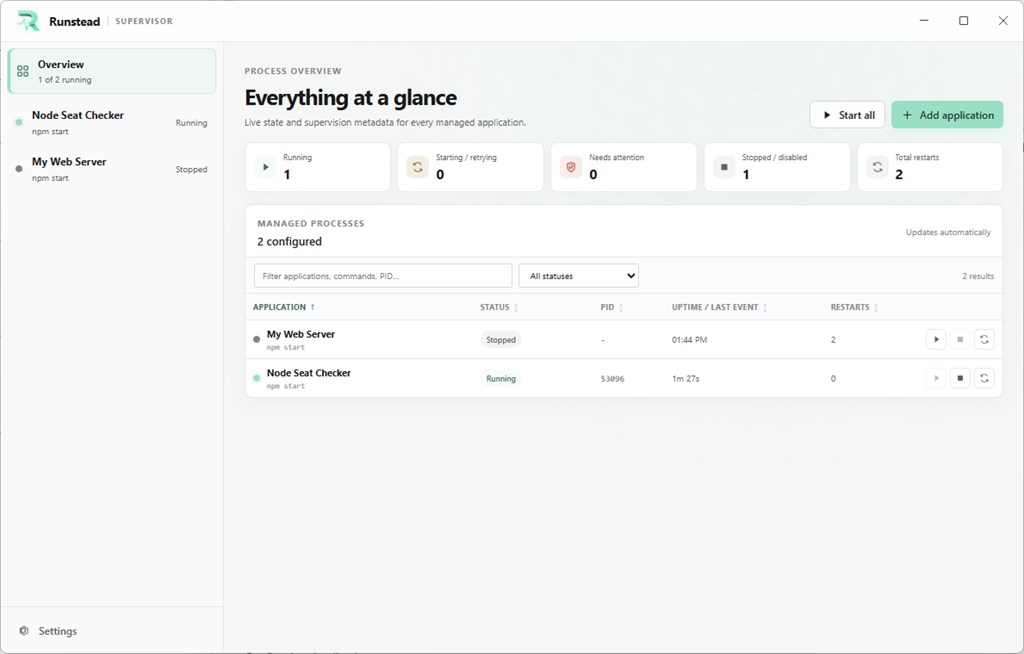
Choosing Runstead over writing your own watchdog script or wrestling with generic Windows service wrappers comes down to three things: simplicity, visibility, and privacy. Setup takes only the time it takes to point Runstead at your executable and choose a restart policy. Visibility comes from the built-in live dashboard, which shows you status, process ID, uptime, restart budget, and last exit details for every managed app in one glance, so you are never guessing why something stopped. And privacy comes from Runstead’s fully local design: there is no account to create, no data sent to any server, and no telemetry collecting information about what you run or how you run it. Everything – configuration, logs, and process output – stays on your own PC.
Whether you are a solo developer running a handful of local services, a homelab enthusiast juggling a dozen self-hosted tools, or a power user who simply wants peace of mind that a critical background app will not silently die while you are away from your desk, Runstead gives you a dependable, low-friction way to keep things running.
Features
Below is a comprehensive list of the key features that make the software a valuable addition to your needs:
- Automatic restart: Runstead restarts your managed apps automatically after a crash or any unexpected exit, so a dropped process does not stay down until you notice it yourself.
- Configurable restart policies: You decide exactly how and when a restart should be triggered for each app, tailoring behavior to how critical or how flaky a given process is.
- Smart backoff: Runstead applies exponential retry delays between restart attempts, spacing them out further each time a process keeps failing instead of hammering it with instant relaunches.
- Consecutive-retry limits: You can cap how many times Runstead will retry a failing process in a row before pausing, preventing a broken app from looping indefinitely.
- Per-minute burst limits: Runstead also enforces a ceiling on how many restarts can occur within a single minute, adding a second layer of protection against runaway restart cycles.
- Live overview dashboard: A central view shows the real-time status of every app Runstead is managing, so you always know what is running and what needs attention.
- Status and PID display: Each managed app’s current running state and process ID are shown clearly, making it easy to cross-reference with Task Manager or other tools if needed.
- Uptime tracking: You can see how long each process has been running since its last start, useful for spotting apps that are crashing more often than expected.
- Restart budget visibility: The dashboard shows how many restart attempts remain under the current policy, so you can see when an app is approaching its backoff limits.
- Last exit information: Details about the most recent exit, including relevant exit codes or context, are surfaced so you can diagnose why a process stopped without digging through separate logs.
- System tray integration: Runstead can be minimized to the system tray, continuing to supervise every registered app quietly in the background without an open window on your desktop.
- Quit-on-demand: When you are ready to stop supervision entirely, a simple option in the tray icon lets you close Runstead cleanly.
- Fully local operation: All configuration and monitoring happens directly on your machine, with no dependency on an external server to keep your apps supervised.
- No account required: There is no sign-up step, no login screen, and no user profile to manage before you can start using the software.
- No telemetry or analytics: Runstead does not collect usage statistics, advertising identifiers, or behavioral data about how you use it or what you run through it.
- Local configuration and logs: Every setting you configure and every log entry generated by a supervised process stays stored on your device, never transmitted elsewhere.
Before installing Runstead, confirm that your system meets the following requirements:
- Operating system: Windows 10 version 14316.0 or higher, or Windows 11.
- Distribution channel: Available through the Microsoft Store, ensuring straightforward installation and updates.
- No account setup needed: No sign-up, login, or internet-based activation is required to begin using the application.
Buy now, the price start from:
Thank you for reading the Runstead review, and enjoy the discount coupon. If you notice any issues with the Runstead discount coupon, deal, or giveaway—such as an expired offer, broken link, or sold‑out promotion—please let us know while the deal is still available.