Giveaway – Epubor Kobo Mate: Free 1-year License Code | Kobo eBook Downloader and DRM Removal Software – for Windows

Back Up Your Entire Kobo Library in Minutes — Get Epubor Kobo Mate with a Free 1-Year License Key Today!
✔ 1-year License. ✔ Free Product Updates ✔ Customer Support
BUY NOW
Epubor Kobo Mate is available for $29.99 per year. But, you can now get Epubor Kobo Mate license with our exclusive discount coupon. This offer is available for a limited time!

Kobo eBook Downloader and DRM Removal Software | Convert Kobo Books to EPUB, Kobo Audiobooks to MP3 and Back Up Your Kobo Plus Library
- 1 PC / 1 Year
- 30-Day MoneyBack Guarantee
- 1-Year free upgrades
- Free remote assistance
Platforms: Windows
Kobo eBook Downloader and DRM Removal Software | Convert Kobo Books to EPUB, Kobo Audiobooks to MP3 and Back Up Your Kobo Plus Library
- 1 PC / 5 Years
- 30-Day MoneyBack Guarantee
- 5-Year free upgrades
- Free remote assistance
Platforms: Windows
Kobo eBook Downloader and DRM Removal Software | Convert Kobo Books to EPUB, Kobo Audiobooks to MP3 and Back Up Your Kobo Plus Library
- 2-5 PCs / 5 Years
- 30-Day MoneyBack Guarantee
- 5-Year free upgrades
- Free remote assistance
Platforms: Windows
Kobo eBook Downloader and DRM Removal Software | Convert Kobo Books to EPUB, Kobo Audiobooks to MP3 and Back Up Your Kobo Plus Library
- 1 Mac / 1 Year
- 30-Day MoneyBack Guarantee
- 1-Year free upgrades
- Free remote assistance
Platforms: Mac
Kobo eBook Downloader and DRM Removal Software | Convert Kobo Books to EPUB, Kobo Audiobooks to MP3 and Back Up Your Kobo Plus Library
- 1 Mac / 5 Years
- 30-Day MoneyBack Guarantee
- 5-Year free upgrades
- Free remote assistance
Platforms: Mac
Kobo eBook Downloader and DRM Removal Software | Convert Kobo Books to EPUB, Kobo Audiobooks to MP3 and Back Up Your Kobo Plus Library
- 2-5 Macs / 5 Years
- 30-Day MoneyBack Guarantee
- 5-Year free upgrades
- Free remote assistance
Platforms: Mac

Epubor Ultimate Converter BEST OFFER

Epubor Reader GIVEAWAY

Epubor Kclippings GIVEAWAY
Epubor Kindle Transfer BEST OFFER

Epubor Pro BEST SELLER
Epubor All DRM Removal - for Windows / Mac/ BEST SELLER
Epubor Kobo Mate Giveaway
Available now: Free License Key for a LimitedTime!
To access the giveaway, kindly provide your email address. Please refrain from closing this page after signing in to receive instructions on how to access the offer at no cost.
NOTES:
– All prices shown here are in listed USD (United States Dollar).
– Such promotional programs are subject to change without notice, from time to time in our sole discretion.
– Data may vary based on different systems or computers.
Epubor Kobo Mate Review at a Glance
Every Kobo reader eventually runs into the same frustration: you buy an eBook or audiobook, and then realize it only plays inside the Kobo app on Kobo-approved devices. If your Kobo account gets locked, a subscription lapses, or you simply want to switch to a different reading app or e-reader brand, your paid-for library suddenly feels out of reach. This is a common pain point for readers who value ownership over rented access, and it is exactly the problem Epubor Kobo Mate was built to solve.
What is Epubor Kobo Mate
Epubor Kobo Mate is a specialized Kobo content backup and conversion utility designed to remove DRM restrictions from both purchased Kobo eBooks and Kobo Plus subscription content. After signing in with your Kobo account credentials, the software automatically detects your full library, including books you may not have manually downloaded yet, and lists them for selection. From there, you choose which titles to convert, and the program processes them locally on your computer, outputting clean EPUB files for eBooks and MP3 files for audiobooks, complete with original metadata and chapter structure preserved.
Unlike generic DRM-removal scripts that require technical setup, command-line knowledge, or plugin installation inside Calibre, Epubor Kobo Mate is built with a simple graphical interface aimed at everyday readers. It is compatible with Windows 10 and Windows 11, and it supports sign-in through email and password, Google, Facebook, or partner booksellers such as Bol.com and FNAC that use Kobo’s platform.
Key Benefits
Before getting into the specific advantages, it helps to understand why this matters for the average Kobo user managing a growing digital library across several devices and apps.
- True content ownership: once converted, your eBooks and audiobooks exist as standard EPUB and MP3 files that are not tied to Kobo’s servers or account status.
- Cross-platform freedom: read your books on any eReader, tablet, or app, and play audiobooks in any media player, instead of being restricted to Kobo hardware or software.
- No emulator required: skip the slow, unstable process of running Android emulators just to access Kobo Plus content.
- Time savings: high-speed batch downloading means an entire library backup takes minutes rather than hours of manual work.
- Preserved quality: original formatting, metadata, and audio fidelity are maintained throughout the conversion process, so nothing is lost.
- Simplified migration: switching from Kobo to another reading ecosystem becomes straightforward since your files are already in universally supported formats.
- Peace of mind: protect your purchases against account lockouts, service changes, or Kobo Plus subscription cancellations that would otherwise cut off access.
Epubor Kobo Mate is a Windows desktop application that connects directly to your Kobo account, pulls in your entire library automatically, and converts your eBooks and audiobooks into standard, DRM-free EPUB and MP3 files. There is no need to install an Android emulator, no need to manually pre-download titles through the Kobo app, and no complicated workaround involving ADE (Adobe Digital Editions). You simply log in, select your titles, and click convert.
What sets this tool apart from free alternatives like Calibre with the Obok plugin is its ability to handle Kobo Plus content, both eBooks and audiobooks, which are notoriously difficult to extract because they use a subscription-based DRM scheme that keeps files inside the Kobo ecosystem. Standard purchased Kobo eBooks typically use KEPUB or ADE DRM, which free tools can strip reasonably well. Kobo Plus audiobooks, however, are streaming-first, do not even show a download button in the desktop app, and normally require an emulator-based workaround that is slow and unreliable. Epubor Kobo Mate removes that complexity entirely.
This product benefits anyone who reads or listens on multiple devices, readers who want a permanent backup independent of any single retailer, users migrating away from Kobo to another eReader or app, and audiobook listeners who want organized, chapter-split MP3 files instead of being locked into a single streaming interface. If you have ever lost access to a title after an account issue, or you simply want peace of mind that your purchases are truly yours, this is the tool built for that exact situation.
Key Features
Below is a comprehensive list of the key features that make the software a valuable addition to your needs:
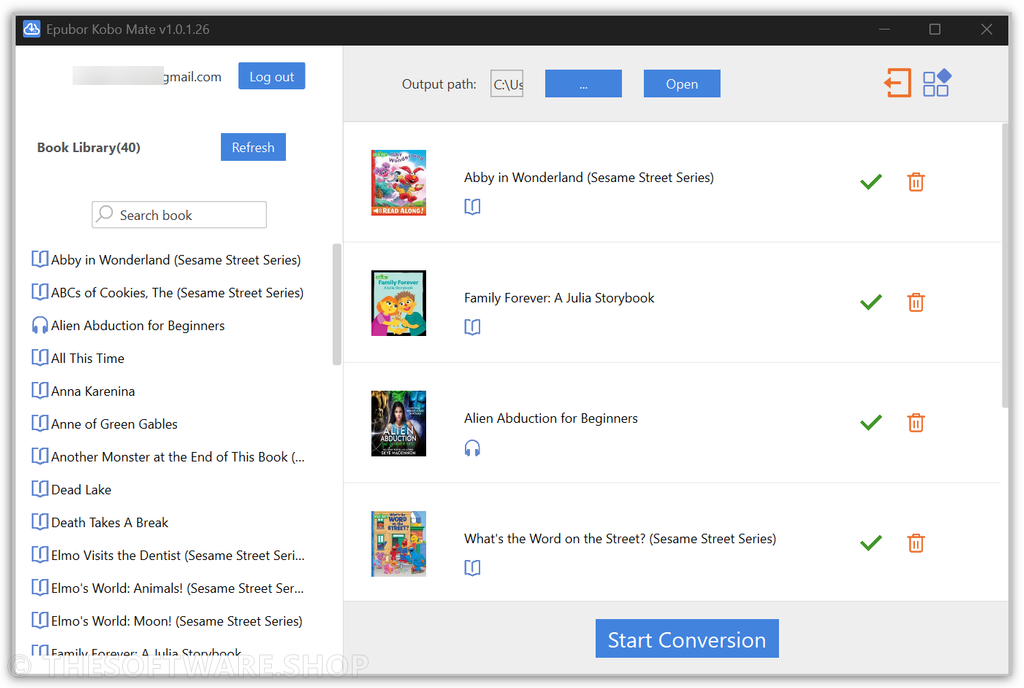
- Automatic Kobo Library Sync: after logging in, the tool fetches your entire Kobo library automatically and displays every title in the left panel without needing to pre-download anything through the Kobo app.
- Real-time refresh: if new titles are missing, a single click on the Refresh button reloads your full, updated catalog.
- No manual download step: skips the traditional requirement of opening each book once in the Kobo app before it can be processed.
- Bulk Download with One Click: add multiple eBooks and audiobooks to the right panel and start the entire batch with a single “Start Conversion” click.
- Drag and organize: move selected titles into the processing queue quickly for large backup sessions.
- Progress tracking: a green check icon appears next to each title once conversion finishes successfully.
- Rapid Downloads with Original Quality: the tool is optimized for speed while preserving the integrity of your content.
- Fast processing engine: entire libraries can be converted in minutes instead of hours.
- Format and metadata preservation: original formatting, cover art, and metadata carry over into the final EPUB and MP3 files.
- Kobo Plus Decryption Support: goes beyond standard purchased titles to also handle subscription-based Kobo Plus eBooks and audiobooks.
- eBook decryption: converts Kobo Plus titles that normally never appear as downloadable .epub or .acsm files.
- Audiobook decryption: extracts Kobo Plus audiobooks that are otherwise streaming-only and hidden from the standard download menu.
- Automatic Chapter Splitting for Audiobooks: converted audiobooks are organized into individual chapter files rather than one long audio track.
- Organized playback: makes it easier to navigate long audiobooks on any MP3 player or phone.
- Consistent naming: chapter files are labeled clearly for straightforward browsing.
- Multiple Sign-In Options: flexibility in how you access your Kobo account during setup.
- Google and Facebook login: sign in using linked social accounts instead of typing credentials manually.
- Partner bookseller support: log in through Kobo-partnered retailers such as Bol.com and FNAC using their own site credentials.
- Direct Output Access: quickly locate your converted files after processing completes.
- Open Folder button: jumps straight to the output directory containing all DRM-free files.
- Individual file locator: clicking the green check icon next to a title opens that specific converted file directly.
Requirement List
Before installing, check that your system meets the following basic requirements to ensure smooth operation.
- Operating system: Windows 10 or Windows 11
- An active Kobo account with purchased eBooks or an active Kobo Plus subscription
- A stable internet connection for account sign-in and library synchronization
- A web browser available for the activation code step during first sign-in
- Sufficient local storage space for your converted EPUB and MP3 files
Downloads
See how Epubor Kobo Mate handles your own Kobo library before committing to a purchase. Get the free trial edition now and test the full workflow, from login and library sync to conversion, at no cost.
DOWNLOAD
Windows/Mac
The free trial version allows you to convert up to three Kobo titles for free, giving you a real, hands-on look at the sign-in process, the automatic library sync, and the final output quality of the converted EPUB and MP3 files. This is enough to confirm that your Kobo Plus content, partner bookseller account, or standard purchased titles convert correctly on your specific system before you decide on a license.
or
Buy now, the price start from:
Thank you for reading the Epubor Kobo Mate review, and enjoy the discount coupon. If you notice any issues with the Epubor Kobo Mate discount coupon, deal, or giveaway—such as an expired offer, broken link, or sold‑out promotion—please let us know while the deal is still available.