

33% Off – Video Pro X17: Perpetual License | Video Editing Software with AI, 8K, HDR, Color Grading — Pro Audio Tools, LUTs, Multicam, 360° – for Windows

Create next-level videos faster with Video Pro X17 or go all-in with Ultimate’s plug-ins and content—get started now with 33% discount coupon, then choose the edition that fits your workflow.
✔ Perpetual License. ✔ Free Product Updates ✔ 24×7 Customer Support ✔ 30-day Money-back Guarantee.
Video Pro X17 Review at a Glance
For content creators, independent filmmakers, and ambitious videographers, the gap between consumer-level software and high-end professional suites has often been a source of frustration. Many creators find themselves limited by basic tools that cannot handle complex projects, yet they are hesitant to switch to overly complicated industry-standard systems that require a steep learning curve and significant downtime.
Video Pro X17 by MAGIX solves this dilemma by offering a powerful, sophisticated editing environment that remains accessible and intuitive. It is built specifically to address the need for a workflow that is both fast and feature-rich, eliminating the bottlenecks associated with rendering high-resolution footage or managing extensive media libraries. With Video Pro X17, you no longer have to choose between ease of use and professional capability; you get a robust system that grows with your skills.
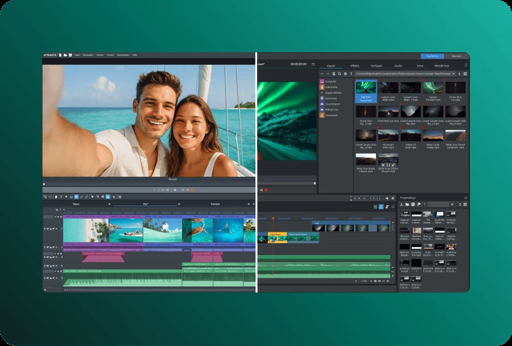
What is MAGIX Video Pro X17
MAGIX Video Pro X17 is a Windows-based video editing program made for creators who want a more advanced toolkit and more precise editing control. It builds on the familiar editing approach found in MAGIX’s consumer line while adding stronger grading, audio tools, and broader format handling for precision.
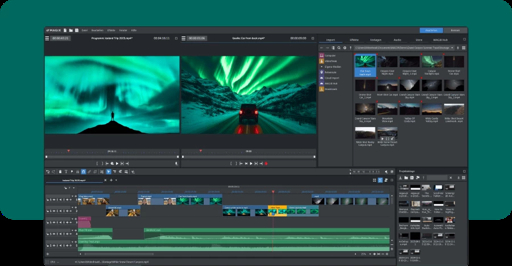
It also includes newer workflow helpers designed to reduce manual busywork. For example, Video Pro X17 offers AI Media Management for automatic sorting and tagging of assets, helping you locate clips faster during complex projects.
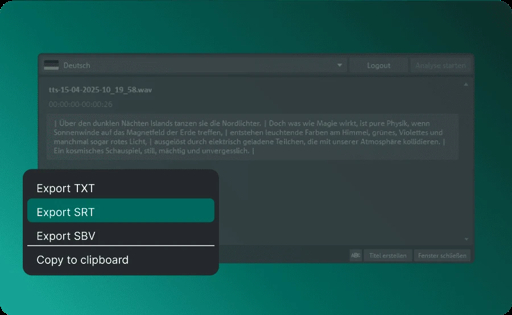
It also offers karaoke-style subtitles that highlight each word as it’s spoken, helping engagement and accessibility for vlogs, tutorials, and short-form edits.
Video Pro X is also positioned as a step-up choice for creators who want more than basic trimming and templates. MAGIX describes it as “built for creators that want to grow, without overcomplicating the process,” focusing on a bigger toolset and smart features that boost workflow speed.
Key Benefits
Before choosing an editor, it helps to focus on outcomes: faster turnaround, fewer mistakes, and more consistent results across episodes and clients. The benefits below reflect what creators typically need once editing becomes a regular part of their workflow—and not just a once-a-month task.
- Faster organization for big projects: Spend less time hunting for assets and more time assembling scenes.
- More readable subtitles: Improve retention on tutorials and reels with word-by-word highlighted captions.
- Cleaner looking footage: Use AI-supported tools to refine sharpness, haze, and overall clarity.
- More confident color work: Shape a consistent look across mixed lighting, cameras, and locations.
- Stronger sound design: Mix, clean, and balance audio so it supports the story instead of distracting from it.
- Fewer export roadblocks: Work with a wider range of formats so delivery stays predictable.
- Repeatable workflow: Reuse nested sequences and modular content so recurring edits take less time.
Who benefits most from this software:
- YouTubers and educators producing frequent long videos with subtitles and voiceovers.
- Freelancers editing client content that needs consistent color, stable shots, and reliable exports.
- Vloggers and travel creators working with mixed camera formats and large media folders.
- Interview and event editors using multicam timelines and audio-focused finishing.
- Small teams building repeatable series formats (intros, recurring segments, reusable scenes).
This software is designed to streamline every aspect of the post-production process, from the initial ingest of footage to the final export. Whether you are dealing with multi-camera setups for event coverage or intricate color grading for a cinematic short film, Video Pro X17 provides the precision you need without the clutter. The inclusion of advanced AI tools further reduces the time spent on repetitive tasks, allowing you to focus entirely on the creative aspects of your storytelling. By integrating professional-grade formats and a high-performance engine, this software ensures that your technical requirements are met, letting you produce broadcast-quality results from your home studio.
Features
Below is a comprehensive list of the key features that make the software a valuable addition to your needs:
- AI Media Management: Automatically sorts and tags footage so assets are easier to find during editing.
- Auto sorting: Groups media to reduce manual folder work.
- Auto tagging: Adds helpful labels so search takes fewer clicks.
- Karaoke-style subtitles: Highlights each word as it’s spoken to improve readability and viewer focus.
- Word highlighting: Shows timing clearly for fast-paced content.
- Accessibility support: Helps audiences follow along without increasing editing effort.
- Speech-to-Text captions: Converts speech into editable text for quick subtitle creation.
- Editable transcript: Fix wording and timing without retyping everything.
- Caption-ready output: Builds subtitles faster for tutorials and interviews.
- Text-to-Speech voiceovers: Creates voiceovers from typed text in many languages and styles.
- Multi-language output: Useful for global audiences and localization.
- Style options: Pick a voice style that fits your content tone.
- AI Sharpen: Improves perceived sharpness and reduces harsh highlights for a more polished image.
- Detail boost: Makes soft footage look clearer.
- Highlight control: Reduces harshness for smoother skin tones and surfaces.
- AI Smoothen: Reduces imperfections and unwanted highlights for a more refined look.
- Skin-friendly smoothing: Useful for interviews and close-ups.
- Highlight reduction: Helps footage look more even in bright light.
- AI Dehaze: Reduces haze, fog, or smoke to bring back hidden details.
- Clarity recovery: Helps landscape and travel footage.
- Atmosphere correction: Useful for outdoor clips shot in difficult conditions.
- AI Colorize: Converts black-and-white footage into lifelike color quickly.
- Old footage refresh: Great for archives and family videos.
- Fast application: Works like an effect so results appear quickly.
- Style Transfer: Applies artistic styling inspired by classic art to your clips.
- Creative looks: Useful for intros, music edits, and stylized segments.
- Quick styling: Applies a consistent look without manual frame work.
- Source & preview window (3- and 4-point editing): Sets exact in/out points for accurate cuts.
- In/out precision: Makes inserts cleaner and faster.
- Structured editing: Supports a more deliberate edit style for interviews and docs.
- Project folder + nested sequences: Groups clips into a single editable unit for modular editing.
- Nested Sequences: Keeps timelines tidy by combining complex scenes.
- Reusable segments: Save recurring scenes (intro/outro) to reuse later.
- Advanced color grading with LUT support: Shapes a consistent look using LUTs and fine tuning tools.
- LUT presets: Start with preset looks or custom LUTs.
- Look comparison: Switch between grading options to pick the best result.
- Tone refinement: Adjust vibrance and luminance while keeping natural tones.
- Audio editing with mastering tools: Supports detailed sound work for professional output.
- Mastering tools: Apply EQ and compression for balanced sound.
- MIDI editing: Compose and edit MIDI for custom music beds.
- Multichannel audio: Build immersive mixes for film-style projects.
- Extended format support: Works with pro-grade formats and exports with modern codecs.
- XAVC import: Helps with professional camera workflows.
- 10-bit HEVC export: Supports higher color depth delivery options.
- HDR support: Allows HDR workflows with color space handling.
- Ultimate toolkit add-ons (Ultimate edition exclusive): Adds plug-ins and content designed for polishing footage and speeding production.
- ReSpeedr V2: Creates slow motion or time-lapse style results for dramatic pacing.
- ProDrenalin: Improves action-cam style footage using advanced settings and AI support.
- BCC Chroma Key Studio: Provides a keying suite for green screen compositing and background replacement.
- Content packs: Includes audio/video content packages plus themed packs for faster builds.
- Bigger voiceover/subtitle contingents: Provides more capacity for Text-to-Speech and Speech-to-Text usage than other versions.
Requirements
Before purchase, confirm your PC meets the recommended specs so editing stays smooth—especially for 4K, 8K, and AI-assisted tools. MAGIX lists Windows 10/11 (64-bit) as the supported OS and provides separate recommendations for HD, 4K, and AI performance needs.
Recommended for HD (summary):
- OS: Windows 10/11 (64-bit)
- CPU: 6th-gen Intel Core i5 (or AMD equivalent), 2.5 GHz, 4 cores
- RAM: 8 GB
- GPU: GTX 1050 Ti / Radeon (4 GB) / Intel HD 620 series or higher
- Storage: 2 GB for installation
Recommended for 4K / 8K (summary):
- RAM: 16 GB (32 GB recommended for 8K)
- GPU: GTX 1070 or higher with 8 GB (RTX series recommended for 8K) or equivalent
- Storage: 10 GB recommended (SSD or fast RAID for 4K media)
Recommended for AI features (summary):
- CPU: 10th-gen Intel Core i7 (or AMD equivalent) or newer
- GPU: NVIDIA RTX 20xx series or AMD Radeon RX 5xxx series or newer
- RAM: 32 GB
Supported formats (high-level examples):
- Import supports formats including AVI, MKV, MOV, MXF, WMV, MPEG-2/4, HEVC/H.265, and AV1 (among others).
- Export supports formats including MPEG-2/4, HEVC/H.265, AV1, AVI, DV-AVI, MJPEG, and WMV (among others).
Downloads
To check performance on your own PC and confirm the workflow fits your projects, start with the trial version first. MAGIX provides a “Video Pro X” free download page where Video Pro X17 can be downloaded to test before purchase.
MAGIX lists Video Pro X17 as a “30-day free trial” option on its free-download listing, which is useful for real-world testing with your footage and export settings.
BUY NOW
Video Pro X17 is available for $199.99 and $239.99 for the Ultimate Edition. But you can now get the Video Pro X17 license with our exclusive discount coupon—this offer is available for a limited time, so secure your copy while the deal is active.
When you purchase the premium version, you typically receive:
- A genuine license (activation/serial) for the software.
- Continued access to product fixes and feature updates included with your license terms.
- Access to support resources so installation and activation stay straightforward.
- The option to choose a subscription or a perpetual license, since MAGIX offers both purchase models for Video Pro X.
If you choose the Ultimate edition, it is positioned as an all-in-one package that includes additional tools/content and larger contingents for voice-over and subtitle creation, plus more stock content—helpful when you publish frequently and want fewer limits.

" />
Video Editor for Windows 10/11 (64-bit) with AI Subtitles, Pro Color Grading, 8K Editing Workflow & Advanced Audio Tools — Creative Suite for Creators
- Perpetual License
- Core video editing workflow and toolset.
- AI Media Management
- Karaoke-style subtitles
- Advanced color grading
- Pro audio tools
- Extended format support
- Free Technical Support by MAGIX
- 30-day money-back Guarantee
Platforms: Windows

" />
Video Editor for Windows 10/11 (64-bit) with AI Subtitles, Pro Color Grading, 8K Editing Workflow & Advanced Audio Tools — Creative Suite for Creators
- Perpetual License
- Core video editing workflow and toolset.
- AI Media Management
- Karaoke-style subtitles
- Advanced color grading
- Pro audio tools
- Extended format support
- Exclusive Features and Benefits of the Ultimate Edition:
- ReSpeedr V2 (slow motion/time-lapse plug-in).
- ProDrenalin (action-cam editing support).
- BCC Chroma Key Studio (green screen/keying suite).
- Extra content packs (Ultimate Audio Content Package, Ultimate Video Content Package, Travel Package, Christmas Song Collection, and Mix Song Collection.).
- Larger Text-to-Speech and Speech-to-Text allowances.
- Additional premium stock downloads.
- Free Technical Support by MAGIX
- 30-day money-back Guarantee
Platforms: Windows
Choose your edition (Standard vs Ultimate)
Both editions share the core Video Pro X17 workflow, including AI-assisted features, grading, audio tools, and the precision editing approach. The difference is that Ultimate adds an expanded package of plug-ins and content, plus larger contingents for creating voice-overs and subtitles and additional stock content to keep production moving.
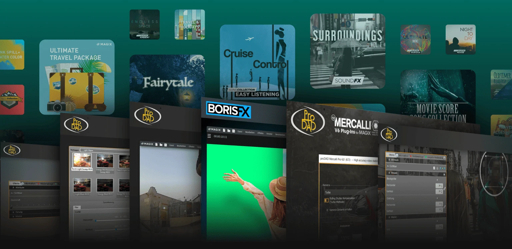
| What you get | Video Pro X17 (Standard) | Video Pro X17 Ultimate |
|---|---|---|
| Core Video Pro X toolset | Includes the full Video Pro X editing workflow and toolset. | Includes the same base workflow and tools. |
| AI Media Management | Included for automatic sorting and tagging. | Included as part of the same editing platform. |
| Karaoke-style subtitles | Included with word-by-word highlighting. | Included with the same subtitle style. |
| proDAD Hide V2 | Included for removing unwanted objects/people. | Ultimate is positioned as an all-in-one package with proDAD tools and additional content (availability can vary by offer). |
| Extra plug-ins & content | Core program focus. | Adds plug-ins such as ReSpeedr V2, ProDrenalin, and a Boris FX keying suite, plus additional content packs. |
| Larger voiceover/subtitle allowances | Standard allowances. | More than double the Text-to-Speech character quota and more Speech-to-Text hours than other versions. |

Video deluxe 2026: Perpetual License BEST SELLER

ACID Pro 11: Producer Bundle BEST OFFER

MAGIX Photostory deluxe BEST OFFER
VEGAS Pro 17 Suite BEST SELLER

Boris FX CrumplePop GIVEAWAY
MAGIX Video Pro X17 Giveaway
Unavailable at this moment!

To access the giveaway, kindly provide your email address. Please refrain from closing this page after signing in to receive instructions on how to access the offer at no cost.
NOTES:
– All prices shown here are in listed USD (United States Dollar).
– Such promotional programs are subject to change without notice, from time to time in our sole discretion.
– Data may vary based on different systems or computers.
Thanks for reading Video Pro X17 Review & Enjoy the discount coupon. Please Report if Video Pro X17 Discount Coupon/Deal/Giveaway has a problem such as expired, broken link, sold out, etc while the deal still exists.


![[ENDING] Giveaway – Aiseesoft Slideshow Creator: Free 1-year License Code | Full Version – for Windows](https://thesoftware.shop/wp-content/uploads/thumbs_dir/Aiseesoft-Slideshow-Creator-Review-Download-Discount-Coupon-rfosm1ai09dz80dd53zmk8l27vuzkozl5x9jyeck9k.png)

![[NEW KEY #16] Giveaway – MiniTool MovieMaker 8.4: Free License Key | Full Version – for Windows](https://thesoftware.shop/wp-content/uploads/thumbs_dir/Minitool-MovieMaker-Review-Download-Discount-Coupon-Code-Giveaway-rfosm9r1prpk4i12rpn9oog7kcpahyx6734x9w00pk.png)

