
83% Off – MindArchitect 2 Pro: Lifetime License | Mind Map Editor Software | Native Diagram & Brainstorming Tool – for Mac

Create clean, professional mind maps in minutes with native macOS performance. Claim the limited-time 83% discount on MindArchitect 2 Pro and start mapping your next plan today.
✔ Lifetime License. ✔ Free Product Updates ✔ 24×7 Customer Support
MindArchitect 2 Pro Review at a Glance
Messy notes slow you down. A long meeting, a new project brief, a semester’s worth of research, or a product roadmap can quickly turn into scattered documents, disconnected ideas, and endless scrolling. When your thoughts live across text files, sticky notes, and half-finished outlines, you spend more time searching than deciding.
MindArchitect Pro for macOS is built to solve that problem by giving you a fast, visual way to organize ideas into clear structures you can refine as your thinking changes.
What is MindArchitect Pro for macOS
MindArchitect Pro is a desktop mind map editor for macOS that helps you create structured diagrams for planning, brainstorming, studying, and documenting complex topics. It combines fast zooming, strong editing controls, and formatting tools—like tables, images, anchor lines, and hyperlinks—so you can represent both hierarchy and relationships in one visual workspace. The goal is simple: help you move from “a lot of thoughts” to “a usable plan” with a mapping canvas that stays responsive even when your diagram grows.
Unlike lightweight web tools that can feel limited in formatting and responsiveness, MindArchitect focuses on native performance and a workflow that scales as your map grows. You can also switch between predefined styles quickly, which helps you move from a “working draft” look to a share-ready layout without redoing content.
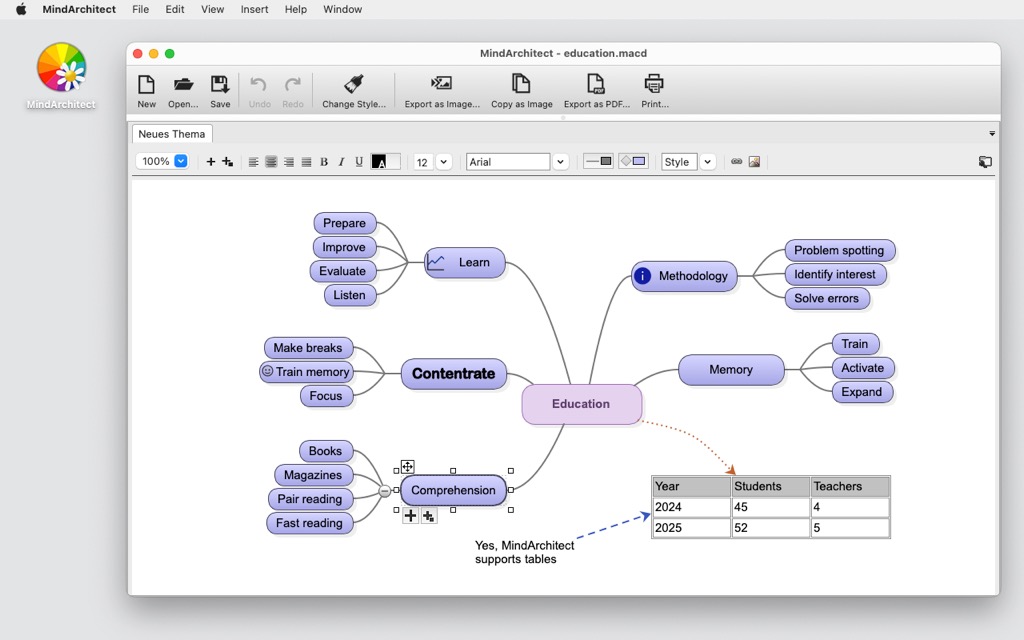
Because MindArchitect is a native macOS application, it’s tuned for performance and everyday reliability. You can zoom quickly around large mind maps, keep working confidently with advanced undo management, and format diagrams with an extensible style manager that supports consistent visual rules. That matters when you’re preparing a presentation, drafting an essay outline, planning software features, or coordinating a team deliverable—your map needs to stay readable, and your edits need to stay safe.
If you’ve tried mind mapping tools that feel cramped, laggy, or limited in formatting, MindArchitect Pro focuses on practical flexibility. Add structure with tables where lists make sense, clarify relationships with anchor lines, attach references using hyperlinks, and include images that keep context close to your ideas. When you’re done, switch styles instantly to get a cleaner look for sharing, printing, or presenting—without rebuilding the map from scratch.
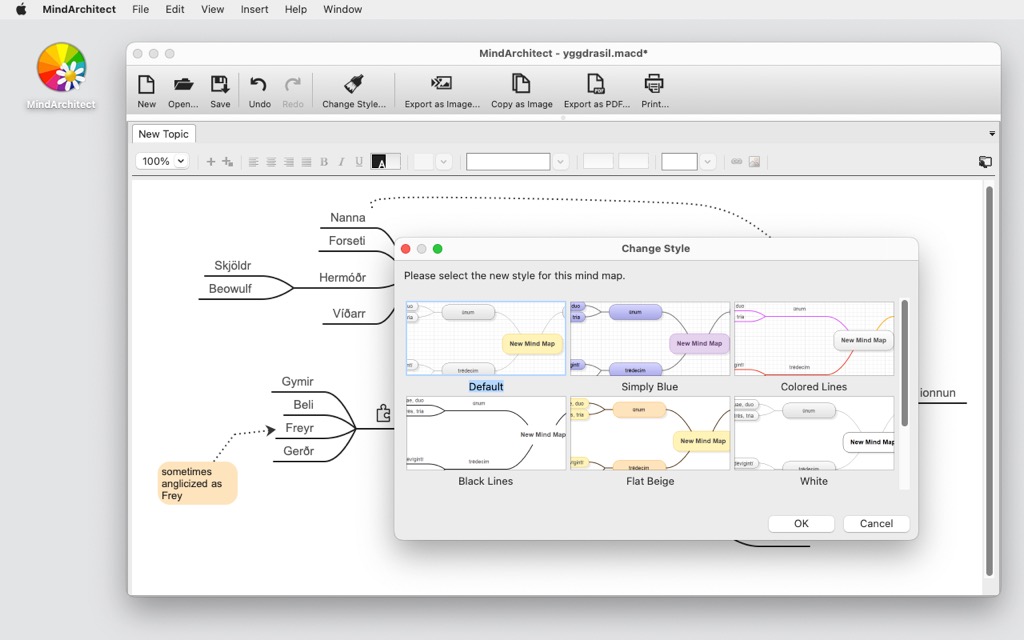
MindArchitect also supports a friendly entry point: the free edition lets you create an unlimited amount of mind maps, which is ideal if you’re getting started or only need basic mapping. When you want more capacity for visual language—especially icons and hyperlinks at scale—the Professional edition removes those limits so you can build richer maps for complex planning, research, and documentation. In other words, you can start free, then choose Pro when you need the extras that make large projects easier to navigate.
This listing is for MindArchitect Pro for macOS, including a per-seat license key for one device and lifetime usage. You also get free minor-version updates and service packs, plus preliminary access to patches if they’re available. Major-version upgrades are paid, which keeps pricing fair while still supporting ongoing development. If you rely on mind maps as a working tool—rather than an occasional experiment—Pro is designed to be the version you keep using across projects for an unlimited amount of time.
MindArchitect Pro fits a wide range of users because mind maps are not just for brainstorming. Students can turn readings into structured study guides and track thesis arguments without losing sources. Professionals can break big deliverables into manageable branches, then attach links to tickets, docs, or reference pages. Managers and team leads can plan meetings, convert discussion into action items, and preserve decisions in a map that stays easy to revisit later. Creatives can outline articles, books, scripts, and content calendars while keeping research images and reference links right next to key points.
A strong mind mapping app also needs to help you communicate, not just think privately. MindArchitect’s style switching and formatting options let you produce maps that look presentable when you share them with others. Clean formatting reduces misunderstandings, especially when the map becomes a planning artifact that someone else must follow. With Pro, you can lean on icons and hyperlinks more heavily to create navigation, priority cues, and quick jumps to supporting material, turning a map into a living dashboard for a project.
Finally, compatibility matters. MindArchitect Pro runs on macOS 10.9 or later and supports both Intel and Apple Silicon systems. It’s listed as compatible with Ventura, Catalina, Sonoma, and Sequoia, which makes it a practical choice for many Mac setups in schools, offices, and home workstations. If you want a dedicated desktop mind map editor that prioritizes speed, structure, and polished output, MindArchitect Pro is designed to keep you moving from idea to action with less friction and more clarity.
Key Benefits
These benefits focus on what you get in day-to-day use, especially when your mind maps become larger and more detailed.
- Faster organization of complex topics with a clear visual structure and quick zooming
- Cleaner communication through instant style switching for polished, readable maps
- More context in one place using images, tables, and links instead of scattered notes
- Safer editing with advanced undo management for confident changes
- Long-term value with a lifetime per-seat license and minor updates included
Features
Below is a clear breakdown of the features that make MindArchitect Pro a practical choice for users who want more than basic mind mapping.
- Native performance: Responsive editing designed for macOS.
- Optimized desktop engine: Keeps interaction smooth as maps grow.
- Apple Silicon compatible: Runs on modern Mac hardware efficiently.
- Intel compatible: Works on many existing Mac systems.
- Fast navigation: Move across big diagrams quickly.
- Quick zooming: Jump from overview to detail with minimal delay.
- Large-map handling: Stay productive even with many branches.
- Mind map creation tools: Build maps with practical elements.
- Branches and nodes: Organize ideas into clear hierarchies.
- Anchor lines: Connect related concepts across different areas.
- Tables: Add structured lists and comparisons inside the map.
- Rich content support: Keep references near the ideas they support.
- Images: Place visual cues and reference material on nodes.
- Hyperlinks: Attach URLs and resources for quick access Proremoveslimits.
- Styling and formatting: Make maps readable and presentation-ready.
- Predefined styles: Pick a look that matches your audience quickly.
- Instant style switching: Apply a different design without rebuilding content.
- Extensible style manager: Control formatting rules for consistent results.
- Editing safety: Make changes with confidence.
- Advanced undo management: Reverse edits reliably during rapid iteration.
- Iterative workflows: Try alternatives without fear of losing structure.
- Free and Professional editions: Choose the right level for your needs.
- Unlimited mind maps: Create unlimited maps even in the free version.
- Unlimited icons: Use as many visual markers as needed Pro.
- Unlimited hyperlinks: Add links at scale for research and project maps Pro.
Requirements
Before purchase, confirm these requirements match your Mac setup so installation and use are smooth.
- Operating system: macOS 10.9 or later
- Compatible with: Ventura, Catalina, Sonoma, Sequoia
- CPU support: Intel and Apple Silicon compatible
- Device activation: 1 device oneper−seatlicense
Downloads
Try MindArchitect at your own pace with the free edition: create unlimited mind maps, test the interface, and confirm it fits your workflow before upgrading to Professional.
Start with the free version, then move to Pro when you need unlimited icons and hyperlinks for larger, more reference-heavy maps.
BUY NOW
MindArchitect Pro is offered as a lifetime license for 1 device, and right now you can get it with an 83% discount—previously $23.07, now available for just $4 for a limited time.
By purchasing the Professional edition, you get: one per-seat license key for unlimited-time use, unlimited mind maps without the free-edition maximum limit, free minor updates and service packs, and preliminary access to patches if available. Major updates are paid, and the license code is not for resale.

" />
Mind Map Editor Software | Native Diagram & Brainstorming Tool with Styles, Tables, Images, Links | Productivity Planning App
- Please Notes:
- You may be directed to the bundle page, but it is possible to purchase the software individually.
- If you're having difficulty locating the product on the bundle page, please utilize the browser's search feature.
- Get an additional $3 discount on all orders more that $30.
- LEGITIMATE: All apps are authentic and have original licenses obtained directly from the creators via contracts.
- INSTANT ACCESS: Fully activated macOS Apps & Windows Software with instant downloads & license key access.
- Number of devices: 1
- This includes free updates for all minor versions and service packs.
- Paid Major Updates.
- License code is not for resale.
- Minor Updates Included Only
- Lifetime License
Platforms: macOS
" />
Mind Map Editor Software | Native Diagram & Brainstorming Tool with Styles, Tables, Images, Links | Productivity Planning App
- Number of devices: 1
- This includes free updates for all minor versions and service packs.
- Paid Major Updates.
- License code is not for resale.
- Minor Updates Included Only
- Lifetime License
Platforms: macOS

MindManager Professional EXCLUSIVE

GitMind VIP BEST OFFER

MindMaster Pro BEST SELLER

MyDraw BEST OFFER
![[NEW CODE #6] Giveaway – Fluig AI Pro: Free License Key | AI-Powered I-powered Diagram Generator](https://thesoftware.shop/wp-content/uploads/thumbs_dir/Fluig-AI-Pro-Review-Free-License-Key-Giveaway-247kvlmusx363tqog5ww73ldx4mb4pjl1cn4v5msdwno.png)
Fluig AI Pro GIVEAWAY

Presenti AI BEST OFFER
MindArchitect Pro Key Giveaway
Unavailable at this moment!

To access the giveaway, kindly provide your email address. Please refrain from closing this page after signing in to receive instructions on how to access the offer at no cost.
NOTES:
– All prices shown here are in listed USD (United States Dollar).
– Such promotional programs are subject to change without notice, from time to time in our sole discretion.
– Data may vary based on different systems or computers.
Thanks for reading MindArchitect Pro Review & Enjoy the discount coupon. Please Report if MindArchitect Pro Discount Coupon/Deal/Giveaway has a problem such as expired, broken link, sold out, etc while the deal still exists.