Giveaway – Perfect PDF ® 12 Office Edition: Free Lifetime Product Key | Professional PDF Tools with Microsoft Office Integration – for Windows

Transform Your Document Workflow: Get Perfect PDF 12 Office Edition with a Product Key at a no cost and Master Every PDF Task with Professional-Grade Tools!
Free Full Version!
Review at a Glance
Are you tired of juggling multiple applications just to handle your PDF documents? Do you find yourself struggling with expensive subscription-based PDF software that drains your budget year after year? Many professionals and businesses face the constant challenge of managing PDF files efficiently—from creating and editing to securing and converting documents. The frustration of incompatible file formats, limited editing capabilities, and complex workflows can slow down productivity and create unnecessary bottlenecks in your daily operations.
Perfect PDF 12 Office Edition provides a comprehensive solution to all your PDF-related challenges. This powerful software brings together professional-grade PDF tools in one unified application, allowing you to create, edit, annotate, convert, and secure PDF documents with ease. Unlike limited free readers or costly subscription services, Perfect PDF 12 Office Edition offers a complete toolkit that handles everything from simple viewing tasks to advanced document management operations.
With seamless Microsoft Office integration, this software becomes an indispensable asset for anyone working with documents regularly. Whether you’re a business professional preparing reports, a legal expert managing contracts, an educator creating course materials, or a small business owner handling invoices, Perfect PDF 12 Office Edition streamlines your workflow and saves valuable time. The application combines intuitive design with powerful functionality, making complex PDF operations accessible to users of all skill levels while providing the advanced features that power users demand.
What is Perfect PDF 12 Office Edition
Perfect PDF 12 Office Edition is a comprehensive PDF management software designed specifically for Windows users who need more than basic PDF viewing capabilities. This robust application serves as your all-in-one document solution, combining PDF creation, editing, annotation, conversion, and security features in a single, user-friendly interface.
At its core, the software includes the Perfect PDF Reader, which allows you to view PDF, XPS, EPUB, FB2, and text files with advanced navigation options. But it goes far beyond simple reading functionality. The application features the Perfect PDF Printer, a virtual printer driver that converts any printable document from any Windows application directly into PDF format. This means you can create PDFs from virtually any source with just a few clicks.
What sets Perfect PDF 12 Office Edition apart is its deep integration with Microsoft Office applications. The software can import and convert Word documents, Excel spreadsheets, and PowerPoint presentations directly into PDF format while preserving formatting, links, bookmarks, and comments. It also integrates with Microsoft Outlook, enabling you to convert emails and tasks into PDFs with attachments embedded as needed.
The Office Edition includes advanced document manipulation tools that let you merge multiple files, split large PDFs, rearrange pages, resize documents, and crop content. For security-conscious users, the software offers encryption and password protection using industry-standard RC4 and AES algorithms. You can also set specific permissions to control how others can interact with your PDF documents.
Document decoration and annotation capabilities make this software invaluable for professional workflows. Add headers, footers, watermarks, and letterheads to maintain brand consistency. Use annotation tools to mark up documents with text highlights, sticky notes, stamps, and comments. The redaction feature allows you to permanently remove sensitive information before sharing documents.
Key Benefits
Perfect PDF 12 Office Edition delivers substantial advantages that directly impact your productivity and document management efficiency. Understanding these benefits will help you recognize how this software can revolutionize your daily workflow.
- Cost-Effective Alternative to Subscription Services: Unlike expensive PDF software that requires ongoing monthly or annual payments, Perfect PDF 12 Office Edition is a one-time purchase that provides lifetime access to all features. This means you avoid the recurring costs that add up significantly over time, making it an economical choice for individuals and businesses alike. You get professional-grade tools without the financial burden of subscription fees.
- Time-Saving Automation and Batch Processing: The software streamlines repetitive tasks through automated workflows and batch operations. Convert multiple documents at once, apply the same formatting to numerous files, or process large volumes of PDFs without manual intervention. These capabilities can reduce document processing time by up to 70%, freeing you to focus on more important work rather than tedious file management tasks.
- Enhanced Security and Compliance: In an era where data protection is critical, Perfect PDF 12 Office Edition provides robust security features that safeguard sensitive information. Password protection, encryption, and permission controls ensure your confidential documents remain secure. The redaction tool permanently removes sensitive data, helping you comply with privacy regulations like GDPR and HIPAA. This level of security protection is essential for legal, financial, and healthcare professionals who handle private information daily.
- Seamless Microsoft Office Integration: The native integration with Microsoft Office eliminates compatibility issues and preserves document fidelity. Convert Word documents, Excel spreadsheets, and PowerPoint presentations to PDF while maintaining hyperlinks, bookmarks, formatting, and even comments. This integration creates a smooth workflow between your familiar Office applications and PDF management, reducing errors and saving time on document preparation.
- Professional Document Presentation: First impressions matter in business communications. Perfect PDF 12 Office Edition helps you create polished, professional-looking documents with headers, footers, watermarks, and custom letterheads. Maintain brand consistency across all your PDF documents, from proposals and reports to invoices and contracts. The ability to add these professional touches elevates the quality of your communications and reinforces your brand identity.
- Versatile File Format Support: The software doesn’t limit you to PDFs alone. It supports multiple file formats including XPS, EPUB, FB2, text files, and various image formats (JPEG, PNG, BMP, TIFF, SVG, EMF). This versatility means you can work with diverse document types within a single application, eliminating the need for multiple programs and simplifying your software toolkit.
- Collaborative Annotation Tools: Modern work often requires collaboration and feedback. The comprehensive annotation and commenting features enable effective document review processes. Add text markup, sticky notes, stamps, and text boxes to communicate changes and suggestions clearly. These tools facilitate better collaboration between team members, clients, and stakeholders, improving communication and reducing misunderstandings.
- Complete Page Management Control: Whether you need to reorganize a complex report, remove outdated sections, or combine multiple documents, the advanced page management features give you complete control. Insert, delete, reorder, resize, crop, and label pages with ease. This flexibility is invaluable when preparing final documents or consolidating information from multiple sources.
Features
The software architecture incorporates a comprehensive array of capabilities designed to address every aspect of PDF document management. Below is a detailed breakdown of the powerful features that make Perfect PDF 12 Office Edition an essential tool for your document workflow:
PDF Creation and Generation Capabilities
- Perfect PDF Printer Integration: Virtual printer driver that creates PDFs from any Windows application with print functionality, enabling universal document conversion without format restrictions or compatibility concerns
- Text File Import with Custom Formatting: Import plain text documents with configurable page layout, font selection, size adjustment, and text formatting options to create professionally formatted PDFs
- Image to PDF Conversion: Convert raster images (JPEG, PNG, BMP, TIFF) and vector graphics (SVG, EMF) into PDF documents with resolution control and quality settings
- Direct Scanning to PDF: Scan physical documents directly into PDF format using connected scanner devices, with options for multi-page scanning, resolution adjustment, and color mode selection
- Microsoft Word Import: Convert Word documents (.doc, .docx) to PDF while preserving document structure, formatting, hyperlinks, bookmarks, and embedded comments
- Maintain Document Formatting: Preserve fonts, styles, colors, and layout exactly as they appear in the original Word document
- Preserve Hyperlinks and Bookmarks: Retain all internal and external links plus document navigation bookmarks for seamless user experience
- Include Comments and Tracked Changes: Option to include or exclude Word comments and revision marks in the resulting PDF
- Microsoft Excel Import: Transform Excel spreadsheets (.xls, .xlsx) into PDF documents with worksheet selection and formatting preservation
- Multi-Sheet Conversion: Convert individual worksheets or entire workbooks with each sheet as a separate page
- Preserve Cell Formatting: Maintain colors, borders, fonts, and cell styles from the original spreadsheet
- Scale to Fit Options: Automatically adjust content to fit PDF page dimensions or maintain original sizing
- Microsoft PowerPoint Import: Convert presentations (.ppt, .pptx) to PDF format with slide transition preservation and layout retention
- Slide Layout Preservation: Maintain all visual elements, animations, and formatting from original slides
- Notes and Comments Inclusion: Option to include speaker notes and presentation comments in the PDF
- Handout and Outline Views: Create PDFs in various presentation formats including handouts with multiple slides per page
- Microsoft Outlook Email Conversion: Import Outlook emails, tasks, and calendar items directly to PDF format
- HTML and Text Email Support: Convert both HTML-formatted and plain text emails with complete formatting retention
- Attachment Embedding: Automatically include email attachments in the PDF, with Office format attachments converted to PDF pages
- Email Thread Preservation: Maintain conversation threads and reply chains in chronological order
- Contact and Task Conversion: Convert Outlook contacts, tasks, and calendar appointments to structured PDF documents
PDF Manipulation and Management Tools
- Combine Multiple Files: Merge multiple PDF documents or importable file formats into a single unified PDF with customizable page ordering
- Mixed Format Merging: Combine PDFs with Word documents, images, and other supported formats in one operation
- Page Range Selection: Choose specific pages from each source document to include in the final merged PDF
- Bookmark Preservation: Retain original document bookmarks and create new ones for merged sections
- Split PDF Documents: Separate large PDF files into multiple smaller documents based on page ranges or other criteria
- Single Page Split: Extract each page as an individual PDF file for maximum flexibility
- Page Range Split: Divide documents into specific page count groups (every 5 pages, every 10 pages, etc.)
- Bookmark-Based Split: Automatically split PDFs at bookmark locations to create logical document segments
- Page Insertion and Deletion: Add new blank or imported pages at any position within existing PDF documents, remove unwanted pages individually or in ranges
- Page Reordering: Drag and drop pages to reorganize document structure, move pages between different positions, or reverse page order
- Page Resizing and Orientation: Change page dimensions, switch between portrait and landscape orientations, apply uniform sizing across all pages or selected ranges
- Page Cropping: Remove unwanted margins and whitespace, define custom crop areas, apply cropping to single pages or entire documents
- Page Label Management: Assign custom labels to pages, create numbered sequences with prefixes, organize complex documents with section-based page numbering
Export and Conversion Options
- Plain Text Extraction: Export all text content from PDF documents to standard text files (.txt) while preserving paragraph structure and basic formatting
- Image Export: Convert PDF pages to raster image formats (JPEG, PNG) with adjustable resolution settings
- Custom Resolution Control: Set DPI from 72 to 600 for optimal image quality based on intended use
- Page Range Selection: Export specific pages or entire documents as individual image files
- Color and Grayscale Options: Choose between full color, grayscale, or monochrome output for different requirements
Security and Encryption Features
- Password Protection: Apply user passwords to restrict document opening, owner passwords to control editing permissions
- RC4 and AES Encryption: Secure documents using industry-standard encryption algorithms (40-bit, 128-bit, or 256-bit AES)
- Permission Controls: Set granular restrictions on document usage
- Printing Restrictions: Control whether users can print documents and at what quality level
- Content Copying Prevention: Disable text and image extraction to prevent unauthorized content reuse
- Modification Limits: Prevent document editing, form filling, or annotation by unauthorized users
- Screen Reader Access: Allow text access for visually impaired users while maintaining other restrictions
- Encryption Management: Decrypt password-protected PDFs when authorized, change encryption settings on existing secured documents
Document Decoration and Branding
- Header and Footer Addition: Add consistent headers and footers across all pages with customizable text, dates, page numbers, and formatting
- Dynamic Content Insertion: Include automatic page numbering, current dates, document titles, and custom text variables
- Position and Alignment Control: Precisely control placement with margin settings and alignment options (left, center, right)
- Font and Style Customization: Choose fonts, sizes, colors, and text styles to match your branding requirements
- Watermark Application: Overlay text or image watermarks on PDF pages for branding, draft marking, or confidentiality notices
- Transparency Control: Adjust watermark opacity from fully opaque to nearly transparent for subtle branding
- Rotation and Positioning: Angle watermarks diagonally or position them anywhere on the page
- Template Gallery: Save frequently used watermarks to a gallery for quick one-click application
- Background Addition: Apply solid colors, gradients, or images as page backgrounds to create visually appealing documents
- Letterhead Integration: Add corporate letterheads to transform standard PDFs into official company documents
- Multi-Page Letterheads: Apply different letterheads to first pages and subsequent pages for professional correspondence
- Template Management: Store multiple letterhead designs and apply them instantly to any document
- Layer Management: Work with PDF layers to show or hide specific content, manage complex documents with multiple overlay elements
Annotation and Collaboration Tools
- Text Markup Tools: Highlight important passages, underline key phrases, strikethrough obsolete text for clear communication of changes and emphasis
- Text Box Annotations: Add floating text boxes anywhere on PDF pages with customizable fonts, colors, sizes, and background fills
- Sticky Notes: Insert digital sticky notes for comments and feedback without permanently altering the document content
- Author Identification: Automatically tag notes with user names and timestamps for accountability
- Color Coding: Use different colored notes to categorize comments by type or priority
- Reply Threads: Create threaded discussions within documents through note replies
- Stamp Library: Apply pre-designed or custom stamps (Approved, Confidential, Draft, Reviewed) for document workflow management
- Dynamic Stamps: Use stamps that automatically include dates, times, and user information
- Custom Stamp Creation: Design and save your own stamps with company logos, signatures, or specific messages
- Watermark Annotations: Add temporary watermarks that can be edited or removed, unlike permanent background watermarks
- Redaction Tools: Mark sensitive information for removal with visible redaction annotations before finalizing permanent deletions
- Redaction Markup: Highlight text and areas to be redacted without immediately removing content
- Redaction Finalization: Apply marked redactions permanently, removing underlying content completely and irreversibly
- Search and Redact: Find and mark all instances of specific text or patterns for batch redaction
- Redaction Appearance: Customize the appearance of redacted areas with colors and overlay text
Viewing and Navigation Features
- Multiple File Format Support: Open and view PDF, XPS, EPUB, FB2, and plain text files within the same application interface
- Advanced Navigation Modes: Navigate documents using thumbnails, bookmarks, page numbers, or search results
- Zoom and Rotation: Adjust viewing magnification from 10% to 6400%, rotate pages in 90-degree increments for comfortable reading
- Display Mode Options: Choose between single page, continuous scrolling, facing pages, or cover page view modes
- Full-Screen Presentation: Present documents in distraction-free full-screen mode ideal for meetings and presentations
- Search Functionality: Find text within documents or across multiple files in folders with case-sensitive and whole-word matching options
- Interactive Form Support: Fill out PDF forms with text fields, checkboxes, radio buttons, and dropdown lists
- Digital Signature Verification: View and verify digital signatures to confirm document authenticity and integrity
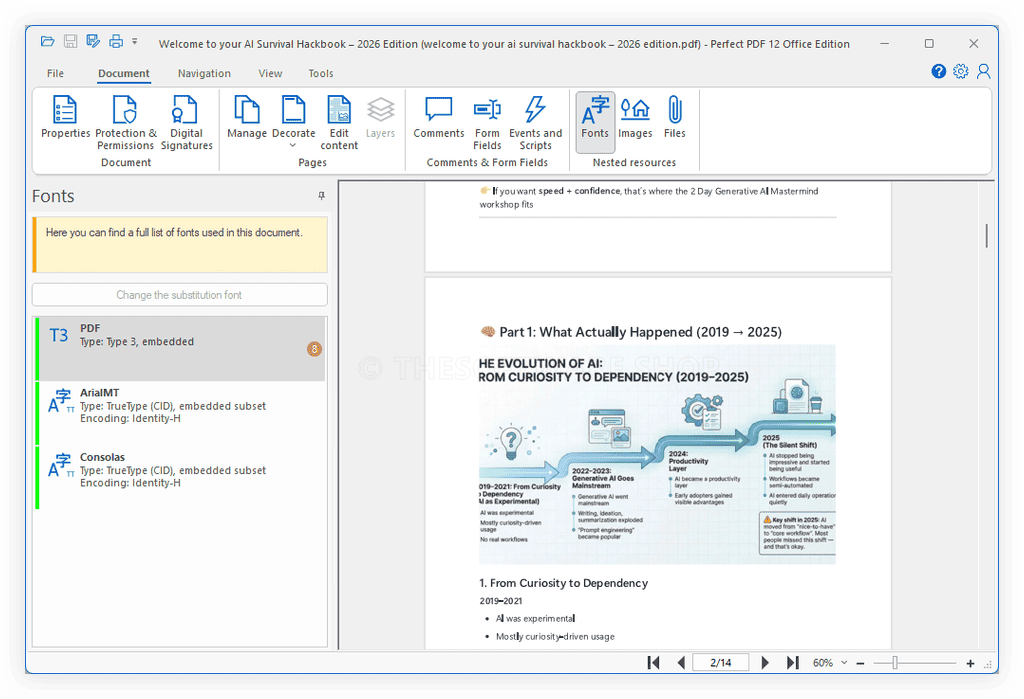
- Document Properties: Access detailed metadata including author, title, subject, keywords, creation date, and modification history
- Print Options: Print documents with advanced settings for page selection, scaling, orientation, and quality adjustment
Requirements
To ensure optimal performance and full feature compatibility, your computer should meet the following specifications:
- Operating System: Windows 10, Windows 8.1, Windows 8, or Windows 7 (32-bit or 64-bit versions)
- Processor: 1 GHz or faster processor recommended for smooth operation
- Memory: Minimum 1 GB RAM (2 GB or more recommended for handling large documents)
- Hard Disk Space: At least 200 MB of available disk space for software installation
- Display: 1024 x 768 screen resolution or higher for optimal interface display
- Additional Requirements for Full Functionality:
- Microsoft Office (Word, Excel, PowerPoint) installation required for Office format import features
- Microsoft Outlook installation required for email conversion functionality
- TWAIN-compatible scanner for direct scanning to PDF feature
- Internet connection for software activation and updates
Downloads
Click the button below to download the trial edition and start optimizing your PDF management today. No credit card required, no hidden obligations—just a straightforward opportunity to evaluate whether Perfect PDF 12 Office Edition delivers the productivity improvements and professional results you’re looking for.
Experience the full capabilities of Perfect PDF 12 Office Edition risk-free with the trial version. See firsthand how the software simplifies your document workflow and meets your specific needs. Access all features without limitations during the trial period to ensure this solution is right for you.
BUY NOW
Perfect PDF 12 Office Edition is regularly priced at competitive rates that reflect its professional-grade capabilities and comprehensive feature set.
Software Giveaway: You can now get Perfect PDF 12 Office Edition full version with a product key for free in the Giveaway tab below. This offer is available for a limited time!

" />
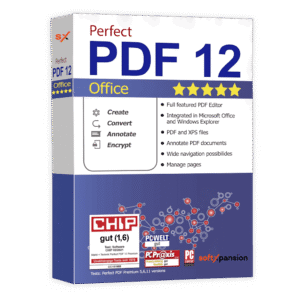
Professional PDF Tools with Microsoft Office Integration
- Lifetime License
- Create PDFs with Perfect PDF® printer
- Create PDFs from text and image files (incl. SVG and EMF), scan pages direct to PDF
- Create PDFs from Microsoft Word, Excel, PowerPoint files
- Create PDFs from Microsoft Outlook mails and objects, including attachments
- Combine & split PDF files
- Export plain text and pages as raster images
- Encrypt and password protect PDFs, specify restrictions on use
- Manage pages of PDFs (insert, remove, reorder, resize, crop, etc.)
- Decorate pages of PDFs - letterheads, backgrounds, headers, footers, watermarks, layers
- Comment PDFs - text markup, redactions and text boxes, sticky notes, stamps and watermarks
Platforms: Windows

" />
Professional PDF Tools with Complete Features for Daily Users
- Lifetime License
- Perfect PDF® Reader
- Create PDFs with Perfect PDF® printer
- Create PDFs from text and image files (incl. SVG and EMF), scan pages direct to PDF
- Create PDFs from Microsoft Word, Excel, PowerPoint files
- Create PDFs from Microsoft Outlook mails and objects, including attachments
- Combine & split PDF files
- Create PDFs from single HTML files
- Convert between PDF and XPS/OXPS formats
- Export plain text and pages as raster images
- Encrypt and password protect PDFs, specify restrictions on use
- Sign PDFs digitally, optionally with graphic signature and trusted timestamp
- Manage pages of PDFs (insert, remove, reorder, resize, crop, etc.)
- Decorate pages of PDFs - letterheads, backgrounds, headers, footers, watermarks, layers
- Manage navigation within a document - links, bookmarks, table of content
- Comment PDFs - text markup, redactions and text boxes, sticky notes, stamps and watermarks
- Comment PDFs - ink and shape, media & 3D annotations
- Attach files to the PDF - embedded files and attachment annotations
- Create and edit interactive PDF forms
- Edit content of the pages

GitMind VIP BEST OFFER
PDF Reader Pro BEST OFFER
WordPerfect Office Standard: Perpetual License BEST OFFER

PDFZilla Productivity Toolkit BEST OFFER
Ashampoo Office 9: Perpetual License, 5 PCs BEST OFFER
Perfect PDF 12 Office Edition Giveaway
Available now: Free Product Key for a Limited Time!
To access the giveaway, kindly provide your email address. Please refrain from closing this page after signing in to receive instructions on how to access the offer at no cost.
NOTES:
– All prices shown here are in listed USD (United States Dollar).
– Such promotional programs are subject to change without notice, from time to time in our sole discretion.
– Data may vary based on different systems or computers.
Thanks for reading Perfect PDF 12 Office Edition Review & Enjoy the discount coupon. Please Report if Perfect PDF 12 Office Edition Discount Coupon/Deal/Giveaway has a problem such as expired, broken link, sold out, etc while the deal still exists.


![[NEW KEY #5] Giveaway – Swifdoo PDF Pro: Free Redeem Code | Full Version – for Windows & Mac](https://thesoftware.shop/wp-content/uploads/thumbs_dir/SwifDoo-PDF-PRO-Review-Download-Full-Version-Code-Giveaway-rfosltrshl3on4oad0qm0ahdgsw1v45qgw1o46npnc.png)