

Giveaway – Tenorshare PixPretty: Free License | Professional AI Portrait Photo Retoucher – for Windows / Mac

Transform Your Portrait Photography Workflow Today – Get Professional AI-Powered Retouching with Natural Results, Tenorshare PixPretty with a full-access license for free Today!
You can also get 3-year full access to Tenorshare PixPretty that includes higher credits, free updates and support at a discount of up to 80%!
✔ 3 Years. ✔ Free Product Updates ✔ 24×7 Customer Support ✔ 30-day Money-back Guarantee.
Tenorshare PixPretty Review at a Glance
Portrait photographers and content creators face a persistent challenge: spending countless hours manually retouching photos to achieve professional results while maintaining natural-looking skin textures and authentic features. Traditional photo editing software often requires extensive technical knowledge, creates artificial-looking results, or lacks the efficiency needed for handling large volumes of images. Tenorshare PixPretty emerges as a solution specifically designed to address these pain points by combining advanced artificial intelligence technology with an intuitive interface that delivers professional-grade portrait retouching in a fraction of the time.
This comprehensive photo retouching solution streamlines your entire editing workflow by offering intelligent automation for the most time-consuming tasks while giving you complete control over every detail. Whether you’re processing wedding albums with hundreds of images, creating commercial fashion photography, or producing professional identification photos, PixPretty provides the tools and efficiency you need to maintain consistent quality across all projects. The software leverages cutting-edge AI algorithms to understand facial structures, skin textures, and body proportions, ensuring every adjustment looks natural rather than overly processed.
What is Tenorshare PixPretty
Tenorshare PixPretty is a professional AI-powered portrait photo retouching software designed to help photographers, content creators, and visual artists achieve flawless portrait results with minimal effort. The application serves as a comprehensive editing solution that combines traditional photo editing capabilities with advanced artificial intelligence features specifically optimized for portrait photography.
At its core, PixPretty functions as an intelligent retouching assistant that can identify and enhance facial features, smooth skin imperfections, reshape body proportions, and apply professional color grading while preserving the authentic characteristics that make each portrait unique.
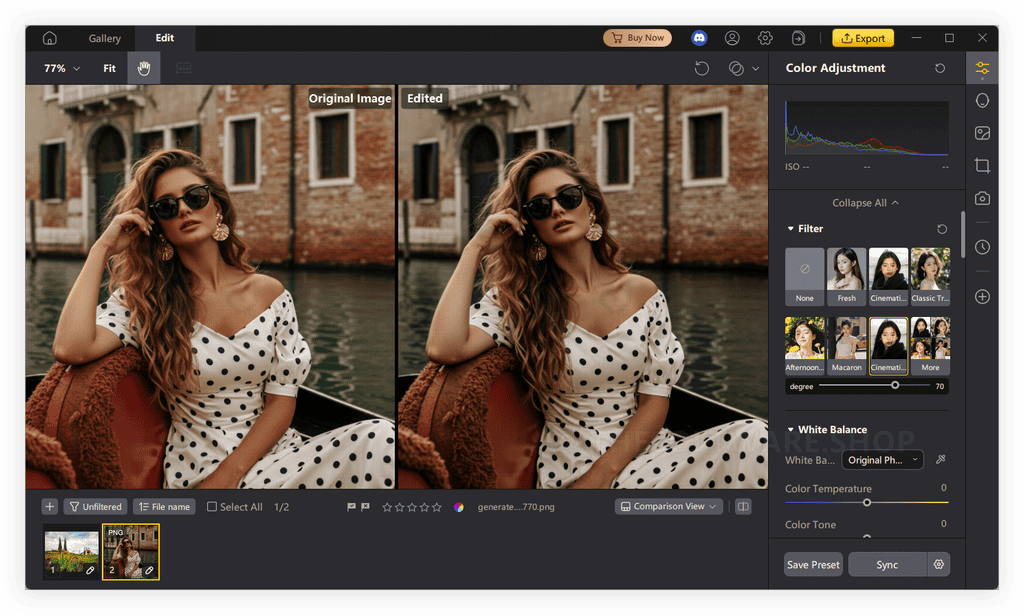
Unlike generic photo editors that require manual masking and extensive technical knowledge, PixPretty utilizes AI-driven facial recognition technology to automatically detect and map facial features, allowing for precise adjustments to specific areas without affecting surrounding elements. The software supports both desktop installation for Windows and Mac systems, making it accessible to photographers regardless of their platform preference. With support for professional RAW image formats from mainstream cameras alongside standard image files, PixPretty integrates seamlessly into professional photography workflows.
The platform distinguishes itself through its dual focus on automation and customization – while it offers one-click solutions for common retouching tasks, it also provides granular control over individual parameters for photographers who want to fine-tune every aspect of their images. This balanced approach makes it suitable for both beginners seeking quick results and professional retouchers who demand precise control over their editing process.
Key Benefits
Photography professionals and enthusiasts who integrate Tenorshare PixPretty into their workflow experience significant advantages that directly impact both their productivity and output quality. The software addresses multiple pain points simultaneously while opening new creative possibilities.
Time Efficiency and Workflow Optimization – The most immediate benefit photographers notice is the dramatic reduction in editing time. Tasks that traditionally require 15-20 minutes per image can be completed in under a minute using PixPretty’s AI-powered automation and batch processing capabilities. Wedding photographers who previously spent days retouching large albums can now complete the same work in hours, allowing them to take on more clients and increase revenue without sacrificing quality. The ability to create and save custom presets means your signature editing style can be applied consistently across entire photo sets with a single click.
Natural-Looking Professional Results – PixPretty employs advanced algorithms that preserve authentic skin texture while removing imperfections, avoiding the artificial “plastic” appearance common with aggressive smoothing tools. The AI understands the difference between natural skin texture that should be preserved and actual blemishes that should be removed, resulting in retouched images that maintain photographic authenticity. Professional photographers report that clients specifically comment on how natural their edited photos look compared to work from competitors using other software.
Versatility Across Photography Genres – The software excels in multiple portrait photography scenarios including artistic portrait sessions, high-volume wedding photography, corporate headshots, identification photos, and commercial fashion work. This versatility eliminates the need to maintain multiple specialized software subscriptions, consolidating your editing toolkit into a single comprehensive solution. Whether you’re creating dramatic artistic portraits or clean corporate headshots, PixPretty provides the appropriate tools and presets for each scenario.
Cost-Effective Professional Solution – Compared to subscription-based alternatives that can cost hundreds of dollars annually, PixPretty offers professional-grade capabilities at a more accessible price point. The software provides functionality comparable to industry-standard tools while being specifically optimized for portrait work, meaning you’re not paying for features you’ll never use. For photographers building or growing their businesses, this represents significant savings that can be reinvested in equipment or marketing.
Accessibility for All Skill Levels – The intuitive interface design ensures that even photographers with minimal editing experience can achieve professional results quickly. The learning curve is deliberately gentle, with slider-based controls and visual feedback that makes it easy to understand how each adjustment affects your image. Advanced users benefit from the depth of customization available while beginners can rely on intelligent presets and one-click solutions until they’re ready to explore more complex techniques.
Perfecting Your Craft with Professional-Grade Technology
Tenorshare PixPretty represents a significant advancement in accessible professional portrait retouching, bringing studio-quality results within reach of photographers at every level. The software successfully balances powerful AI automation with the manual control that professionals demand, creating a tool that grows with your skills rather than limiting your creative expression. By eliminating the technical barriers and time constraints that often prevent photographers from achieving their creative vision, PixPretty allows you to focus on what matters most – capturing compelling images and building relationships with clients.
The combination of natural-looking results, workflow efficiency, and comprehensive feature sets positions this software as a valuable investment for anyone serious about portrait photography. Whether you’re a wedding photographer drowning in post-production backlogs, a studio owner seeking to standardize output across multiple editors, or an emerging photographer building your skills and portfolio, PixPretty provides the tools and flexibility to meet your specific needs. The software’s ability to maintain authentic skin texture while delivering flawless retouching addresses one of the most common complaints about AI-powered editing tools – the tendency to create artificial-looking results that undermine photographic credibility.
As portrait photography continues evolving with changing aesthetic preferences and technical capabilities, having software that receives regular updates ensures your toolkit remains current with industry standards and creative trends. The commitment to continuous improvement means you’re not simply purchasing software as it exists today, but gaining access to an evolving platform that will incorporate future innovations in AI technology and photo editing capabilities. For photographers ready to reclaim their time, improve their output consistency, and deliver exceptional results that keep clients returning, Tenorshare PixPretty offers a compelling solution that delivers on its promises without the complexity or cost barriers associated with traditional professional retouching software.
Features
Below is a comprehensive overview of the powerful capabilities that establish this software as an essential tool for portrait photography professionals and enthusiasts seeking exceptional results:
- AI-Powered Blemish Removal – Automatically detects and removes facial and body imperfections including acne, spots, moles, and wrinkles with a single click while maintaining natural skin texture. The neutral gray technique ensures seamless blending without creating obvious patches or inconsistencies.
- Selective Mole Preservation – Toggle switch allows you to choose whether to remove or retain moles, giving you complete control over which features to preserve for authentic-looking results.
- Body Blemish Correction – Extends blemish removal capabilities beyond the face to address imperfections on arms, shoulders, and other visible body areas in your portraits.
- Advanced Skin Retouching – Comprehensive skin enhancement tools that smooth and beautify skin on both face and body while preserving authentic texture to avoid artificial appearance.
- Texture Smoothing – Reduces the appearance of skin texture irregularities while maintaining enough detail to keep the image looking natural and photographic.
- Skin Radiance Adjustment – Enhances skin luminosity to create a healthy, glowing appearance that makes subjects look their best without appearing overly processed.
- Even Complexion – Balances skin tones across the face and body to create a uniform, professional appearance while respecting natural undertones.
- Precision Face Reshaping – Facial liquify adjustments allow meticulous fine-tuning of individual features including face slimming, nose refinement, eye enlargement, brow definition, and lip enhancement for sculpting ideal facial contours.
- Proportional Feature Adjustment – Intelligent sliders ensure that facial modifications remain within natural-looking parameters to prevent distorted or unrealistic results.
- Multi-Point Facial Control – Adjust multiple facial features independently or in coordination to achieve your desired aesthetic while maintaining facial harmony.
- Professional Body Sculpting – AI-driven body adjustment tools enable reshaping of body proportions in photos, allowing you to enhance bust and hips or slim waist, legs, and arms to showcase ideal proportions.
- Natural Body Contouring – Algorithms understand human anatomy to ensure body modifications look realistic and maintain proper proportions.
- Targeted Area Adjustment – Focus adjustments on specific body areas without affecting surrounding elements in the composition.
- Creative Hair Color Modification – Virtually experiment with trendy hair shades without actual dyeing, authentically simulating coloring effects to refresh your subject’s style.
- Multi-Tone Hair Coloring – Apply single colors or create highlights and lowlights for more complex, dimensional hair color effects.
- Hair Density Enhancement – Retouch sparse hair partings separately to make hair appear thicker and fuller, addressing thinning or sparse areas.
- Tethered Shooting Integration – Connect your camera directly to your computer for real-time shooting and editing, allowing you to correct flaws instantly and ensure perfect lighting and sharpness without extended post-processing.
- Plug-and-Play Camera Connection – Simple setup process gets you shooting and editing simultaneously without complex configuration.
- Real-Time Live View – Monitor your shots as they’re captured with the ability to zoom and check focus before committing to the shot.
- Remote Focus Control – Adjust camera focus remotely from your computer for precise control during tethered shooting sessions.
- Live Shoot Collaboration – Enable remote team members or clients to view shoots in real-time for immediate feedback and direction.
- Comprehensive Color Grading – Professional-level color adjustment solutions including curve adjustments, smart exposure correction, and intelligent color balance to achieve sophisticated color and lighting enhancements.
- Advanced Curve Adjustments – Fine-tune tonal values across highlights, midtones, and shadows for precise control over image contrast and mood.
- Smart Exposure Compensation – Automatically correct underexposed or overexposed images while preserving detail in both shadows and highlights.
- White Balance Optimization – Correct color casts and ensure accurate skin tones regardless of the lighting conditions during capture.
- Efficient Batch Processing – Enable batch editing and preset application across multiple photos simultaneously to maintain consistent style and significantly reduce editing time for large photo sets.
- Multi-Image Selection – Apply edits to dozens or hundreds of images at once rather than processing each individually.
- Preset Synchronization – Save your custom editing settings as presets and apply them universally across entire photo sessions with one click.
- Extensive Filter Library – Access a vast collection of artistic filters perfectly matched to various shooting scenarios, from vintage film looks to modern cinematic color grades.
- Scenario-Specific Filters – Pre-designed filters optimized for weddings, portraits, fashion, and other specific photography genres.
- Customizable Filter Intensity – Adjust the strength of any filter application to achieve subtle enhancements or bold artistic statements.
- Professional RAW Format Support – Fully supports RAW image processing from mainstream camera manufacturers, providing access to maximum image data for superior editing flexibility and quality.
- Universal Format Compatibility – Processes files from Canon, Nikon, Sony, Fujifilm, and other major camera brands without conversion requirements.
- Extended Format Support – Also handles JPG, BMP, PNG, HEIC, HEIF, TIFF, WEBP, EXR, and numerous other standard and specialized image formats for complete workflow integration.
- Intuitive User Interface – Upload photos via one-click or drag-and-drop functionality, then retouch using intuitive sliders that make the software accessible even for editing beginners.
- Visual Feedback System – Real-time preview shows exactly how each adjustment affects your image before you commit to the changes.
- Organized Tool Panels – Logical grouping of features ensures you can quickly locate the tools you need without hunting through complex menus.
- Customizable Parameter Control – Support for fine-tuned parameter adjustments gives you authority over edit intensity, ensuring every photo achieves professional-grade perfection tailored to your vision.
- Slider and Numeric Input – Choose between dragging sliders for intuitive adjustment or entering precise numeric values for exact control.
- Before/After Comparison – Toggle between original and edited versions instantly to evaluate your changes and ensure desired results.
- Personalized Preset System – Create custom presets by freely combining various retouching functions, then save and apply these presets to streamline future editing sessions.
- Unlimited Preset Storage – Save as many custom presets as needed to accommodate different clients, styles, or project requirements.
- Preset Import/Export – Share presets with team members or backup your custom settings for use across multiple workstations.
- Continuous Software Updates – Regular updates ensure users access the latest AI technologies and photo editing innovations, providing an outstanding experience that improves over time.
- New Feature Additions – Receive new retouching capabilities and tools as they’re developed without purchasing upgrades.
- Performance Improvements – Benefit from speed optimizations and efficiency enhancements that make your workflow progressively faster.
Requirements
To ensure optimal performance and compatibility, your computer system should meet the following specifications before installing Tenorshare PixPretty:
Operating System Compatibility
- Windows 11 and Windows 10 (x64 bit architecture required)
- MacOS 26 or later versions
Hardware Specifications
- Processor: 1GHz CPU or faster recommended for smooth operation
- Memory: Minimum 512MB RAM or more for efficient processing
- Storage: At least 1GB of available hard disk space for installation and temporary files
Downloads
Experience the full capabilities of Tenorshare PixPretty risk-free before making any purchase commitment. New registered users receive 200 complimentary editing credits valid for 14 days, allowing you to export up to 200 professionally retouched images completely free during this trial period.
This generous trial allocation gives you ample opportunity to test the software with your actual photography projects, evaluate how it integrates into your existing workflow, and confirm that the results meet your professional standards. Download the trial edition now to see firsthand how PixPretty can transform your portrait retouching process and significantly reduce your post-production time.
BUY NOW
Tenorshare PixPretty is regularly priced at $49.99 per month, but for a limited time, you can access this professional portrait retouching solution with exclusive discount coupons offering up to 80% OFF the standard pricing. This substantial savings opportunity makes professional-grade AI retouching technology accessible at a fraction of the typical cost, representing exceptional value for photographers seeking to improve their workflow efficiency and output quality.
Software Giveaway: You can also get full access to Tenorshare PixPretty with higher credits, free updates and support for free in the Giveaway tab below

" />
Professional AI Portrait Photo Retoucher | Batch Processing, RAW Support, Face & Body Reshaping | One-Click Blemish Removal Software
- 3-Year License
- Access to all Features
- 18000 credits / 1 Year (500 credits / 1 Month)
- Credits valid for 1 year
- Support for 2 PCS
- Continuous updates
- 1 Photo = 1 Credit
- 30 Days Money Back Guarantee.
- Free Technical Support.
- 100% Secure Purchase via 256-bit SSL
Platforms: Windows
" />
Professional AI Portrait Photo Retoucher | Batch Processing, RAW Support, Face & Body Reshaping | One-Click Blemish Removal Software
- 1-Year License
- Access to all Features
- 5000 credits / 1 Year (416 credits / 1 Month)
- Credits valid for 1 year
- Support for 2 PCS
- Continuous updates
- 1 Photo = 1 Credit
- 30 Days Money Back Guarantee.
- Free Technical Support.
- 100% Secure Purchase via 256-bit SSL
Platforms: Windows
" />
Professional AI Portrait Photo Retoucher | Batch Processing, RAW Support, Face & Body Reshaping | One-Click Blemish Removal Software
- 3-Year License
- Access to all Features
- 18000 credits / 1 Year (500 credits / 1 Month)
- Credits valid for 1 year
- Support for 2 PCS
- Continuous updates
- 1 Photo = 1 Credit
- 30 Days Money Back Guarantee.
- Free Technical Support.
- 100% Secure Purchase via 256-bit SSL
Platforms: Windows
" />
Professional AI Portrait Photo Retoucher | Batch Processing, RAW Support, Face & Body Reshaping | One-Click Blemish Removal Software
- 1-Year License
- Access to all Features
- 5000 credits / 1 Year (416 credits / 1 Month)
- Credits valid for 1 year
- Support for 2 PCS
- Continuous updates
- 1 Photo = 1 Credit
- 30 Days Money Back Guarantee.
- Free Technical Support.
- 100% Secure Purchase via 256-bit SSL
Platforms: Windows
" />
Professional AI Portrait Photo Retoucher | Batch Processing, RAW Support, Face & Body Reshaping | One-Click Blemish Removal Software
- 1-month License
- Access to all Features
- 400 credits / 1 Month
- Credits valid for 1 Month
- Support for 2 PCS
- Continuous updates
- 1 Photo = 1 Credit
- 30 Days Money Back Guarantee.
- Free Technical Support.
- 100% Secure Purchase via 256-bit SSL
Platforms: Windows
" />
Professional AI Portrait Photo Retoucher | Batch Processing, RAW Support, Face & Body Reshaping | One-Click Blemish Removal Software
- 3-Year License
- Access to all Features
- 18000 credits / 1 Year (500 credits / 1 Month)
- Credits valid for 1 year
- Support for 2 MacS
- Continuous updates
- 1 Photo = 1 Credit
- 30 Days Money Back Guarantee.
- Free Technical Support.
- 100% Secure Purchase via 256-bit SSL
Platforms: Mac
" />
Professional AI Portrait Photo Retoucher | Batch Processing, RAW Support, Face & Body Reshaping | One-Click Blemish Removal Software
- 1-Year License
- Access to all Features
- 5000 credits / 1 Year (416 credits / 1 Month)
- Credits valid for 1 year
- Support for 2 MacS
- Continuous updates
- 1 Photo = 1 Credit
- 30 Days Money Back Guarantee.
- Free Technical Support.
- 100% Secure Purchase via 256-bit SSL
Platforms: Mac
" />
Professional AI Portrait Photo Retoucher | Batch Processing, RAW Support, Face & Body Reshaping | One-Click Blemish Removal Software
- 3-Year License
- Access to all Features
- 18000 credits / 1 Year (500 credits / 1 Month)
- Credits valid for 1 year
- Support for 2 MacS
- Continuous updates
- 1 Photo = 1 Credit
- 30 Days Money Back Guarantee.
- Free Technical Support.
- 100% Secure Purchase via 256-bit SSL
Platforms: Mac
" />
Professional AI Portrait Photo Retoucher | Batch Processing, RAW Support, Face & Body Reshaping | One-Click Blemish Removal Software
- 1-Year License
- Access to all Features
- 5000 credits / 1 Year (416 credits / 1 Month)
- Credits valid for 1 year
- Support for 2 MacS
- Continuous updates
- 1 Photo = 1 Credit
- 30 Days Money Back Guarantee.
- Free Technical Support.
- 100% Secure Purchase via 256-bit SSL
Platforms: Mac
" />
Professional AI Portrait Photo Retoucher | Batch Processing, RAW Support, Face & Body Reshaping | One-Click Blemish Removal Software
- 1-month License
- Access to all Features
- 400 credits / 1 Month
- Credits valid for 1 Month
- Support for 2 MacS
- Continuous updates
- 1 Photo = 1 Credit
- 30 Days Money Back Guarantee.
- Free Technical Support.
- 100% Secure Purchase via 256-bit SSL
Platforms: Mac
[/wpsm_list]

4DDiG File Repair BEST OFFER

Tenorshare Phone Mirror BEST OFFER

HitPaw FotorPea BEST OFFER

PDNob Image Translator BEST OFFER

PDNob PDF Editor BEST OFFER
Tenorshare PixPretty Giveaway
Available now: Free License for a Limited Time!

To access the giveaway, kindly provide your email address. Please refrain from closing this page after signing in to receive instructions on how to access the offer at no cost.
NOTES:
– All prices shown here are in listed USD (United States Dollar).
– Such promotional programs are subject to change without notice, from time to time in our sole discretion.
– Data may vary based on different systems or computers.
When you purchase your PixPretty license, you receive comprehensive access to the complete feature set including all AI-powered retouching tools, batch processing capabilities, RAW format support, and the full library of filters and presets. Your license includes ongoing software updates that provide access to new features, performance improvements, and the latest AI technology enhancements as they’re released, ensuring your investment continues delivering value well into the future. Additionally, you receive dedicated technical support to assist with installation, answer questions about features, and help troubleshoot any issues you encounter while using the software.
For photographers who want to experience the full capabilities before committing to a subscription, take advantage of the software giveaway promotion currently available. This special offer provides complete access to Tenorshare PixPretty including all premium features, free updates, and full support absolutely free for one month – a $49.99 value. This promotion represents an excellent opportunity to thoroughly evaluate the software in real-world production scenarios without any financial risk, allowing you to make an informed decision about whether PixPretty is the right solution for your portrait retouching needs.
Thanks for reading Tenorshare PixPretty Review & Enjoy the discount coupon. Please Report if Tenorshare PixPretty Discount Coupon/Deal/Giveaway has a problem such as expired, broken link, sold out, etc while the deal still exists.
AI portrait retoucher, professional photo editing software, batch photo processing, face reshaping software, body sculpting tool, blemish removal software, skin retouching application, RAW photo editor, tethered shooting software, portrait photography software, AI photo enhancement, wedding photo editor, identification photo software, commercial photography retouching, natural skin texture editor, color grading software, preset-based photo editor, facial liquify tool, hair color changer, automated photo retouching, professional portrait editor, photography workflow software, beauty retouching software, headshot editing software, filter library software


![[KEY #2] Giveaway – UltraPic Pro: Free Activation Code | Instant Background Remover, Batch Processing, AI Backgrounds, Pro E-commerce Photo Editing Tool](https://thesoftware.shop/wp-content/uploads/thumbs_dir/UltraPic-Pro-Free-Credits-Activation-Code-Giveaway-rfw7nyk7hu4iw3lyks61674v7m1vsvlmyfi22fordk.png)
![[KEY #11] Giveaway – SoftSkin Photo Makeup 5.2: Free License Key | Full Version for Windows](https://thesoftware.shop/wp-content/uploads/thumbs_dir/SoftSkin-Photo-MakeUp-Review-Download-Discount-Coupon-rfoskhu0t1a270lx4y0mz4kv65gbyjvfaarwn2msgo.png)

![[KEY #4] Giveaway – Easy Photo Denoise 10.0: Free License Key | Full Version – for Windows](https://thesoftware.shop/wp-content/uploads/thumbs_dir/SoftOrbits-Easy-Photo-Denoise-Boxshot-rfosjkxo5u10wnxph1sp1uvqdnyhh58thrxwudzkig.jpg)

