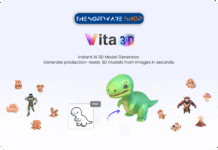
Giveaway – Vita3D: Free Promo Code | AI 3D Model Generator | Image-to-3D, Scribble-to-3D, Smart Texturing, Auto-Rigging, Motion Capture

Turn a single image into a usable 3D asset fast—build, texture, rig, and animate in one place, then download your files and start creating. Get Full Access to Vita3D Basic Plan with a Promo Code for FREE!
Free Full Version!
Vita3D Review at a Glance
Creating 3D models traditionally requires years of technical expertise, expensive software licenses, and countless hours of manual modeling, texturing, and rigging work. Game developers, filmmakers, product designers, and AR/VR creators face significant bottlenecks when they need production-ready 3D assets quickly, often spending days or weeks on a single character model. The steep learning curve of traditional 3D software like Blender or Maya puts professional 3D creation out of reach for many creative professionals who have brilliant ideas but lack advanced modeling skills.
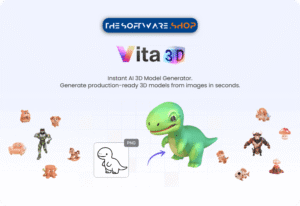
Vita3D solves this fundamental problem by leveraging artificial intelligence to generate complete, production-ready 3D models from simple inputs like photographs or sketches in mere seconds.
What is Vita3D
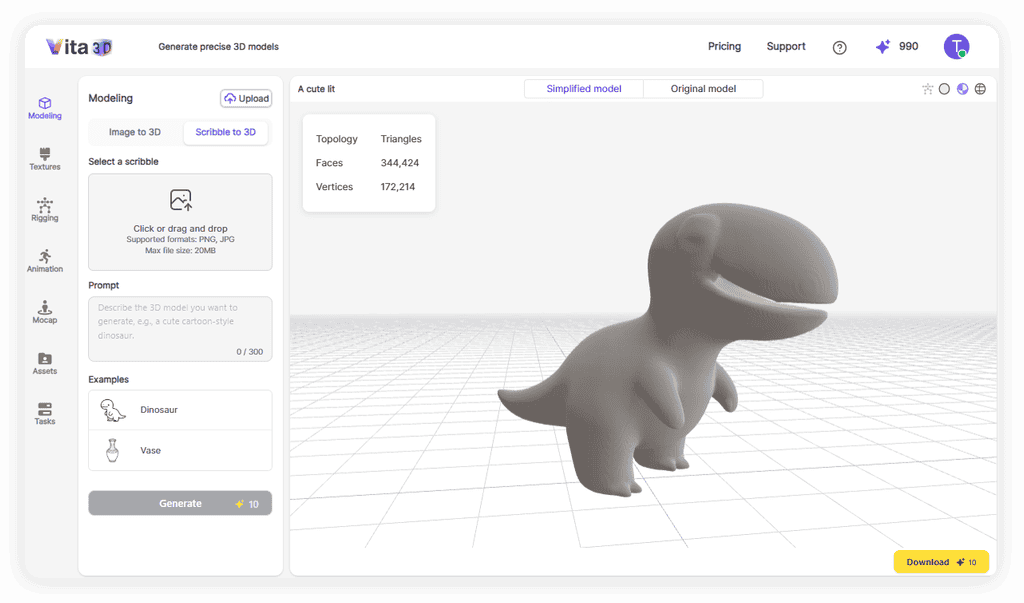
Vita3D is an all-in-one AI-powered 3D creation platform developed by PopPop AI that revolutionizes how creators build 3D content. This comprehensive software integrates six essential 3D workflows into a single unified toolset: 3D modeling, texturing, rigging, animation creation, motion capture, and asset management. The platform offers two primary methods for generating 3D models—Image-to-3D conversion that transforms photographs into dimensional assets, and Scribble-to-3D functionality that combines hand-drawn sketches with text prompts to materialize creative concepts.
Built specifically for both professional designers and creative beginners, Vita 3D eliminates the technical barriers that traditionally separate ideas from execution. The software automatically handles complex processes like UV mapping, skeletal rigging, and texture generation through sophisticated AI algorithms trained on extensive 3D datasets. Users receive 100 free credits monthly to experiment with model generation, texturing, rigging, animation, and motion capture features without requiring credit card information.
Every asset created through Vita 3D can be exported in industry-standard formats including GLB, FBX, and BVH, ensuring full compatibility with professional 3D editing software like Blender, Unity, Unreal Engine, and Maya. The platform maintains persistent cloud storage for all generated models, textures, and animations, with retention periods ranging from 7 days on the free plan to 3 months on professional tiers. Vita3D represents a fundamental shift in 3D content creation by making professional-quality assets accessible to anyone with a creative vision, regardless of their technical modeling experience.
Key Benefits
The benefits below focus on what matters in real projects: time saved, fewer tools to manage, and outputs you can actually use. Vita3D is not only about generating a model; it’s about finishing the steps that make that model usable.
- Faster path from reference to 3D asset (image → model, or scribble + prompt → model)
- Less manual work for realistic results through AI texturing from a reference image
- Quicker character setup with auto-rigging so the model is ready for motion work
- Faster animation iteration using a motion library and text-to-motion generation
- Natural movement options by generating motion from an uploaded video (motion capture)
- Downloadable outputs across workflows (models, textures, animations, mocap clips) for reuse and delivery
- Editable exports (like GLB) for further work in Blender and other 3D software
- Helpful for both beginners (guided automation) and pros (editable outputs and pipeline flexibility)
Features
Detailed below are the comprehensive capabilities that position Vita3D as a complete 3D production solution, organized by functional category with specific technical details to help you understand exactly what the software can accomplish.
3D Model Generation
- Image-to-3D Conversion – Upload photographs in PNG or JPG format (up to 20 MB) to generate fully dimensional 3D models with automatic depth interpretation and surface reconstruction. The AI analyzes lighting, shadows, and visual cues to infer three-dimensional structure from two-dimensional images, producing models with realistic proportions and accurate geometry.
- Scribble-to-3D Creation – Combine rough hand-drawn sketches with descriptive text prompts to generate 3D models that match your creative vision. This feature interprets artistic intent from basic line drawings, allowing concept artists and designers to rapidly materialize ideas without detailed technical drawings.
- Adjustable Face Count Control – Choose between default automatic optimization or manually specify maximum polygon counts to balance detail level against performance requirements. Higher face counts produce more geometric detail for close-up renders, while lower counts optimize for real-time game engine performance.
- Multiple Export Formats – Download generated models in industry-standard formats including GLB, FBX, and OBJ for compatibility with all major 3D software packages. Each format preserves geometry, UV mapping, and material assignments ensuring seamless integration into existing production pipelines.
- Direct Model Upload – Import existing 3D models in FBX, VRM, or GLB formats to apply Vita 3D’s texturing, rigging, and animation capabilities to assets created in other software. This interoperability allows you to enhance legacy content or combine traditional modeling with AI-powered finishing.
- Optimized Geometry Output – Generated models feature clean topology suitable for animation with proper edge flow and minimal triangle count. The AI avoids common modeling errors like non-manifold edges, reversed normals, and overlapping vertices that cause rendering problems.
- Automatic Background Removal – When generating models from photographs, the AI intelligently separates foreground subjects from backgrounds, focusing reconstruction on the primary object. This feature eliminates the need for manual photo editing and green screen photography.
- High-Resolution Support – Process source images up to 4K resolution (1024×1024 pixels minimum recommended) for maximum detail capture and accurate feature representation. Higher resolution inputs produce more detailed geometry and better texture quality in the final output.
AI Texturing System
- Photorealistic Texture Generation – Upload reference photographs to automatically generate complete PBR (Physically Based Rendering) material sets including albedo, normal, metallic, and roughness maps. The AI analyzes surface properties in the reference image to create textures that respond realistically to lighting in any rendering engine.
- Automatic UV Mapping – The system automatically creates optimized UV layouts without manual unwrapping, eliminating one of the most tedious aspects of 3D texturing. Generated UV maps minimize distortion and maximize texture space efficiency for superior visual quality.
- Background Masking Option – Enable automatic background removal during texturing to focus color and detail extraction on the primary subject while ignoring irrelevant image areas. This produces cleaner textures free from environmental contamination.
- Remesh Optimization – Optionally convert models to standardized 40,000-face meshes during texture generation to accelerate processing, then restore original topology afterward. This technique maintains your preferred mesh density while benefiting from faster texture computation.
- Multi-Layer Material Output – Receive complete material packages with separate texture maps for different surface properties, enabling realistic rendering in game engines and rendering software. Each layer contributes specific visual information for accurate material representation.
- Instant Application – Generated textures apply automatically to models with correct UV alignment and material channel assignments. No manual texture painting or projection mapping required—the AI handles complete material setup.
Auto-Rigging Capabilities
- Humanoid Skeleton Generation – Automatically create anatomically correct skeletal rigs for human and human-like characters with proper joint hierarchy and naming conventions. The system places shoulder, elbow, hip, knee, and spine joints in positions that enable natural movement.
- Articulation Rigging – Generate flexible skeletal structures for non-humanoid subjects including animals, robots, vehicles, and props. This universal rigging system adapts to varied topology without requiring humanoid proportions.
- Automatic Weight Painting – The AI assigns vertex weights to skeletal influences automatically, determining how each polygon deforms during animation. This eliminates hours of manual weight painting and testing that traditional rigging requires.
- Animation Preview Testing – Test generated rigs immediately using built-in example animations that demonstrate joint range of motion and deformation quality. This instant validation allows you to verify rig functionality before investing time in custom animation.
- Standard Rig Compatibility – Output rigs follow industry-standard naming conventions and hierarchies compatible with animation software, mocap systems, and game engines. This standardization ensures assets integrate smoothly into professional pipelines.
- Constraint-Free Deformation – Rigged models deform naturally without the joint artifacts and mesh tearing that plague poorly configured rigs. The AI optimizes influence falloff for smooth, organic movement.
Animation Tools
- Text-to-Animation Generation – Type natural language descriptions like “a person waving hello enthusiastically” to generate custom animations matching your specifications. The AI interprets motion intent from text and produces keyframed animation sequences.
- Smart Prompt Assistance – Enable AI-powered prompt enhancement that suggests improvements to motion descriptions for better generation results. This feature helps users unfamiliar with animation terminology communicate their intent effectively.
- Pre-Built Motion Library – Access dozens of ready-to-use animations including walks, runs, jumps, gestures, and combat moves. These professional-quality animations apply instantly to any rigged character for immediate usability.
- Custom Animation Creation – Generate unique movements tailored to specific narrative or gameplay requirements without manual keyframing. This capability enables rapid prototyping of character behaviors and interactions.
- Animation Preview System – Review generated animations in the integrated viewport before downloading or applying to final assets. This preview functionality allows iteration and refinement without workflow interruption.
- Loopable Animation Export – Receive properly formatted animation files with correct timing and loop points for cyclical movements. These seamlessly looping animations work perfectly in game engines and real-time applications.
Motion Capture System
- Video-Based Motion Extraction – Upload standard video recordings to extract realistic human motion and apply it to 3D characters. The AI analyzes body positions across video frames to reconstruct three-dimensional movement data.
- Multiple Character Support – Apply captured motion to built-in reference characters (X Bot, Y Bot, Skeleton) or your own custom rigged models. This flexibility allows motion testing on simple characters before committing to final asset application.
- Video Format Compatibility – Process motion capture from common video formats with file size support up to 30 MB on paid plans. Longer video durations capture extended motion sequences on higher subscription tiers.
- Dual Format Export – Download motion capture data in both FBX (includes mesh and animation) and BVH (skeleton-only animation) formats. FBX files work directly in game engines, while BVH format enables motion retargeting across different character rigs.
- Motion Retargeting – Captured movements automatically adapt to characters with different proportions and skeletal structures. A motion captured from a tall person correctly adjusts when applied to a short character.
- Clean Motion Data – Extracted animations feature smooth interpolation without the jitter and noise that often plague marker-based motion capture. The AI filters out tracking errors and camera movement artifacts.
- Single-Subject Optimization – The system works best with video containing one clearly visible person against clean backgrounds. Front-facing camera angles with good lighting produce optimal motion capture accuracy.
Asset Management
- Centralized Asset Library – All generated models, textures, rigs, and animations store automatically in a unified asset browser. This central repository eliminates file management confusion and version control issues.
- Visual Preview Thumbnails – Every asset displays with an identifying icon and preview image showing its content type and appearance. These visual indicators enable rapid identification of specific assets in large libraries.
- Search and Filter Functions – Locate specific assets quickly using name search and type filtering. Organizational tools scale effectively even when managing hundreds of generated assets.
- Folder Organization – Create custom folder structures to organize assets by project, character, type, or any classification system. Hierarchical organization maintains clarity as asset libraries grow.
- Batch Asset Operations – Perform copy, rename, move, and delete operations on multiple assets simultaneously. These batch tools streamline project management and asset cleanup.
- Multiple Download Formats – Export assets in various formats optimized for different software packages and use cases. Format options adapt to whether you’re targeting game engines, rendering software, or 3D editing applications.
- Persistent Cloud Storage – Assets remain accessible across devices and sessions without local file management. Cloud storage ensures team members can access shared assets from any location.
- Retention Period Management – Free accounts retain assets for 7 days, Basic plans for 30 days, and Pro subscriptions for 3 months. Storage duration scales with subscription level to accommodate professional archival needs.
Task Monitoring
- Real-Time Progress Tracking – Monitor all active generation, texturing, rigging, and animation jobs with live status updates. The task panel shows processing progress for operations that require computation time.
- Recent History Display – View completed jobs from the past three days with instant result loading. This recent history provides quick access to your latest work without searching the full asset library.
- Priority Queue System – Paid subscriptions receive higher processing priority, reducing wait times during peak usage periods. Pro accounts enjoy top-priority processing for maximum productivity.
- Concurrent Task Limits – Free accounts process one job at a time, Basic plans handle three concurrent tasks, and Pro subscriptions manage five simultaneous operations. Higher concurrency enables parallel workflow development.
- Instant Result Loading – Click any completed task to load its results directly into the viewport for immediate review. This seamless workflow integration eliminates manual file importing.
Platform Integration
- Cross-Software Compatibility – Export formats work seamlessly with Blender, Maya, 3ds Max, Unity, Unreal Engine, and other major 3D applications. This universal compatibility integrates Vita3D into any existing production pipeline.
- Game Engine Ready – Generated assets include proper scale, pivot points, and material assignments for direct import into game development environments. No additional setup or conversion required for game integration.
- Rendering Software Support – Materials and textures export in formats compatible with V-Ray, Arnold, Octane, and other production renderers. PBR texture sets provide physically accurate rendering in any modern rendering engine.
- 3D Printing Optimization – Models export as watertight meshes with manifold geometry suitable for direct 3D printing. STL and OBJ exports maintain correct scale and structural integrity for fabrication.
- Web Browser Access – The platform runs entirely through modern web browsers without software installation or system requirements. This browser-based approach enables work from any computer with internet access.
- Cross-Device Synchronization – Access projects and assets from desktop, laptop, or tablet devices with automatic synchronization. Cloud-based architecture maintains consistency across all access points.
Requirements
Before starting, it helps to confirm you have the basics ready for smooth uploads and clean outputs, especially for image-to-3D and video motion capture tasks.
- Web access: A modern web browser (Chrome, Edge, Firefox, or Safari recommended).
- Internet: Stable connection for uploads and generation tasks.
- Image inputs: PNG or JPG, up to 20 MB (recommended 1024×1024 or higher for clearer results).
- Sketch inputs: PNG or JPG, up to 20 MB (clean lines and clear silhouette recommended).
- Motion capture inputs: A clear, well-lit video with one subject for best tracking.
- Export needs: A 3D editor like Blender if you plan to refine GLB exports after generation .
Downloads
See how Vita3D works for your workflow by starting with the free monthly credits and running a few real tasks—model generation, texturing, or motion capture—by clicking the button below.
Vita 3D includes 100 free credits every month, usable for creating 3D models, generating textures, running motion capture, and more at no cost . If you later need higher usage, you can upgrade to a higher plan such as Basic or Pro for more credits .
BUY NOW
Vita3D offers flexible pricing plans designed to scale with your production needs. The Basic plan is available for $20 per month (or $15/month when billed annually, saving $60 per year) and includes 1,000 monthly credits, high-priority processing, 3 concurrent tasks, 30-second video length support, storage for 50 models, and 30-day asset retention. The Pro plan costs $48 per month (or $36/month annually, saving $144 per year) and provides 3,000 monthly credits, top-priority processing, 5 concurrent tasks, 60-second video processing, storage for 100 models, and 3-month asset retention.
Software Giveaway: For a limited time, get full access to the Vita 3D Basic plan for free using a promo code available in the Giveaway tab below.

Daz 3D Memberships EXCLUSIVE
![[FLASH SALE] 92% Off – Ashampoo 3D CAD Professional 12: Lifetime License | Complete Architectural Design Suite with Electrical Planning, Floor Plan Tools & Object Catalogs – for Windows](https://thesoftware.shop/wp-content/uploads/thumbs_dir/Ashampoo-3D-CAD-Professional-Review-Download-Discount-Coupon-247kvlmusx363tqog5ww73ldx4mb4pjl1cn4v5msdwno.png)
Ashampoo 3D CAD Professional BEST OFFER
TerrainAxe EXCLUSIVE

BeckerCAD 12 3D Pro GIVEAWAY
Coohom Pro BEST OFFER
Live Home 3D Pro for Mac BEST OFFER

Clip Studio Paint PRO Ver 3.0 Edition: Perpetual License EXCLUSIVE
PixioGraphics: Full Commercial License BEST OFFER

Giveaway – Creative Market Free Design Asset Downloads | Free Download Four Featured Assets Each Week GIVEAWAY

Glory Lifetime Deal BEST OFFER

Drawtify Designer BEST OFFER
Vita 3D Promo Code Giveaway
Available now: Free Full Access for a Limited Time!
To access the giveaway, kindly provide your email address. Please refrain from closing this page after signing in to receive instructions on how to access the offer at no cost.

NOTES:
– All prices shown here are in listed USD (United States Dollar).
– Such promotional programs are subject to change without notice, from time to time in our sole discretion.
– Data may vary based on different systems or computers.
Thanks for reading Vita 3D Review & Enjoy the discount coupon. Please Report if Vita 3D Promo Code Giveaway has a problem such as expired, broken link, sold out, etc while the deal still exists.