
Giveaway – AnyMP4 iOS System Recovery: Free 1-year License Code | Professional iOS System Fix Tool – For Windows

Repair Stuck Screens, Disabled Devices, and iOS Glitches Without Data Loss! Get AnyMP4 iOS System Recovery with a 1-year License Key For Free Now!
You can also get AnyMP4 iOS System Recovery with a lifetime license that includes free lifetime updates and official technical support at a special discount!
✔ Lifetime. ✔ Free Product Updates ✔ 24×7 Customer Support ✔ 30-day Money-back Guarantee.
AnyMP4 iOS System Recovery Review at a Glance
Is your iPhone stuck on the Apple logo, frozen on a black screen, or trapped in recovery mode? Are you frustrated with iTunes errors or unable to upgrade your iOS version? These common iOS system problems can disrupt your daily life and leave you feeling helpless. Traditional solutions often require expensive trips to repair shops or risk losing valuable data during the recovery process.
AnyMP4 iOS System Recovery provides a comprehensive solution that allows you to repair your iOS device at home, safely and efficiently, without compromising your personal data.
What is AnyMP4 iOS System Recovery
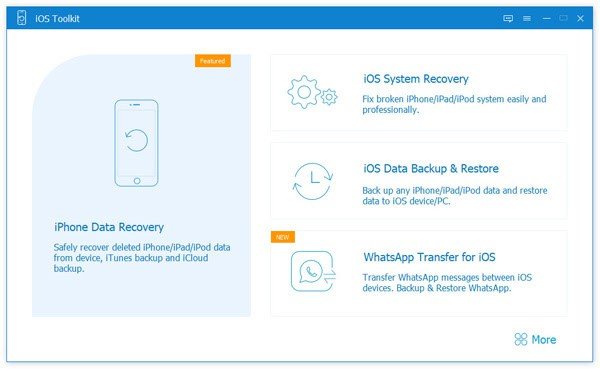
AnyMP4 iOS System Recovery is professional iOS system repair software designed to restore problematic iOS devices to normal functioning conditions. This powerful tool addresses over 100 different iOS system issues that affect iPhones, iPads, and iPods, ranging from screen problems to iTunes errors and everything in between. The software works seamlessly on both Windows and Mac computers, providing a user-friendly interface that guides even beginners through the repair process.
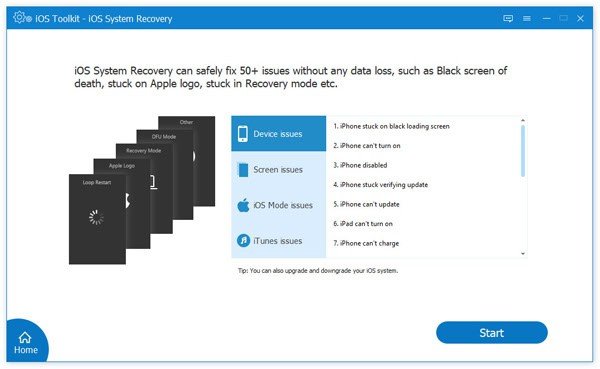
The software operates as a complete iOS troubleshooting solution that goes beyond simple repairs. It enables users to upgrade or downgrade iOS versions, fix complicated system bugs, and recover devices from various abnormal states. Whether your device is completely unresponsive, stuck in a continuous restart loop, or experiencing charging problems, AnyMP4 iOS System Recovery provides the tools necessary to diagnose and resolve these issues quickly.
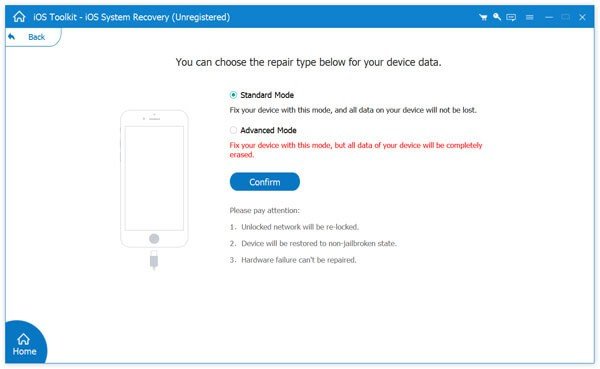
What sets this software apart is its dual-mode repair system. The Standard Mode handles most common iOS issues while preserving all your data intact. For more severe problems, the Advanced Mode provides deeper system repairs, though it may require device restoration. This flexibility ensures that regardless of the severity of your iOS problem, you have an appropriate solution available.
Recover from Various iOS System Issues
The following examples show the wide range of problems this software is built to address, organized by the most common failure categories seen on iPhone, iPad, and iPod touch.
Device issues
These issues relate to device status, startup, activation, charging, updates, and network behavior, where the phone may be unusable or unstable due to system-level faults.
- Disabled: Fix iPhone disabled states caused by repeated unlock failures.
- Power: Address cases where iPhone turns on unexpectedly or behaves abnormally during startup.
- Charging: Resolve system-related charging problems and abnormal charging behavior.
- Activation: Help correct activation-related issues tied to system instability.
- Restart: Repair loop restart and continuous reboot scenarios.
- Update: Fix iPhone update issues that fail mid-process or refuse to complete.
- Battery: Address abnormal battery behavior linked to iOS system errors.
- Service: Repair “No Service” symptoms when caused by system faults rather than carrier issues.
Screen issues
These issues appear when iOS fails to load properly or the display becomes unresponsive due to system crashes or boot failures.
- Logo: Fix iPhone stuck on Apple logo during boot.
- Frozen: Resolve iPhone frozen screens and non-responsive UI states.
- Blue: Address blue screen issues associated with system errors.
- White: Repair white screen states that prevent normal use.
- Black: Fix black screen problems linked to iOS startup failures.
- Red: Address red screen issues caused by system instability.
- Touch: Repair iPhone not responsive behavior where taps and swipes do not register.
- Other: Handle additional screen-related system problems not listed above.
iOS mode issues
These issues occur when the device gets trapped in a special mode or toggles into an abnormal mode state that blocks regular operation.
- DFU: Exit DFU mode loops and restore normal boot behavior.
- Headphone: Fix stuck headphone mode when software triggers the state.
- Recovery: Exit Recovery mode when the device cannot return to normal boot.
- Mute: Correct abnormal mute mode behavior tied to software faults.
- Safe: Address safe mode loops and unstable app/system states.
- Restore: Fix restore mode states that block normal startup.
- Shuffle: Correct shuffle mode issues caused by system bugs.
- Zoom: Repair zoom mode issues when system behavior becomes abnormal.
iTunes issues
These problems show up during sync, backup, restore, and update tasks, where iTunes fails due to device-side iOS instability or error states.
- Sync: Fix iTunes sync errors that stop data transfer.
- Backup: Resolve iTunes backup errors that prevent saving device data.
- Update: Repair iTunes update errors that fail during firmware install.
- Restore: Fix iTunes restore errors that block recovery.
- Store: Address issues connecting to iTunes Store when tied to device errors.
- Connect: Fix device connection errors that prevent iTunes recognition.
- Cannot: Resolve “cannot restore” errors caused by system corruption.
- Other: Handle additional iTunes-related error states.
Key Benefits
Comprehensive Issue Resolution Capability
AnyMP4 iOS System Recovery addresses an extensive range of iOS problems that users commonly encounter. From device issues like iPhone being disabled or experiencing activation problems, to screen issues such as black screen, white screen, blue screen, and red screen scenarios, this software provides solutions for virtually every iOS system malfunction. It also resolves iOS mode issues including DFU mode, recovery mode, headphone mode, and safe mode, along with various iTunes-related errors that prevent synchronization, backup, update, or restore operations.
Data Protection During Repair Process
One of the most significant advantages of using AnyMP4 iOS System Recovery is its commitment to data safety. When using Standard Mode, the software repairs your iOS system without causing any data loss. All your photos, messages, contacts, apps, and other personal information remain intact and properly organized after the repair process completes. This eliminates the anxiety associated with traditional repair methods that often require complete device restoration and data loss.
iOS Version Management Flexibility
Beyond fixing system issues, this software provides the ability to upgrade or downgrade iOS versions according to your preferences. The program automatically detects all available firmware versions supported by Apple for your specific device. You can choose to upgrade to the latest iOS version without using iTunes, or downgrade to a previous version if the current one causes compatibility issues with your apps or doesn’t meet your needs. This flexibility gives you complete control over your device’s operating system.
User-Friendly Interface for All Skill Levels
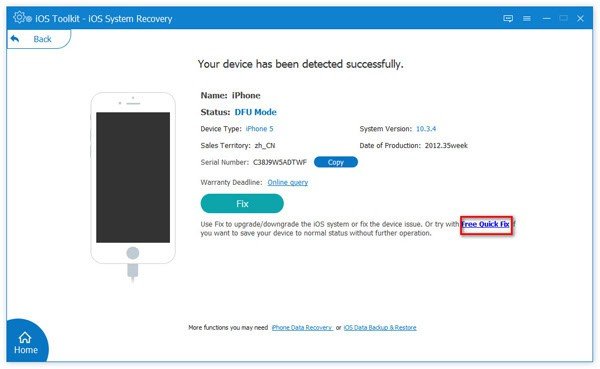
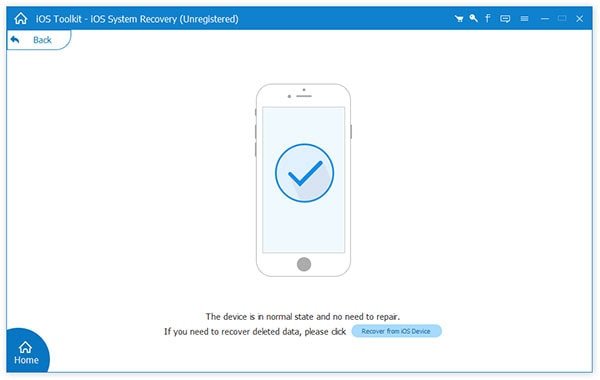
The software features an intuitive design that makes iOS system recovery accessible to everyone, regardless of technical expertise. Clear step-by-step guides walk you through the entire repair process, from connecting your device to completing the fix. The program automatically detects whether your device needs repair and provides appropriate recommendations. This simplicity means you don’t need professional technical knowledge to restore your iOS device to normal functioning.
Cost-Effective Home Solution
Repairing iOS devices at authorized service centers or Apple Stores can be expensive and time-consuming. AnyMP4 iOS System Recovery allows you to fix problems at home, saving money on repair fees and avoiding the inconvenience of being without your device for extended periods. The software pays for itself after just one use, making it a smart investment for anyone who relies on their iOS devices daily.
Wide Device Compatibility
The software supports all iOS devices, including the latest iPhone 17, iPhone 17 Air, iPhone 17 Pro, iPhone 17 Pro Max, iPhone 16 series, iPhone 15 series, and extends backward to iPhone 4. It also works with all models of iPad Pro, iPad Air, iPad mini, standard iPad, and iPod touch generations 1 through 7. This comprehensive compatibility ensures that regardless of which iOS device you own, AnyMP4 iOS System Recovery can help resolve its system issues.
Dual Operating System Support
Whether you use Windows or Mac, AnyMP4 iOS System Recovery works seamlessly on both platforms. The software supports Windows 11, 10, 8.1, 8, and 7, as well as Mac OS X 10.7 and above, including the latest macOS Tahoe 26. This cross-platform compatibility ensures that you can repair your iOS devices regardless of your computer’s operating system.
Time-Efficient Repair Process
Traditional iOS repair methods can take hours or even days to complete. AnyMP4 iOS System Recovery fixes most iOS system issues within minutes. The streamlined process involves connecting your device, selecting the appropriate repair mode, downloading the firmware package, and initiating the repair. The software handles the technical complexities automatically, allowing you to have your device back to normal quickly.
Why Choose AnyMP4 iOS System Recovery
This software stands out in the iOS repair market due to its comprehensive approach to system recovery. Unlike basic troubleshooting tools that only address superficial problems, AnyMP4 iOS System Recovery tackles deep system issues that other software cannot resolve. The combination of data protection, version management, and extensive issue coverage makes it a complete iOS maintenance solution.
The reliability of the software is backed by continuous updates that ensure compatibility with the newest iOS versions and devices. As Apple releases new iPhones, iPads, and iOS updates, AnyMP4 consistently updates their software to maintain full support. This ongoing commitment to compatibility means your investment remains valuable over time.
Who Can Benefit from AnyMP4 iOS System Recovery
Anyone who owns an iOS device can benefit from this software. Individual users facing sudden iOS problems will appreciate the ability to fix issues without technical knowledge or expensive repairs. Parents whose children accidentally put devices in unusual modes can quickly restore normal functionality. Business professionals who depend on their iPhones for work cannot afford downtime and need rapid solutions when problems occur.
IT professionals and technical support personnel can use this software to efficiently service multiple iOS devices without maintaining large inventories of replacement parts. Small repair shops can expand their service offerings without requiring extensive iOS repair training. Educational institutions managing multiple iPads for student use can resolve common issues quickly without disrupting learning activities.
Even Apple enthusiasts who regularly update to beta versions of iOS can use the downgrade feature to return to stable versions if they encounter problems. Anyone who has experienced the frustration of an unresponsive iOS device will appreciate having a reliable solution available when needed.
Features
Below is a detailed overview of the main features that make AnyMP4 iOS System Recovery a powerful and practical choice for fixing iOS system issues at home.
- Repair 100+ iOS system issues – Fix a wide range of device, screen, mode, and iTunes‑related errors using a guided desktop repair process.
- Fix device startup problems – Address iPhone disabled, cannot power on, endless restart loops, update failures, activation issues, battery anomalies, and “no service” errors.
- Resolve screen errors – Correct Apple logo stuck, frozen screen, black screen, white screen, blue screen, red screen, and other display faults that prevent normal use.
- Correct iOS mode stuck issues – Bring devices out of DFU mode, recovery mode, mute mode, safe mode, headphone mode, restore mode, shuffle mode, and zoom mode.
- Repair iTunes connection errors – Fix iTunes sync, backup, update, restore, and connection errors, plus problems connecting to iTunes Store or recognizing the iOS device.
- Standard Mode data‑safe repair – Use Standard Repair Mode to fix common iOS system issues while keeping your data intact as much as possible.
- Standard Mode – Run a non‑destructive repair that focuses on system components, aiming to leave your photos, messages, app data, and settings untouched.
- Advanced Mode – Switch to a stronger repair method for disabled, dead, or severely corrupted devices that do not respond to standard fixes.
- Automatic firmware download – Let the software detect your device model and iOS version, then fetch the correct firmware package directly inside the program.
- iOS upgrade and downgrade support – Change iOS versions quickly and safely to any Apple‑supported firmware available for your device.
- View official firmware options – See a list of available iOS versions compatible with your iPhone, iPad, or iPod touch, based on Apple’s current signing status.
- One‑click downgrade – Move from a newer iOS version to a supported older one when you experience crashes, app issues, or reduced performance.
- Update without iTunes – Upgrade your device to the latest supported iOS version using AnyMP4 iOS System Recovery instead of going through iTunes.
- Broad Apple device compatibility – Use a single tool that works across multiple generations of iPhone, iPad, and iPod touch devices.
- Support for latest iPhone models – Compatible with iPhone 17/Air/17 Pro/17 Pro Max, iPhone 16/16 Plus/16 Pro/16 Pro Max, iPhone 15/15 Plus/15 Pro/15 Pro Max, iPhone 14/14 Plus/14 Pro/14 Pro Max, and more.
- iPad and iPod touch support – Work with all models of iPad Pro, iPad Air, iPad mini, regular iPad, plus iPod touch 1–7.
- Support for older devices – Include long‑term support for iPhone X, 8, 7, 6 series, 5 series, 4S, and 4, so older devices still have a reliable repair option.
- Simple, guided workflow – Follow a step‑by‑step repair process with clear options and visuals.
- Intuitive interface – Use a clean layout with labeled buttons and instructions suited for users without technical backgrounds.
- Automatic device detection – Let the program identify your device model and status immediately after connection, reducing the chance of wrong selections.
- Real‑time progress tracking – Watch download and repair progress bars, so you always know what the software is doing and how long it may take.
- Professional repair at home – Apply methods similar to those used by service centers, right from your home or office computer.
- No technician visit required – Solve many system‑level failures without bringing your device to a physical shop.
- Reduce repair costs – Use the same software license to fix issues multiple times, across multiple household devices, increasing long‑term value.
- Useful for helpers and small shops – Keep a practical repair toolkit ready for friends, family members, or clients who run into recurrent iOS issues.
Requirements
To run #THE SOFTWARE with optimum reliability and performance, your system should match the following requirements:
- Supported operating systems – Windows 11/10/8.1/8/7, Mac OS X 10.7 or later (including macOS Tahoe 26).
- CPU requirement – 1 GHz Intel or AMD processor or above to handle the repair tasks and firmware processing.
- RAM requirement – At least 1 GB of system memory to give the software enough resources during repair.
- Disk space for installation – 200 MB or more free hard disk space to install the program and store basic working files.
- Extra space for firmware package – At least 500 MB of extra space on your iOS device for downloading and applying firmware packages.
- Standard Mode free space – For Standard Mode, at least 5 GB of free space on both your iOS device and computer is recommended for smooth operation.
- Battery level – Your iOS device should have at least 30% power to reduce the risk of shutdown during repair.
- Supported iOS devices –
- iPhone: iPhone 17/Air/17 Pro/17 Pro Max, 16/16 Plus/16 Pro/16 Pro Max, 15/15 Plus/15 Pro/15 Pro Max, 14/14 Plus/14 Pro/14 Pro Max, 13 series, 12 series, 11 series, XS, XS Max, XR, X, 8/8 Plus, 7/7 Plus, SE, 6/6 Plus/6s/6s Plus, 5/5c/5s, 4/4S.
- iPad: All models of iPad Pro, iPad Air, iPad mini, and iPad.
- iPod: iPod touch 1–7.
Downloads
Test how AnyMP4 iOS System Recovery fits your repair routine on your own devices first. Download the trial version for free and run the software risk‑free by clicking the trial button below to see how it handles your iOS issues.
The trial is an excellent way to get familiar with the interface, workflow, and main features. You can see how Standard and Advanced modes are set up, check system requirements, and understand the process, so that your first full repair session feels smooth and predictable once you activate the premium license.
BUY NOW
Repair your device today for a fraction of the cost of a new phone or a professional repair service. AnyMP4 iOS System Recovery is available for a $29.95 for 1 year and $62.45 for a Lifetime, but you can now get a lifetime license with our exclusive discount coupon.
This offer is available for a limited time and includes a lifetime of technical support, regular software updates for new iOS versions, and a full license to fix unlimited devices.

" />
Repair 100+ iPhone & iPad System Issues at Home, No Data Loss iOS Repair Tool for Frozen Screen, Boot Loop, iTunes Errors, iOS Downgrade/Upgrade
- One license for 1 PC.
- Lifetime free upgrades.
- Free customer support.
- 30-day Money-back Guarantee
Platforms: Windows
" />
Repair 100+ iPhone & iPad System Issues at Home, No Data Loss iOS Repair Tool for Frozen Screen, Boot Loop, iTunes Errors, iOS Downgrade/Upgrade
- Auto-renewal, cancel at any time.
- One license for 1 PC.
- 1 Year free upgrades.
- Free customer support.
Platforms: Windows
" />
Repair 100+ iPhone & iPad System Issues at Home, No Data Loss iOS Repair Tool for Frozen Screen, Boot Loop, iTunes Errors, iOS Downgrade/Upgrade
- One license for 1 Mac.
- Lifetime free upgrades.
- Free customer support.
- 30-day Money-back Guarantee
Platforms: Mac OS X
" />
Repair 100+ iPhone & iPad System Issues at Home, No Data Loss iOS Repair Tool for Frozen Screen, Boot Loop, iTunes Errors, iOS Downgrade/Upgrade
- Auto-renewal, cancel at any time.
- One license for 1 Mac.
- 1 Year free upgrades.
- Free customer support.
Platforms: Mac OS X
AnyMP4 iPhone Data Recovery: Lifetime BEST OFFER

AnyMP4 Mobile Transfer EXCLUSIVE

AnyMP4 Phone Mirror: 1 Year GIVEAWAY

AnyMP4 iPhone GPS Spoofer GIVEAWAY
ANYMP4 iOS Cleaner: 1 Year License GIVEAWAY

AnyMP4 WhatsApp Transfer for iOS GIVEAWAY
AnyMP4 iOS System Recovery Key Giveaway
Available now: Free Registration Code for a Limited Time!
To access the giveaway, kindly provide your email address. Please refrain from closing this page after signing in to receive instructions on how to access the offer at no cost.
NOTES:
– All prices shown here are in listed USD (United States Dollar).
– Such promotional programs are subject to change without notice, from time to time in our sole discretion.
– Data may vary based on different systems or computers.
Thanks for reading AnyMP4 iOS System Recovery Review & Enjoy the discount coupon. Please Report if AnyMP4 iOS System Recovery Discount Coupon/Deal/Giveaway has a problem such as expired, broken link, sold out, etc while the deal still exists.


![[ENDING] Giveaway – Aiseesoft WhatsSync: Free License Key | Whatsapp Data Transfer Tool – for Windows](https://thesoftware.shop/wp-content/uploads/thumbs_dir/Aiseesoft-WhatsSync-Review-Download-Discount-Coupon-rfosmwb69skfv54b3zebcir9tlm3mpeqa6sksj2kk8.png)

![[NEW KEY #8] Giveaway – iReaShare iPhone Manager: Free 1-year License Key | A Robust iPhone Data Transfer and Management Solution](https://thesoftware.shop/wp-content/uploads/thumbs_dir/iReaShare-iPhone-Manager-Review-Download-Discount-Coupon-rfosmz4ouaoatz07nim7201nlr879spxakr18cye1k.png)
![[NEW Key #8] Giveaway – MobiKin Assistant for iOS: Free 1-year License Code | A Powerful iOS Data Backup and Manager Tool – For Windows](https://thesoftware.shop/wp-content/uploads/thumbs_dir/Mobikin-Assistant-for-iOS-Review-Download-Discount-Giveaway-rfosmeg8nxvzqju909oej59ija24kgftvqeco9t1ug.png)

