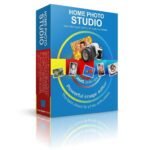
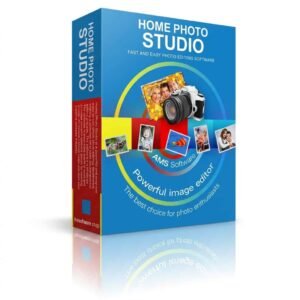
80% Off – Home Photo Studio Gold: Perpetual License, 1-year Free Upgrades | Portrait Retouching, Background Changer, 1000+ Templates, Photo Frames, Collage Maker and Greeting Card Designer – for Windows
Get Home Photo Studio today at 80% off, now $14 instead of $70, and start retouching portraits, changing backgrounds and creating framed photos in a few clicks. Order before the offer ends!
✔ Perpetual License. ✔ Free Product Updates ✔ Customer Support
BUY NOW
Home Photo Studio normally costs $70.00, but you can get a license for just $14 with our exclusive discount coupon. This 80% off offer is available for a limited time, so secure your copy now.

Portrait Retouching, Background Changer, 1000+ Templates, Photo Frames, Collage Maker and Greeting Card Designer
- After you purchase Home Photo Studio Gold it may be used indefinitely.
- Home Photo Studio Gold is licensed per computer, and not per user.
- Each license allows installation on 1 computer.
- Transfer of a license to another owned computer is allowed.
- Online license activation is required with a hardware footprint, and 7 installations per footprint.
- This promotion can be used to upgrade or extend an existing license.
- You can install/register the software at any time.
- License can be used for Commercial and Personal use.
- Upgrades to future versions of the software will be free for 12 months. For versions after that, upgrades will require additional payment, which will be discounted.
- Support is provided for the lifetime of the product.
- Lifetime return policy.
- Prices do not necessarily include taxes, which will vary by country.
Platforms: Windows

BackErase - AI Background Remover BEST OFFER

Topaz Image Web BEST OFFER

On1 Photo RAW 2026 + 2027: Perpetual License BEST SELLER

Luminar BEST OFFER

Topaz Studio BEST OFFER
Home Photo Studio Gold Key Giveaway
Unavailable at this moment!
To access the giveaway, kindly provide your email address. Please refrain from closing this page after signing in to receive instructions on how to access the offer at no cost.
NOTES:
– All prices shown here are in listed USD (United States Dollar).
– Such promotional programs are subject to change without notice, from time to time in our sole discretion.
– Data may vary based on different systems or computers.
Home Photo Studio Gold Review at a Glance
Anyone who takes digital photos knows the frustration. Portraits show red eyes or uneven skin, landscapes look flat, and many editing programs are so complicated that you spend hours on tutorials before you finish a single picture. Holiday cards, framed prints and photo collages usually require several separate tools, which costs both time and money.
Home Photo Studio solves these problems in one program. It combines fast photo correction, creative effects, and a big library of ready-made designs in a single interface. You can fix a blurred shot, replace a background, add a frame, and print a card without switching software.

What Is Home Photo Studio?
Home Photo Studio is a convenient, powerful photo editing program for Windows. It gives you a full kit of image manipulation tools: levels, curves, color balance, contrast, saturation, and a set of brushes. It also adds creative design features such as over a hundred filters, special effects, picture frames, masks, and more than 1000 templates.
The program is built to be simple to learn. A clean interface and a detailed built-in help system let beginners, families, and hobbyists produce good results quickly. It also offers enough options to keep experienced photo enthusiasts busy. It supports 20 input and output graphic formats, so it works with almost any image you have.
Why Choose Home Photo Studio?
Many editors are either too basic or too complex. Home Photo Studio sits in the middle, with professional-style tools and a gentle learning curve. Its multi-undo function removes the fear of mistakes, and its decoration features make it different from ordinary editors. The current price is also far lower than the original.
Key Benefits
The advantages below show how the software saves time and improves results for different kinds of users:
- Fast results: Fix colors, red eyes, and blur with a single click.
- Low learning curve: The help system answers questions while you work.
- Creative freedom: Frames, masks, effects, and templates turn photos into artwork.
- Safe editing: Multi-undo lets you reverse any step.
- Wide compatibility: 20 graphic formats are supported for input and output.
- Light on hardware: It runs on a 1GHz CPU with 512 MB RAM.
- Great value: One purchase at 80% off covers editing and design.
Who Can Benefit?
- Home users who want to improve family photos and make cards.
- Photo hobbyists who want effects, filters and 3D compositions.
- Parents and kids, because the interface is easy enough for children.
- Small business owners and online sellers who need quick, clean product and promotional images.
- Gift makers who create framed photos, collages and DIY holiday cards.
Key Features
Below is a complete list of the main tools that make Home Photo Studio a practical addition to your creative toolkit:
- Fast Photo Editing – Improves and retouches digital photos in minutes.
- Levels and Curves – Adjust tonal range and brightness precisely.
- Color Balance, Contrast, and Saturation – Correct color casts and make images vivid.
- Brush Set – Retouch specific areas by hand.
- One-Click Fixes – Remove red eyes and sharpen blurred pictures quickly.
- Portrait Retouching – Smooth and refine faces for better portraits.
- Unique Filters and Effects – Applies over a hundred looks to change the mood of any picture.
- Illumination and Nature Effects – Add light, glow, and natural atmosphere.
- Optical, Geometric, and Plastic Effects – Create artistic distortions and textures.
- 3D Composition – Builds three-dimensional looks rarely found in non-professional editors.
- Creative Photo Decoration – Provides design resources for finished, shareable projects.
- Picture Frames – Offer a large collection in many styles.
- Shaped Masks – Create original edge effects with different shapes.
- 1000+ Templates – Make framed photos, collages, and greeting cards easily.
- Background Change – Replace the backdrop of a photo for a new scene.
- All-in-One Photo Editor – Gathers editing and management in one place.
- 20 Graphic Formats – Open and save a wide range of file types.
- Image Viewer – Browse all photos stored on your computer instantly.
- Multi-Undo – Step back through edits to correct errors.
- Convenient and Easy to Master – Keeps the software friendly for every skill level.
- User-Friendly Interface – Find tools quickly without a long learning period.
- Built-In Help System – Get answers without searching the web.
Requirements
Check the specifications below to confirm that your computer is ready to run the software:
- Operating system: Windows 11, 10, 8, 7
- CPU: 1GHz
- RAM: 512 MB
Downloads
See how Home Photo Studio fits your own projects before you commit. Download the trial edition for free and test the editing tools, filters, and templates by clicking the button below.
or
Buy now, the price start from:
Thank you for reading Home Photo Studio review, and enjoy the discount coupon. If you notice any issues with Home Photo Studio discount coupon, deal, or giveaway—such as an expired offer, broken link, or sold‑out promotion—please let us know while the deal is still available.