87% Off – BackErase: Lifetime License | Offline Batch Photo Cutout Software with GPU Acceleration, Hair Edge Refinement, etc – for Windows

Remove Backgrounds 10x Faster – Get BackErase Now! Fully offline, GPU-accelerated batch processing with spec-ready exports for Amazon, Etsy, and Instagram. Claim your lifetime license at a 87% discount today and stop paying per image.
✔ Lifetime License. ✔ Free Product Updates ✔ Customer Support
BUY NOW
BackErase is available at $67.00, but you can now get a license with our exclusive discount sale of up to 87% OFF. This offer is available for a limited time, so secure your copy today.

AI Background Remover for Windows PC – Offline Batch Photo Cutout Software with GPU Acceleration, Hair Edge Refinement, Transparent PNG and Ecommerce Export Presets, 2 PC License
- Free updates and upgrades for the lifetime of the product
- Free customer support by email and chat, for the lifetime of the product
- Commercial use rights for client and business projects
- Instant download access after purchase
- Ready-to-sell setup included
- Windows 10/11 compatibility
- Detailed video tutorials to get you started
- Verified, malware-free software
Platforms: Windows
HitPaw Photo Object Remover BEST OFFER
![[NEW KEY] Giveaway – UltraPic Pro/Pro+: Free Activation Code | Instant Background Remover, Batch Processing, AI Backgrounds, Pro E-commerce Photo Editing Tool](https://thesoftware.shop/wp-content/uploads/thumbs_dir/UltraPic-Pro-Free-Credits-Activation-Code-Giveaway-2485hak007vdtdebobh7jg3jtw8nb809zolgzlemf638.png)
UltraPic Pro GIVEAWAY

Aiarty Image Matting GIVEAWAY

HitPaw Video Object Remover BEST OFFER

HitPaw Online BEST OFFER

Apowersoft Background Eraser: Lifetime 1000 Credits BEST OFFER

Topaz Image Web BEST OFFER
BackErase Free Key Giveaway
Unavailable at this moment!

To access the giveaway, kindly provide your email address. Please refrain from closing this page after signing in to receive instructions on how to access the offer at no cost.
NOTES:
– All prices shown here are in listed USD (United States Dollar).
– Such promotional programs are subject to change without notice, from time to time in our sole discretion.
– Data may vary based on different systems or computers.
BackErase Review at a Glance
Masking images by hand eats up hours, and the results are often uneven. Hair, fur, and fine details take the longest to select, and cloud tools add new problems. They force you to upload every file, which puts private content at risk. Pay-per-image and API fees cut into thin margins. Batch jobs crawl or crash, and edge halos, jagged lines, and exports that miss marketplace specs lead to rejected listings and rework. Switching between several apps to replace a background and export variants wastes still more time.
BackErase is built to solve these problems on a Windows PC. It removes backgrounds with AI, runs fully offline, and uses your GPU for speed. You drop in a folder, review the result, and export files that already meet marketplace requirements.
Official Product Page:https://gogrowtools.com/items/l/BackErase-AI-Background-Remover
What Is BackErase?
BackErase is a Windows desktop application that removes image backgrounds automatically using the U2Net and U2NetP ONNX models. These models isolate the subject and produce clean, accurate cutouts, including around hair and complex edges.
All processing happens locally on your computer. There are no API keys, no uploads, and no per-image fees. The software uses DirectML to accelerate work on supported GPUs. If no compatible GPU is present, it switches to CPU mode automatically, so you can keep working on any machine.
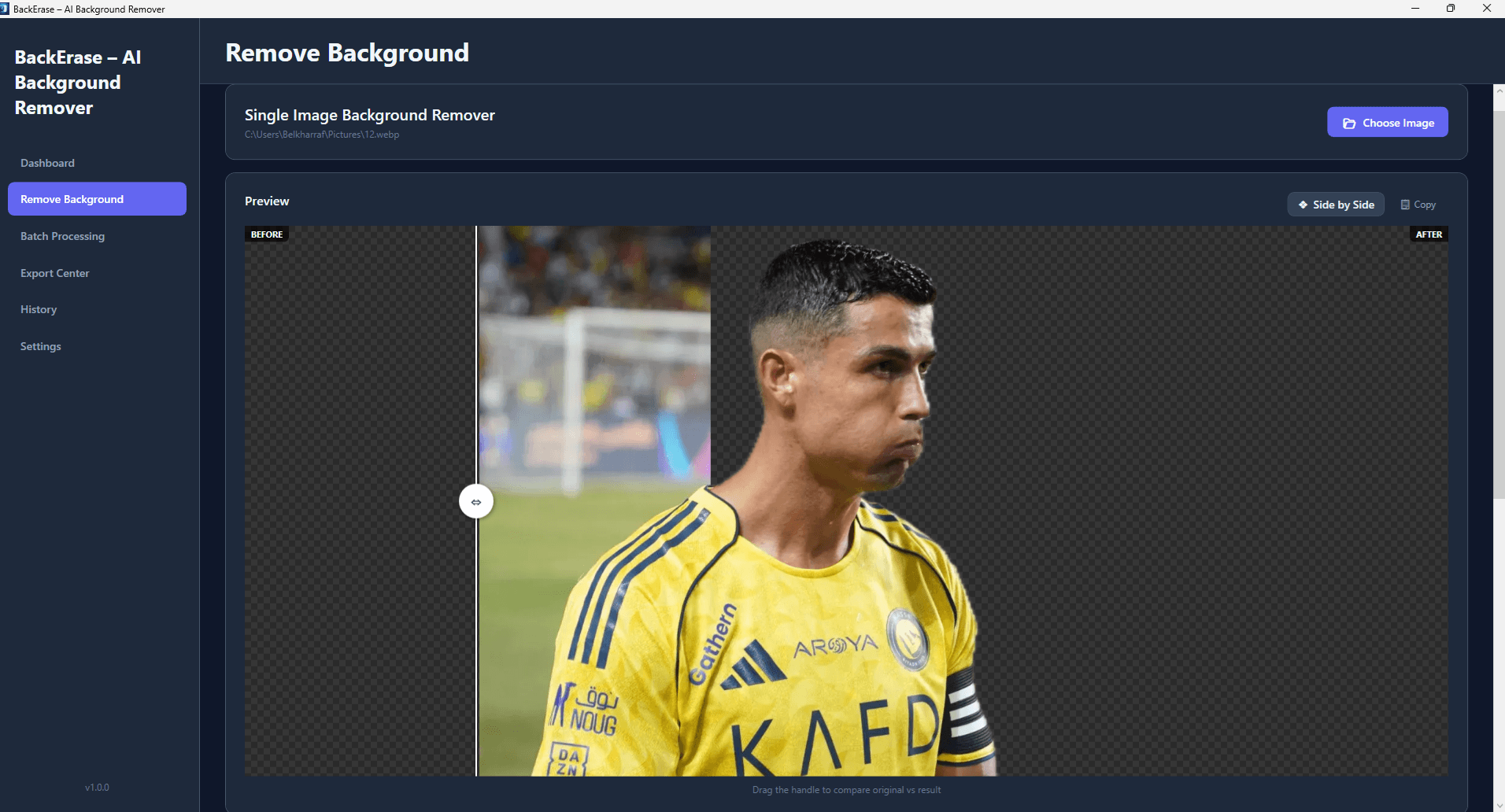
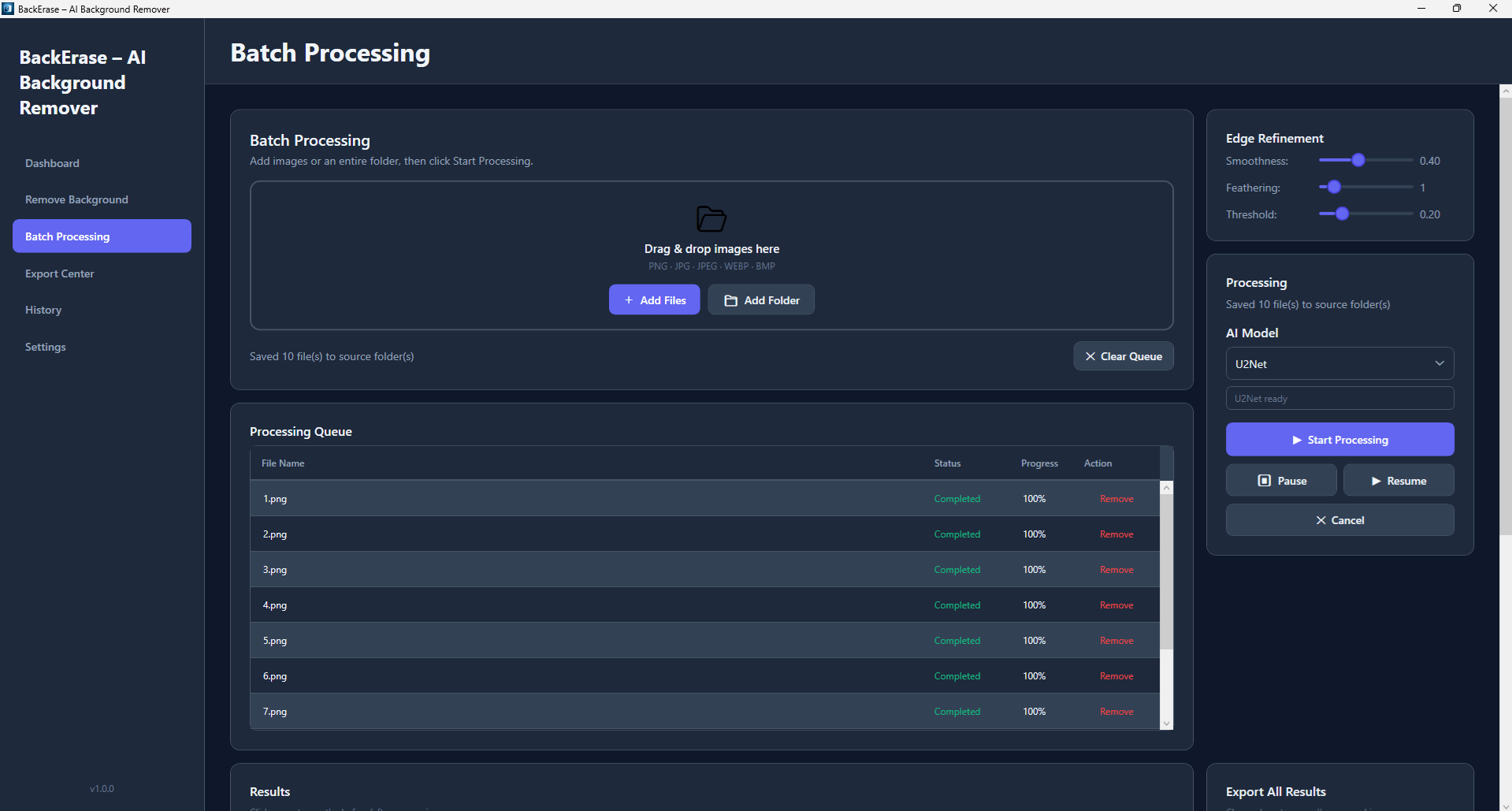
Beyond removal, BackErase includes a before/after comparison slider, edge refinement, background replacement, export presets, and a history system. You can finish a whole product-photo workflow in one app. The interface is a modern WPF design that is clean and responsive.
Why Choose BackErase AI?
BackErase AI Background Remover gives you speed, privacy, and predictable costs in one tool. The points below show what sets it apart for production work.
- Offline by design: Nothing leaves your PC, so sensitive content stays protected.
- Fast batch output: A queue system and GPU acceleration keep large jobs moving.
- No recurring fees: One license replaces pay-per-image and API charges.
- Marketplace-ready exports: Presets reduce the risk of rejected listings.
- One workspace: Removal, refinement, replacement, and export all happen in the same app.
Key Benefits
The benefits below come from the way BackErase AI combines local processing, AI accuracy, and export tools. Each one addresses a common production bottleneck.
- Save hours of manual work: Automatic cutouts replace slow selection and masking.
- Protect your privacy: Local processing means zero uploads and no exposure of client files.
- Cut your costs: No pay-per-image or API fees protects your margins.
- Deliver consistent quality: The same AI models and refinement tools give uniform results across a batch.
- Avoid listing rejections: Spec-ready presets help your files meet marketplace rules.
- Keep working anywhere: Offline operation suits travel, air-gapped systems, and unreliable connections.
- Fine-tune with confidence: Real-time preview and the comparison slider remove guesswork.
- Stay flexible on hardware: DirectML GPU acceleration with automatic CPU fallback fits most Windows PCs.
Who Can Benefit?
BackErase suits anyone who handles many images and needs consistent results.
- Ecommerce sellers on Amazon, Etsy, and other marketplaces who need clean product photos.
- Photographers and retouchers who want to cut masking time on portraits and detailed subjects.
- Digital marketing agencies producing ads and social content for multiple clients.
- Graphic designers who need transparent PNGs for compositing.
- Social media managers preparing Instagram-ready visuals quickly.
- Teams on secure networks that cannot send files to cloud services.
- Travelers and remote workers who need an editing tool with no internet connection.
Features
Below is a comprehensive list of the key features that make BackErase AI Background Remover a valuable addition to your editing toolkit:
- AI Background Removal – Isolates subjects automatically for clean, accurate cutouts.
- U2Net Model – Delivers high-quality detection of subjects and complex edges.
- U2NetP Model – Provides a lighter model option for faster processing.
- Hair and Edge Accuracy – Handles hair, fur, and fine details with precision.
- Fully Offline Processing – Runs on your PC with no internet connection required.
- No API Required – Removes the need for keys, subscriptions, or per-image fees.
- Zero Uploads – Keeps sensitive images on your own machine.
- Air-Gapped Support – Works on secure networks that block outside access.
- GPU Acceleration and CPU Mode – Speeds up processing on Windows hardware.
- DirectML Acceleration – Uses supported GPUs for much faster results.
- Automatic CPU Fallback – Keeps you productive when no compatible GPU is available.
- Batch Image Processing – Handles large volumes of images in one run.
- Queue System – Processes files reliably in order for high-volume production.
- Folder Processing – Loads entire folders at once.
- Drag and Drop Support – Lets you add images with no complicated setup.
- Before/After Comparison Slider – Shows the original and the result side by side.
- Instant Verification – Confirms cutout quality at a glance.
- Fine-Tuning Aid – Guides adjustments without guesswork.
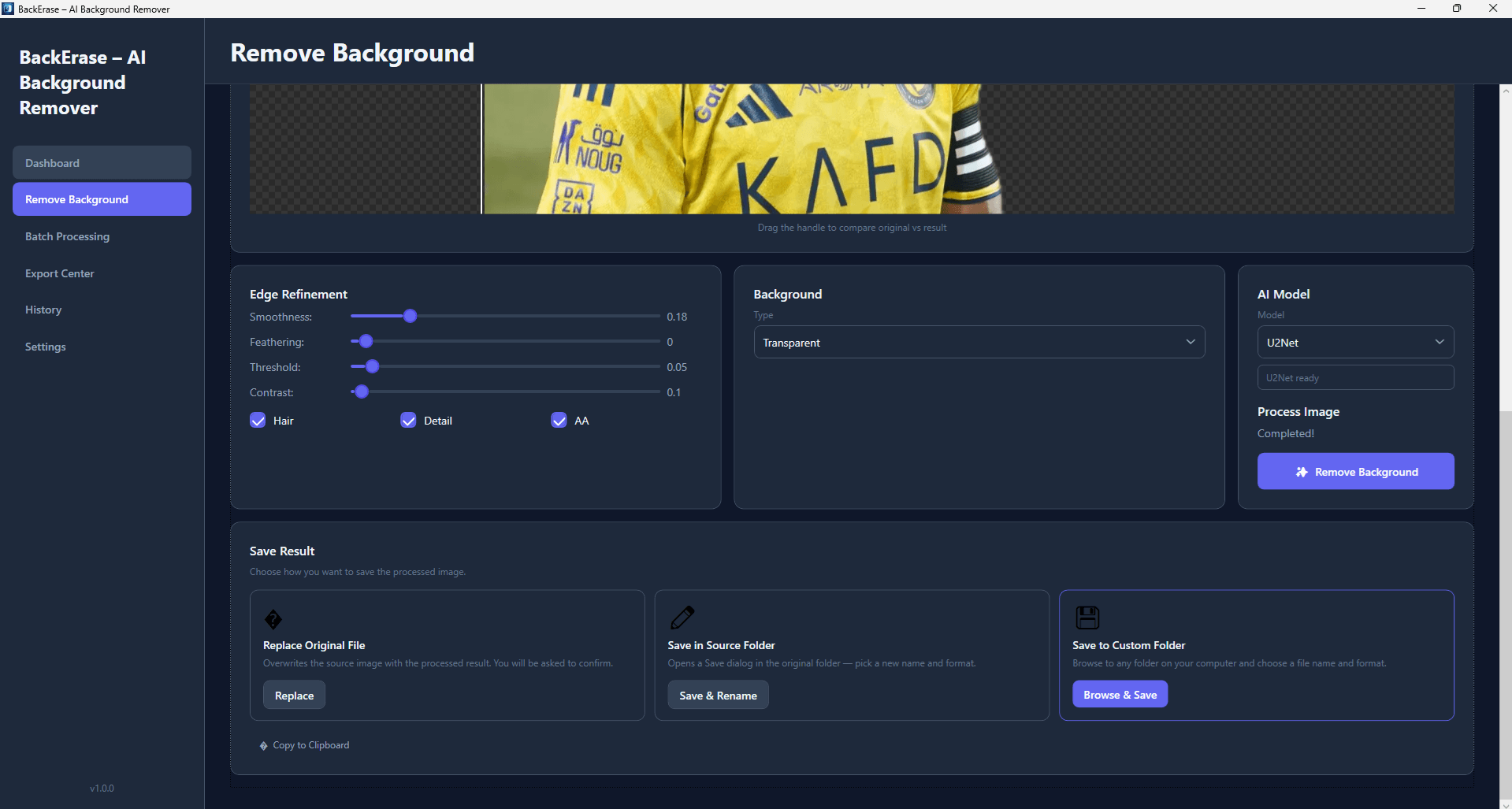
- Edge Refinement – Improves delicate edges for natural, lifelike detail.
- Halo Removal – Reduces light or dark fringes around subjects.
- Hair and Fine Detail Control – Preserves strands and intricate outlines.
- Background Replacement – Swaps backgrounds in a click.
- Solid Color – Matches your brand palette or marketplace requirements.
- Gradient – Adds studio-style backdrops.
- Custom Image – Places subjects on any picture you choose.
- Blur – Creates subtle depth-of-field effects.
- Export Presets – Produces marketplace-ready outputs with one click.
- Ecommerce – Fits general online store requirements.
- Etsy – Matches the needs of Etsy listings.
- Amazon – Meets common Amazon image specifications.
- Instagram – Prepares visuals for social posts.
- PNG Transparency Support – Exports clean images with alpha channels.
- Alpha Channel Output – Keeps transparent backgrounds for design work.
- Compositing Ready – Fits smoothly into design applications.
- Copy to Clipboard – Sends results straight into your design app in one click.
- History Tracking System – Lets you revisit earlier results.
- Restore Previous Work – Brings back earlier versions without reprocessing.
- Quick Re-Export – Saves files again in a different format or setting.
- Export Optimization Tools – Balances quality and file size.
- Fast-Loading Output – Keeps product pages and social posts light.
- Quality Control – Preserves visual clarity at smaller sizes.
- Real-Time Preview – Shows changes as you work.
- Modern WPF Interface – Offers a clean, responsive Windows interface.
- Focused Layout – Keeps tools easy to reach.
- Responsive Performance – Stays smooth during heavy tasks.
Requirements
The software runs on standard Windows systems. The list below covers what the product details specify.
- Operating system: Windows 10 or Windows 11
- GPU (optional): DirectML-supported GPU for acceleration
- Fallback: CPU mode works on machines without a compatible GPU
- Internet: Not required for processing
Buy now, the price start from:
Thank you for reading BackErase review, and enjoy the discount coupon. If you notice any issues with BackErase discount coupon, deal, or giveaway—such as an expired offer, broken link, or sold‑out promotion—please let us know while the deal is still available.