Giveaway – Hunter Disk Cleaner Pro: Free 1-year License Key | Deep System Cleanup and Safe Cache Optimization Tool – for Windows

Reclaim Gigabytes of Wasted Space in Seconds with Hunter Disk Cleaner Pro – Safe, Fast, One-Click Deep Cleanup. Get Your Pro License for FREE Today and Stop Losing Storage to Hidden Junk!
Free Full Version!
BUY NOW
Hunter Disk Cleaner Pro is available for $12.00 per year. For a limited time, you can buy a Pro license with our exclusive discount coupon and pay less than the regular price. Use the offer soon, because the discount will not last.

Offered by Bitsdujour
Disk Cleanup Utility, Cache Cleaner, Temp File Remover and PC Optimizer to Free Up Storage Safely
- Full PRO Features Unlocked
- Deep target & system cleanup
- Standard Email Support
- One-time payment – No recurring subscription
- 1 Device
7 days return policy.
Platforms: Windows
Disk Cleanup Utility, Cache Cleaner, Temp File Remover and PC Optimizer to Free Up Storage Safely
- Full PRO Features Unlocked
- Deep target & system cleanup
- Standard Email Support
- One-time payment – No recurring subscription
- 1 Device
60-day unconditional money-back guarantee
Platforms: Windows
Disk Cleanup Utility, Cache Cleaner, Temp File Remover and PC Optimizer to Free Up Storage Safely
- Full PRO Features Unlocked
- Deep target & system cleanup
- Standard Email Support
- Valid for 1 full year – No recurring subscription
- 5 Devices
60-day unconditional money-back guarantee
Platforms: Windows
Disk Cleanup Utility, Cache Cleaner, Temp File Remover and PC Optimizer to Free Up Storage Safely
- Full PRO Features Unlocked
- Deep target & system cleanup
- Standard Email Support
- Valid for 2 full years – No recurring subscription
- 6 Devices
60-day unconditional money-back guarantee
Platforms: Windows

IObit Smart Defrag 12 PRO (1 Year, 3-PCs License) BEST SELLER

Smart Game Booster Pro: BEST OFFER

Ashampoo WinOptimizer Pro 29 BEST SELLER
Hard Disk Sentinel Professional: Lifetime Family License BEST SELLER

Reg Organizer: Lifetime License BEST SELLER

Auslogics Disk Defrag BEST OFFER

AWZ PC Cleaner BEST OFFER
Hunter Disk Cleaner PRO Key Giveaway
Available now: Free License Key for a Limited Time!

To access the giveaway, kindly provide your email address. Please refrain from closing this page after signing in to receive instructions on how to access the offer at no cost.
NOTES:
– All prices shown here are in listed USD (United States Dollar).
– Such promotional programs are subject to change without notice, from time to time in our sole discretion.
– Data may vary based on different systems or computers.
Hunter Disk Cleaner PRO Review at a Glance
Every Windows computer slowly fills with files nobody asked for. Browsers store gigabytes of cached pages, applications leave temporary folders behind, system logs pile up, and uninstalled programs abandon leftovers in hidden directories. Over time, your storage shrinks, your drive feels crowded, and the PC loses the snappy response it had on day one. Many cleanup tools make this worse by being slow, cluttered, or too aggressive, so people worry that one wrong click will delete something important.
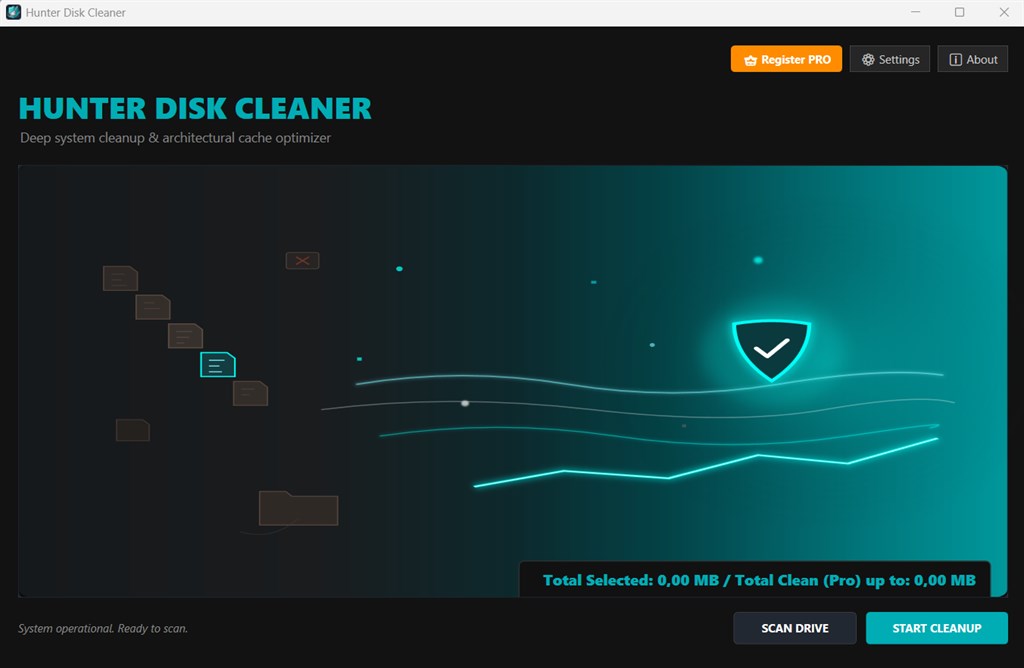
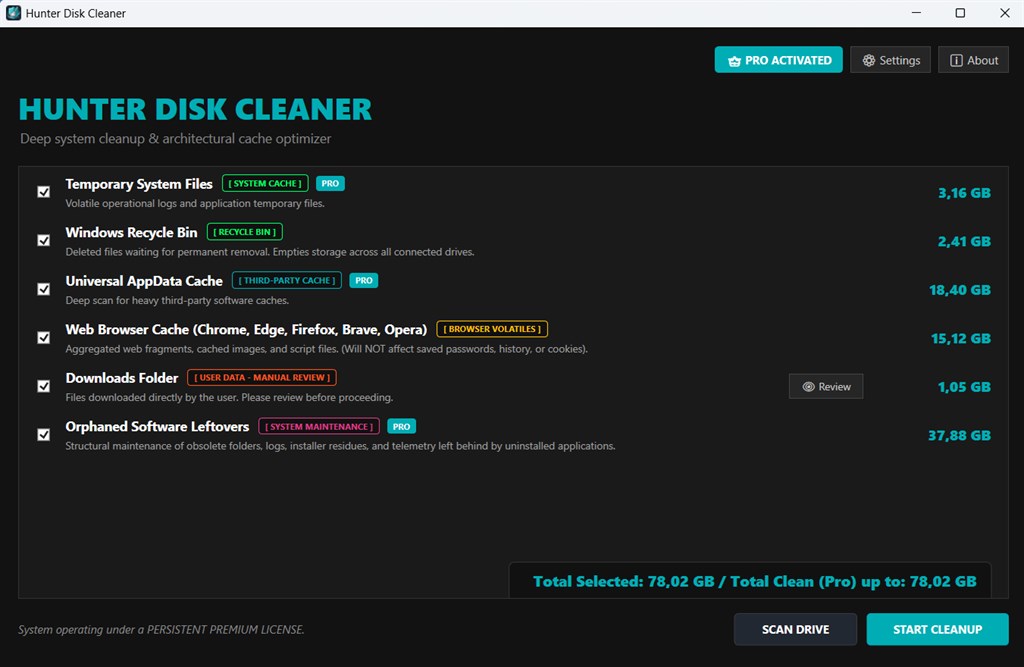
Hunter Disk Cleaner Pro solves this problem with a modern, lightweight cleanup utility built for Windows. It hunts down hidden temporary files, shows exactly where your space is going, and removes only what is safe to remove. The multi-threaded scanner checks critical Windows temporary locations in seconds. Color-coded safety labels tell you what each category contains before you clean anything.
The Pro edition adds the Unrestricted One-Click Deep Cleanup, which clears system caches, third-party application caches, and software leftovers in a single pass. You get a faster, tidier drive without the surprises of aggressive cleaners. It suits home users, gamers, freelancers, designers, video editors, and IT technicians who want storage back without risking personal data.
What Is Hunter Disk Cleaner Pro?
Hunter Disk Cleaner Pro is a disk cleanup and cache optimization utility for Windows 10 and Windows 11. It scans your system for temporary data, such as browser caches, system logs, application caches, and remnants of removed software. It then lets you clear that data safely and quickly.
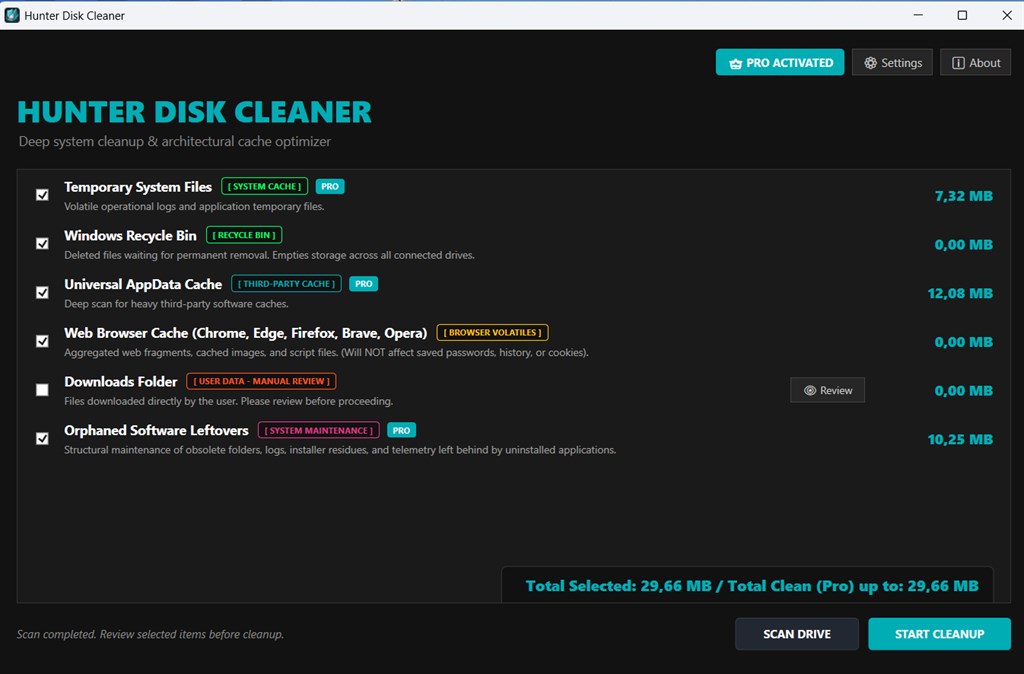
The software has a minimalistic dashboard, so even a first-time user can start a scan and read the results without a tutorial. Cache allocations appear in a detailed layout, and each category carries a color-coded safety label. That label shows what is safe to clean and what deserves a closer look. Because the tool works only on carefully curated temporary directories, it avoids documents, photos, saved projects, and application settings.
The program comes in two editions. The Free edition covers basic system cleanup, real-time storage analysis, and web browser cache cleanup, and it analyzes other categories without cleaning them. The Pro edition removes every restriction and adds the one-click deep cleanup across all supported categories. The developer treats the product as a long-term project and keeps refining it.
Why Choose Hunter Disk Cleaner Pro?
Many cleaners promise speed and deliver confusion. Hunter Disk Cleaner Pro takes a different approach: it shows before it deletes, and it limits itself to locations that are safe to clear. You stay in control the whole time.
- You get a lightweight tool that does not slow your PC down while it works to speed it up.
- You see real-time storage figures, so you know how much space you are recovering.
- You switch languages instantly, which helps multilingual households, teams, and agencies.
- You avoid bundled extras, aggressive registry changes, and unclear prompts.
Who Can Benefit?
This utility fits a wide range of people. Everyday users gain breathing room on laptops with small solid-state drives. Gamers recover space for new titles and updates. Content creators, designers, and video editors clear the heavy cache files that editing and rendering software leave behind. Freelancers and small agencies keep several work machines tidy with less effort. Technicians and IT helpers get a quick, predictable maintenance tool for client computers.
Key Benefits
The following section explains how Hunter Disk Cleaner Pro improves daily computing, so you can judge how it fits your needs and your workflow.
- Instant storage recovery: Clear gigabytes of cache and temporary data in a few clicks, without hunting through hidden folders by hand.
- Safe by design: Curated target directories protect personal files, so there is no accidental deletion of documents, photos, or project data.
- Fast scanning: The multi-threaded engine reviews critical Windows temporary locations in seconds, which saves time on every maintenance session.
- Clear visibility: Exact cache sizes and color-coded safety labels let you decide with confidence.
- Complete cleanup in Pro: One-click deep cleanup covers system, third-party, and leftover data in a single run.
- Multilingual comfort: Real-time language switching makes the interface friendly for users in many international markets.
- Lightweight footprint: The tool uses few resources, so it runs comfortably on older and newer machines alike.
- Better long-term maintenance: Regular cleanup keeps drives organized and reduces clutter that builds up through months of use.
Key Features
Below is a detailed breakdown of the capabilities that make Hunter Disk Cleaner Pro a practical addition to your Windows maintenance routine:
- Architectural Cache Optimizer: A modern, minimalistic dashboard designed for quick navigation and automated system scanning.
- Minimalistic Dashboard: A clean layout presents every tool in a clear, uncluttered view.
- Rapid Navigation: Moving between scan results and cleanup options takes only a click.
- Automated System Scanning: The scan starts and finishes with minimal input from you.
- Detailed Analysis and Safety Labels: A comprehensive layout shows exact cache allocations, mapped with color-coded targets for data preservation.
- Exact Cache Allocations: Each category lists the precise amount of space it occupies.
- Structural Target Colors: Colors separate safe-to-clean areas from areas that need attention.
- Data Preservation Focus: The labels guide you away from anything that could affect personal content.
- Advanced Targeting Engine: A deep scanning system that reaches temporary zones where large amounts of space hide.
- Profound Temporary Zone Scanning: The engine reaches deep into temporary locations that basic cleaners often skip.
- Massive Space Recovery: Large cache stores are located so you can reclaim storage quickly.
- Seamless Operation: Scanning and targeting run smoothly in the background without interrupting your work.
- Post-Scan Clean Operations: Cleanup actions that stabilize the system after scanning while protecting essential application settings.
- Instant System Stabilization: Residual files are removed right away to leave the system tidy.
- Optimal Residual Cleanup: The best-fit cleaning actions are applied to what the scan found.
- Application Parameter Protection: Critical application settings stay intact after cleaning.
- High-Speed Scanning: A multi-threaded engine tuned to check critical Windows temporary locations in seconds.
- Multi-Threaded Processing: Several tasks run in parallel to shorten scan time.
- Critical Windows Temporary Fields: The scan concentrates on the places where junk builds up most.
- Low Waiting Time: Results appear fast enough to make regular cleanups a habit.
- Dynamic Localization: Full native language support with real-time switching for key international markets.
- Real-Time Language Switching: Change the interface language instantly without restarting the program.
- Native Interface Support: Menus and labels appear in the selected language.
- International Market Coverage: Users in multiple regions can work in the language they prefer.
- Safety First Protection: Carefully curated temporary directories that protect system stability and personal data.
- Curated Directory List: Only reviewed temporary locations are targeted for removal.
- No Accidental Personal Data Loss: Documents, photos, and saved work stay out of the cleanup path.
- System Stability: The cleaner leaves the files Windows needs to keep running smoothly.
- Web Browsers Cache Cleanup [WEB CACHE]: Removes stored website data from your browsers to free space.
- Cache Removal: Cleared browser caches recover storage taken by saved pages and media.
- Available in Both Editions: Free and Pro users can both run this cleanup.
- Temporary Files and System Logs [SYSTEM CACHE]: Clears temporary Windows files and old logs in the Pro edition.
- Temporary File Removal: Short-term files that no longer serve a purpose are deleted.
- System Log Cleanup: Accumulated log files are cleared to recover additional space.
- AppData Universal Software Cache [THIRD-PARTY CACHE]: Cleans cache data left by installed applications in the Pro edition.
- Universal Application Coverage: Cache folders from many programs are handled in one pass.
- Creative and Gaming Software Cleanup: Heavy caches from editors, launchers, and similar tools are included.
- Uninstalled Software Leftovers and Telemetry [SYSTEM MAINTENANCE]: Removes remnants of deleted programs and telemetry data in the Pro edition.
- Leftover File Removal: Folders abandoned by uninstalled software are cleared out.
- Telemetry Data Cleanup: Stored diagnostic data that no longer serves you is removed.
- Real-Time Storage Analysis and Counter: Live figures that show how much space you are reclaiming.
- Live Space Counter: The counter updates as the scan finds and clears data.
- Clear Progress Insight: You always see the effect of each cleaning step.
- Unrestricted One-Click Deep Cleanup: A Pro-only action that runs every supported cleanup category together.
- Single-Click Operation: One button starts a full cleaning pass.
- All Categories Included: Web, system, third-party, and maintenance data are cleaned together.
Free vs. Pro Edition Comparison
| Feature / Module | Free | Pro |
|---|---|---|
| Basic System Cleanup | Yes | Yes |
| Real-Time Storage Analysis and Counter | Yes | Yes |
| Web Browsers Cache Cleanup [WEB CACHE] | Yes | Yes |
| Temporary Files and System Logs [SYSTEM CACHE] | Analysis only | Yes |
| AppData Universal Software Cache [THIRD-PARTY CACHE] | Analysis only | Yes |
| Uninstalled Software Leftovers and Telemetry [SYSTEM MAINTENANCE] | Analysis only | Yes |
| Unrestricted One-Click Deep Cleanup | No | Yes |
Requirements
The program is built for modern Windows systems. Check the following details to confirm that your computer is compatible before you install:
- Operating System: Windows 11 or Windows 10 (Build 19041 or higher)
- Architecture: 64-bit (x64) optimized deployment
Downloads
Test Hunter Disk Cleaner on your own computer before you commit. The Free edition costs nothing and lets you run real scans, view live storage figures, and clear browser caches. Click the button below to get the free edition and see for yourself how quickly it finds hidden clutter.
or
Buy now, the price start from:
Thank you for reading Hunter Disk Cleaner PRO review, and enjoy the discount coupon. If you notice any issues with Hunter Disk Cleaner PRO discount coupon, deal, or giveaway—such as an expired offer, broken link, or sold‑out promotion—please let us know while the deal is still available.