Giveaway – Kerish Disk Health: Free 1-year License Key | SSD Health Monitor, HDD Lifespan Checker, Disk Health Analyzer, Hard Drive Monitor, Drive Failure Predictor – for Windows

Get real‑time health ratings, months‑to‑failure predictions, and automatic alerts so you never lose files to sudden disk failure. Get Kerish Disk Health with a 1-year license key for free!
Free Full Version
Kerish Disk Health Review at a Glance
Every computer user faces the same hidden threat: your storage drive can fail without warning and wipe out irreplaceable photos, documents, and work files. Mechanical hard drives (HDDs) wear out over time, and SSDs have a limited number of write cycles. When a drive starts to degrade, the first symptom is usually too subtle to notice—until the crash happens. Kerish Disk Health directly addresses this risk by turning your SSD or HDD into a predictable, monitored asset rather than a ticking time bomb.
What Is Kerish Disk Health?
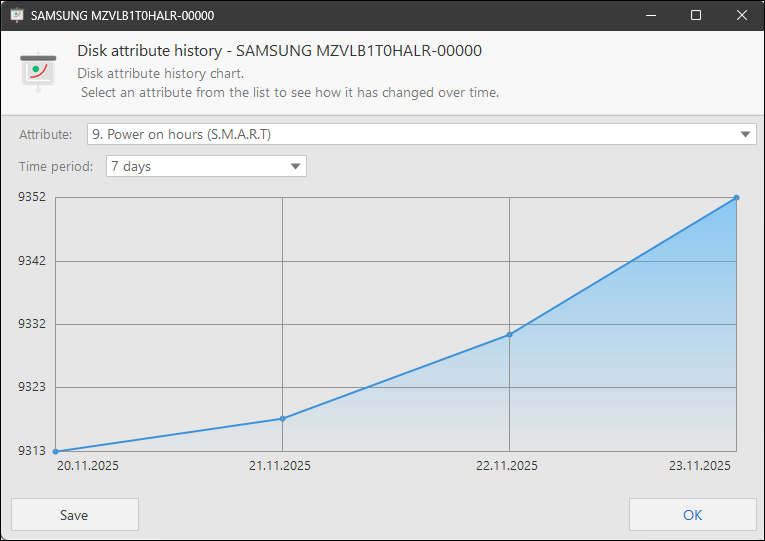
Kerish Disk Health is a disk‑monitoring application for Windows that continuously assesses the physical condition, SMART status, temperature, and overall health of your internal and external SSDs and HDDs. It is designed to reduce the risk of data loss by predicting when a drive is likely to fail and providing clear, actionable information.
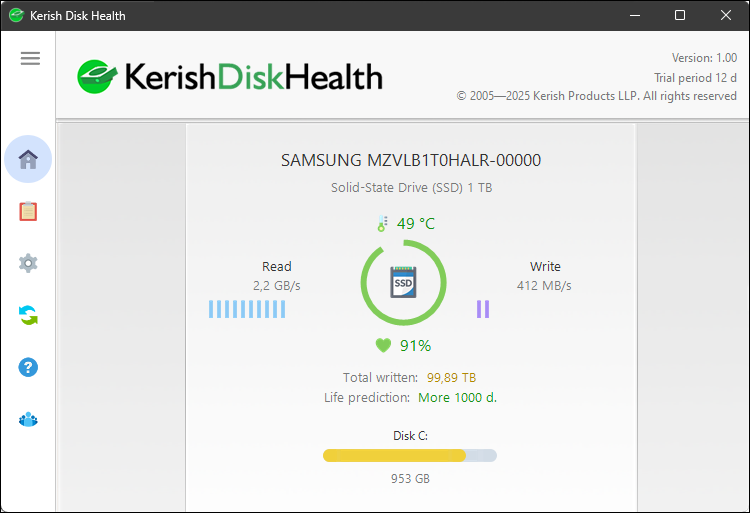
Instead of waiting for a blue screen or a corrupted file, the software proactively tracks key indicators such as bad sectors, error rates, wear leveling (for SSDs), and overheating. The result is a health percentage rating and a lifespan prediction that tell you how close each drive is to the end of its usable life. This makes Kerish Disk Health a practical tool for anyone who relies on their PC for study, work, or business and wants to avoid unexpected hardware failures.
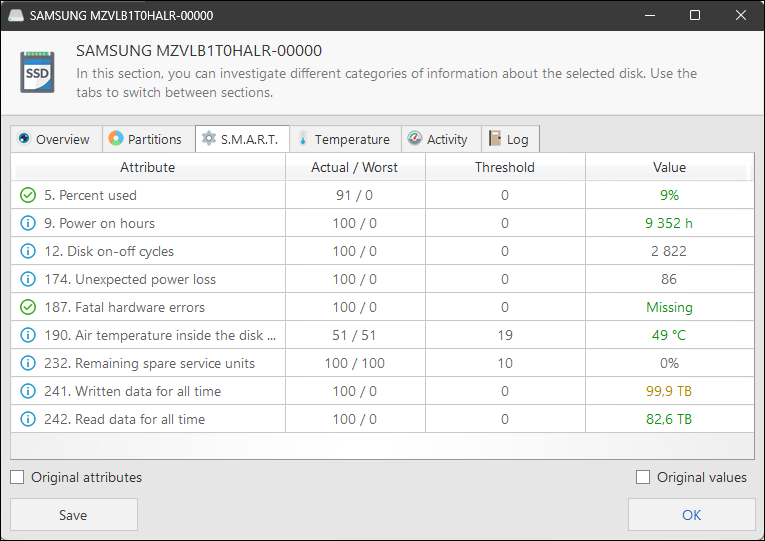
Kerish Disk Health runs quietly in the background, analyzing your disk’s S.M.A.R.T. attributes, health percentage, temperature, and usage patterns 24/7. It calculates how much of your drive’s life remains and tells you, in simple months‑left estimates, when it is approaching a critical state. This early warning system lets you back up data, replace aging drives, and avoid downtime instead of reacting after a failure.
The software supports most modern and legacy SSD and HDD models from over 50 manufacturers, making it suitable for home users, students, freelancers, small‑business owners, and IT administrators who manage multiple Windows machines. With weekly reports, continuous SMART monitoring, and automatic overheating alerts, Kerish Disk Health helps you keep your storage in peak condition, even if you are not a technical expert.
Key Benefits
Below are the main reasons why Kerish Disk Health helps protect your data and improve your computing experience:
- Prevent data loss by detecting disk degradation before catastrophic failure occurs.
- Plan drive replacements in advance using clear health percentages and estimated months‑to‑failure.
- Monitor disk temperature and avoid heat‑related damage with automatic overheating warnings.
- Detect risky parameters early through detailed S.M.A.R.T. and statistical analysis.
- Support for both SSDs and HDDs, including older and legacy models from major manufacturers.
- Simple, user‑friendly interface that makes complex disk metrics easy to understand.
- Regular weekly reports that show how your drive’s health changes over time.
- Background operation that does not slow down your PC.
- Compatibility with Windows 11, 10, 8 (8.1), and 7, so it works on most recent and older Windows systems.
These benefits make Kerish Disk Health especially useful for home users backing up personal photos and documents, professionals storing work projects, gamers managing large game libraries, and IT administrators overseeing multiple machines.
Why Choose Kerish Disk Health?
Kerish Disk Health stands out because it focuses on proactive disk health, not just error repair. While many utilities only fix problems after they appear, Kerish Disk Health helps you avoid those problems altogether by predicting when a drive is nearing its limits.
Its health rating system converts complex technical data into a simple percentage, so you do not need to interpret raw SMART codes yourself. The lifespan prediction gives you confidence when deciding whether to keep using an older drive or replace it. Additional features like temperature monitoring, weekly reports, and real‑time read‑write tracking make it a comprehensive disk‑care tool rather than a one‑time diagnostic checker.
Features
Below is a comprehensive list of the key features that make Kerish Disk Health a valuable addition to your needs:
- Health rating – Provides a percentage‑based health score for every disk, making it easy to judge overall condition.
- Real‑time score update – Recalculates the health percentage whenever significant changes in S.M.A.R.T. or usage occur.
- Critical status alerts – Warns you when health drops below safe thresholds, prompting backup and replacement.
- Lifespan prediction – Estimates how many months a disk is expected to remain reliable under current usage.
- Dynamic prediction – Adjusts the forecast based on your actual read‑write activity and wear patterns.
- Simple time‑to‑failure display – Shows remaining months in a clear, easy‑to‑read format.
- Disk thermometer – Monitors drive temperature continuously.
- Temperature graph – Displays historical temperature trends over hours or days.
- Overheat alerts – Notifies you if the disk exceeds recommended safe operating temperatures.
- Detailed analysis – Breaks down technical data into user‑friendly reports.
- Parameter highlights – Points out which S.M.A.R.T. or statistical items need attention.
- Risk‑level indicators – Shows whether each parameter is normal, warning, or critical.
- All types of disks – Fully supports SSDs and HDDs.
- SSD specific monitoring – Tracks write amplification, wear leveling, and remaining life for solid‑state drives.
- HDD mechanical monitoring – Watches for bad sectors, reallocations, spin‑up time, and other mechanical‑wear indicators.
- All well‑known manufacturers – Works with over 50 brands.
- Broad compatibility – Recognizes drives from major storage vendors and handles their unique S.M.A.R.T. layouts.
- Model‑specific rules – Applies optimized health checks tailored to each manufacturer’s behavior.
- Old models support – Includes support for older and legacy drives.
- Legacy‑drive detection – Properly reads S.M.A.R.T. data from older SATA and PATA drives.
- Backward‑compatible algorithms – Uses conservative health models suitable for aging hardware.
- Weekly reports – Delivers periodic summaries of your drives’ health.
- Automated schedule – Generates reports once per week without user intervention.
- Trend visualization – Shows how health, temperature, and key parameters change over time.
- Read‑Write monitoring – Tracks data‑transfer activity.
- Write‑cycle tracking – Counts or estimates write operations for SSDs to gauge wear.
- Activity history – Keeps a log of high‑usage periods that may correlate with heat or stress.
- S.M.A.R.T. analysis – Monitors S.M.A.R.T. parameters in real time.
- Real‑time threshold checking – Alerts when any S.M.A.R.T. attribute exceeds safe values.
- Attribute explanation – Provides brief descriptions of technical parameters so you can understand what they mean.
- Windows compatibility – Runs on multiple Windows versions.
- Support for Windows 11 / 10 / 8 (8.1) / 7 – Compatible with mainstream desktop and laptop editions.
- Background service – Operates as a low‑impact, always‑on process that does not interfere with daily tasks.
These features make Kerish Disk Health a practical, all‑in‑one solution for anyone who wants to keep their storage drives safe and avoid unexpected failure.
Requirements
Before installing Kerish Disk Health, please ensure your system meets the following requirements:
- A Windows PC running Windows 11, 10, 8 (8.1), or 7 (32‑bit or 64‑bit, as supported).
- At least one internal or external SSD or HDD connected to the system.
- Administrator rights to install and run the software.
- Internet access (optional, for updates and vendor‑specific drive‑support improvements).
- Minimum disk space of approximately 100–200 MB for program files and temporary data.
Downloads
Explore how Kerish Disk Health works according to your needs. Get the free trial to test the software on your actual drives and see health percentages, lifespan predictions, and temperature monitoring in real time.
Windows
15-day Free Trial
Download the trial version and start monitoring your SSDs and HDDs today—no credit card required. The trial lets you experience the full feature set before deciding whether to purchase a permanent license.
BUY NOW
Kerish Disk Health is available starting at a $14.95. But, for a limited time, you can now get a full version of Kerish Disk Health with a 1-year license key for free in the Giveaway tab below.

" />
Predict SSD & HDD Lifespan, 24/7 Disk Monitoring, Health Rating, SMART Analysis and Temperature Control for Windows 11, 10, 8, 7
- One license for three computers
- Applies to all versions of the application
- Free updates
- Free technical support
- You can recover your license if it gets lost
Platforms: Windows
Abelssoft CheckDrive BEST OFFER

IObit Smart Defrag 10 PRO (1 Year, 3-PCs License) BEST SELLER
Hard Disk Sentinel Professional: Lifetime Family License BEST SELLER

Qiling Disk Master Professional BEST SELLER
Systweak Disk Speedup BEST OFFER
Kerish Disk Health Giveaway
Available now: Free License Key For a Limited Time!
To access the giveaway, kindly provide your email address. Please refrain from closing this page after signing in to receive instructions on how to access the offer at no cost.
NOTES:
– All prices shown here are in listed USD (United States Dollar).
– Such promotional programs are subject to change without notice, from time to time in our sole discretion.
– Data may vary based on different systems or computers.
Thanks for reading Kerish Disk Health Review & Enjoy the discount coupon. Please Report if Kerish Disk Health Discount Coupon/Deal/Giveaway has a problem such as expired, broken link, sold out, etc while the deal still exists.


![[NEW LINK #9] Giveaway – ASCOMP PC Internals Professional Edition v2.102: Free License Key | Real-Time PC Hardware Analysis and Drive Monitoring Tool – for Windows](https://thesoftware.shop/wp-content/uploads/thumbs_dir/ASCOMP-PC-Internals-Professional-Review-Download-Discount-Coupon-rfosnlotebj6km3fzsd8pucpv050ej7hdoeor00xw8.png)