60% Off – HitPaw Online Ultra: 1-year Pro Subscription | All-in-One AI Media Toolkit | AI Photo Generator, Video Upscaler 4K, Image Unblur, Watermark Remover & Audio Enhancer

Achieve professional-grade results instantly with this complete suite of web-based editing solutions. Get a 1-year PRO access to HitPaw Online Ultra at a 60% Discount!
✔ Free Product Updates ✔ 24×7 Customer Support ✔ 30-day Money-back Guarantee.
HitPaw Online Review at a Glance
Creating high-quality media often requires navigating complicated interfaces, expensive software, and steep learning curves. Many users find themselves frustrated by the technical barriers involved in simply trying to clear up a blurry photo, remove a distracting object from a video, or clean up background noise in an audio recording. This friction slows down production and prevents great ideas from reaching completion.
HitPaw Online eliminates these obstacles by providing a browser-based, algorithmically advanced solution that requires no installation.
What is HitPaw Online?
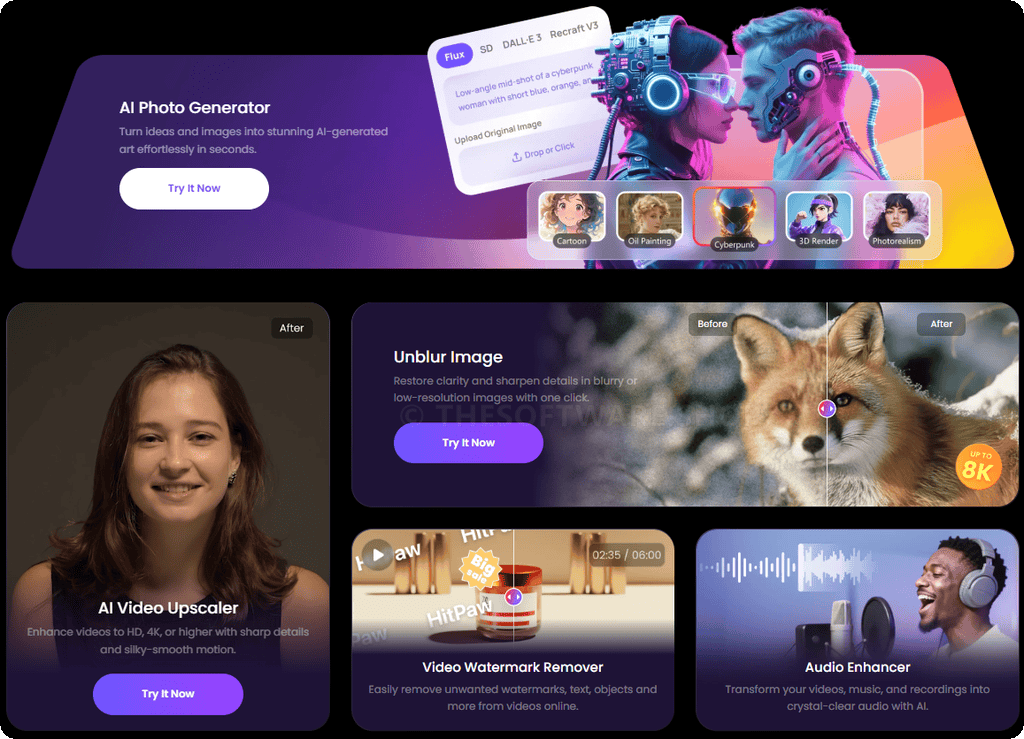
HitPaw Online is a robust, cloud-based platform that functions as a comprehensive media laboratory for creators of all skill levels. It aggregates over 40 distinct tools powered by artificial intelligence to process videos, photos, and audio files directly in your web browser.
Unlike traditional desktop software that demands heavy system resources, this toolkit processes data in the cloud, allowing you to perform intensive tasks like 4K upscaling and complex object removal on any device, including standard laptops, tablets, and smartphones. It serves as a centralized hub where static images become animations, low-resolution footage becomes high-definition masterworks, and noisy recordings become studio-quality soundscapes.
The platform prioritizes user privacy, ensuring that no files are stored permanently, making it a secure choice for personal and professional projects alike.
Key Benefits
Choosing HitPaw Online means opting for efficiency, accessibility, and quality without the hardware limitations of traditional editing. The primary benefit lies in its ability to democratize professional editing techniques; complex processes that previously took hours of manual labor are now automated into single-click operations.
Here are the practical outcomes buyers typically want from an AI media toolkit, and how HitPaw Online aligns with those needs across photo, video, and audio workflows.
- Faster cleanup for common issues (blur, noise, watermarks) in a simple upload → process → export flow.
- Higher perceived quality for content that needs to look sharp (social posts, product images, client previews).
- More consistency across projects by keeping photo, video, and audio tools in one place instead of switching between multiple sites.
- Flexible use on different devices, including mobile, with no installation required for online tools like watermark removal.
- Clearer audio for speech and recordings via AI noise reduction and vocal clarity improvements.
- Privacy-oriented handling described by HitPaw (no private collection of user data, no file backups, auto-deletion after a period of time).
Who benefits from this toolkit?
- Content Creators: YouTubers and TikTok influencers can generate scroll-stopping videos by refining footage clarity and scrubbing unwanted watermarks to maintain a polished, professional brand aesthetic.
- Photographers: Professionals and hobbyists can retouch portraits, fix damaged vintage photographs, and upscale lower-resolution images to print-ready quality without needing expensive desktop suites.
- Designers: Graphic artists can swiftly remove backgrounds, stylize assets, and prepare clean, high-fidelity visual elements for marketing campaigns and client projects.
- E-commerce Sellers: Online merchants can upscale product photography to 8K resolution and strip away cluttered backgrounds to create clean, trustworthy visuals that drive higher click-through rates and sales.
- Educators: Teachers and lecturers can improve the resolution of lecture videos, create engaging explainer content with subtitles, and ensure audio clarity for better student comprehension.
- Podcasters: Audio professionals can reduce distracting background noise, refine voice clarity, and produce crisp recordings that sound like they were captured in a high-end studio.
Universal Compatibility
One of the defining advantages of this toolkit is its platform independence. HitPaw Online is fully compatible with Windows, Mac, iOS, and Android devices. Whether you are at your desk editing a 4K video, on your tablet designing a social media post, or on your phone quickly removing a background, the experience remains consistent and powerful. This cross-platform capability ensures that your creativity is never restricted by the device you have at hand.
Uncompromised Privacy and Security
In an era where data security is paramount, HitPaw Online adheres to a strict privacy policy. The platform does not privately collect sensitive user data, nor does it create backups of the files you upload. All user files are processed temporarily and are automatically deleted from the servers after a short period. This ensures that your personal photos, proprietary videos, and confidential audio recordings remain yours alone. Users are reminded to download their processed files immediately, as they cannot be retrieved once the deletion cycle completes.
Features
Below is a comprehensive list of the key features that make the software a valuable addition to your needs:
Online Video AI Tools
HitPaw Online provides a massive array of video manipulation tools designed to correct common footage issues and generate new creative possibilities.
- AI Video Quality Improver: Video Enhancer utilizes deep learning to upscale low-resolution footage up to 4K, sharpening details and reducing artifacts for a crisp viewing experience.
- Resolution Upscaling: Video Upscaler boosts pixel density intelligently to make standard definition clips look like high-definition recordings.
- Object and Mark Erasure: Video Watermark Remover automatically detects and wipes away static watermarks, logos, text overlays, and unwanted objects without leaving obvious traces.
- Clean Text Removal: Remove Text without Blur specializes in erasing subtitles or captions while preserving the texture and fidelity of the background behind the text.
- Format and Size Management: Video Converter allows for the seamless modification of video file types to MP4, MOV, and other popular containers for universal playback.
- File Compression: Video Compressor reduces file sizes significantly to save storage space or meet upload limits without degrading visual fidelity.
- Platform Specific Optimization: Discord Video Compressor targets the specific file size limits of Discord, compressing clips to under 8MB for easy sharing.
- Creative Editing Suite: Video Cutter enables precise trimming of unwanted sections from the beginning, middle, or end of your clips to tighten the narrative flow.
- Speed Manipulation: Video Speed Changer adjusts playback rates to create dramatic slow-motion sequences or energetic fast-forward effects.
- Clip Combination: Video Merger stitches multiple video files into a single, cohesive timeline without re-encoding quality loss.
- Visual Adjustments: Crop \& Rotate Video helps you reframe your shot to 16:9, 9:16, or 1:1 aspect ratios and fix orientation issues.
- Playback Modification: Reverse Video plays your footage backward to create surreal visual effects or comedic moments.
- Loop Creation: Loop Video repeats specific segments of your clip to create seamless, endless playback files perfect for social media backgrounds.
- Audio-Visual Utility: Mute Video completely strips the audio track from your footage, allowing you to layer new sound or silence background noise.
- Music Integration: Add Music to Video lets you upload and synchronize external audio tracks to your video file for a professional soundtrack.
- Accessibility Tools: Add Subtitle to Video provides a simple interface for overlaying text, making content accessible to deaf or hard-of-hearing audiences.
- Global Reach Tools: Video Translator automatically translates spoken dialogue into over 35 languages, broadening your audience reach instantly.
- Language Pairs: English to Spanish/French/German/etc. ensures your content is understood globally by converting English audio into fluent foreign languages.
- Security and Branding: Add Watermark to Video allows you to upload your own logo or text overlay to protect your intellectual property from unauthorized use.
- Animation Tools: Video to GIF converts short video segments into high-quality animated GIFs for use in emails, websites, and messaging apps.
Online Photo AI Tools
The photo editing suite focuses on restoration, generation, and perfection of static imagery using advanced neural networks.
- Image Quality Restoration: Photo Enhancer acts as a comprehensive restoration engine, fixing blur, correcting colors, and sharpening soft edges in a single pass.
- High-Fidelity Upscaling: Image Upscaler increases the resolution of small images up to 4K, making them suitable for large prints or high-DPI displays.
- Clarity Correction: Unblur Image Portrait specifically targets facial features in out-of-focus shots to restore skin texture and eye sharpness.
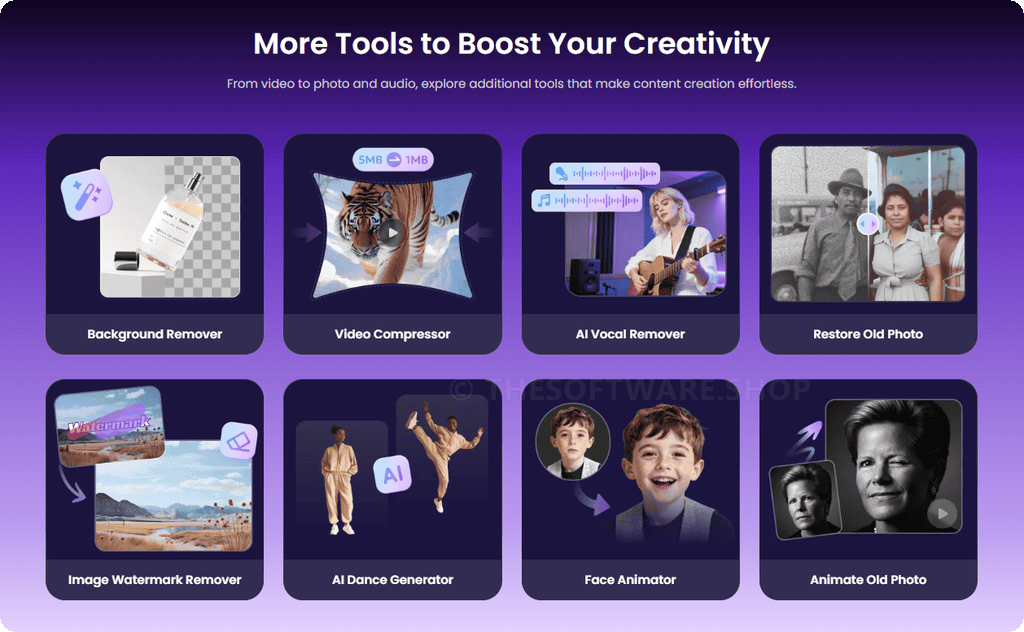
- Vintage Restoration: Restore Old Photo identifies scratches, tears, and sepia-fading in scanned physical photos and digitally repairs them to look new.
- Object Manipulation: Remove Object from Photo intelligently fills in the area left behind when you erase bystanders, trash cans, or other distractions from your composition.
- Watermark Erasure: Image Watermark Remover scrubs copyright stamps, date stamps, and logos from images while reconstructing the underlying visual data.
- Background Editing: Background Remover isolates the subject with extreme precision and deletes the backdrop, creating a transparent PNG instantly.
- Scenery Replacement: Background Changer allows you to swap a dull or messy environment for a custom color, gradient, or scenic image.
- Creative Generation: AI Photo Generator converts text prompts into unique, artistically rendered images, allowing you to visualize concepts that do not yet exist.
- Motion Generation: Animate Old Photo adds subtle movement to still portraits, making ancestors blink, smile, and move their heads realistically.
- Avatar Creation: Face Animator transforms static selfies into expressive, animated avatars for use in gaming or social profiles.
- Dance Animation: AI Dance Generator takes a full-body photo of a person and animates them performing trendy dance moves using skeletal mapping.
- Utility and Format: Image Converter switches files between JPG, PNG, WEBP, and other formats to ensure compatibility with various web and software requirements.
- Identity Documents: Passport Photo Maker automatically crops and adjusts your photo to meet the strict dimensional and background requirements of official ID documents.
- Code Generation: QR Code Art generates functional QR codes that are visually blended with artistic elements, making them far more engaging than standard black-and-white squares.
Online Audio AI Tools
Audio tools in this package ensure that the sound accompanying your visuals is just as polished as the imagery itself.
- Sound Quality Improvement: Audio Enhancer analyzes waveforms to remove hiss, hum, and crackle, resulting in studio-grade sound from imperfect recordings.
- Volume Normalization: Audio Volume Changer boosts quiet recordings or dampens overly loud tracks to achieve a balanced, comfortable listening level.
- Track Separation: Vocal Remover isolates the vocal frequencies from a song, allowing you to extract an instrumental version for karaoke or background music.
- Content Extraction: Audio Extractor pulls the audio stream directly from a video file, saving it as a standalone MP3 or WAV for podcasting or editing.
- File Management: Audio Converter changes audio coding between MP3, FLAC, AAC, WMA, and WAV to ensure your audio plays on any device or player.
- Size Reduction: Audio Compressor shrinks the file size of music and voice recordings to make them easier to email or upload without losing audible quality.
- Editing Functions: Audio Cutter allows for the precise removal of silence, mistakes, or unwanted sections from your audio timeline.
- Track Merging: Audio Joiner combines multiple audio clips into a single continuous track, perfect for creating medleys or podcast episodes.
- Pacing Adjustment: Audio Speed Changer speeds up or slows down audio playback, which is useful for transcribing interviews or creating special effects.
- Mixing: Add Music to Audio enables the layering of background tracks or sound effects over a primary voice recording.
Requirements
Before you start, make sure you have the basics ready so uploads, previews, and exports run smoothly across your devices.
- Internet Connection: High-speed internet connection recommended for uploading and downloading large video files.
- Web Browser: Compatible with modern browsers including Google Chrome, Mozilla Firefox, Safari, and Microsoft Edge.
- Operating System: Platform independent; works on Windows, macOS, Android, and iOS.
- Account: Registration required to access Pro features and save processed history.
Downloads
See how HitPaw Online performs with your own clips, photos, and recordings—use the free trial option first, then decide if Pro is right for your workload.
HitPaw’s plan pages describe a free experience designed around previews and limits, which is helpful for checking output quality before paying.
BUY NOW
HitPaw Online Pro offers access through subscription plans—weekly, monthly, or yearly—each including a set amount of AI credits. The yearly plan is currently available at a 60% discount: instead of $199.99, you pay only $79.99 per year.

" />
All-in-One AI Media Toolkit | AI Photo Generator, Video Upscaler 4K, Image Unblur, Watermark Remover & Audio Enhancer for Fast, No-Install Editing
- 3000 AI Credits/Year
- AI Video Enhancer: up to 6000 seconds
- Video Watermark Remover: up to 9000 seconds
- AI Photo Enhancer: up to 3000 images
- AI Video Generator: up to 300 videos
- AI Photo Generator: up to 1500 images
- AI Audio Enhancer: up to 30000 seconds
" />
All-in-One AI Media Toolkit | AI Photo Generator, Video Upscaler 4K, Image Unblur, Watermark Remover & Audio Enhancer for Fast, No-Install Editing
- 1200 AI Credits/Month
- AI Video Enhancer: up to 2400 seconds
- Video Watermark Remover: up to 3600 seconds
- AI Photo Enhancer: up to 1200 images
- AI Video Generator: up to 60 videos
- AI Photo Generator: up to 600 images
- AI Audio Enhancer: up to 12000 seconds
" />
All-in-One AI Media Toolkit | AI Photo Generator, Video Upscaler 4K, Image Unblur, Watermark Remover & Audio Enhancer for Fast, No-Install Editing
- 300 AI Credits/Week
- AI Video Enhancer: up to 600 seconds
- Video Watermark Remover: up to 900 seconds
- AI Photo Enhancer: up to 300 images
- AI Video Generator: up to 30 videos
- AI Photo Generator: up to 150 images
- AI Audio Enhancer: up to 3000 seconds

ImagineArt EXCLUSIVE

SiteSpeakAI EXCLUSIVE

Pippit AI BEST OFFER

Deep Art Creator Pro BEST OFFER

Vision FX BEST OFFER
HitPaw Online Ultra Pro Giveaway
Unavailable at this moment!

To access the giveaway, kindly provide your email address. Please refrain from closing this page after signing in to receive instructions on how to access the offer at no cost.
NOTES:
– All prices shown here are in listed USD (United States Dollar).
– Such promotional programs are subject to change without notice, from time to time in our sole discretion.
– Data may vary based on different systems or computers.
User & Media Reviews
What are their users saying about #THE SOFTWARE? Why they loved it?
(Source: )
 ⭐⭐⭐⭐⭐
⭐⭐⭐⭐⭐HitPaw Online Video Upscaler helps increase resolution while preserving visual details. The enhanced footage looks sharper and more stable, especially when working with older or low-quality videos.
Video Editor⭐⭐⭐⭐⭐" class="author_image">James Wilson
Video Editor
⭐⭐⭐⭐⭐
sitejabber review
Working with raw footage, HitPaw Online’s Crop & Rotate Video helps me adjust composition quickly. Adjusting angles and framing feels natural, and I don’t need heavy software for simple fixes.
Graphic Design Assistant⭐⭐⭐⭐⭐" class="author_image">Oliver Scott
Graphic Design Assistant
⭐⭐⭐⭐⭐
trustpilot review
HitPaw Online Image Background Remover helps me separate products from backgrounds accurately. The edges stay clean, and the images look ready for online stores without extra manual retouching.
Online Store Owner⭐⭐⭐⭐⭐" class="author_image">Sofia Rodriguez
Online Store Owner
⭐⭐⭐⭐⭐
I use the HitPaw Online Video Enhancer to improve the clarity of my tech videos. The AI makes screen recordings and demos sharper, helping viewers understand detailed software features more easily.
Tech YouTuber⭐⭐⭐⭐⭐" class="author_image">Ryan Anderson
Tech YouTuber
⭐⭐⭐⭐⭐
Thanks for reading HitPaw Online Review & Enjoy the discount coupon. Please Report if HitPaw Online Pro Discount Coupon/Deal/Giveaway has a problem such as expired, broken link, sold out, etc while the deal still exists.