72% Off – Fontpeek: Lifetime License | Professional Font Preview – for macOS

Preview Fonts Faster Than Ever — Get FontPeek at a 72% Discount Now and Stop Wasting Time Hunting for the Right Typeface
✔ Lifetime License. ✔ Free Product Updates ✔ Customer Support
BUY NOW
FontPeek is available for $9.99 USD. But right now, you can get your FontPeek license with our exclusive discount of up to — a limited-time offer you do not want to miss. This deal will not last, so act now while it is still available.
By purchasing FontPeek, you receive:
- Complete feature access including Glyph Explorer, Font Comparison, Variable Font Support, CSS Snippets, Custom Collections, Favorites, and all Designer-Friendly tools
- Full lifetime license for one Mac, with all current features unlocked
- Access to all future updates within the current major version — your app stays current as macOS evolves
- Priority support from the FontPeek development team for any technical questions or issues
- Instant delivery via the Mac App Store — download immediately after purchase with your Apple ID

Professional Font Preview for macOS | Instant Font Browser, Glyph Explorer & Variable Font Support | Menubar App for Graphic & UI Designers | Lightweight, Fast & Native SwiftUI
- Please Notes:
- You may be directed to the bundle page, but it is possible to purchase the software individually.
- If you're having difficulty locating the product on the bundle page, please utilize the browser's search feature.
- Get an additional $3 discount on all orders more that $30.
- LEGITIMATE: All apps are authentic and have original licenses obtained directly from the creators via contracts.
- INSTANT ACCESS: Fully activated macOS Apps & Windows Software with instant downloads & license key access.
- Device Activation: 1 Device
- Major & Minor Updates Included
- Lifetime License
Platforms: Mac

99% Off – Cute and Friendly Fonts Bundle: Commercial License | 78 Premium Fonts for Windows & Mac OS X BEST OFFER
96% Off – Kids Font Collection Bundle: Commercial License | 25 Best Fonts for Kids – for WIndows & Mac OS X BEST OFFER

98% Off – Impressive Font Bundle: 53 Premium Fonts with Commercial License – for Windows & Mac BEST OFFER
$1 Only – Kayla Font Bundle: Commercial License | 47 Premium Fonts – for Windows & Mac OS X BEST OFFER
99% Off – The Versatile Font Bundle: 61 Premium Fonts with Commercial License – for Windows, Mac OS X BEST OFFER
Fontpeek Mac App Giveaway
Unavailable at this moment!

To access the giveaway, kindly provide your email address. Please refrain from closing this page after signing in to receive instructions on how to access the offer at no cost.
NOTES:
– All prices shown here are in listed USD (United States Dollar).
– Such promotional programs are subject to change without notice, from time to time in our sole discretion.
– Data may vary based on different systems or computers.
Fontpeek Review at a Glance
Every designer knows the frustration: you are deep in a project, you need the right font, and suddenly you are buried in Font Book, switching between apps, typing sample text over and over, and losing precious momentum. Choosing typography should not slow you down — it should be a seamless, fast, and even enjoyable part of the design process. The reality is that macOS’s built-in font tools were never designed for the speed and precision that professional designers demand daily. This is the problem FontPeek was built to solve.
What is FontPeek?
FontPeek is a lightweight, native macOS menubar application designed specifically for graphic designers, UI/UX designers, brand specialists, and developers who need fast, reliable, and professional font previewing right from their desktop. Built with SwiftUI for macOS 14+, FontPeek lives quietly in your menubar and launches instantly whenever you need it — no internet connection required, no heavy resource usage, and no disruption to your main design workflow.

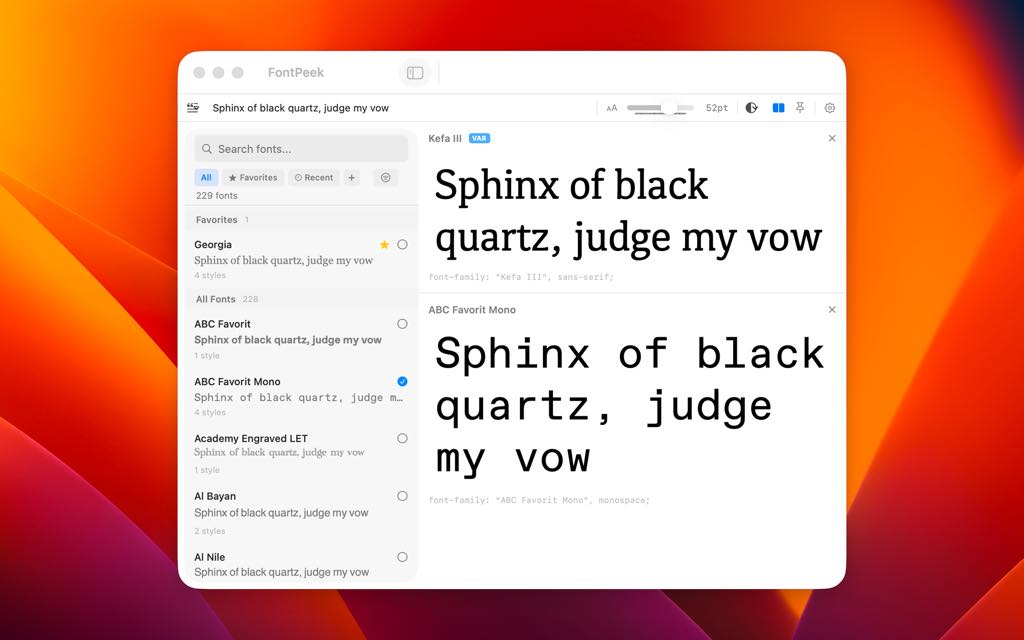
At its core, FontPeek is a focused tool that does one thing exceptionally well: it helps you find, preview, and compare the perfect font as quickly as possible. From browsing your complete library of installed system fonts with live text previews, to exploring full glyph sets, comparing multiple typefaces side by side, and interactively adjusting variable font axes — FontPeek puts complete typographic control at your fingertips in a clean, minimal interface.

Unlike bloated font managers that try to do everything, FontPeek respects your workflow. It is always just one click or keyboard shortcut away, and it stays completely out of your way when you do not need it. With its always-on-top floating window option, you can keep FontPeek visible while you work in Figma, Sketch, Adobe Illustrator, or any other design application — making real-time font decisions without losing focus.
Key Benefits
FontPeek solves the everyday typography bottleneck for professionals. Whether you are a graphic designer auditing a client’s brand typography, a UI designer selecting interface fonts that balance readability and personality, a brand specialist comparing typeface options for a new visual identity, or a developer who needs quick font specifications and CSS snippets — FontPeek is built for you.
Here is why designers choose FontPeek over other solutions:
- Speed first: FontPeek launches instantly and responds in real time. There is no loading screen, no sync delay, and no lag — just immediate access to your font library.
- Zero workflow disruption: Because it lives in the menubar, FontPeek never interrupts your active design work. It is always one click or one shortcut away.
- Professional-grade features in a lightweight package: From glyph exploration and variable font control to CSS snippet generation and custom collections, FontPeek delivers advanced functionality without the complexity or resource weight of a full font management suite.
- Completely offline: FontPeek works entirely without an internet connection, making it reliable in any working environment — from a coffee shop to a client’s office.
- macOS-native performance: Built natively with SwiftUI for macOS 14+, FontPeek is optimized for Apple Silicon and Intel Macs, ensuring a smooth, responsive experience that feels right at home on your Mac.
- Dark mode and customization: FontPeek adapts to your visual preferences with full dark mode support and customizable preview backgrounds — keeping your workspace cohesive and distraction-free.
Key Features
Below is a comprehensive breakdown of the core capabilities that make FontPeek a must-have addition to every designer’s toolkit. Each feature has been purpose-built to deliver maximum utility with minimum friction:
- Instant Font Preview — Browse your complete library of installed system fonts with live, real-time text previews.
- Custom Text Input — Type any word, phrase, or sentence to see exactly how a font renders your specific content.
- Built-in Pangrams — Use pre-loaded pangrams (e.g., “The quick brown fox”) to instantly test full character coverage across any font.
- Glyph Explorer — View the complete character set of any installed font in a clean, organized layout.
- Uppercase & Lowercase — Quickly scan the full alphabetic range of a typeface at a glance.
- Numbers & Punctuation — Verify how a font handles numeric characters and common punctuation marks.
- Symbols & Diacritics — Check for special symbols and international diacritic characters, ensuring compatibility with multilingual projects.
- Font Comparison — Select multiple fonts simultaneously and view them side by side for direct comparison.
- Personality & Readability Evaluation — Assess typeface tone, mood, and legibility in a single, unified view.
- Stylistic Differences at a Glance — Identify subtle or major visual distinctions between typefaces without switching between separate windows.
- Variable Font Support — Interactively control and adjust the full design space of modern variable fonts in real time.
- Weight Axis Control — Slide smoothly between thin and heavy weights to find the perfect typographic density.
- Width Axis Control — Adjust font width from condensed to extended with precise, live feedback.
- Slant & Custom Axes — Manipulate slant and any additional custom axes defined by the variable font’s designer.
- Code Snippets — Automatically generate ready-to-use CSS
font-familydeclarations for any selected font.- Proper Fallback Stacks — CSS output includes correctly structured fallback font families for production-ready web code.
- One-Click Copy — Copy generated snippets to your clipboard instantly for seamless integration into your codebase.
- Always Accessible — FontPeek lives in your macOS menubar, always ready without cluttering your Dock or desktop.
- Always-on-Top Floating Window — Keep the FontPeek panel visible above all other windows while you design.
- Global Keyboard Shortcut — Toggle FontPeek’s visibility from anywhere on your Mac with a customizable hotkey.
- Fast & Lightweight — Native SwiftUI architecture ensures blazing-fast search and an ultra-minimal memory footprint.
- Instant Launch — FontPeek opens in milliseconds — no startup delay or loading screens.
- No Internet Required — All font data is read locally from your system; no network connection is ever needed.
- macOS 14+ Optimized — Built for modern macOS, delivering peak performance on both Apple Silicon and Intel processors.
- Designer-Friendly Organization — A full suite of organizational tools to keep your font workflow tidy and efficient.
- Custom Collections — Group fonts into named collections for specific projects, clients, or design systems.
- Favorites Marking — Star your most-used fonts for instant one-click access at any time.
- Recently Used Tracking — FontPeek automatically keeps a log of recently previewed fonts so you can quickly return to previous choices.
- Dark Mode Support — Full system dark mode compatibility for comfortable use in any lighting condition.
- Customizable Preview Backgrounds — Adjust the preview background color to test font legibility across light, dark, and colored contexts.
Your Typography Workflow Starts and Ends with FontPeek
The right font can define an entire brand identity, make an interface effortless to read, or bring a design concept to life. Yet for too long, finding that right font has been the most friction-filled step in the design process. FontPeek changes that completely. By combining instant browsing, deep glyph inspection, side-by-side comparison, variable font control, and developer-ready CSS output — all in a lightweight, always-accessible menubar app — FontPeek gives designers exactly what they need, right when they need it.
Whether you are fine-tuning a brand’s typographic system, selecting the perfect UI typeface for a mobile app, or simply auditing your font library for a new project, FontPeek is the tool that keeps up with your creative pace. It is precise, fast, native, and built with real design workflows in mind. Once you start using FontPeek, you will wonder how you ever worked without it.
Requirements
- Operating System: macOS 14.6 or later
- Platform: Mac only (native macOS application)
- Architecture: Compatible with Apple Silicon (M-series) and Intel-based Macs
- Internet Connection: Not required — fully offline functionality
- Font Source: Works with all fonts installed on your macOS system
Free to Try
See for yourself how FontPeek fits into your daily design workflow. FontPeek offers a free trial so you can put every feature to the test — from instant font previewing and glyph exploration to variable font controls and CSS snippet generation — before making any commitment. Experience the speed, simplicity, and power of a tool built specifically for professional designers. Click the button below to get your free trial and start previewing fonts the smart way.
or
Buy now, the price start from:
Thank you for reading FontPeek review, and enjoy the discount coupon. If you notice any issues with FontPeek discount coupon, deal, or giveaway—such as an expired offer, broken link, or sold‑out promotion—please let us know while the deal is still available.