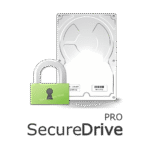
Giveaway #4 – SecureDrive PRO 1.0: Lifetime License | Windows Encrypted Virtual Drive Software – for Windows

Lock Down Your Files Before Someone Else Gets to Them. Get a Full Version of SecureDrive 1.0 for FREE today and start protecting what matters before it’s too late.
You can also get SecureDrive PRO with a lifetime license that includes free updates and support at a 33% Discount!
✔ Lifetime License. ✔ Free Product Updates ✔ Customer Support
BUY NOW
SecureDrive PRO is normally available at $39.95, but you can now secure your license that includes free updates and support using our exclusive limited-time discount offer of up to 55% OFF. This special offer won’t last, so act now to lock in your savings.
Software Giveaway: Get a full version of SecureDrive PRO v1.0, including a free license key, in the Giveaway tab below.

Windows Encrypted Virtual Drive Software | Create Password-Protected Virtual Volumes | Secure File Storage & Data Encryption Utility | Mount as Drive Letter | Protect Sensitive Files with Read-Only & Ransomware Defense Mode
- Lifetime License for 1 PC
- Full software license with no feature restrictions or storage limitations.
- Priority customer support for setup, troubleshooting, and best-practice guidance.
- Free software updates to ensure continued compatibility with the latest Windows versions.
- Peace of mind knowing your sensitive data stays private, portable, and protected for the long term.
Platforms: Windows
Windows Encrypted Virtual Drive Software | Create Password-Protected Virtual Volumes | Secure File Storage & Data Encryption Utility | Mount as Drive Letter | Protect Sensitive Files with Read-Only & Ransomware Defense Mode
- Lifetime License for 1 PC
- Full software license with no feature restrictions or storage limitations.
- Priority customer support for setup, troubleshooting, and best-practice guidance.
- Free software updates to ensure continued compatibility with the latest Windows versions.
- Peace of mind knowing your sensitive data stays private, portable, and protected for the long term.
Platforms: Windows
Windows Encrypted Virtual Drive Software | Create Password-Protected Virtual Volumes | Secure File Storage & Data Encryption Utility | Mount as Drive Letter | Protect Sensitive Files with Read-Only & Ransomware Defense Mode
- Lifetime License for 2 PCs
- Full software license with no feature restrictions or storage limitations.
- Priority customer support for setup, troubleshooting, and best-practice guidance.
- Free software updates to ensure continued compatibility with the latest Windows versions.
- Peace of mind knowing your sensitive data stays private, portable, and protected for the long term.
Platforms: Windows
Windows Encrypted Virtual Drive Software | Create Password-Protected Virtual Volumes | Secure File Storage & Data Encryption Utility | Mount as Drive Letter | Protect Sensitive Files with Read-Only & Ransomware Defense Mode
- Lifetime License for 5 PCs
- Full software license with no feature restrictions or storage limitations.
- Priority customer support for setup, troubleshooting, and best-practice guidance.
- Free software updates to ensure continued compatibility with the latest Windows versions.
- Peace of mind knowing your sensitive data stays private, portable, and protected for the long term.
Platforms: Windows
Windows Encrypted Virtual Drive Software | Create Password-Protected Virtual Volumes | Secure File Storage & Data Encryption Utility | Mount as Drive Letter | Protect Sensitive Files with Read-Only & Ransomware Defense Mode
- Lifetime License for 10 PCs
- Full software license with no feature restrictions or storage limitations.
- Priority customer support for setup, troubleshooting, and best-practice guidance.
- Free software updates to ensure continued compatibility with the latest Windows versions.
- Peace of mind knowing your sensitive data stays private, portable, and protected for the long term.
Platforms: Windows
Hasleo BitLocker Anywhere BEST OFFER

Drime Secure Cloud Storage BEST OFFER
Cryptbox 2026: Saver Subscription BEST OFFER
FolderFort Cloud Storage Pro BEST OFFER
Abelssoft FileCryptor BEST OFFER
Wise Folder Hider Pro: 3 PCs / 1 Year BEST OFFER

82% Off – WinZip Ultimate Suite: 7 Premium Tools in One | File Compression, Encryption, PDF Editing, Large Attachment Sharing, and PC Optimization BEST OFFER

Icedrive: Lifetime Subscription BEST OFFER
SecureDrive PRO Giveaway
Available now: Free License Key For a Limited Time!
To access the giveaway, kindly provide your email address. Please refrain from closing this page after signing in to receive instructions on how to access the offer at no cost.
NOTES:
– All prices shown here are in listed USD (United States Dollar).
– Such promotional programs are subject to change without notice, from time to time in our sole discretion.
– Data may vary based on different systems or computers.
SecureDrive PRO Review at a Glance
Most people store their most sensitive files—tax documents, client contracts, private photos, proprietary code—in plain folders that anyone with physical or remote access to their computer can open. A stolen laptop, a curious family member, a malware infection, or a simple oversight can expose years of confidential information in seconds. Traditional Windows folders offer no real protection, and relying on basic password-protected ZIP files is slow, clunky, and easy to crack.
SecureDrive PRO solves this problem by giving you a private, encrypted digital vault that lives on your PC but behaves exactly like a normal disk drive.
What is SecureDrive PRO
SecureDrive PRO is a Windows-based data encryption utility that creates secure, password-protected virtual disk volumes. These volumes function as encrypted container files stored on your physical drive, but once mounted, they appear and behave exactly like a standard Windows drive letter—complete with full Explorer integration, drag-and-drop support, and native application compatibility.
The software combines the simplicity of a regular USB drive with the protective strength of dedicated encryption software, making it easy for non-technical users to secure sensitive files without specialized training.
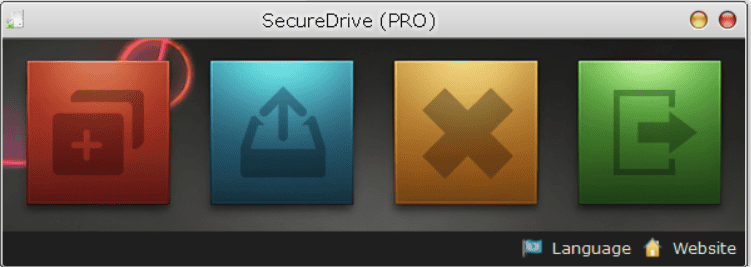
Instead of wrestling with complicated encryption software or command-line tools, you simply create a virtual volume, assign it a password, and mount it as a drive letter in Windows Explorer. From that point forward, you can drag, drop, save, and run files just as you would on any other drive—except everything inside is fully encrypted and invisible to anyone without your password.
At its core, SecureDrive PRO is a lightweight Windows security utility built around the concept of encrypted container files (with the “.sdd” extension). Each container acts as an isolated, password-protected vault that can hold gigabytes of data while appearing as a single file on your physical disk.
When you “mount” that file, it instantly becomes a recognizable drive letter—like a USB stick—that integrates seamlessly with Windows. When you’re done, you “dismount” it, and the data disappears back into an unreadable encrypted file, leaving no trace on your system.
Key Benefits
Before listing the specific advantages, it helps to understand how these benefits translate into real-world peace of mind for anyone storing confidential data on a Windows PC.
- Total data privacy: Your files remain completely unreadable to anyone without the correct password, even if the container file is copied or stolen.
- Zero learning curve: Mounted volumes work exactly like normal drives, so there’s no need to learn new software workflows or interfaces.
- Ransomware defense: Read-only mode prevents malicious encryption or tampering while you’re simply viewing archived files.
- Organized security: Multi-volume support lets you separate work, personal, and archival data into independently secured vaults.
- No system footprint: Dismounted volumes leave no visible trace on your operating system’s file structure, protecting your privacy even from casual snooping.
- Fast, efficient encryption: On-the-fly processing means minimal slowdown, even with large files or deep folder hierarchies.
- Full control over sessions: Choose whether volumes stay mounted for convenience or auto-dismount for maximum security.
Why choose SecureDrive PRO? Unlike bulky enterprise encryption suites that demand IT expertise, SecureDrive PRO is designed for everyday users, freelancers, small business owners, and professionals who need serious protection without the hassle. It’s ideal for anyone handling sensitive information, including accountants safeguarding client financials, developers protecting proprietary source code, consultants storing confidential contracts, or individuals simply wanting a private space for personal documents and photos. Because it runs locally with no cloud dependency, your data never leaves your control.
The benefits go beyond simple password protection. SecureDrive PRO’s read-only mode guards against accidental deletion and, importantly, defends against ransomware attempts to encrypt or corrupt your files while mounted. Its multi-volume support lets you organize different types of data—work, personal, archives—into separate vaults, each with independent passwords and storage limits. And because the encryption and decryption happen on-the-fly with minimal CPU overhead, you get robust security without sacrificing speed, even with large files or complex folder structures.
Key Features
Below is a comprehensive list of the key features that make SecureDrive PRO a valuable addition to your digital security toolkit:
- Encrypted Virtual Volumes: Create secure container files that function as isolated, password-protected vaults for your data.
- Industry-Standard Encryption: Ensures files remain unreadable even if the container is copied or transferred elsewhere.
- Seamless Windows Integration: Mounted volumes behave exactly like a physical hard drive or USB device.
- Native Explorer Support: Drag, drop, save, and run applications directly from the encrypted drive without extra steps.
- Multi-Volume Support: Manage multiple independent encrypted containers simultaneously.
- Custom Vault Categories: Assign separate storage limits and passwords for different data types, such as Work, Personal, or Archives.
- Flexible Session Management: Control how your encrypted drive behaves after closing the main application.
- Persistent Mounting Option: Keep the drive accessible in the background for uninterrupted workflows.
- Auto-Dismount on Exit: Automatically locks the drive when you finish, ensuring maximum security.
- Read-Only Protection Mode: Mount volumes in a “look-but-don’t-touch” state for viewing sensitive archives safely.
- Ransomware Mitigation: Neutralizes risks from accidental edits, deletions, or malicious encryption attempts.
- Stealth and Privacy: Encrypted containers leave no footprint on your host system once dismounted.
- Single-File Storage: All data is consolidated into one container file, simplifying backup and portability.
- Lightweight Performance: Handles on-the-fly encryption and decryption with minimal CPU overhead.
- Optimized for Large Files: Maintains smooth performance even with complex directory structures or high storage volumes.
Step-by-Step Setup Guide
Getting started with SecureDrive PRO is straightforward, even for users with no prior encryption experience. The process is broken into a few clear stages.
- Create a New Virtual Volume: Launch the program, click “Create a Secured Drive,” choose a save location, name your “.sdd” file, set a strong password, define a storage capacity, and select an available drive letter.
- Mount the Volume: Select your “.sdd” file, enter your password, optionally enable Read-Only Mode, choose a drive letter, and decide whether to enable “Dismount on Exit.”
- Work with Your Data: Access the mounted drive through “This PC,” then drag, drop, save, or run files exactly as you would on a normal disk.
- Configure Exit Behavior: Decide whether the drive stays mounted after closing SecureDrive PRO (persistent mode) or automatically locks (auto-secure mode).
- Dismount When Finished: Return to the dashboard, select “Dismount,” choose the drive letter, and confirm—your data instantly re-encrypts and disappears from Windows Explorer.
Best Practices for Maximum Protection
A few simple habits will help you get the most secure and reliable experience from SecureDrive PRO.
- Use Read-Only Mode when opening archives on shared or untrusted computers to prevent accidental changes or ransomware damage.
- Back up your “.sdd” container file regularly to an external drive or cloud storage to avoid data loss.
- Keep your volume file on a local SSD rather than a network share for the fastest encryption and decryption speeds.
- Choose a strong, memorable password, since there is no recovery option if it’s forgotten—this is a local-only security tool by design.
Requirements
Before installing, confirm your system meets the following minimum specifications for smooth performance.
- Operating System: Windows 10 (version 1809), Windows 11, or later, including Windows Server.
- Framework Dependency: .NET Framework 4.0 must be installed.
Downloads
See how SecureDrive PRO performs in your own workflow before committing to a purchase. Download the free trial edition by clicking the button below to test volume creation, mounting, and file management firsthand—completely risk-free.
or
Buy now, the price start from:
Thank you for reading SecureDrive PRO review, and enjoy the discount coupon. If you notice any issues with SecureDrive PRO discount coupon, deal, or giveaway—such as an expired offer, broken link, or sold‑out promotion—please let us know while the deal is still available.


![[NEW KEY #17] Giveaway – IObit Protected Folder 1.3: Free License Code | Full Version – for Windows](https://thesoftware.shop/wp-content/uploads/thumbs_dir/IObit-Protected-Folder-Review-Discount-Coupon-Code-Giveaway-rfoslhjw0qmyg761cdgglvkdqska31t837kcvl5tw8.png)