

Giveaway – AnyHEIC: Free License Key | HEIC to JPG, PNG & WebP Converter – for Windows

Batch Convert HEIF Images, Resize, Keep EXIF Metadata, 100% Offline and Private Local Photo Conversion Tool. Get a full version of AnyHEIC – HEIC Photo Converter, with a license key for FREE!
Free Full Version!
BUY NOW
AnyHEIC – HEIC Photo Converter is available for $9.99. But, you can now get a full version of AnyHEIC with a license key for free in the Giveaway tab below.This offer is available for a limited time!

Turn stubborn HEIC and HEIF images into universally supported JPG, PNG, or WebP files in seconds, without ever sending a single photo to the cloud.
- After you purchase AnyHeic - Heic Photo Converter for Win it may be used indefinitely.
- AnyHeic - Heic Photo Converter for Win is licensed per computer, and not per user.
- Each license allows installation on 2 computers, and AnyHeic - Heic Photo Converter for Win may be used at exactly the same time on each of them.
- Transfer of a license to another owned computer is allowed.
- Online license activation is required without a hardware footprint. what's this?
- This promotion can be used to upgrade or extend an existing license.
- You can install/register the software at any time.
- License can be used for Commercial and Personal use.
- Upgrades to future versions of the software will be free for the lifetime of the product.
- Support is provided for the lifetime of the product.
- Prices do not necessarily include taxes, which will vary by country.
Platforms: Windows
Aiseesoft HEIC Converter: Lifetime License BEST OFFER
Duplicate Photos Fixer Pro BEST OFFER

AnyWebP - WebP Converter GIVEAWAY

Vovsoft Batch Image Converter GIVEAWAY
MyFormatConverter Premium: Lifetime License BEST OFFER
AnyHEIC – Heic Photo Converter Key Giveaway
Available now: Free License Key for a Limited Time!

To access the giveaway, kindly provide your email address. Please refrain from closing this page after signing in to receive instructions on how to access the offer at no cost.
NOTES:
– All prices shown here are in listed USD (United States Dollar).
– Such promotional programs are subject to change without notice, from time to time in our sole discretion.
– Data may vary based on different systems or computers.
AnyHEIC Review at a Glance
Anyone who owns an iPhone knows the frustration of opening a folder full of photos labeled .HEIC and finding that half of the programs on a Windows computer simply refuse to open them. Email attachments bounce back, website uploads fail, and photo editors show a blank thumbnail instead of the picture. This mismatch between Apple’s default image format and the rest of the software world is a common headache for anyone who moves photos between devices, and it becomes even more time-consuming when there are dozens or hundreds of images that all need to be fixed one at a time.
AnyHEIC was built specifically to remove that friction.
What Is AnyHEIC
AnyHEIC is a Windows desktop application designed to convert Apple’s HEIC and HEIF image formats into the more widely compatible JPG, PNG, and WebP formats. HEIC (High Efficiency Image Container) and HEIF (High Efficiency Image Format) are the default photo formats used by modern iPhones and some other devices because they store high-quality images in a smaller file size than older formats like JPG. The tradeoff is compatibility: many Windows programs, older devices, websites, and third-party platforms do not recognize these formats without additional codecs or converters.
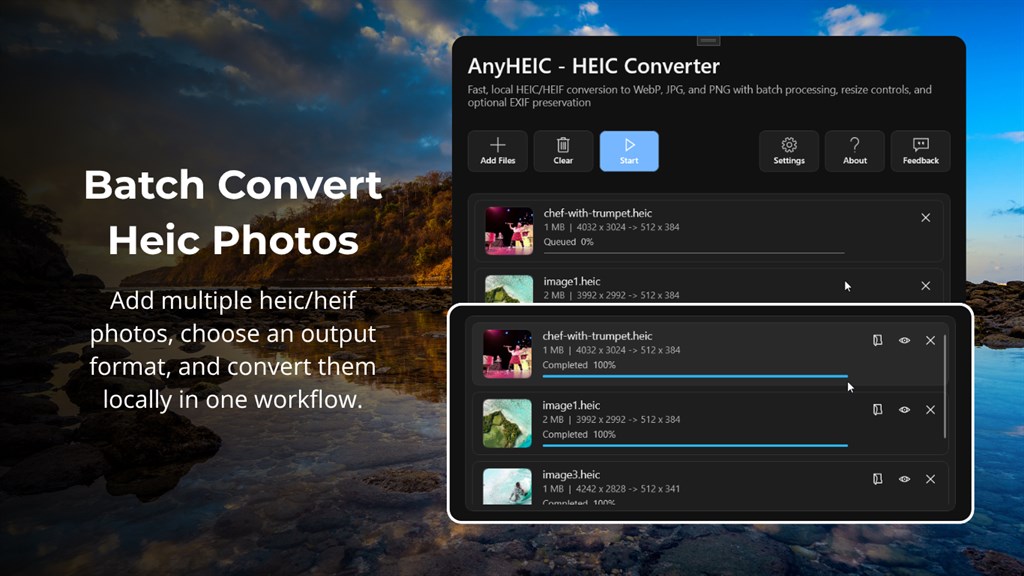
AnyHEIC solves that compatibility gap directly on the desktop. Instead of relying on a browser-based tool or a separate codec pack, the software provides a self-contained conversion environment where users add their HEIC or HEIF files, select an output format, adjust image settings such as size and quality, and generate finished files that open correctly in virtually any application, from photo viewers to design software to email clients. The tool is distributed for Windows 10 (build 17763.0 or higher) and is also listed as compatible with PC, Mobile, Surface Hub, and HoloLens devices, giving it broad reach across the Windows ecosystem.
Key Benefits
Before looking at the individual features, it helps to understand the practical advantages AnyHEIC brings to everyday photo management. The list below highlights the core benefits that make this converter a sensible addition to any Windows-based photo or content workflow.
- Universal compatibility — Convert HEIC and HEIF files into JPG, PNG, or WebP so your photos open correctly in any program, device, or website that does not support Apple’s native formats.
- Time savings through batch processing — Convert an entire folder of images in one operation instead of opening and exporting each photo individually.
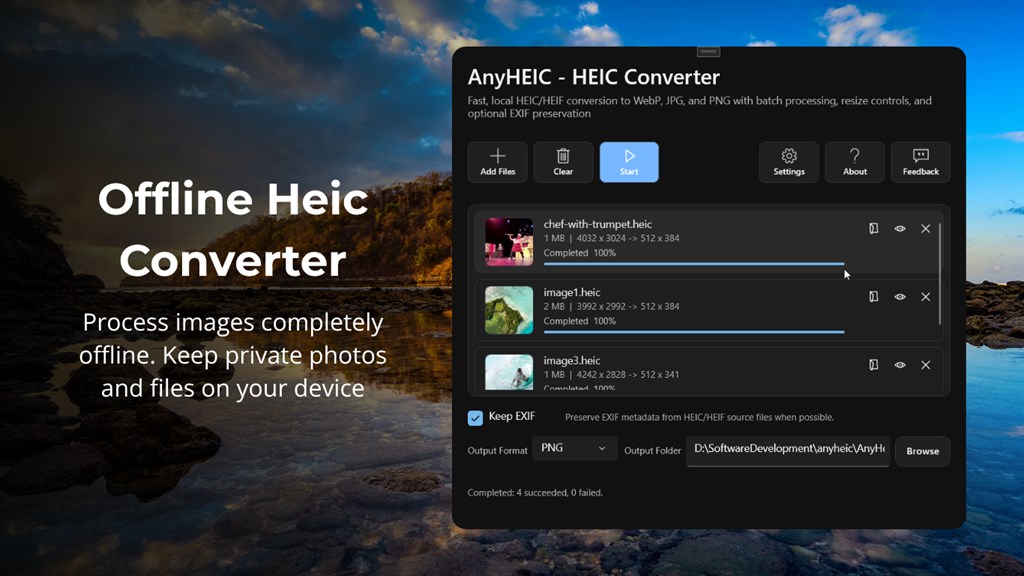
- Complete data privacy — All conversion happens on your own device, so personal photos and their metadata are never uploaded to a server or shared with a third party.
- No internet dependency — Because processing is fully offline, AnyHEIC works during travel, in secure work environments, or anywhere a stable connection is not available.
- Flexible output control — Adjust image dimensions, resize by percentage, and fine-tune WebP quality so the final files match exactly what a project requires, whether that is a lightweight web image or a high-detail print file.
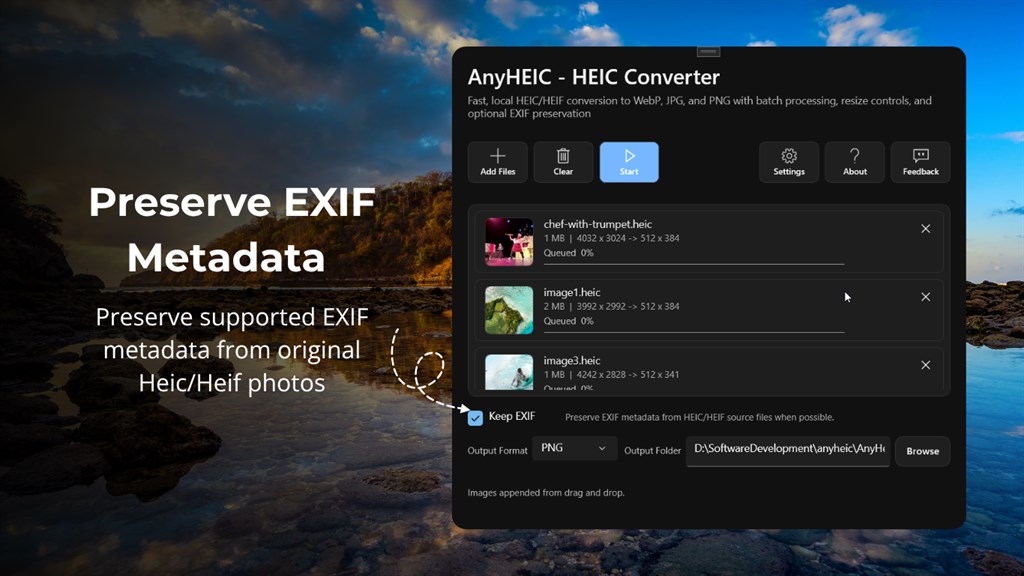
- Metadata preservation option — Keep supported EXIF data, such as camera information, intact in the converted files when that information needs to travel with the image.
- No account or sign-up required — Start converting immediately without creating a profile or logging into a cloud service.
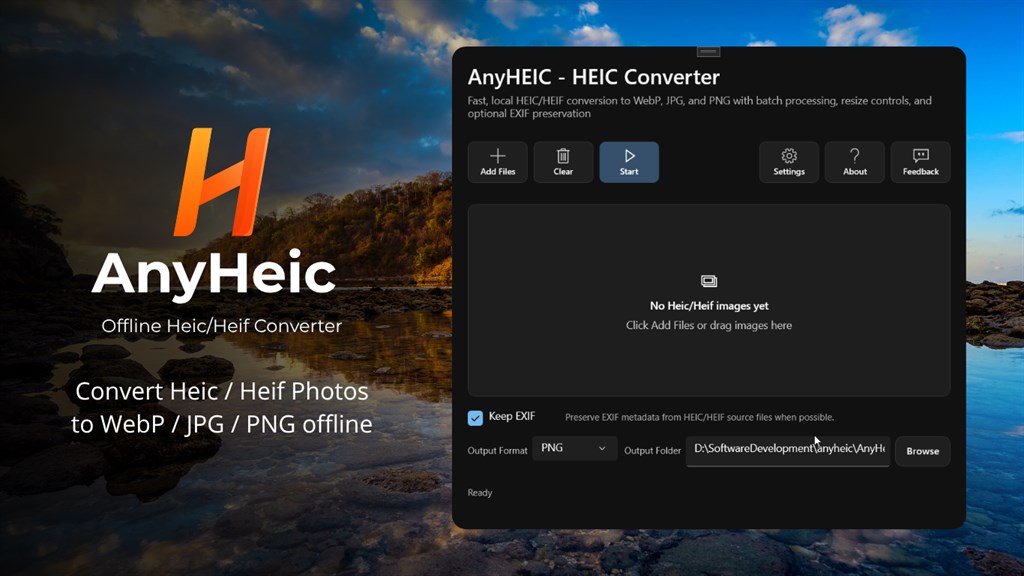
It is a Windows application dedicated to converting HEIC and HEIF image files into the three formats accepted almost everywhere: JPG, PNG, and WebP. Rather than forcing users to open each photo individually in a viewer and export it manually, AnyHEIC lets you add a whole folder of images at once, pick the output format and settings you want, and process the entire batch in a single pass. The interface is built around a simple, linear workflow — import, choose format, adjust settings, export — so people without any technical background can convert images just as easily as an experienced editor.
What makes AnyHEIC particularly appealing is where the processing actually happens. Every conversion runs locally on your own computer. There is no upload step, no cloud server, and no account requirement standing between you and your converted files. This matters for anyone handling personal photos, client images, or work documents that should not leave the device, and it also means the software keeps working even without an active internet connection. For a digital marketing entrepreneur or content creator who regularly imports images from an iPhone into a video or graphic design project, this local-only approach protects sensitive visual assets while still delivering fast results.
AnyHEIC is a practical fit for several types of users. Photographers and content creators who shoot on iPhone but edit on Windows-based tools need a dependable bridge between formats. Small business owners preparing product photos for an online store benefit from batch conversion instead of manually resaving each picture. Everyday users who just want to share a photo from a family trip without running into a “file format not supported” error will also find the tool useful. Because the app supports resizing, quality adjustment, and metadata handling in addition to basic format conversion, it serves both casual users who want a quick fix and more demanding users who need control over the final output.
Choosing AnyHEIC over generic online converters comes down to three things: privacy, speed, and control. Online tools require uploading photos to a third-party server, which introduces both a privacy risk and a dependency on internet speed. AnyHEIC removes both concerns by keeping every file on your own machine and processing images using your computer’s own hardware, which is typically faster for batches of any meaningful size. On top of that, the software gives you direct control over resizing, output quality, and metadata retention, options that many free web-based converters do not offer at all.
Key Features
Below is a comprehensive list of the key features that make the software a valuable addition to your photo conversion toolkit:
- Multi-format conversion — Converts both HEIC and HEIF source files into JPG, PNG, or WebP output.
- HEIC and HEIF to JPG — Produces a widely compatible format ideal for everyday photos and general sharing.
- HEIC and HEIF to PNG — Delivers a lossless format suited to situations where image quality needs to remain uncompressed.
- HEIC and HEIF to WebP — Generates a modern format that can reduce file size while keeping strong visual quality.
- Batch image processing — Adds and converts multiple HEIC or HEIF files in a single run instead of handling them one at a time.
- Drag-and-drop importing — Lets users add images to the queue quickly by dragging files directly into the application window.
- EXIF metadata handling — Gives users the choice of whether to retain original image metadata in the converted output.
- Keep EXIF toggle — A single setting that preserves supported camera and photo details when metadata continuity is important.
- Flexible resizing controls — Adjusts the final image dimensions to fit different use cases.
- Original size retention — Keeps the source image dimensions unchanged for users who only need a format change.
- Custom width and height — Sets a specific pixel size for images destined for websites, documents, or design templates.
- Percentage-based resizing — Scales images up or down by a chosen percentage for quick, proportional adjustments.
- WebP quality settings — Provides direct control over the balance between file size and visual detail for WebP exports.
- Adjustable quality level — Lets users pick a smaller file size or higher fidelity depending on the project.
- Lossless WebP option — Produces WebP output with no quality loss when exact detail preservation matters.
- Fully offline operation — Runs every conversion locally without uploading images anywhere.
- No cloud dependency — Removes reliance on external servers, keeping the process available even without internet access.
- No account requirement — Allows local conversion to begin immediately, without a sign-in step.
- Straightforward Windows workflow — Structures the process around four simple steps: import, format selection, settings adjustment, and export.
- Clean interface layout — Keeps controls organized so new users can complete a conversion without prior experience with photo software.
Requirements
Before installing AnyHEIC, it is worth checking that your Windows device meets the specifications needed for smooth performance during batch conversions. The requirements below cover the minimum and recommended setup for the application.
- Operating system — Windows 10, version 17763.0 or higher.
- Memory — 300 MB minimum, 1 GB recommended for larger batch jobs.
- Processor — 1 GHz or faster minimum; an Intel Core i3, AMD Ryzen 3, or equivalent processor is recommended for faster batch conversion.
- Graphics processor — Integrated graphics meets the minimum requirement, while any DirectX-compatible graphics adapter is recommended.
- Supported devices — Available on PC, Mobile, Surface Hub, and HoloLens.
Downloads
Test the software directly on your own device before committing to any purchase. Get the AnyHEIC trial edition for free and run a batch of your own HEIC or HEIF photos through the conversion process to see how the resizing, EXIF, and quality settings perform on your actual images before deciding whether the upgraded version fits your workflow.
or
Buy now, the price start from:
Thank you for reading AnyHEIC review, and enjoy the discount coupon. If you notice any issues with the AnyHEIC discount coupon, deal, or giveaway—such as an expired offer, broken link, or sold‑out promotion—please let us know while the deal is still available.



![[2026 Giveaway #4] Giveaway – MobiKin HEIC to JPG Converter: Free 1-year License Code | Easy-to-use HEIC Photo File to PNG/JPG Converter – for Windows](https://thesoftware.shop/wp-content/uploads/thumbs_dir/MobiKin-HEIC-to-JPG-Review-Download-Discount-Giveaway-rfosmaovwlqug3zpm81w967o5qknpo0wj7ser5ymjc.png)

