
Free – Luminar on Web: Free Web Only Plan | Online Photo Editor with Develop Tools, Crop, Landscape Tools, Vignette, Monochrome,100 MB Cloud Storage

Edit your photos for free in any browser with the Luminar on Web Only Plan. Open your browser, sign in with a Skylum account, and start editing today with no payment needed!
✔ Free Access. ✔ Free Product Updates ✔ Customer Support
BUY NOW
Luminar on Web Only plan is available at $0. When you want more, Luminar on Web Full Access is available for $69 as a one-time purchase, and the All Platforms plan is $159. Check the BUY HERE tab below for the current discount coupon and offer, which may be available for a limited time.

Edit your photos with essential tools online
- Basic Tools:
- Develop (Light, Details, Color, Curves)
- Crop
- Landscape (Golden Hour, Foliage, Dehaze, Fog)
- Vignette
- Monochrome
- Full RAW file support
- Cloud: 100 MB
- Export (standard quality)
By upgrading to a paid plan, you get:
- A lifetime license for the Luminar Web editor and the Luminar Mobile app
- Unlimited use of core AI tools: Enhance AI, Sky AI, Structure AI, Bokeh AI, Face AI, Skin AI, and Body AI
- Presets, Filters, Erase, and Light Depth
- Cloud storage and cross-device editing between Web and Mobile
- Support through your Skylum account
- Continuous updates and access to Fall Upgrade 2026 features with the All Platforms plan
Edit your photos with essential tools online
- Basic Tools:
- Develop (Light, Details, Color, Curves)
- Crop
- Landscape (Golden Hour, Foliage, Dehaze, Fog)
- Vignette
- Monochrome
- Full RAW file support
- Export (standard quality)
- Include Products:
- Luminar on Web - Lifetime
- Luminar on Mobile - Lifetime
- Presets, Filters, Erase & Light Depth
- Unlimited AI edits
- Cloud storage access from Web & Mobile
- Cross-device editing

On1 Photo RAW 2026 + 2027: Perpetual License BEST SELLER

Luminar BEST OFFER

Topaz Photo BEST OFFER

CorelDRAW Graphics Standard BEST SELLER

Topaz Image Web BEST OFFER

Topaz Studio BEST OFFER
Luminar on Web Only Free Plan Giveaway
Available now: Free Plan forever

Free Online Photo Editor with Develop Tools, Crop, Landscape Tools, Vignette, Monochrome and 100 MB Cloud Storage – No Download, No Subscription Required
- HINTS
- Just sign up for a Luminar account—or log in if you already have one.
- No credit card required!
- TERMS:
- Basic Tools
- Develop (Light, Details, Color, Curves)
- Crop
- Landscape (Golden Hour, Foliage, Dehaze, Fog)
- Vignette
- Monochrome
- Full RAW file support
- Cloud: 100 MB
- Export (standard quality)
- Basic Tools
Platforms: Web App
We will not send this via email.
NOTES:
– All prices shown here are in listed USD (United States Dollar).
– Such promotional programs are subject to change without notice, from time to time in our sole discretion.
– Data may vary based on different systems or computers.
Luminar on Web Review at a Glance
Learning photo editing is expensive. Desktop editors ask for a powerful computer, large storage, and often a monthly fee before you have made a single edit. Many online editors are slow, filled with ads, or lock basic sliders behind a paywall. Beginners end up stuck between a phone app that feels too limited and professional software that feels too heavy.
The Luminar on Web Only plan solves this. It is a completely free browser-based photo editor from Skylum.
You open a browser, sign in, and edit. The plan works on Windows, macOS, and Linux, and it needs no admin rights. That makes it practical on a laptop, a shared computer, or a work machine where you can’t install software. Because the Free Web Only plan sits inside the Luminar ecosystem, it also gives you a clear path to the AI tools later, if you decide you want them.
What Is Luminar on Web Only Plan?
Luminar on Web Only plan is the no-cost entry level of Luminar on Web, the browser-based editor from Skylum. It gives you a selection of essential photo-editing tools with limited cloud storage, and you pay nothing. It runs in a modern browser, so there is nothing to download, install, or update.
It includes essential tools: Develop controls for light, details, color, and curves, a Crop tool, Landscape adjustments, a Vignette tool, and a Monochrome option. It also provides 100 MB of cloud storage, so your work stays online and you don’t need to install anything.
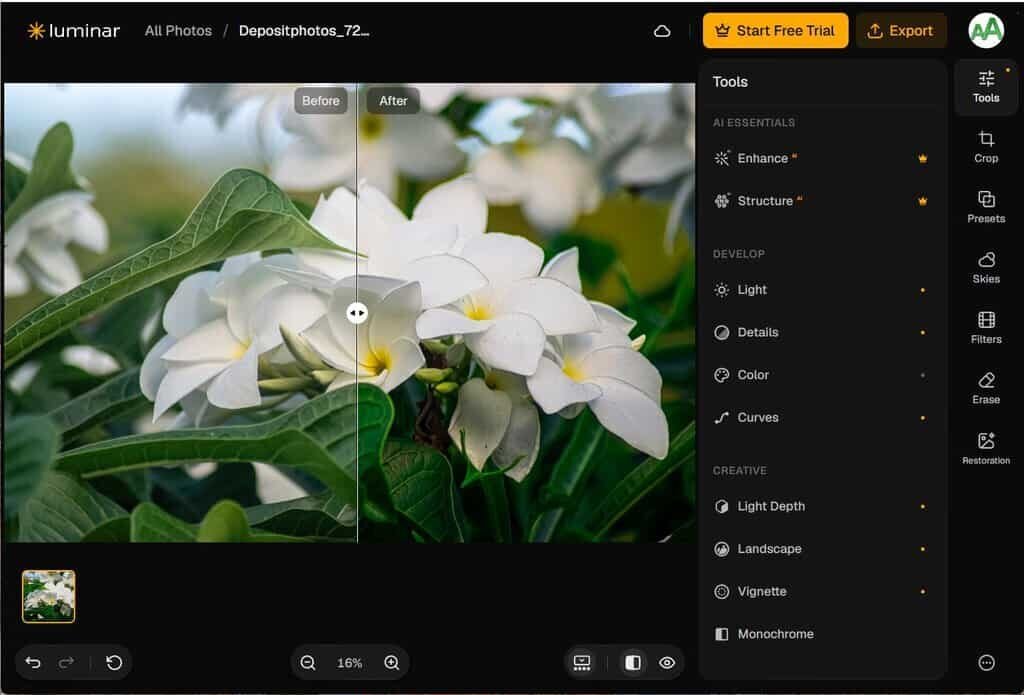
The plan covers the basics of a proper editing workflow. You can adjust exposure and tone, refine detail, correct color, shape contrast with curves, and crop the frame. You can also apply landscape-focused corrections, add a vignette, or convert a picture to monochrome. Edits are saved to your account, and the 100 MB of cloud space keeps a small set of projects available online.
Luminar on Web as a whole is described as the world’s first browser-based photo editor with Light Depth technology. It also brings Sky Replacement to the web for the first time. Those advanced AI tools belong to the paid Web Full Access plan. The Free plan is the starting point, built so that beginners can learn editing and see how the interface works.
Key Benefits
The Free plan removes the usual barriers to photo editing: cost, hardware, and setup. The benefits below explain why it suits people who are starting out or editing on the move.
- Zero cost: You get a working editor at no charge, with no trial clock on the Free plan itself.
- No installation: Everything runs in the browser, so you use no local storage for software.
- Any operating system: Windows, macOS, and Linux users can all sign in and edit.
- Essential controls: Light, details, color, and curves cover most everyday corrections.
- Landscape shortcuts: Golden Hour, Foliage, Dehaze, and Fog speed up outdoor photo edits.
- Cloud access: 100 MB of cloud storage keeps selected work reachable from any browser.
- Low hardware needs: You don’t need a powerful PC, since the editor runs on any device with a browser.
- Easy upgrade path: You can move to Web Full Access later without changing tools or learning a new interface.
Who Benefits from the Free Plan
The Free Web Only plan is aimed at people who want real editing controls without paying anything first. The groups below get the most from it.
- Beginner photographers who want to learn light, color, and curves before spending money.
- Hobbyists and travelers who want to polish shots from a hotel, café, or friend’s computer.
- Landscape photographers who want quick access to Golden Hour, Foliage, Dehaze, and Fog adjustments.
- Students and workshop attendees who need an editor that runs in a browser on any machine.
- Users with low storage who can’t install another application or keep a large local photo library.
- Social media and e-commerce sellers who need a fast crop, a color fix, or a black-and-white look.
Why Choose the Luminar on Web Only Free Plan
Most free online editors give you a few sliders and a watermark, or push you toward credits and subscriptions. Luminar on Web comes from an established photo-software brand, and the product information cites a 4.6 rating on Trustpilot. The Free Web Only plan uses the same interface as the paid tiers, so the skills you build carry over. The interface is also lighter and easier to learn than Lightroom or Photopea, which helps first-time editors get results quickly.
Where the Web Only Plan Fits Best
Editing often happens away from your main computer. After a photo walk, in a hotel after a day of shooting, on vacation without your laptop, or during a class, the Free Web Only plan lets you open a browser and start. If you are an existing Luminar user, your photos in Spaces can be opened in the browser and edited without extra technical steps.
Features
Here is a clear list of the tools included in the Free Web Only plan, so you know what you can do before you sign in:
- Develop: Core adjustment panel for shaping the overall look of a photo.
- Light: Adjusts exposure, brightness, and contrast to balance the tones.
- Details: Controls sharpness and clarity to bring out fine texture.
- Color: Adjusts saturation, vibrance, and white balance for accurate or creative color.
- Curves: Shapes tonal range with a precise curve for finer contrast control.

- Crop: Frames your image, removes distractions at the edges, and fixes composition.
- Landscape: Group of one-click adjustments built for outdoor and nature photos.
- Golden Hour: Adds a warm, glowing tone that mimics sunrise or sunset light.
- Foliage: Adjusts the greens in trees, grass, and leaves for a richer natural look.
- Dehaze: Cuts through atmospheric haze to restore clarity and contrast.
- Fog: Adds a soft misty atmosphere to scenes.
- Vignette: Darkens or lightens the edges of the frame to guide the eye toward your subject.
- Monochrome: Converts color photos to black and white for a classic, dramatic result.
- Cloud: Provides 100 MB of online storage so selected photos and edits stay available.
- Export: Saves your finished picture as a web-ready file.
- JPEG format: Produces a widely supported image for sharing and posting.
- 1280 px on the longest side: Sets the export size for online use and previews.
- 80% quality: Keeps file sizes small while preserving good visual quality.
- Browser-Based Access: Runs on modern browsers and operating systems, including Linux, with nothing to install.
Free Plan vs Paid Plans

The table below shows how the Free plan compares with the two paid options, so you can decide when an upgrade makes sense.
| Plan | Price | What You Get |
|---|---|---|
| Web Only (Free) | $0 | Develop, Crop, Landscape tools, Vignette, Monochrome, 100 MB cloud, JPEG export at 1280 px and 80% quality |
| Web Full Access | $59 | Everything in Free, plus lifetime Web editor and Mobile app, core AI tools, Presets, Filters, Erase, Light Depth, cloud storage, and Web-Mobile editing |
| All Platforms | $477 | Everything in Web Full Access, plus Luminar Desktop, Photo Restoration and GenErase (1 year), AI Assistant (coming soon, 1 year), Spaces, continuous updates, and Fall Upgrade 2026 features |
Requirements
- A modern web browser on Windows, macOS, or Linux
- A stable internet connection
- A free Skylum account
- No payment details are needed for the Free plan
Free to Try
The Free plan costs nothing, so you can test Luminar on Web with your own photos right away. Sign in and open an image to see how Develop, Curves, and the landscape tools work on real files. Click the button below to start editing at no charge.
If you want to try the AI tools too, you can start a 7-day free trial of the Web Full Access plan. You enter payment details at checkout but are not charged upfront. Billing starts only after the 7 days end, and you can cancel in your Skylum account at any time during the trial.
or
Buy now, the price start from:
Thank you for reading Luminar on Web review, and enjoy the discount coupon. If you notice any issues with Luminar on Web discount coupon, deal, or giveaway—such as an expired offer, broken link, or sold‑out promotion—please let us know while the deal is still available.