Get Stunning Photos in One Click – Get Ashampoo Photo Optimizer Pro 26 at a Special Discount Today and Experience Professional-Grade Results Without the Learning Curve!
Ashampoo Photo Optimizer Pro 26 is available at its standard retail price: $40, but right now you can secure your license at a special discounted rate using our exclusive coupon code. This pricing offer is available for a strictly limited time, so act now to lock in the best possible deal.
BUY HERE:
You also might like
Giveaway
Exclusive Launch Offer!
Ashampoo® Photo Optimizer Pro 26: Lifetime License (62% Off)
Optimize colors and contrasts for single photos or entire collections in just a few clicks!
Delivery: Download-Version.
Lifetime License: One-time payment, No time limit.
What's New:
New image compression with live preview and file size control
27 new LUTs for fresh one-click looks
New photo frames for additional image moods
Modernized user interface
Enhanced RAW support and optimized metadata handling
Ashampoo® Photo Optimizer 8 - New License (Giveaway 5)
Optimize colors and contrasts for single photos or entire collections in just a few clicks!
HINTS:
Get your own license key by clicking on the BUY NOW button on this offering box.
If you already have an Ashampoo account, Login to your account.
If you don't have an Ashampoo account yet, please register it first (Don't forget to give a password)
After you have gotten the license, Download the software from here:
https://download.digitalphoto.de/files/DigitalPHOTO/2023/03/ashampoo_photo_optimizer_8_37783.exe.zip
Or Here:
https://cdn1.ashampoo.net/public/fam/1657/ashampoo_photo_optimizer_8_37783.exe
Once downloaded, install it & launch the program after installing it.
Login to your account through the software (Use your email andd password) & click the ACTIVATE button to activate the full version!
Ashampoo® Photo Optimizer 8 - New License (Giveaway 3)
Optimize colors and contrasts for single photos or entire collections in just a few clicks!
HINTS:
Get your own license key by clicking on the BUY NOW button on this offering box.
If you already have an Ashampoo account, Login to your account.
If you don't have an Ashampoo account yet, please register it first (Don't forget to give a password)
After you have gotten the license, Download the software from here:
https://www2.aomeisoftware.com/download/qd/vendor/AshampooPhotoOptimizer.zip
Or here:
https://cdn1.ashampoo.net/public/aomei/1657/ashampoo_photo_optimizer_8_37533.exe
Once downloaded, install it & launch the program after installing it.
Login to your account through the software (Use your email andd password) & click the ACTIVATE button to activate the full version!
Ashampoo® Photo Optimizer 8 - New License (Giveaway 2)
Optimize colors and contrasts for single photos or entire collections in just a few clicks!
HINTS:
Get your own license key by clicking on the BUY NOW button on this offering box.
If you already have an Ashampoo account, Login to your account.
If you don't have an Ashampoo account yet, please register it first (Don't forget to give a password)
After you have gotten the license, Download the software from here:
https://thesoftwareshop.app.link/Ashampoo_Photo_Optimizer_8_Giveaway_exe
or here:
https://cdn1.ashampoo.net/public/btn/1657/ashampoo_photo_optimizer_8_37023.exe
Once downloaded, install it & launch the program after installing it.
Login to your account through the software (Use your email andd password) & click the ACTIVATE button to activate the full version!
NOTE: – All prices shown here are in listed USD (United States Dollar). – Such promotional programs are subject to change without notice, from time to time in our sole discretion. – Data may vary based on different system or computer.
Ashampoo Photo Optimizer Pro 26 Review at a Glance
Every photo tells a story — but what happens when the story is overshadowed by poor lighting, awkward angles, dull colors, or distracting blemishes? Most people either spend hours wrestling with complex editing software or simply settle for photos that fall short of what the moment truly deserved. The result is a growing library of underwhelming images that fail to capture the magic of vacations, weddings, birthdays, and everyday life.
Ashampoo Photo Optimizer Pro 26 is the solution that bridges the gap between ordinary snapshots and breathtaking photographs — automatically, intelligently, and in just a few clicks.
What Is Ashampoo Photo Optimizer Pro 26?
Ashampoo Photo Optimizer Pro 26 is a professional-grade photo enhancement and editing software designed for Windows users who want outstanding photo quality without the complexity of traditional editing tools. Built on a completely rewritten auto-optimization engine shaped by feedback from over 5,000 real customers, this version represents the most refined and capable release in the Photo Optimizer series to date.
At its core, Photo Optimizer Pro 26 uses sophisticated algorithms to automatically analyze and correct colors, contrast, exposure, and white balance — producing visually stunning results with minimal effort. Whether you are a casual photographer looking to improve your vacation shots or a creative professional seeking a fast, reliable editing workflow, this software adapts to your needs seamlessly.
The program processes both single images and entire photo collections through its powerful batch processing engine, making it ideal for anyone managing large libraries. It supports an extensive range of file formats including JPG, WebP, PNG, and RAW, and now features significantly improved RAW format support and optimized metadata handling for clean, reliable processing from start to finish.
What truly sets Photo Optimizer Pro 26 apart is its commitment to privacy. Unlike cloud-based editors that upload your personal photos to remote servers, this software processes everything locally on your machine. Your memories stay yours — private, secure, and always under your control.
Key Benefits
Ashampoo Photo Optimizer Pro 26 delivers real, measurable improvements that matter to photographers at every skill level. Here is why thousands of users rely on it as their go-to photo optimization tool:
Instant, Automatic Results for Anyone The rebuilt auto-optimization engine analyzes each photo individually and applies the most appropriate corrections for color, contrast, brightness, and white balance — all automatically. You do not need prior editing experience to produce photos that look professionally polished. The entire process takes seconds, not hours.
Complete Creative Control When You Want It Beyond automation, Photo Optimizer Pro 26 gives you full manual control over light curves, color temperatures, gamma, exposure, and dozens of other parameters through intuitive sliders. You can fine-tune results to match your personal vision without being forced into a rigid, one-size-fits-all workflow.
27 Brand-New LUTs for Instant Atmosphere Look-Up Tables (LUTs) are among the most powerful tools in modern photo editing. They adjust multiple image parameters — hue, saturation, brightness, contrast — simultaneously, transforming the mood and atmosphere of a photo in a single click. Pro 26 adds 27 brand-new LUTs across nine creative categories including Halloween, Christmas, Autumn, Summer, Vintage, Contrast, HighKey, LowKey, and FX, giving you an extensive palette of looks crafted by image editing experts.
Precision Image Compression with Live Preview Sharing and storing large photo files has never been more convenient. The new image compression feature lets you reduce JPG, WebP, and PNG files with full control over quality and file size, backed by an interactive live before/after preview that shows you the expected file size in real time. Save storage space without visible quality loss — perfect for online sharing, archiving, or web publishing.
Perspective Correction That Saves Failed Shots Photographing buildings, landscapes, or tall structures often introduces unwanted perspective distortions that make objects appear to lean or fall over. Photo Optimizer’s perspective correction tool lets you fix horizontal and vertical distortions in just a few clicks, rescuing shots that would otherwise be unusable.
Automatic Backup and Non-Destructive Editing Every original photo is automatically backed up in a dedicated database at a location you choose. This means every change you make is fully reversible — at any time, with a single click. The integrated before/after split-view keeps your edits transparent, so you always know exactly what has changed.
Customizable Favorites for a Faster Workflow Repetitive navigation through menus wastes valuable time. The Favorites feature lets you bundle your most-used tools into a single, instantly accessible menu. Whether that is auto-optimization, horizon straightening, cropping, or perspective correction, your go-to features are always just one click away.
Portrait Enhancement with Natural-Looking Results Faces deserve special attention. Photo Optimizer includes dedicated portrait enhancement tools to fix red eyes, whiten teeth, remove skin blemishes and stains with the clone tool, and perform targeted sharpening or softening — all producing natural-looking results without the artificial, over-processed appearance common in lesser tools.
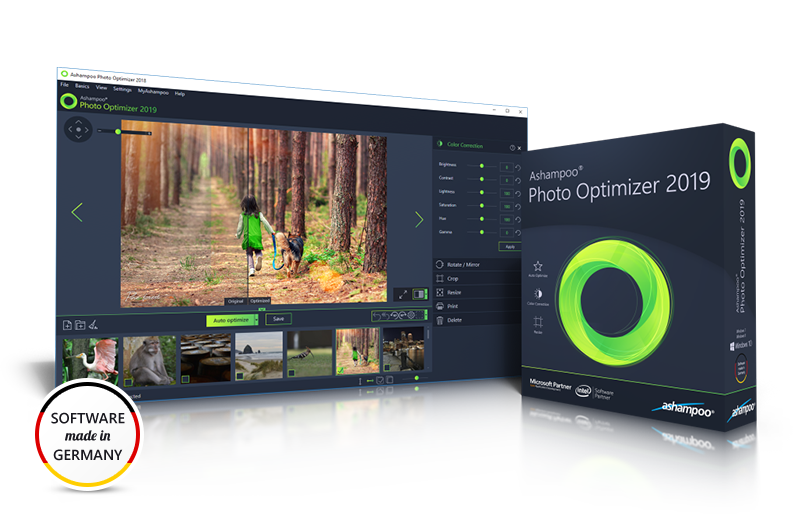
No Learning Curve, No Manuals Required The redesigned interface features no nested menus, a streamlined workflow where every feature is reachable in at most two clicks, and clearly labeled, intuitively organized categories. From the moment you install the software, you are ready to start editing.
What’s New
Ashampoo Photo Optimizer Pro 26 introduces powerful new ways to enhance, refine, and manage your photos with greater precision and efficiency. This release focuses on delivering perfect image quality at optimal file sizes through an all-new image compression engine with live preview and full control over output size.
Creative possibilities expand with 27 brand-new LUTs and additional photo frames, making it easier than ever to apply striking looks and moods in a single click. The modernized user interface ensures a smoother, more intuitive workflow, while enhanced RAW support and improved metadata handling provide greater flexibility for advanced photography needs.
What’s New in Ashampoo Photo Optimizer Pro 26:
Precise image compression with live preview and file size control
Support for JPEG, WebP, and PNG compression
27 new LUTs for fresh one-click looks
New photo frames for enhanced image moods
Modernized and streamlined user interface
Expanded RAW format support
Optimized metadata handling
Features
Below is a detailed breakdown of everything included in Ashampoo Photo Optimizer Pro 26. This carefully assembled list covers every major capability and sub-feature so you can see precisely what the software brings to your photo editing workflow:
Rebuilt Auto-Optimization Engine – Completely rewritten core engine based on feedback from 5,000 customers for more accurate, visually stunning automatic results.
White Balance Correction – Automatically detects and corrects bluish casts, dull tones, and color temperature imbalances for lifelike, vibrant photos.
Contrast Stretch – Intelligently expands the tonal range of low-contrast images, restoring depth and definition lost due to poor lighting conditions.
Auto-Enable Logic – White balance and contrast stretch activate automatically whenever the algorithm determines they will improve the image.
27 New LUTs (Look-Up Tables) – Adds 27 new creative looks across nine themed categories for instant mood and atmosphere transformation with a single click.
Seasonal LUTs – Includes Halloween, Christmas, Autumn, and Summer categories for seasonally appropriate visual effects.
Creative & Stylistic LUTs – Covers Vintage, Contrast, HighKey, LowKey, and FX categories for artistic and cinematic looks.
Image Compression with Live Preview – Reduces JPG, WebP, and PNG file sizes with real-time before/after preview and exact file size display.
Interactive Quality Slider – Adjust compression level while instantly seeing the impact on file size and visual quality.
Lossless-Quality Output – Achieve significant size reductions with minimal or invisible impact on image clarity.
Perspective Correction Tool – Fixes horizontal and vertical perspective distortions caused by camera angle or position.
Building & Architecture Fix – Corrects the “falling over” effect common in architectural photography.
Horizon Straightening – Quickly aligns tilted or uneven horizons for a clean, balanced composition.
Batch Processing – Processes entire photo folders or mixed selections automatically in one operation.
Per-Image Analysis – Each photo is individually analyzed and optimized according to its unique characteristics.
Folder and Mixed-Source Support – Select images from multiple folders or sources and process them in a single batch run.
Portrait Enhancement Tools – Dedicated tools for natural-looking facial corrections and improvements.
Red-Eye Removal – Detects and eliminates red-eye effects from portrait shots automatically or manually.
Teeth Whitening – Brightens teeth for a polished, natural smile without overexposure.
Clone Tool – Removes blemishes, stains, and skin impurities with precision cloning.
Manual Editing Controls – Full suite of manual adjustments for users who prefer hands-on fine-tuning.
Light Curve Adjustment – Manual control over tonal range via adjustable light curves.
Color Temperature Slider – Fine-tune warmth and coolness of the image with a dedicated color temperature control.
Artistic Effects – Creative effects library for experimental and expressive image transformations.
Oil Painting Effect – Converts photos into elegant, painterly artwork.
Double Exposure – Blends two images for a creative, layered visual effect.
Age Effect, Waves, Swirls, Implosion & Explosion – A range of stylized effects for artistic experimentation.
New Frames Library – Expanded frame collection with new designs that suit a variety of image moods and styles.
LUT Collection Expansion – Existing LUT library significantly expanded with 27 additional looks for seasonal, creative, and stylistic purposes.
Watermark Support – Apply text-based or image-based watermarks quickly and easily to protect or brand your photos.
Image Cropping, Rotating & Mirroring – Essential transformation tools handled with maximum simplicity and precision.
Favorites Menu – Customizable shortcut menu for your most-used features, eliminating the need to navigate through multiple categories.
Non-Destructive Editing with Automatic Backup – Every original photo is backed up automatically to a user-defined location and restorable at any time.
Integrated Before/After Split-View – Side-by-side comparison of original and edited versions for clear, transparent editing.
One-Click Revert – Instantly restore any photo to its original state with a single button press.
Improved RAW Format Support – Significantly enhanced compatibility and processing quality for RAW image files from modern cameras.
Optimized Metadata Handling – Reads and preserves image metadata reliably for clean, accurate file management.
New Memory Management System – Rebuilt memory handling for greater speed and stability when processing high-resolution images or large file collections.
Export & Sharing Options – Multiple ways to share, publish, or print your photos.
Email Sharing – Send optimized photos directly via email from within the application.
Ashampoo Web Upload – Share photos using the free Ashampoo Web service.
Desktop Wallpaper – Set any photo as your desktop background in one click.
Feature-Rich Print Dialog – Print photos in high quality with space-efficient layout options.
Redesigned Modern Interface – Streamlined, contemporary UI with no nested menus and a maximum of two clicks to any feature.
Requirements
To run #THE SOFTWARE with optimum reliability and performance, your system should match the following requirements:
Operating System: Windows 11, Windows 10 (64-bit)
Processor: 2.0 GHz or faster CPU
RAM: 2 GB minimum (4 GB or more recommended for large collections)
Storage: 250 MB free disk space for installation
Display: 1024 × 768 resolution or higher
Internet Connection: Required for activation and updates
Downloads
Not sure if #THE SOFTWARE does what you need? Try it out now. Please feel free to download the Ashampoo Photo Optimizer Pro 26 trial here. This image auto-optimization tool by Ashampoo GmbH & Co. KG has been tested professionally and we are assured that no viruses, Trojans, adware, or malware are contained.
Ashampoo Photo Optimizer Pro 26 is not just another photo editor — it is a precision-crafted optimization tool that respects both your time and your privacy. It combines the power of automatic, algorithm-driven corrections with the freedom of full manual control, wrapping everything in an interface so intuitive that even first-time users will feel at home immediately. From the rebuilt auto-optimization engine to the 27 new LUTs, the precision compression tool, enhanced RAW support, and the Favorites workflow, every aspect of this version has been designed to make photo editing faster, smarter, and more satisfying. It does not matter if you are polishing a single portrait, rescuing an entire vacation album, or preparing images for online publication — Photo Optimizer Pro 26 handles all of it with consistency and quality. The fact that all processing happens locally on your device means your personal photos never leave your control. No subscriptions to cloud platforms, no uploads to unknown servers — just a reliable, professional-grade tool that does exactly what you need it to do. If you want a photo optimizer that delivers real, visible results without demanding hours of your time or a background in graphic design, Ashampoo Photo Optimizer Pro 26 is the definitive answer.
PROS
Rotate, crop and straighten images freely
Efficiently whiten teeth, remove red eyes and skin imperfections
Batch-optimize any number of images
Straighten image horizons with precision
Powerful color correction
Eye-friendly ergonomic user interface
Easy emailing and uploading
Thanks for reading Ashampoo® Photo Optimizer Pro 26 Review & Enjoy the discount coupon. Please Report if Ashampoo® Photo Optimizer Pro 26 Discount Coupon/Deal/Giveaway has a problem such as expired, broken link, sold out, etc while the deal still exists.
What happened to the Ashampoo Photo Optimizer 9 giveaway? I click on the link and I am directed to the page where you either buy version 10 or version 9. This is false advertising.
I had previously complained about not being able to get Ashampoo PhotoOptimizer 9 for free and made an accusation of false advertising. I apologize. I was wrong. I did manage to get it. Thank you very much for this freebie.






















What happened to the Ashampoo Photo Optimizer 9 giveaway? I click on the link and I am directed to the page where you either buy version 10 or version 9. This is false advertising.
I had previously complained about not being able to get Ashampoo PhotoOptimizer 9 for free and made an accusation of false advertising. I apologize. I was wrong. I did manage to get it. Thank you very much for this freebie.