Giveaway – MP3 Hammer: Free License Key | Batch Audio Splitter & Cutter Software – for Windows

break down massive audio files—like lengthy audiobooks, marathon podcasts, and continuous lecture recordings—into precise, equal-duration clips with zero quality loss. Get MP3 Hammer with a license key for free!
You can also get MP3 Hammer with a lifetime license, which includes free upgrades and support—all at a special discounted price!
✔ Lifetime License. ✔ Free Product Updates ✔ 24×7 Customer Support
MP3 Hammer Review at a Glance
Wrestling with Massive Digital Audio Files
In our modern digital landscape, audio content is king. We consume information and entertainment through ears more than ever before. However, as our appetite for content grows, so does the size of the files we download. Users frequently encounter “monolithic” audio files: an audiobook that runs for 12 hours straight, a university lecture recording that spans three hours, or a continuous DJ mix that lasts all night.
While having continuous content is great for storage, it presents significant hurdles for practical daily use. Navigating a single, gigantic file is a nightmare. Trying to fast-forward on a smartphone screen to find a specific moment in a 4-hour track is imprecise and frustrating. Worse, many older car stereos, dedicated MP3 players, and even some modern smart devices simply refuse to play files over a certain size or duration, leading to crashes and playback errors. Transferring these massive files over slow internet connections often results in timeouts or corrupted data.
The manual solution is equally painful. Using traditional audio editors (like Audacity or Sound Forge) to cut these files requires you to manually select start and end points for every single segment. If you want to cut a 10-hour book into 30-minute chapters, you are looking at hours of tedious manual labor.
What is MP3 Hammer?
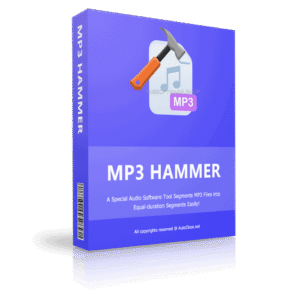
MP3 Hammer is the dedicated software solution engineered specifically to eliminate this frustration. It is a specialized Windows utility built with one core purpose: to batch burst long audio files into smaller, sequential, and manageable pieces based on a fixed time duration.
Unlike complex Digital Audio Workstations (DAWs) that are cluttered with unnecessary effects and mixing tools, MP3 Hammer focuses entirely on splitting efficiency. It automates the entire segmentation process. You don’t need to look at a waveform or select cut points manually. You simply tell the software, “I want this file cut into 15-minute chunks,” and the software handles the rest.
The name “MP3 Hammer” is not just catchy; it describes the utility’s function perfectly. Just as a hammer is used to break apart large objects or drive parts together with force and precision, this software takes the “monolith” of your large audio file and decisively “smashes” it into clean, usable parts. It imposes order on chaotic, lengthy recordings, giving you a structured playlist of files that work on any device, anywhere.
The Magic of Duration-Based Splitting
The defining characteristic of MP3 Hammer is its ability to process files based on time duration. This is the most logical way to handle spoken word content and long mixes.
Instead of splitting by file size (which results in arbitrary cut points that might happen in the middle of a word) or by silence detection (which can be unreliable in noisy recordings), MP3 Hammer uses a precise internal clock.
How the Process Works:
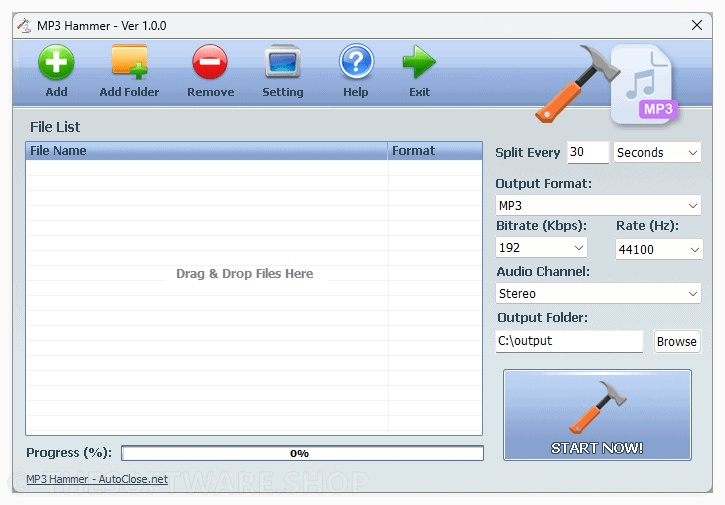
- Input: You drag and drop your massive source files into the interface. This could be a single 5-hour lecture or fifty different podcast episodes.
- Set the “Hammer” Interval: You define the rules. Do you want 10-minute segments? 30-minute chapters? Or perhaps precise 150-second clips? The choice is yours.
- Process: Click the button, and the software calculates the split points mathematically.
- Output: You receive a folder full of sequentially numbered files (e.g., Lecture_Part001, Lecture_Part002, etc.) that flow perfectly from one to the next.
This approach ensures that you know exactly how long every file is, making playlist creation and time management effortless.
Key Benefits
Below is a comprehensive list of the key benefits that make the software a valuable addition to your needs:
- Universal Device Compatibility: By breaking files down, you ensure they play on legacy MP3 players, car entertainment systems, and smartwatches that struggle with large files.
- Zero Quality Loss: The software cuts the audio stream directly without re-encoding, meaning the sound quality remains 100% identical to the source.
- Time-Saving Automation: Process hundreds of files in the time it would take to manually edit just one, freeing up your schedule for more important tasks.
- Clean Organization: Automatically generates sequentially numbered files, turning a messy folder into a neat, ordered library.
- Simplified Sharing: Creates small file chunks that are easy to email, message, or upload to cloud storage services with strict bandwidth limits.
- Focused Listening: Makes it easier to digest long content by breaking it into “mental chapters” suited for commutes or study sessions.
Who Can Get Benefits from the Product?
- Audiobook Collectors: Organize massive libraries into chapter-based folders.
- Students & Academics: Break down lectures and seminars for easier transcription and review.
- Musicians & DJs: Split long rehearsal recordings or live sets into individual tracks.
- Language Learners: Segment long language tapes into bite-sized repetition drills.
- Religious Organizations: Split long sermon recordings for easier distribution to congregation members.
- Forensic Audio Specialists: Break down long surveillance tapes into manageable blocks for analysis.
Why Choose MP3 Hammer?
For the Student and Researcher:
Reviewing a 3-hour recording of a professor speaking is inefficient. By splitting the lecture into 15-minute segments, you create “study blocks.” If you know the professor discussed “Quantum Mechanics” roughly 45 minutes in, you can simply skip to Lecture_Part004. It makes navigation instantaneous.
For the Audiobook Lover:
Many car stereos reset to the beginning of a track if the engine is turned off. If you are listening to a single 10-hour file, you lose your place constantly. With MP3 Hammer, you never lose your spot. If the car restarts, you are only at the start of a 5-minute chapter, not the start of the whole book.
For the Broadcaster and Content Creator:
If you have a long interview that needs to be uploaded to a platform with file size limits (like WhatsApp, email, or certain cloud storage tiers), MP3 Hammer allows you to chop the content into upload-friendly pieces without reducing the audio quality.
Features
Below is a comprehensive list of the key features that make the software a valuable addition to your needs:
- Precise Duration-Based Segmenting
- Time-Specific Cutting: Breaks audio files into exact equal parts based on the time you input.
- Flexible Units: Allows users to define split length by hours, minutes, or even strictly by seconds.
- True Batch Processing Capability
- Multi-File Support: Load dozens or hundreds of MP3s into the queue at once.
- Unified Rules: Apply the same cutting logic (e.g., “split all into 5-minute clips”) to every file in the list simultaneously.
- Lossless Direct Stream Copy
- No Re-Encoding: Splits the file data directly without decoding and re-compressing.
- Quality Preservation: Retains the exact bitrate, sample rate, and audio fidelity of the original source file.
- Broad Audio Format Support
- Popular Formats: Fully supports MP3, WAV, WMA, and OGG files.
- High-Quality Formats: Handles lossless formats like FLAC for audiophiles.
- Additional Codecs: Supports AC3, AAC, AMR, and MPG audio streams.
- User-Friendly Interface
- Drag-and-Drop: Simply pull files from Windows Explorer directly into the MP3 Hammer window.
- One-Click Action: Designed with a “Hammer It” philosophy—minimal settings required to get the job done.
- Naming Convention Automation
- Sequential Numbering: Automatically appends numbers (001, 002, 003) to the output filenames.
- Clean Output: Ensures the resulting folder is sorted correctly by default in any operating system.
Requirements
To run #THE SOFTWARE with optimum reliability and performance, your system should match the following requirements:
- Operating System: Windows 7 / Windows 8 / Windows 10 / Windows 11 or later & Windows Server (64/32 bit editions supported).
- Disk Space: 16 MB of free hard disk space for installation.
- Processor: Intel Pentium 4 or later (or compatible).
- RAM: 512 MB or higher.
Downloads
Explore how MP3 Hammer works according to your needs. Get/Download the trial/Free edition for free to test the software by clicking the button below.
BUY NOW
MP3 Hammer is available for a competitive price. But, you can now get the MP3 Hammer license with our exclusive discount sale. This offer is available for a limited time!
Software Giveaway: Get a lifetime license for MP3 Hammer absolutely free! Just grab your license key in the Giveaway tab below.

" />
Batch Audio Splitter & Cutter Software for Windows (Segments MP3, FLAC, WAV & More into Equal Parts)
- Lifetime License, 1 PCs
- Segment MP3 into Equal-duration Segments
- Support MP3/WAV/FLAC/AC3/WMA/AAC Formats
- Support Segment by Seconds/Minutes/Hours
- Preserves MP3 Quality
- Batch Process Multiple MP3 Files at Once
Platforms: Windows
" />
Batch Audio Splitter & Cutter Software for Windows (Segments MP3, FLAC, WAV & More into Equal Parts)
- Lifetime License, 2 PCs
- Segment MP3 into Equal-duration Segments
- Support MP3/WAV/FLAC/AC3/WMA/AAC Formats
- Support Segment by Seconds/Minutes/Hours
- Preserves MP3 Quality
- Batch Process Multiple MP3 Files at Once
Platforms: Windows
" />
Batch Audio Splitter & Cutter Software for Windows (Segments MP3, FLAC, WAV & More into Equal Parts)
- Lifetime License, 5 PCs
- Segment MP3 into Equal-duration Segments
- Support MP3/WAV/FLAC/AC3/WMA/AAC Formats
- Support Segment by Seconds/Minutes/Hours
- Preserves MP3 Quality
- Batch Process Multiple MP3 Files at Once
Platforms: Windows
" />
Batch Audio Splitter & Cutter Software for Windows (Segments MP3, FLAC, WAV & More into Equal Parts)
- Lifetime License, 10 PCs
- Segment MP3 into Equal-duration Segments
- Support MP3/WAV/FLAC/AC3/WMA/AAC Formats
- Support Segment by Seconds/Minutes/Hours
- Preserves MP3 Quality
- Batch Process Multiple MP3 Files at Once
Platforms: Windows
Abelssoft MP3 Cutter BEST OFFER

MP3 Cutter BEST OFFER

iDealshare VideoGo: Lifetime License BEST OFFER

Boilsoft Video Splitter BEST OFFER

AudFree Audible Converter GIVEAWAY
MP3 Hammer Key Giveaway
Available now: Free License Key for a Limited Time!
To access the giveaway, kindly provide your email address. Please refrain from closing this page after signing in to receive instructions on how to access the offer at no cost.
NOTES:
– All prices shown here are in listed USD (United States Dollar).
– Such promotional programs are subject to change without notice, from time to time in our sole discretion.
– Data may vary based on different systems or computers.
Thanks for reading MP3 Hammer Review & Enjoy the discount coupon. Please Report if MP3 Hammer Discount Coupon/Deal/Giveaway has a problem such as expired, broken link, sold out, etc while the deal still exists.