

Gievaway – VidiKeep Streaming Video Downloader: Free License Key | Over-the-top (OTT) Streaming Video Downloader – for Windows

Download Movies & TV Shows from Any Streaming Service in Stunning 1080P — Build Your Permanent, Ad-Free Offline Library Today. Get VidiKeep Streaming Video Downloader with a License Key for Free Now Before This Exclusive Offer Expires!
✔ Free License. ✔ Free Product Updates ✔ Customer Support
BUY NOW
VidiKeep Streaming Video Downloader is available at a $49.95, but right now you can secure your VidiKeep license for free in the Gievaway tab below. This promotional pricing is available for a limited window only, so act quickly before the offer closes.

StreamFab All-in-One: Lifetime License BEST SELLER
StreamFab NetFlix Downloader: Lifetime License BEST OFFER

EaseUS Video Downloader BEST OFFER

Fast Video Downloader PRO BEST SELLER
Allavsoft Video Downloader Converter BEST SELLER
Abelssoft Recordify Plus BEST OFFER

VideoProc Converter AI: Lifetime License BEST SELLER
TubeLoad Professional BEST OFFER
GK Video: Lifetime License BEST OFFER

PlayerFab All-in-one BEST OFFER
VidiKeep Streaming Video Downloader Key Giveaway
Available now: Free License Key For a Limited Time!

To access the giveaway, kindly provide your email address. Please refrain from closing this page after signing in to receive instructions on how to access the offer at no cost.

NOTES:
– All prices shown here are in listed USD (United States Dollar).
– Such promotional programs are subject to change without notice, from time to time in our sole discretion.
– Data may vary based on different systems or computers.
VidiKeep Streaming Video Downloader Review at a Glance
Streaming subscriptions have made entertainment more accessible than ever, but they have also introduced a new kind of frustration: you never truly own what you watch. Videos vanish when licenses expire, downloads disappear after 30 days, playback is locked to specific devices, and mid-roll ads interrupt your experience even on paid plans. Traveling abroad means losing access to regional content, and a slow internet connection turns a movie night into a buffering nightmare. For anyone who has ever wanted to simply watch their favorite shows and films on their own terms, these platform-imposed restrictions feel like a step backward.
VidiKeep Streaming Video Downloader was built specifically to solve this problem. It is a powerful, all-in-one desktop solution for Windows and macOS that lets you download, convert, and permanently save movies and TV shows from the world’s leading streaming services — including Netflix, Amazon Prime Video, Disney+, Hulu, Max (HBO), and Apple TV — directly to your computer in universally compatible MP4 or MKV formats. With VidiKeep, your entertainment belongs to you, not to a subscription timer.
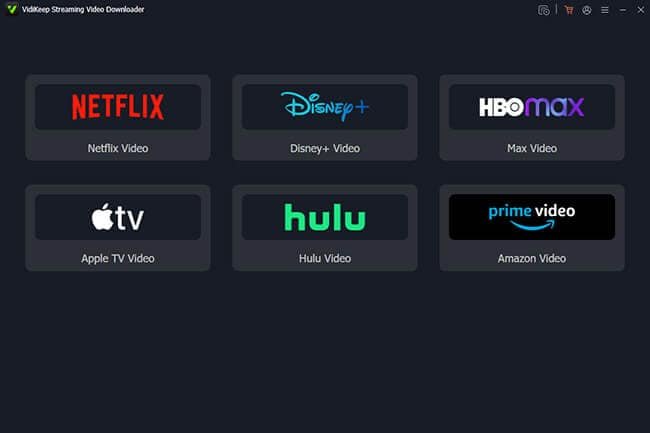
What is VidiKeep Streaming Video Downloader?
VidiKeep Streaming Video Downloader is a dedicated desktop application that captures and converts streaming video content from major OTT platforms into standard, device-agnostic video files stored locally on your Mac or Windows PC. Rather than relying on platform-specific apps that restrict playback to authorized devices and enforce expiration windows, VidiKeep processes each stream at its source and outputs a clean, high-fidelity video file that you can play on any device, share with family, store on a USB drive, or keep in your personal media library indefinitely.
Unlike generic screen recorders that compromise quality, VidiKeep Streaming Video Downloader operates with precision-engineered encoding pipelines tailored to each streaming platform’s unique format. This means you get output that is faithful to the original in resolution, color, audio quality, and subtitle accuracy — not a degraded screen capture. Whether you are building an offline travel library, creating a personal archive of a beloved series, or simply cutting your dependence on monthly subscription bills, VidiKeep Streaming Video Downloader gives you a reliable, high-speed, and legally flexible tool to do exactly that.
The software supports batch downloading, meaning you can queue up entire seasons, full movie franchises, or content from multiple platforms and let VidiKeep Streaming Video Downloader handle everything automatically. Support for Dolby Atmos, EAC3 5.1 surround sound, multiple audio tracks, and both embedded and external SRT subtitles ensures that the cinematic experience you love is preserved completely, even when you are miles from the nearest Wi-Fi signal.
Key Benefits
VidiKeep Streaming Video Downloader delivers a wide range of advantages that go well beyond what native streaming apps can offer. Here is why it has become the go-to solution for media enthusiasts, travelers, and cord-cutters worldwide:
- Permanent Content Ownership — Unlike streaming apps that delete your downloads after 30 to 48 days, VidiKeep Streaming Video Downloader saves your content forever with no expiration dates and no renewal requirements.
- True Platform Independence — Outputs in MP4 and MKV, the two most universally supported video formats, so your downloads play flawlessly on smart TVs, gaming consoles, tablets, smartphones, and laptops without any format compatibility issues.
- Ad-Free Offline Viewing — VidiKeep Streaming Video Downloader automatically strips all ads during the download process, including pre-roll and mid-roll ads, even if your streaming subscription is on an ad-supported plan.
- Zero Region Restrictions — Once converted to MP4/MKV, your content is no longer subject to geo-fencing or regional licensing blocks, allowing you to watch your full library anywhere in the world without needing a VPN.
- Subscription-Free Playback — After your downloads are complete, you can pause or cancel your streaming subscriptions and still enjoy every video you have saved, free from monthly billing pressure.
- High-Speed Batch Downloading — Process entire TV show seasons and movie collections simultaneously with download speeds up to 16X faster than real-time playback, saving you hours of manual downloading.
- Cinema-Grade Audio Preservation — Retain Dolby Atmos and EAC3 5.1 surround sound with bit-perfect accuracy, bringing theater-level audio to your offline viewing experience.
- Full Multilingual Support — Automatically detect and save multiple audio tracks and subtitle languages, with the option to embed subtitles directly into the video or save them as standalone SRT files.
- Up to 1080P and 4K Resolution — Preserve the full visual quality of every title, capturing up to 4K resolution on supported platforms so you never sacrifice picture quality for portability.
- Ideal for Diverse Users — Perfect for frequent travelers, students, remote workers, cord-cutters, movie collectors, language learners, and anyone who wants reliable offline access to their favorite content.
Features
Below is a thorough breakdown of the core capabilities and platform-specific tools that make VidiKeep Streaming Video Downloader an indispensable addition to your digital media toolkit:
- Netflix Video Downloader — Dedicated engine for downloading Netflix content with optimized encoding tailored to Netflix’s streaming format.
- 1080P Download at 7X Speed — Download Netflix movies and TV shows up to 1080P resolution at 7X accelerated conversion speed.
- Batch Download to MP4/MKV — Select multiple Netflix titles or full seasons and download them all simultaneously to MP4 or MKV.
- Multilingual Audio and Subtitles — Preserve every available audio track and subtitle language from your Netflix library.
- Permanent Ad-Free Storage — Keep Netflix movies and shows offline forever with no ads and no expiration dates.
- Amazon Prime Video Downloader — Purpose-built module for Amazon Prime Video with platform-specific encoding support.
- Up to 1080P Resolution — Download Prime Video titles in up to full HD 1080P quality for crisp, detailed playback.
- MP4/MKV Conversion — Convert Prime movies and TV shows to the most widely compatible video formats available.
- Full Season Download at 8X Speed — Save entire seasons of any Prime series in a single batch operation at up to 8X speed.
- Audio Track and Subtitle Preservation — Capture multilingual audio and subtitle options across all available languages.
- Disney Plus Video Downloader — Specialized support for Disney+ including Dolby Atmos and EAC3 audio track preservation.
- 720P Quality Downloads — Download Disney+ originals, Marvel, Star Wars, and Pixar content in 720P resolution.
- MP4/MKV Output — Convert all Disney+ content to portable, universally playable file formats.
- EAC3 5.1 and Dolby Atmos Audio — Retain premium surround sound audio tracks including EAC3 5.1 and Dolby Atmos.
- Offline Playback Anywhere — Watch Disney+ downloads on any device, free from platform or regional restrictions.
- Apple TV Video Downloader — Full support for Apple TV+ content including MLS sports highlights and series.
- 1080P Apple TV Downloads — Download Apple TV+ movies, series, and MLS highlights in up to 1080P resolution.
- MP4/MKV Conversion — Convert Apple TV content to standard formats for playback outside the Apple ecosystem.
- Full Season Download — Capture complete series seasons from Apple TV+ in a single batch download session.
- Cross-Platform Offline Playback — Play Apple TV+ content on Windows, Android, or any non-Apple device.
- HBO Max (Max) Video Downloader — High-performance downloading module for Max with industry-leading conversion speed.
- Unlimited Downloads at 16X Speed — Download Max content at the fastest available speed of up to 16X acceleration.
- Batch MP4/MKV Conversion — Convert multiple Max titles simultaneously to portable video formats.
- Complete Ad Removal — Strip both pre-roll and mid-roll ads automatically during the download process.
- Permanent Offline Storage — Store Max movies and HBO TV shows locally with no time limits or removal warnings.
- Hulu Video Downloader — Tailored solution for Hulu with high-fidelity audio support and ad-free output.
- 720P Ad-Free Downloads — Download Hulu content in 720P quality with all advertising completely removed.
- MP4/MKV Format Conversion — Convert Hulu titles to universally supported video file formats.
- EAC3 5.1 Surround Sound — Preserve high-fidelity EAC3 5.1 surround sound audio from Hulu originals and licensed titles.
- Subscription-Free Playback — Play downloaded Hulu content on any device without an active Hulu subscription.
- Advanced Batch Downloading Engine — A core technology allowing simultaneous multi-title, multi-platform downloads in a single session.
- One-Click Season Download — Select an entire TV series season and initiate the full download with a single click.
- Multi-Platform Queue — Add titles from different streaming services to the same download queue and process them together.
- Multi-Language Audio and Subtitle Support — Comprehensive language detection and management for global audiences.
- Automatic Language Detection — The software automatically identifies and lists every available audio track and subtitle language.
- Embedded or SRT Subtitles — Choose between subtitles embedded directly in the video file or saved as independent SRT files.
- High-Quality Surround Sound Preservation — Bit-perfect audio capture for Dolby Atmos and EAC3 5.1 surround sound.
- Dolby Atmos Support — Retain multidimensional height-channel audio metadata from supported streaming titles.
- EAC3 5.1 Capture — Preserve full-bandwidth surround sound for an immersive home theater experience.
- Adjustable Video Quality Settings — Flexible output customization to balance quality and file size for any device.
- Low/Medium/High Quality Presets — Select from three preset quality tiers to match your storage and playback requirements.
- Custom Bitrate Control — Manually adjust video bitrate to fine-tune output quality for specific devices or storage limits.
- Flexible Video Codec Options — Choose between modern video codecs to optimize compression efficiency.
- H.264 Encoding — Industry-standard codec offering broad device compatibility and reliable performance.
- AV1 Encoding — Next-generation codec delivering superior compression ratios with minimal quality loss.
- Built-in Web Player — Integrated browser for streaming service navigation and direct download initiation within the app.
- In-App Browsing — Browse Netflix, Prime, Disney+, and other platforms directly inside VidiKeep Streaming Video Downloader without switching apps.
- Direct Link Capture — Detect and queue streaming video links automatically as you browse within the player.
- Preserved Original Metadata — Full metadata retention for a clean and organized offline media library.
- Episode Titles and Cast Info — Retain complete episode titles, series names, and cast information for every downloaded file.
- High-Resolution Cover Art — Save original cover artwork alongside your video files for a polished library appearance.
- Smart Queue Management — Efficient download queue controls for managing large batches of content over time.
- Pause and Resume Downloads — Interrupt any active download and resume it later without losing progress.
- Smart Duplicate Skip — Automatically detect and skip files you have already downloaded to avoid redundant storage use.
Requirements
Before installing VidiKeep Streaming Video Downloader, please confirm your system meets the following minimum specifications for optimal performance:
The following requirements apply to both Windows and macOS installations. Meeting or exceeding these specifications ensures the fastest possible download speeds and the highest quality output.
- Operating System (Windows) — Windows 10 or Windows 11 (64-bit)
- Operating System (macOS) — macOS 10.15 Catalina or later
- Processor — Intel Core i5 or AMD equivalent (Intel Core i7 or higher recommended for 4K downloads)
- RAM — 4 GB minimum (8 GB or more recommended for batch downloading)
- Storage — At least 10 GB of free disk space (additional space required for downloaded video files)
- Internet Connection — Stable broadband connection required for streaming and downloading
- Active Streaming Subscription — A valid subscription to the streaming service(s) you intend to download from is required
Downloads
Curious about what VidiKeep Streaming Video Downloader can do for your offline video library before making a commitment? You can put every feature to the test at no cost. Take VidiKeep for a full test run with the free trial edition — sign up, install, and start downloading right away by clicking the button below.
or
Buy now, the price start from:
Thank you for reading VidiKeep Streaming Video Downloader review, and enjoy the discount coupon. If you notice any issues with VidiKeep Streaming Video Downloader discount coupon, deal, or giveaway—such as an expired offer, broken link, or sold‑out promotion—please let us know while the deal is still available.


![[ENDING SOON] Giveaway – OKMusi Pro MP3 Downloader: Free Annual License | MP3 Music Downloader Software – for Windows](https://thesoftware.shop/wp-content/uploads/thumbs_dir/OKMusi-Pro-Review-Download-Discount-Coupon-Giveaway-rfosm28c73f9jmbzzme94qcit9qcse3bi1x1fob63c.png)
![[ENDING SOON] Giveaway – BeeConverter Pro: Free 1-year License Key | Fast-Speed Video Converter – for Windows & Mac OS X](https://thesoftware.shop/wp-content/uploads/thumbs_dir/BeeConverter-Pro-Review-Download-Discount-Sale-Giveaway-rfoslwlb237jlyk6wjyhprrr8yi5i7gxha04k0jj4o.png)

