Giveaway – Audio to Lyrics Converter: Free License key | Offline AI Audio Transcription Software – for Windows

Turn Any Audio Into Perfectly Timed Lyrics & Subtitles — No Internet Required. Get Audio to Lyrics Converter v.1.1 for Free Today!
You can also get a full version of Audio to Lyrics Converter with a lifetime license that includes free updates and support at a discount of up to 81% OFF!
✔ Lifetime License. ✔ Free Product Updates ✔ Customer Support
BUY NOW
Vovsoft Audio to Lyrics Converter is available at a $19.00. But right now, you can secure your license at an exclusive discounted rate of up to 81% OFF using our limited-time coupon offer — a deal that will not last long. This is your opportunity to get permanent access to a professional AI transcription tool at the best price available.
With your premium license, you receive:
- A permanent, single-user license with no expiration date and no subscription fees
- Access to all current features including all Whisper model sizes and all output formats
- Free software updates so you always have the latest improvements and AI model compatibility
- Dedicated customer support from the Vovsoft team to help you get the most from your purchase
Do not miss this window — the discounted coupon is available for a limited time only. Click the BUY NOW button to lock in your savings and start converting audio to lyrics, subtitles, and transcripts today.
Software Giveaway: You can also get Vovsoft Audio to Lyrics Converter v1.1 full version with a license key for free in the Giveaway tab below.

All VOVSOFT Programs Bundle - Get Universal license key for all Vovsoft applications
- Lifetime access to all VOVSOFT programs (103 software and counting)
- Lifetime license for all software with free updates
- Free support and instant activation of license key
- Full access to all features with no trial limitations or interruptions
- No ads while using the software
Platform: Windows

Offline AI Audio Transcription Software for Windows, Convert MP3/WAV/FLAC/OGG to LRC, SRT, VTT & TXT with OpenAI Whisper
- Lifetime license for 1 PC
- Lifetime free updates
- Commercial use allowed
- Instant activation license key via e-mail.
- No trial limitations.
- No nag screen, no ads.
Platform: Windows
Offline AI Audio Transcription Software for Windows, Convert MP3/WAV/FLAC/OGG to LRC, SRT, VTT & TXT with OpenAI Whisper
- Lifetime license for 5 PCs
- Lifetime free updates
- Commercial use allowed
- Instant activation license key via e-mail.
- No trial limitations.
- No nag screen, no ads.
Platform: Windows
Offline AI Audio Transcription Software for Windows, Convert MP3/WAV/FLAC/OGG to LRC, SRT, VTT & TXT with OpenAI Whisper
- Lifetime license for 10 PCs
- Lifetime free updates
- Commercial use allowed
- Instant activation license key via e-mail.
- No trial limitations.
- No nag screen, no ads.
Platform: Windows
Offline AI Audio Transcription Software for Windows, Convert MP3/WAV/FLAC/OGG to LRC, SRT, VTT & TXT with OpenAI Whisper
- Lifetime license for 30 PCs
- Lifetime free updates
- Commercial use allowed
- Instant activation license key via e-mail.
- No trial limitations.
- No nag screen, no ads.
Platform: Windows
Offline AI Audio Transcription Software for Windows, Convert MP3/WAV/FLAC/OGG to LRC, SRT, VTT & TXT with OpenAI Whisper
- Lifetime license for 100 PCs
- Lifetime free updates
- Commercial use allowed
- Instant activation license key via e-mail.
- No trial limitations.
- No nag screen, no ads.
Platform: Windows
Vovsoft Coupon Code

30% OFF – Sitewide Coupon for All Vovsoft Products Coupon
Abelssoft Tagman: Perpetual License BEST OFFER
AllMyNotes Organizer Deluxe Edition: Lifetime License, 12-month Free Upgrades GIVEAWAY
Zortam Mp3 Media Studio PRO: Lifetime License BEST OFFER
VOVSOFT Text to MP3 Converter: Lifetime License BEST OFFER

ImagineArt EXCLUSIVE

PCDJ Karaoki BEST SELLER
Audio to Lyrics Converter Giveaway
Available now: Free License Key For a Limited Time!
To access the giveaway, kindly provide your email address. Please refrain from closing this page after signing in to receive instructions on how to access the offer at no cost.
NOTES:
– All prices shown here are in listed USD (United States Dollar).
– Such promotional programs are subject to change without notice, from time to time in our sole discretion.
– Data may vary based on different systems or computers.
Vovsoft Audio to Lyrics Converter Review at a Glance
Every day, musicians, video editors, podcasters, and content creators spend countless hours doing the same tedious task: manually writing down what they hear. Typing out song lyrics word by word, syncing timestamps by hand, and reformatting text for different media players is a time-consuming, error-prone process that pulls creative professionals away from the work that truly matters. On top of that, most automated transcription services require an active internet connection, monthly subscription fees, and — most critically — upload your private audio files to remote cloud servers, raising serious concerns about confidentiality and data ownership.
There has long been a gap in the market for a reliable, accurate, offline solution that respects your privacy while delivering professional-grade transcription results. That gap is now filled. Meet Vovsoft Audio to Lyrics Converter!
What Is Vovsoft Audio to Lyrics Converter?
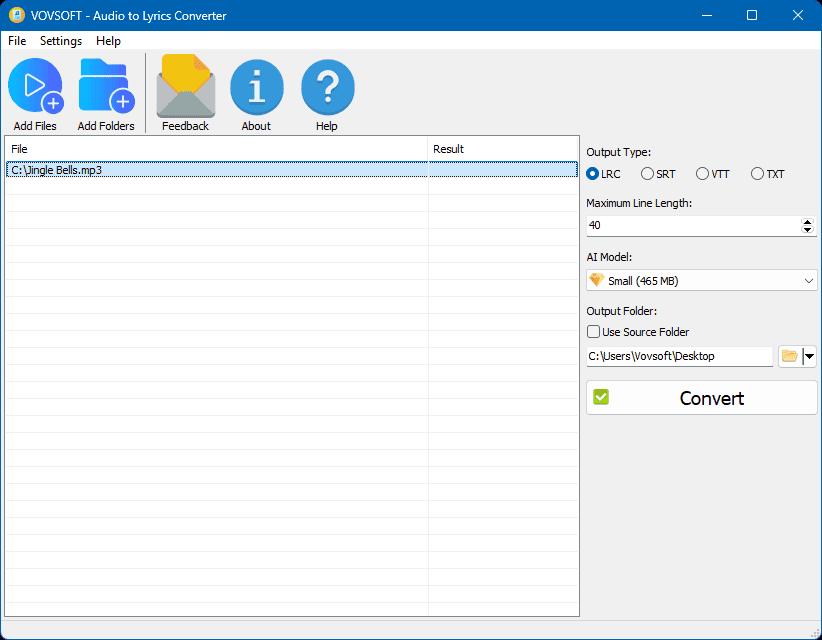
Vovsoft Audio to Lyrics Converter is a dedicated Windows desktop utility engineered to automatically generate text transcripts and synchronized lyric files from your audio recordings. At its core, the software is powered by OpenAI Whisper, one of the world’s most advanced open-source speech recognition models, running entirely on your local machine without requiring any internet access or cloud subscription.
The software “listens” to your audio tracks — be it a full song, a podcast episode, an interview, or a lecture recording — and accurately extracts every spoken or sung word, outputting the results into professional-grade files. You can choose from multiple output formats including LRC for music players and karaoke systems, SRT and VTT for video subtitles, or plain TXT for easy reading and editing. Every output file comes with precisely calculated timestamp tags that synchronize the text to the exact moment it is spoken or sung in the audio.
Unlike web-based transcription services, Vovsoft Audio to Lyrics Converter processes everything locally on your hardware. Your audio files never leave your device. There are no subscription fees, no per-minute billing, and no privacy risks. Once installed, you own the software and can use it as many times as you need, for as many files as you want.
This tool is built for Windows users who demand accuracy, speed, privacy, and simplicity in a single package. Its clean, intuitive interface means you do not need any technical background in AI or machine learning — just load your audio, select your settings, and let the software do the rest.
Key Benefits
Vovsoft Audio to Lyrics Converter delivers a set of meaningful advantages that make it the right choice for anyone who regularly works with audio content. Whether you are a solo creator or part of a professional team, the benefits below explain exactly why this software earns its place in your toolkit.
- Complete Privacy and Data Security
Because all AI processing happens directly on your PC, your audio files are never transmitted to any external server. This is critical for creators working with unreleased music, confidential interviews, proprietary lectures, or any sensitive audio content. You remain in full control of your data at all times. - No Ongoing Costs
Cloud-based transcription services bill you monthly or charge per audio minute. Vovsoft Audio to Lyrics Converter is a one-time purchase — pay once and use it indefinitely, with no hidden fees, no subscription renewals, and no usage caps. - Works Anywhere, Anytime
Because the software runs entirely offline, you can use it on a plane, in a remote studio, or in any environment without a Wi-Fi or internet connection. Your productivity is never dependent on network availability. - Professional-Grade Accuracy
Powered by OpenAI Whisper models, the software delivers industry-leading transcription accuracy across a wide range of audio types — from clear studio recordings to live speech and vocal performances. You can select from multiple model sizes (Base, Small, Medium, Large) to fine-tune the balance between processing speed and output accuracy based on your specific needs. - Significant Time Savings
What once took hours of manual typing and timestamp alignment can now be completed in minutes. Batch processing support means you can queue up an entire album or folder of podcasts and let the software work through them all automatically while you focus on other tasks. - Versatile Output for Any Platform
Whether you need an LRC file for a karaoke app, an SRT file for YouTube, a VTT file for a web video player, or a plain TXT transcript for a blog post, Vovsoft Audio to Lyrics Converter has you covered without any extra conversion steps.
Who Benefits Most From This Software?
This tool is ideal for musicians and bands who need LRC lyric files for digital music libraries and karaoke setups; YouTubers and video editors who need fast, accurate SRT/VTT subtitle files; podcasters and journalists who need quick text transcriptions of recorded interviews; educators and students who need lecture recordings converted to readable notes; and accessibility professionals who need to create captions for audio and video content.
Key Features
Below is a comprehensive breakdown of every powerful capability packed into Vovsoft Audio to Lyrics Converter, designed to give you total control over your transcription workflow:
- Wide Audio Format Support — Accepts all major audio formats so you can work with your files without any prior conversion step.
- MP3 Support — Transcribe standard compressed audio files commonly used for music and podcasts.
- WAV Support — Process uncompressed, high-fidelity audio recordings for the best possible accuracy.
- OGG Support — Compatible with the open-source OGG Vorbis format widely used in digital media.
- FLAC Support — Handle lossless audio files to ensure maximum input quality for your transcriptions.
- Multiple Output Formats — Export your completed transcriptions in the format that best suits your target platform or use case.
- LRC Files — Generate standard Lyric RC files with embedded timestamps for music players and karaoke software.
- SRT Files — Produce SubRip subtitle files compatible with virtually every video player and editing suite.
- VTT Files — Create Web Video Text Track files for HTML5 video players and web-based media platforms.
- TXT Files — Export clean plain text transcripts for reading, editing, publishing, or archiving.
- Offline AI Processing via OpenAI Whisper — The entire transcription engine runs locally on your PC, guaranteeing privacy, security, and independence from internet connectivity.
- Local Model Selection — Choose from Base, Small, Medium, or Large Whisper models to match your speed and accuracy requirements.
- Multi-Thread CPU Support — Takes full advantage of your processor’s multi-core architecture to accelerate transcription jobs.
- No Cloud Upload — Audio data is processed exclusively on your device and is never sent to any external server.
- No Subscription Required — One-time software purchase with no recurring API fees or usage limitations.
- Batch Processing — Handle large volumes of audio files in a single, unattended operation.
- Individual File Queuing — Add specific audio files one by one to build a custom processing queue.
- Folder Import — Load an entire folder of audio files at once to process a full album, podcast series, or lecture archive automatically.
- Seamless Operation — The software works through the entire batch consecutively without requiring manual intervention between files.
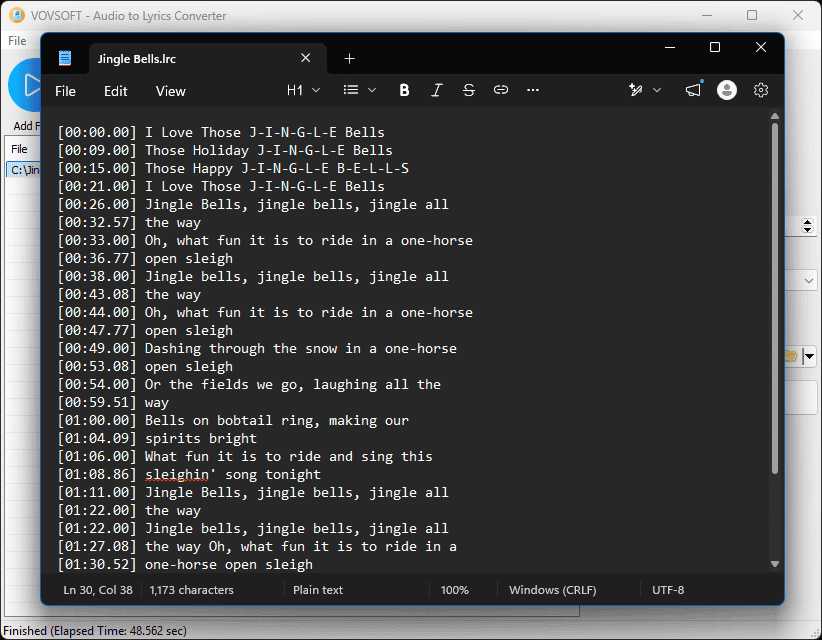
- Synchronized Timestamps — Every output file includes automatically generated time tags that align the transcript text precisely with the audio playback.
- Exact Timing Tags — Generates timestamp codes in the standard format (e.g., [00:26.00]) accurate to the hundredth of a second.
- Compatible With All Players — Timestamp formatting follows universal standards recognized by music players, video software, and subtitle renderers.
- Customizable Line Lengths — Control the maximum number of characters per subtitle or lyric line to ensure proper text display across different screen sizes and media players.
- Per-Line Character Limit — Set a custom character threshold so long sentences are automatically wrapped at logical breakpoints.
- Cross-Platform Display Consistency — Ensures your subtitles and lyrics render correctly on mobile screens, desktop players, and projection displays alike.
- Drag and Drop Support — Load your audio files into the software interface instantly without navigating through file browser dialogs.
- File Drag and Drop — Drag individual audio files directly from Windows Explorer into the application window.
- Folder Drag and Drop — Drop entire folders into the interface to instantly queue all contained audio files for batch processing.
Requirements
- Operating System: Windows 10 / Windows 11 (64-bit recommended)
- Processor: Multi-core CPU (Intel or AMD); higher core count improves batch processing speed
- RAM: Minimum 4 GB (8 GB or more recommended for Medium/Large Whisper models)
- Storage: Minimum 500 MB free disk space for software installation; additional space required for AI model downloads (Base ~210 MB up to Large ~3.3 GB)
- Internet Connection: Required only for initial software installation and AI model download; fully offline thereafter
- Display: 1280×720 or higher resolution recommended
DOWNLOADS
See exactly how Vovsoft Audio to Lyrics Converter fits into your audio workflow before committing to a purchase. A free trial edition is available for download so you can test the AI transcription engine, experiment with output formats, and verify accuracy on your own audio files — right on your own PC, with no account sign-up required. Put the software through its paces with your real audio content and experience the offline AI difference firsthand. Click the button below to download the free trial version now.
DOWNLOAD
Portable/Installer
or
Buy now, the price start from:
Thank you for reading Vovsoft Audio to Lyrics Converter review, and enjoy the discount coupon. If you notice any issues with Vovsoft Audio to Lyrics Converter discount coupon, deal, or giveaway—such as an expired offer, broken link, or sold‑out promotion—please let us know while the deal is still available.

![[NEW LINK #5] Giveaway – Audials Music 2026 SE: Free Lifetime License | Full Version – for Windows](https://thesoftware.shop/wp-content/uploads/thumbs_dir/Audials-Music-2026-Special-Edition-Review-Download-Free-Giveaway-rfy5w62nqt1wed8um44g6por66u091ewvwgo4935i0.png)