Giveaway – AOMEI Partition Assistant for Cleanup Professional: Free 1-Year License Key | Professional PC Cleaner Software – for Windows

Get Your PC Running Like New Again – Free Up Space, Boost Speed, and Stay Organized Today! Get AOMEI Partition Assistant for Cleanup Professional with a 1-year License Key For Free!
You can also get AOMEI Partition Assistant for Cleanup Professional includes a free updates and support at a discount of up to 55% OFF!
✔ Free Product Updates ✔ 24×7 Customer Support ✔ 90-Day Unconditional Money Back Guarantee
AOMEI Partition Assistant for Cleanup Review at a Glance
Is your computer running slower than usual, struggling with low disk space warnings, or taking forever to boot up? Cluttered systems filled with temporary files, forgotten downloads, duplicate photos, and hidden junk can significantly impact your PC’s performance and your productivity. When storage fills up and system files accumulate, even high-performance computers begin to lag, applications take longer to load, and valuable work time gets wasted waiting for systems to respond.
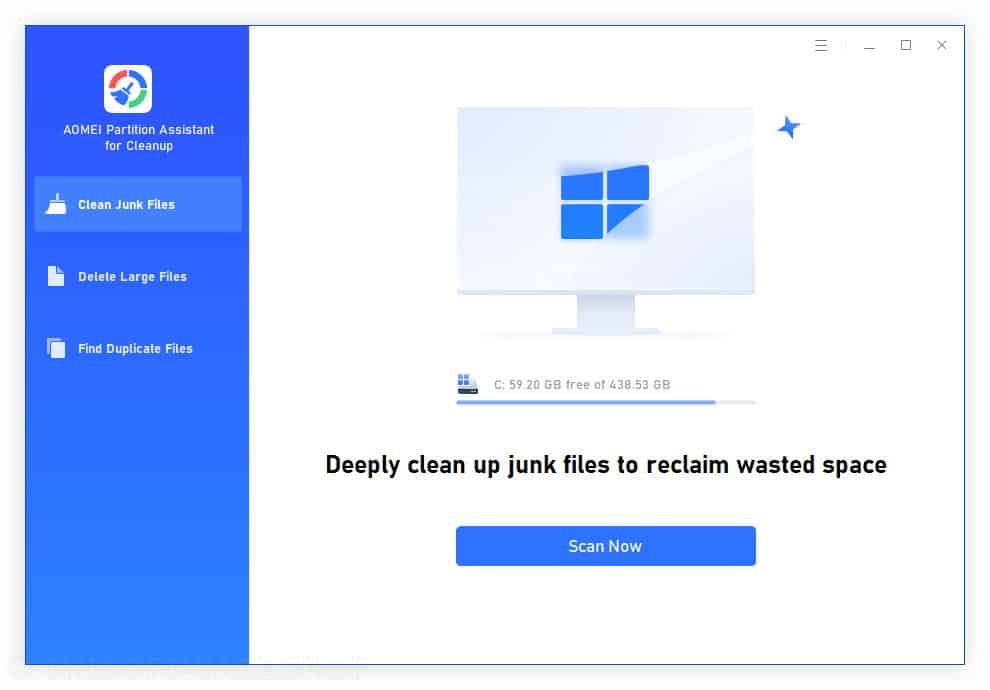
AOMEI Partition Assistant for Cleanup Professional is a comprehensive PC optimization solution designed to tackle these exact challenges. This powerful yet intuitive software provides three essential cleanup functions in one unified platform: junk file removal, large file deletion, and duplicate file detection. By addressing the root causes of system slowdowns and storage issues, this tool helps you maintain a faster, cleaner, and more organized computer environment without requiring technical expertise.
The software works seamlessly across Windows 11, Windows 10, Windows 8, Windows 7, and all Windows Server editions, making it a versatile solution for both personal and professional computing environments. Whether you’re an IT professional managing multiple systems, a content creator dealing with large media files, or a home user simply wanting better performance, AOMEI Partition Assistant for Cleanup delivers measurable results through its intelligent scanning engine and safe deletion protocols.
What is AOMEI Partition Assistant for Cleanup Professional
AOMEI Partition Assistant for Cleanup Professional is a specialized PC maintenance tool that focuses exclusively on helping users reclaim valuable disk space and improve system performance through targeted file cleanup operations. Unlike general partition management software, this dedicated cleanup edition concentrates on identifying and safely removing three main categories of problematic files: system junk, oversized files, and duplicate content.
The software employs advanced scanning algorithms to thoroughly analyze your storage drives and identify files that can be safely removed without affecting system stability or your important personal data. It categorizes findings into easily understandable groups, supporting over 1,000 file formats across documents, pictures, videos, audios, archives, and more. The junk file detection system specifically targets more than 10 different types of system clutter, including temporary files, log files, invalid shortcuts, system registry issues, and recycle bin contents.
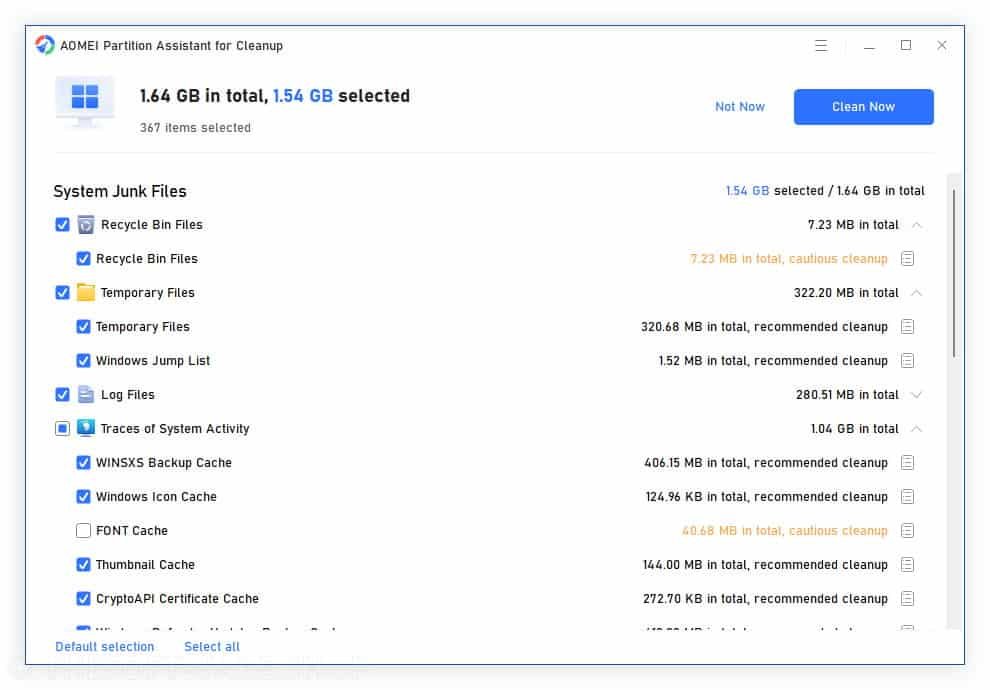
What sets this tool apart is its user-friendly approach to PC maintenance. Rather than overwhelming users with technical details, the software presents clear information about what files are consuming space, offers intelligent clearing suggestions, and provides preview options before any deletions occur. This ensures you maintain complete control over what gets removed from your system while benefiting from automated detection capabilities that would be time-consuming to perform manually.
The Professional edition is engineered to be lightweight yet powerful, running efficiently in the background without adding to system resource strain. It supports scanning across all storage devices recognized by Windows, including traditional hard drives, SSDs, USB external disks, NVME drives, and even network-attached storage (NAS).
Why Choose AOMEI Partition Assistant for Cleanup Professional
Making the right choice in PC cleanup software means selecting a solution that combines power, safety, and ease of use while delivering measurable results. AOMEI Partition Assistant for Cleanup Professional stands as a reliable option backed by real-world performance and global user trust.
The software is trusted by millions of users worldwide, including IT professionals managing enterprise systems, content creators handling large media libraries, and everyday users who simply want a faster computer without technical complexity. This broad user base reflects the tool’s versatility and proven effectiveness across different use cases and skill levels. Customer testimonials consistently highlight significant improvements, with users reporting space recovery ranging from 5GB to over 10GB in single cleanup sessions.
The all-in-one approach eliminates the hassle and expense of juggling multiple specialized tools. Instead of installing separate applications for junk removal, duplicate detection, and large file management, you get comprehensive cleanup capabilities in one cohesive interface. This integration not only simplifies your workflow but also reduces the cumulative system impact of running multiple background processes.
Safety and transparency form the foundation of every operation. The software never makes aggressive automatic deletions that could compromise system stability or remove files you might need. Instead, it provides clearing suggestions, detailed file information, and preview capabilities that keep you informed and in control throughout the cleanup process.
Key Benefits
Understanding how AOMEI Partition Assistant for Cleanup Professional can transform your computing experience helps you make an informed decision about optimizing your system. The software delivers tangible improvements across multiple aspects of PC performance and usability.
- Massive Storage Recovery: Users free an average of 91GB of space after running comprehensive cleanup scans, providing substantial room for new applications, files, and projects without needing hardware upgrades
- Improved System Performance: The software reduces average RAM usage by 35% by eliminating background clutter and unnecessary system processes, resulting in noticeably faster application response times
- Faster Boot Times: Experience an average 22-second reduction in boot time, allowing you to start working more quickly with less frustration from lengthy startup sequences
- Comprehensive Clutter Removal: Each scan typically identifies and cleans over 12,600 junk files, addressing hidden system accumulation that gradually degrades performance over time
- Safe and Controlled Deletion: The software targets only unnecessary system and application files that are safe to remove, ensuring your important data and system stability remain completely intact
- Time-Efficient Cleanup: Complete cleanup operations typically take just a few minutes depending on data volume and system speed, making maintenance convenient rather than time-consuming
- Universal Compatibility: Works flawlessly across all modern Windows operating systems and Server editions, providing consistent cleanup capabilities regardless of your environment
- Intelligent File Detection: The advanced scanning engine accurately identifies junk files, duplicates, and oversized files with no false positives and no accidental deletions, giving you confidence in every operation
- All-in-One Solution: Eliminates the need for multiple cleanup tools by combining junk file cleaning, large file management, and duplicate removal in one intuitive interface
- Professional Support: Access to a responsive support team ready to help you maximize your PC optimization experience and resolve any questions that arise
Features
Below is a comprehensive breakdown of the powerful features that make AOMEI Partition Assistant for Cleanup Professional an indispensable tool for maintaining optimal PC performance and storage efficiency.
Junk File Cleanup
- One-Click System Cleaning: Rapidly detect and remove temporary files, system caches, log files, and other unnecessary data to instantly free up disk space and improve system speed through automated scanning
- Intelligent Clearing Suggestions: Receive smart recommendations about which files are safe to delete, helping you make informed decisions without technical knowledge
- Support for 10+ Junk File Types: Comprehensive coverage including recycle bin files, temporary files, log files, traces of system activity, invalid shortcuts, error reporting diagnostics, Windows pre-read files, recently accessed files, DLL registry, system registry, program registry, and invalid registry entries
- Recycle Bin Files: Permanently remove already-deleted items still consuming space in your recycle bin
- Temporary Files: Clear out short-term system files that accumulate from installations, updates, and daily operations
- Log Files: Delete outdated system and application logs that serve no ongoing purpose
- Traces of System Activity: Eliminate stored records of recent system activities and user actions
- Invalid Shortcuts: Remove broken links to programs or files that no longer exist
- Error Reporting Files: Clean diagnostic data collected from system crashes and errors
- Windows Pre-read Files: Remove prefetch files that are no longer optimizing system performance
- Recently Accessed Files: Clear history of recently opened documents and applications
- Registry Entries: Identify and clean invalid DLL, system, and program registry entries safely
Large File Management
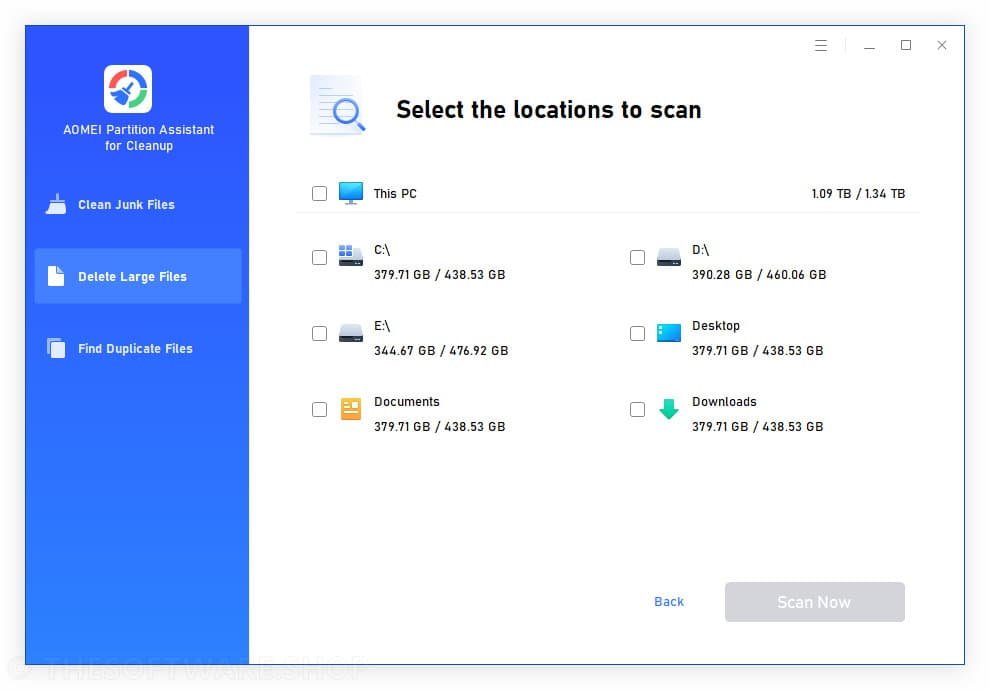
- Oversized File Detection: Automatically identify and locate rarely used large files taking up valuable space, ideal for cleaning up videos, installers, archives, and downloads that accumulate over time
- Flexible Sorting Options: Sort detected large files by size, date, or type to quickly prioritize which items to remove based on your specific needs
- Customizable Scan Locations: Define specific drives, folders, or locations to scan for large files, giving you targeted control over where to focus cleanup efforts
- Instant Space Reclamation: Reclaim gigabytes of storage space immediately by removing space-hogging files that serve no current purpose
- File Type Categorization: View large files organized by category such as videos, installers, or archives for easier decision-making
Duplicate File Removal
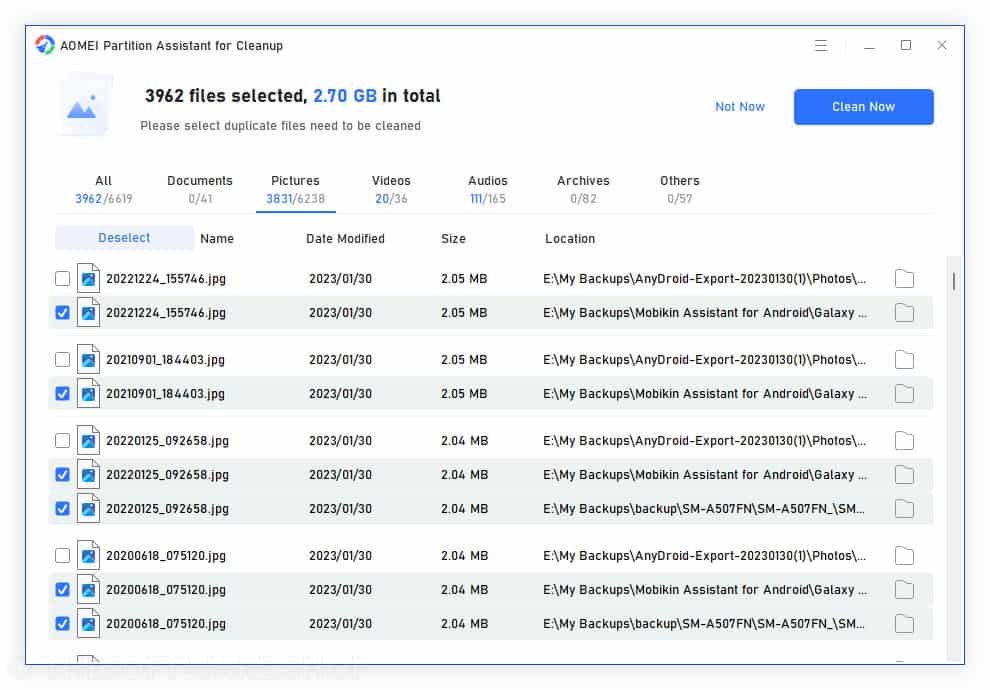
- Automated Duplicate Scanning: Systematically scan across all drives to automatically identify duplicate documents, photos, videos, and other files that waste valuable storage space
- Smart Matching Algorithm: Advanced detection technology ensures accuracy in identifying true duplicates, preventing false matches and protecting unique files
- Preview Before Deletion: Review all identified duplicates with preview functionality before removing them, maintaining total control over what gets deleted
- Support for 1000+ File Formats: Comprehensive duplicate detection across documents (TXT, DOC, XLSX, CSV, PDF, PPT, ODP), pictures (JPG, PNG, TIF, HEIC, GIF, PSD, SVG, ARW, X3F, NEF), videos (MP4, MOV, AVI, WMV, FLV, RMVB), audios (MP3, WAV, WMA, FLAC, APE), archives (7Z, ZIP, RAR, BZ), and others (MSG, EML, HTML, ASPX)
- Organized Data Management: Keep your file system clean and organized by eliminating redundant copies scattered across multiple locations
Advanced Scanning Technology
- Intelligent Scanning Engine: Utilizes sophisticated algorithms to accurately identify problematic files without false positives or risks of accidental deletion
- Comprehensive Drive Coverage: Scan all storage devices recognized by Windows including IDE, SATA, SCSI, SSD, USB external disks, NVME drives, RAID arrays, and Network Attached Storage (NAS)
- Multi-Format Support: Works with NTFS, FAT16, and FAT32 file systems to ensure compatibility across different storage configurations
- Detailed Scan Results: Receive clear, organized reports showing exactly what was found and how much space can be recovered
User Experience and Safety
- Intuitive Interface Design: Clean, user-friendly interface that makes PC cleanup accessible to users of all technical skill levels
- Risk-Free Operations: Safety features built into every function with clearing suggestions and preview options to prevent unintended deletions
- Lightweight Performance: Designed to run efficiently with minimal system resource usage, avoiding the bloat common in competing cleanup software
- Quick Cleanup Execution: Fast processing speeds that complete most cleanup operations in just minutes regardless of system size
Compatibility and Integration
- Universal Windows Support: Full compatibility with Windows 11, Windows 10, Windows 8/8.1, Windows 7 (all editions, both 32-bit and 64-bit versions)
- Server Edition Support: Works seamlessly with Windows Server 2025, 2022, 2019, 2016, 2012/R2, 2008 R2, Windows Home Server 2011, and Small Business Server 2011
- Disk Standard Compatibility: Supports both MBR (Master Boot Record) and GPT (Globally unique identifier Partition Table) disk standards, working effectively with UEFI (Unified Extensible Firmware Interface) startup processes
- Minimal Hardware Requirements: Operates efficiently with just a 500 MHz processor and 256MB RAM, ensuring broad device compatibility
Requirements
To run #THE SOFTWARE with optimum reliability and performance, your system should match the following requirements:
Hardware Requirements
- Processor: 500 MHz x86 or compatible CPU
- Memory: 256MB RAM minimum
- Input Device: Mouse or another pointing device (recommended for optimal navigation)
Supported Operating Systems
- Windows Desktop: Microsoft Windows 11 (all editions), Windows 10 (all editions, 32-bit and 64-bit), Windows 8/8.1 (all editions, 32-bit and 64-bit), Windows 7 (all editions, 32-bit and 64-bit)
- Windows Server: Microsoft Windows Server 2025 (all editions), Windows Server 2022 (all editions), Windows Server 2019 (all editions), Windows Server 2016 (all editions), Windows Server 2012 and 2012 R2 (all editions), Windows Server 2008 R2 (all editions), Windows Home Server (WHS) 2011, Windows Small Business Server (SBS) 2011
Supported File Systems
- NTFS
- FAT16
- FAT32
Supported Storage Devices
The software recognizes almost all storage devices compatible with Windows, including IDE, SATA, SCSI, SSD, USB external disks, NVME drives, RAID (Redundant Array of Independent Disks), and NAS (Network Attached Storage). Additionally, it supports MBR (Master Boot Record) and GPT (Globally unique identifier Partition Table) disk standards and works effectively with the UEFI (Unified Extensible Firmware Interface) startup process.
Downloads
Experience how AOMEI Partition Assistant for Cleanup Professional works specifically for your system before making a purchase decision. Download the trial edition at no cost to test all the software’s powerful cleanup features and see firsthand how much space you can recover and how significantly your system performance can improve by clicking the download button below.
BUY NOW
AOMEI Partition Assistant for Cleanup Professional is regularly available for $29.95 per year. However, you can now secure your license with our exclusive discount coupon offering up to 64% OFF the regular price. This limited-time promotion makes professional-grade PC optimization remarkably affordable for both individual users and businesses.
What You Get with Your Premium License
- Full Access to All Cleanup Features: Unlimited junk file cleaning, large file detection, and duplicate file removal without restrictions
- Professional Edition License: One-year license key providing complete access to all Professional features
- Priority Technical Support: Direct access to AOMEI’s responsive support team for assistance with any questions or technical issues
- Free Updates: Receive all software updates and improvements released during your license period at no additional cost
- Multi-Device Capability: Install and use the software on multiple computers depending on your license type
Exclusive Giveaway Opportunity
You can also obtain AOMEI Partition Assistant for Cleanup Professional with a 1-year license key completely free through our special Giveaway promotion. Visit the Giveaway tab below to claim your complimentary Professional edition license and start optimizing your PC today without any financial commitment.

" />
PC Cleaner Software | Remove Junk Files, Delete Large Files & Duplicates | Performance Optimizer
- One license for 2 computers
- 1-Year Subscription
- Free Product Updates
- Free Technical Support
- 90-Day Unconditional Money Back Guarantee
Platforms: Windows
3 Years / 2 Computers (55% Off)" />
PC Cleaner Software | Remove Junk Files, Delete Large Files & Duplicates | Performance Optimizer
- One license for 2 computers
- 3-Year Subscription
- Free Product Updates
- Free Technical Support
- 90-Day Unconditional Money Back Guarantee
Platforms: Windows
1 Year / 5 Computers (60% Off)" />
PC Cleaner Software | Remove Junk Files, Delete Large Files & Duplicates | Performance Optimizer
- One license for 5 computers
- 1-Year Subscription
- Free Product Updates
- Free Technical Support
- 90-Day Unconditional Money Back Guarantee
- Share license code with extended family members, friends, and colleagues
Platforms: Windows
3 Years / 5 Computers (64% Off)" />
PC Cleaner Software | Remove Junk Files, Delete Large Files & Duplicates | Performance Optimizer
- One license for 5 computers
- 3-Year Subscription
- Free Product Updates
- Free Technical Support
- 90-Day Unconditional Money Back Guarantee
- Share license code with extended family members, friends, and colleagues
Platforms: Windows

Ashampoo WinOptimizer 28: Lifetime License, 3 PCs BEST SELLER
CCleaner Professional (Windows/Mac) BEST SELLER

IObit Advanced SystemCare 19 PRO with Super Valur Pack: 6 Items included! BEST SELLER
AOMEI Partition Assistant Professional Edition + Lifetime Free Upgrades (2 Computers/license) BEST SELLER

WashAndGo BEST SELLER
AOMEI Partition Assistant for Cleanup Professional Key Giveaway
Available now: Free License Key for a Limited time!
To access the giveaway, kindly provide your email address. Please refrain from closing this page after signing in to receive instructions on how to access the offer at no cost.
NOTES:
– All prices shown here are in listed USD (United States Dollar).
– Such promotional programs are subject to change without notice, from time to time in our sole discretion.
– Data may vary based on different systems or computers.
Thanks for reading AOMEI Partition Assistant for Cleanup Professional Review & Enjoy the discount coupon. Please Report if AOMEI Partition Assistant for Cleanup Professional Discount Coupon/Deal/Giveaway has a problem such as expired, broken link, sold out, etc while the deal still exists.