

Giveaway – BgEraser Pro: Free Lifetime License Key | Offline AI Background Remover – for Windows

Remove Backgrounds in Batches, Offline and On Your Terms. Get BgEraser Pro with a Lifetime License key For Free!
Free Full Version!
BUY NOW
BgEraser Pro is available for $39.00. But, you can now get a full version of BgEraser with a Lifetime license key for free through the Giveaway tab below. This offer is available for a limited time!

Offline AI Background Remover | Batch Photo Background Removal, Transparent PNG Export, GPU & CPU Processing, Private Secure Image Editing Tool
- A full license for unrestricted use of the batch background removal workflow on your Windows device
- Continued software updates as new features and model improvements are released
- Access to customer support for installation, performance, or usage questions
- Offline processing rights with no ongoing subscription fees tied to image uploads or per-file charges
- The ability to run background removal on unlimited batches without waiting on cloud-based upload queues
Platforms: Windows

Aiarty Image Matting GIVEAWAY

Apowersoft Background Eraser: Lifetime 1000 Credits BEST OFFER
![[NEW KEY] Giveaway – UltraPic Pro/Pro+: Free Activation Code | Instant Background Remover, Batch Processing, AI Backgrounds, Pro E-commerce Photo Editing Tool](https://thesoftware.shop/wp-content/uploads/thumbs_dir/UltraPic-Pro-Free-Credits-Activation-Code-Giveaway-2485hak007vdtdebobh7jg3jtw8nb809zolgzlemf638.png)
UltraPic Pro GIVEAWAY

Pixlr Premium BEST SELLER

HitPaw Video Object Remover BEST OFFER

HitPaw Online BEST OFFER
BgEraser Pro Key Giveaway
Available now: Free License Key for a Limited Time!

To access the giveaway, kindly provide your email address. Please refrain from closing this page after signing in to receive instructions on how to access the offer at no cost.
NOTES:
– All prices shown here are in listed USD (United States Dollar).
– Such promotional programs are subject to change without notice, from time to time in our sole discretion.
– Data may vary based on different systems or computers.
BgEraser Review at a Glance
Anyone who has prepared product photos for an online store, built a portfolio, or edited a batch of portraits knows the same frustration: removing backgrounds one image at a time is slow, repetitive, and often requires uploading personal or business files to an unknown cloud service. That last part matters more than most people realize, since product photography and customer photos frequently contain sensitive branding, unreleased items, or private details that shouldn’t be sitting on someone else’s server while you wait for a web tool to process them.
BgEraser is a Windows application built specifically to solve this problem. It is an offline background remover that uses local AI models to detect the main subject in a photo and separate it from the background automatically, without any manual selection, layer masking, or lasso tool work. Instead of editing images individually, you add a group of files, let BgEraser process them together in a batch, and export the results as clean transparent PNGs. Every step of that process, from detection to export, happens on your own device using either your CPU or a supported GPU.
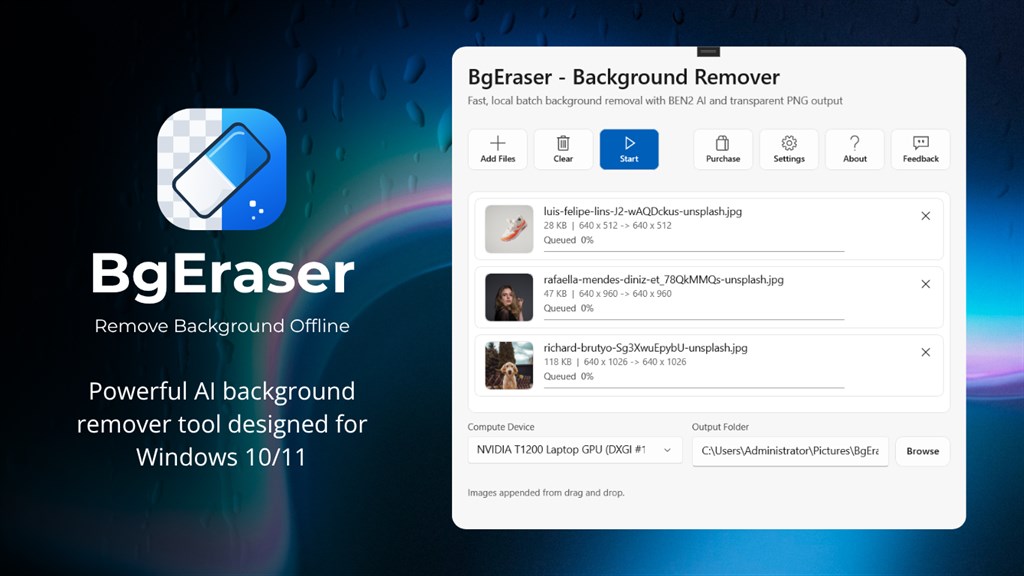
This makes BgEraser a practical fit for digital marketing agencies, e-commerce sellers, photographers, and content creators who regularly need to prepare large volumes of product shots, marketplace listings, profile pictures, or design assets. It’s equally useful for anyone managing personal photo collections, pet photos, or portraits who wants a quick way to lift a subject out of its background without opening a full design suite. Because the software runs locally, it also works without an internet connection once installed, which means no upload queues, no server downtime, and no dependency on a third-party service staying online.
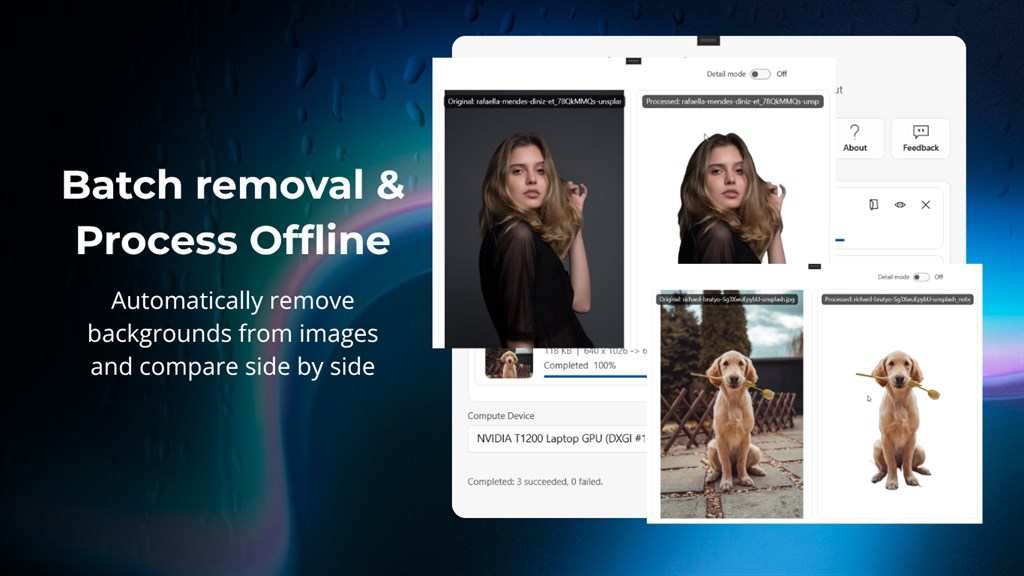
Why choose BgEraser over a browser-based background remover? Online tools are convenient, but they typically require uploading your files to a remote server, and many impose usage limits, watermarks, or file deletion policies that leave you guessing about where your images actually went. BgEraser removes that uncertainty entirely. Your images stay on your machine from start to finish, processing speed depends on your own hardware rather than someone else’s server load, and there is no ongoing dependency on an external service for a task you may need to repeat daily.
Key Benefits
Before listing what BgEraser can do, it helps to understand the practical value it brings to a daily workflow. The points below outline the benefits users notice most once they start relying on BgEraser for regular background removal work.
- Faster batch turnaround: Process a full folder of product photos together instead of opening and editing each file separately, cutting hours of repetitive editing down to a single run.
- Complete file privacy: Images are processed locally, so sensitive product shots, client photos, or unreleased designs are never uploaded to an external server.
- Works without internet: Once installed, BgEraser functions fully offline, which is useful for studios, offices, or locations with unreliable connectivity.
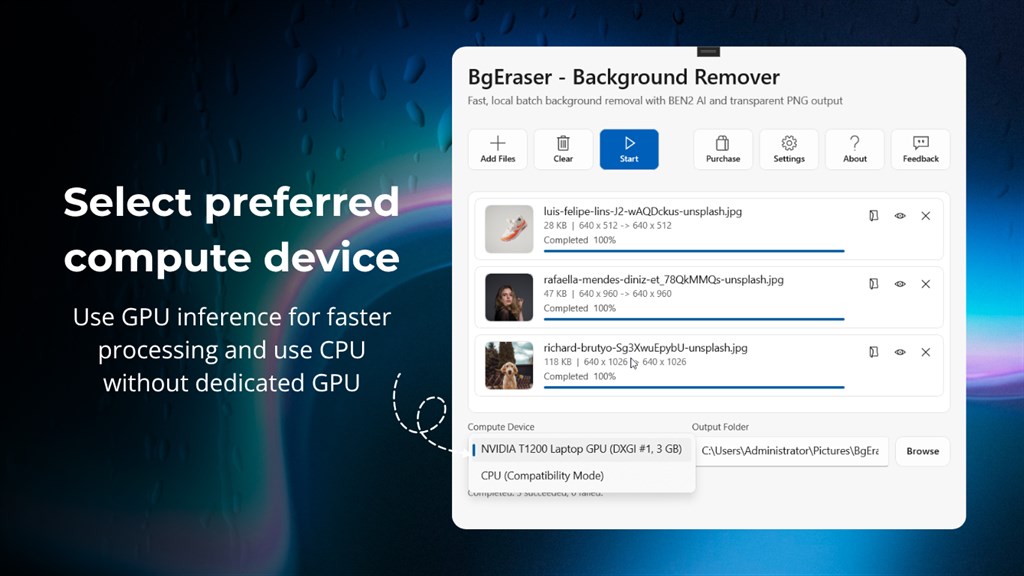
- Hardware flexibility: BgEraser runs on both GPU and CPU, so it remains usable on laptops without a dedicated graphics card as well as on systems with supported GPUs for faster processing.
- Cleaner catalog assets: Automatic subject detection produces consistent transparent backgrounds across large batches, which helps marketplace and website listings look uniform.
- No recurring per-image fees: Since processing happens locally rather than through a cloud service, there’s no per-upload cost model to manage as your image volume grows.
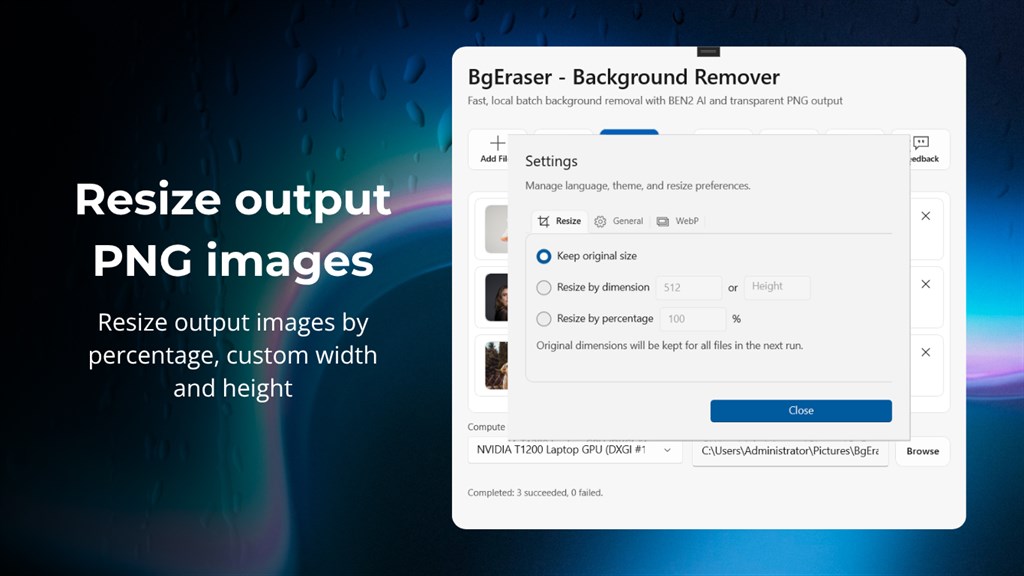
- Flexible export sizing: Built-in resize options let you match output dimensions to specific platform requirements without a separate resizing tool.
Key Features
Below is a comprehensive list of the key features that make the software a valuable addition to your workflow:
- Automatic Image Background Removal: BgEraser detects the main subject in a photo and separates it from the surrounding background without manual selection.
- Subject Detection AI: The local AI model identifies the primary object or person in each image automatically.
- Transparent Background Export: Processed images are saved with clean transparent backgrounds ready for immediate use.
- Batch Background Removal: Multiple image files can be added and processed together in a single workflow instead of one at a time.
- Multi-File Import: Add a group of images at once rather than opening and processing each file individually.
- Batch Export: Export an entire processed batch together, saving time when working with product photo sets or image collections.
- GPU and CPU Processing: Choose the compute device that best matches the capabilities of your computer.
- GPU Inference: Supported graphics hardware can be used to speed up processing on capable systems.
- CPU Inference: Computers without a compatible GPU can still run background removal using CPU-based processing.
- Completely Offline and Private Processing: All background removal happens locally on your Windows device with no cloud dependency.
- No Image Uploads: Files are never sent to an external server during processing.
- Offline Functionality: The app continues working without an active internet connection after installation.
- Flexible Output Resizing: Exported images can be resized to fit different platforms and use cases.
- Custom Dimension Resize: Set a specific width and height for exported images.
- Percentage-Based Resize: Scale images up or down by a chosen percentage instead of fixed dimensions.
- Original Size Retention: Keep the original image dimensions unchanged when resizing isn’t needed.
- Simple Batch Workflow: A straightforward five-step process guides users from import to export.
- Guided Steps: Add files, select a compute device, choose resize settings, run removal, and export results in a clear sequence.
- No Advanced Skills Required: The workflow is designed for users without prior image editing or design experience.
- Browser-Based Companion Tool: An accompanying web-based background eraser allows quick processing without installing software.
- No Sign-Up Required: Use the browser tool directly without creating an account.
- Automatic File Cleanup: Uploaded images and generated results in the web version are removed within 2 hours to limit long-term storage of your files.
- Multi-Format Support: The tools accept common image formats used across e-commerce and design work.
- JPG, PNG, and WebP Compatibility: Upload and process files in the most widely used image formats without conversion beforehand.
- Background Color Replacement: Optionally apply a solid background color instead of transparency before downloading processed images.
Requirement List
Reviewing the system requirements before installation helps confirm that BgEraser will run smoothly on your current setup. The specifications below outline the minimum and recommended hardware and software needed for stable performance.
- Available on: PC, Mobile, Surface Hub, HoloLens
- Operating System: Windows 10 version 17763.0 or higher
- DirectX: Version 11 minimum, DirectX 12 API with Hardware Feature Level 12 recommended
- Memory: 4 GB minimum, 16 GB recommended
- Video Memory: 1 GB minimum, 4 GB recommended
- Processor: x64 dual-core CPU at 2.0 GHz or higher minimum, x64 quad-core CPU at 3.0 GHz or higher recommended
- Graphics Processor: DirectX 11-compatible integrated or discrete GPU minimum, DirectX 12-compatible discrete GPU such as NVIDIA GTX 1650 / RTX 3050 class or AMD RX 570 class and above recommended
Downloads
Test how BgEraser handles your specific photo library before deciding on a purchase. Run the trial edition on your own product photos, portraits, or design files to confirm the batch workflow, export quality, and processing speed match what your projects need.
The trial edition lets you experience the full batch removal process, including subject detection, GPU or CPU selection, and resize options, using your own images on your own hardware. This is the most reliable way to judge output quality, since results depend on your specific photo types and system configuration. There is also a browser-based background eraser available with no sign-up required, useful for a quick one-off test before committing to the full desktop installation.
or
Buy now, the price start from:
Thank you for reading BgEraser review, and enjoy the discount coupon. If you notice any issues with the BgEraser Pro discount coupon, deal, or giveaway—such as an expired offer, broken link, or sold‑out promotion—please let us know while the deal is still available.






The provided license key does not work. After entering the license key and hitting the activate button I get the following: “? Not activated on this device.”
Good day
Can not successfully activate.
After inserting the number and clicking on ”activate” the resuklt, after a short while is:
”can not activate on this device ”
Regards
jmc