
92% Off – DoneIt: Premium Lifetime License | Task Manager, Project Planner, Kanban Board, iCloud Sync, Reminders Integration – for Mac

Organize tasks faster across iPhone, iPad, Mac, and Apple Watch. Get DoneIt Premium today at a 92% Discount and start planning your next week in a clean list, a Kanban board, or a timeline view.
✔ Lifetime License. ✔ Free Product Updates ✔ 24×7 Customer Support
DoneIt Review at a Glance
Keeping up with personal goals, school deadlines, and work deliverables can feel stressful when tasks are scattered across notes, chats, and multiple to-do apps, so focus becomes harder than it should be.
DoneIt is a projects and tasks manager built for Apple platforms, designed to keep task lists from becoming messy while helping you plan what needs to happen now versus later.
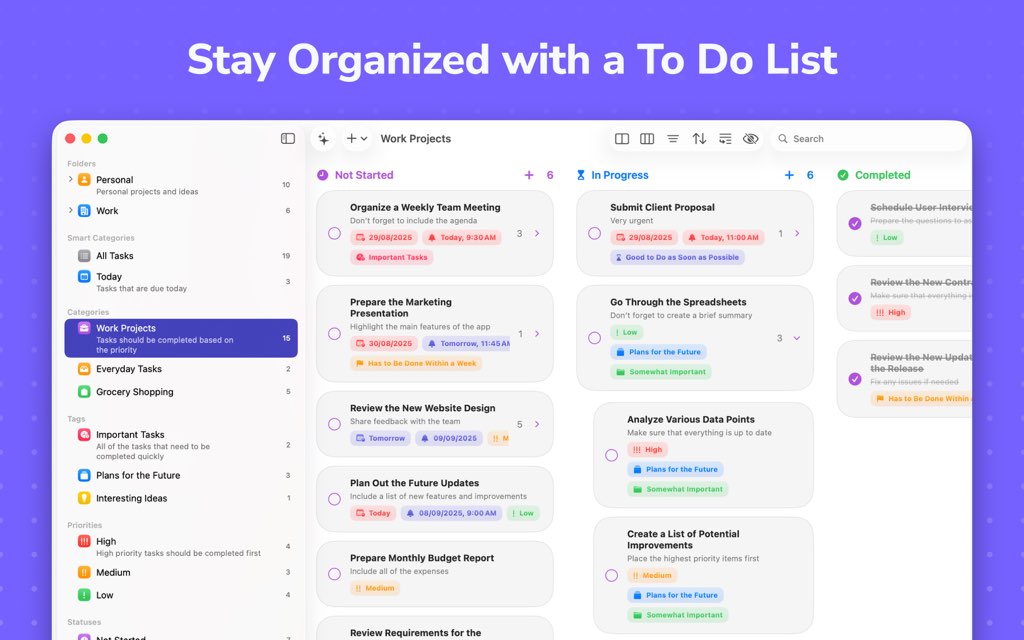
It combines flexible task organization with multiple ways to view your work—list, grid, Kanban board, and timeline—so you can choose a layout that matches each project.

What is DoneIt
DoneIt is a feature-packed projects and tasks manager for Apple devices that focuses on simplicity and organization while helping keep task lists from becoming messy. It supports multiple task views (including list, grid, Kanban board, and timeline), plus iCloud sync and integrations with Apple Reminders and Calendar for a connected workflow.
If you mainly want a fast place to capture and check off daily actions, DoneIt supports unlimited tasks and unlimited subtasks, so simple lists can scale into bigger projects without switching tools. If you need more structure, DoneIt includes organization tools like folders, smart categories, categories, tags, priorities, statuses, and custom task attributes to keep information sorted and easy to filter.
To reduce app-hopping, DoneIt syncs across devices via iCloud and also supports syncing with Apple’s Reminders app, including importing reminders when you want everything in one place. It can also add tasks and subtasks as events in Apple’s Calendar app, and it supports importing calendar events so your schedule and your tasks can sit side by side.
When your workflow needs more automation, DoneIt includes list actions that let you configure what happens when you add or move a task to a specific list, which is useful for repeatable processes. For tasks that need context, you can attach files, photos, scanned documents, and drawings, so the details travel with the work instead of living in separate folders.

DoneIt is designed with a fully native interface that feels at home on Apple devices, with dark mode and system integrations like widgets, Siri Shortcuts, and Focus Filters for quicker access. For customization, it includes options like changing tint color and app icon, plus settings that let you adjust how task information appears so the interface can match your preference for simplicity or detail.
Privacy matters when your tasks contain personal and business information, and the App Store listing notes that some collected data may be “not linked to you” (such as purchases, identifiers, usage data, and diagnostics). Because DoneIt is available on iOS, iPadOS, macOS, and watchOS, you can review a task on your wrist, plan on a larger screen, and capture quick actions on your phone with the same iCloud-connected setup.
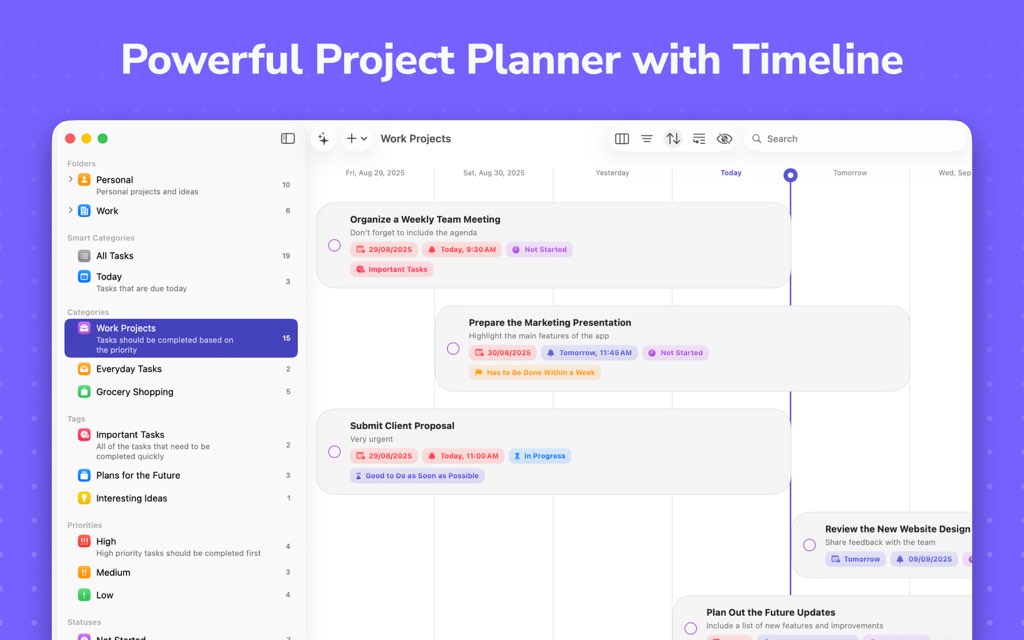
DoneIt can be used for free, and there is also a premium version available via subscription or a one-time purchase, so you can start small and upgrade only if you need advanced capabilities. Premium adds power-user features like timeline view, advanced board view, advanced filters, collaboration via iCloud sharing, attachments, recurring reminders with custom intervals, and bulk editing to speed up big changes.
If you are a student, DoneIt can help you keep classes separated by categories and break assignments into subtasks, so you always know the next action without rewriting your plan. If you run a small business or manage client work, DoneIt’s views and attributes can help you track status, urgency, and context, while iCloud sync keeps everything consistent across your Apple devices.
If you like visual planning, use the Kanban board for workflow stages and switch to a timeline view for longer-term scheduling, then return to list view for quick daily execution. If you prefer minimal setup, start with just a couple of categories (the free version supports up to 2 categories) and expand later if you decide you want deeper organization.
DoneIt also supports practical daily management tools like reminders and notifications, including all-day reminders, which helps when you need gentle nudges without assigning a strict time. When you want to clean up without losing history, DoneIt lets you archive or hide tasks you do not want to delete yet, keeping your workspace neat while preserving reference material.
On iPhone and iPad, widgets help you keep important task info visible, and DoneIt offers more than five widgets to view tasks directly from your Home Screen or other widget areas. On Apple Watch, a standalone watchOS app can support quick checks and light task interactions, so you can stay on track even when your phone is not in hand.
If you often reorganize, DoneIt includes sorting options and filters so you can reorder task lists, surface the most urgent items, and hide noise while you work. If you rely on quick gestures, it includes swipe actions, pinning for important items, and Home Screen quick actions to speed up common steps.

DoneIt is a good fit when you want one system for both daily to-dos and multi-step projects, because it supports tasks, subtasks, notes, links, and list-level notes for context. It is also a strong pick for Apple-first users who want a native feel and tight integration with iCloud, Reminders, Calendar, widgets, Siri Shortcuts, and Focus Filters.
To get started, install DoneIt, create a category for one area of life (like Work or Personal), then choose the view that matches your current planning style and keep adjusting as you learn what you actually use. As your system grows, premium features like custom attributes, advanced filters, bulk edits, recurring reminders, and collaboration can help you keep control without spending extra time maintaining your lists.
Key Benefits
These benefits highlight the practical ways DoneIt can help you plan, prioritize, and complete work with less friction across your Apple devices.
- Keep tasks organized with categories, folders, tags, priorities, statuses, and custom attributes (premium adds deeper structure).
- Switch between list, grid, board, and timeline views to match each project and planning style.
- Stay consistent across devices with iCloud sync, plus iCloud sharing for collaboration in premium.
- Reduce duplication by syncing with Apple Reminders, including importing reminders when needed.
- Put tasks on your schedule by adding tasks/subtasks as Calendar events and importing calendar events.
- Keep details attached to the task with support for files, photos, scans, and drawings (premium).
- Save time on repeat workflows using list actions (premium) and bulk editing (premium).
- Personalize the look with tint colors, icons, and appearance options so the app feels comfortable for daily use.
Features
Below is a comprehensive list of the key features that make the software a valuable addition to your needs: speed in capture, clarity in planning, and flexible organization when projects get complex.
- Multi-view planning: Choose the layout that fits the work in front of you.
- List view: Simple daily execution and quick capture.
- Grid view: A more visual way to scan tasks.
- Kanban board view: Workflow-based columns for project stages.
- Timeline view: Long-range planning for scheduled tasks (premium).
- Task organization system: Build a structure that matches your responsibilities.
- Categories: Group tasks by area; free supports up to 2 categories.
- Folders: Organize categories into higher-level groupings (premium).
- Smart categories: Dynamic groupings for tasks (premium).
- Tags: Add flexible labels for context (premium).
- Priorities: Mark urgency and importance (premium).
- Statuses: Track progress states (premium).
- Custom attributes: Create custom task fields for your workflow (premium).
- Subtasks and notes: Break work down into manageable actions.
- Unlimited subtasks: Split big tasks into smaller steps.
- Task notes: Add supporting details to tasks and subtasks.
- List notes: Add notes to task lists for context.
- Links in tasks: Save relevant URLs directly on items.
- iCloud sync and collaboration: Keep everything updated on all your devices.
- Multi-device iCloud sync: Sync across devices on one iCloud account.
- iCloud sharing: Share and collaborate on categories securely (premium).
- Apple Reminders integration: Keep system reminders connected to your plan.
- Sync with Reminders: Automatically sync tasks with the Reminders app.
- Import reminders: Bring existing reminders into DoneIt.
- Apple Calendar integration: Place tasks on a real schedule when needed.
- Task-to-event: Add tasks and subtasks as Calendar events.
- Import events: Import calendar events into DoneIt.
- Reminders and notifications: Stay on time without constant checking.
- Due notifications: Schedule reminders that notify you when tasks are due.
- All-day reminders: Support for all-day reminders.
- Recurring reminders: Custom repeat intervals for recurring tasks (premium).
- Attachments (premium): Keep files and visuals with the task itself.
- Files: Attach documents to tasks and subtasks.
- Photos: Add reference images for context.
- Scanned documents: Store scans directly on relevant tasks.
- Drawings: Add sketches when visuals help.
- Automation with list actions (premium): Reduce repetitive sorting and setup.
- Add rules per list: Configure what happens when you add a task to a list.
- Move-trigger actions: Configure what happens when tasks are moved between lists.
- Sorting, filtering, and bulk changes: Control large lists without slow manual edits.
- Sorting options: Multiple sorting options for task lists.
- Filters: Different filters for task lists; advanced filters in premium.
- Bulk editing (premium): Edit items in bulk to save time.
- Customization and native UI: Make the app feel natural for daily use.
- Fully native design: UI designed to feel at home on Apple platforms.
- Dark mode: Built-in dark mode support.
- Tint colors: Choose interface tint colors (premium includes more options).
- App icons: Pick from multiple app icons (premium).
- Appearance settings: Set Dark, Light, or System appearance (premium).
- Widgets, shortcuts, and Focus support: Get to tasks faster from the system.
- Widgets: More than 5 widgets to view your tasks.
- Siri Shortcuts: Use Siri Shortcuts for quick actions.
- App shortcuts: Support for app shortcuts (noted in the App Store listing).
- Focus filters: Support for Focus Filters.
- Multi-platform availability: Keep one system across your Apple devices.
- iOS and iPadOS: Use DoneIt on iPhone and iPad.
- macOS: Plan on a bigger screen when you want.
- watchOS: Standalone Apple Watch app support.
Requirements
Use this checklist to confirm your devices meet the minimum OS versions listed for DoneIt on the App Store.
- iOS 17.0 or later
- iPadOS 17.0 or later
- macOS 14.0 or later
- watchOS 10.0 or later
- visionOS 1.0 or later (if using Apple Vision)
Downloads
See how DoneIt works according to your needs—download the free version first and test the core experience by clicking the button below.
DoneIt can be used completely for free, with premium available via monthly or yearly subscription or a one-time purchase if you decide you need advanced features.
BUY NOW
DoneIt Premium is available for $19.00, but you can now get DoneIt Premium with a Lifetime License—this deal is available for a limited time.
By buying Premium, you get: unlimited categories, advanced board view, timeline view, list actions, advanced filters, iCloud sharing and collaboration, folders and smart categories, tags/priorities/statuses, custom attributes, attachments, recurring reminders with custom intervals, bulk editing, extra icons/colors, and appearance controls plus ongoing updates and support.

" />
Task Manager, Project Planner, Kanban Board, iCloud Sync, Reminders Integration | Timeline & Widgets for iPhone iPad Mac Watch
- Please Notes:
- You may be directed to the bundle page, but it is possible to purchase the software individually.
- If you're having difficulty locating the product on the bundle page, please utilize the browser's search feature.
- Get an additional $3 discount on all orders more that $30.
- LEGITIMATE: All apps are authentic and have original licenses obtained directly from the creators via contracts.
- INSTANT ACCESS: Fully activated macOS Apps & Windows Software with instant downloads & license key access.
- Device Activation: 1 Device
- By purchasing the premium version of Doneit, you will also get access to the premium versions of Accountit and Creativit apps as part of the it Toolbox bundle.
- You can use the apps on an unlimited number of devices and all of the future updates are included as well.
- Please note that you can only redeem your license key in the macOS versions of the apps that you can download here: https://f004.backblazeb2.com/file/it-Toolbox/it+Toolbox/it+Toolbox.zip.
- Your license will then be automatically synced to your other devices as long as you have enabled the iCloud functionality for each of the apps that are part of the it Toolbox and logged into the same iCloud account as on the device that you have redeemed your license key on.
- Major & Minor Updates Included
- Lifetime License

ClearCRM BEST OFFER
Blue - All-in-one Project Management Tool BEST OFFER
Stackby: Lifetime Subscription BEST OFFER
Taskade: 1-year Subscription BEST OFFER
Timelinr BEST OFFER
Doneit Premium Lifetime License Key Giveaway
Unavailable at this moment!
To access the giveaway, kindly provide your email address. Please refrain from closing this page after signing in to receive instructions on how to access the offer at no cost.
NOTES:
– All prices shown here are in listed USD (United States Dollar).
– Such promotional programs are subject to change without notice, from time to time in our sole discretion.
– Data may vary based on different systems or computers.
User & Media Reviews
What are their users saying about #THE SOFTWARE? Why they loved it?
I’ve had this app for a few months now and didn’t consistently use it due to it not being feature specific for my needs. However, I looked beyond it being more capable than what I was looking for and treated it like any other product and focused on my requirements since it is designed to be used in this manner. I’m pleased with it just as much as I am with their other app Accountit.
 ⭐⭐⭐⭐⭐" class="author_image">Lance E
⭐⭐⭐⭐⭐
What I really enjoy about this app is its simplicity and how similar it is to reminders. However, despite paying for the lifetime version because I despise subscriptions, the iCloud sync is lacking. How it looks on my phone is different from how it looks on my iPad app or mac app. I like the board/grid view and how quick and easy it is to organize everything I need to. But the lack of proper syncing is slowing me down and making me regret purchasing this app to begin with.
⭐⭐⭐⭐⭐" class="author_image">MrsV062815⭐⭐⭐⭐⭐
I don’t write reviews. Ever. But this app has saved my cluttered existence. Doneit enables you to sift through long term projects and break down daily tasks. Multiple views allow you to see the big and biggest pictures. The only downside is that it crashes often. No data is lost but it’s a little glitchy. Overall though, this is a 9 out of 10. Worth the $
⭐⭐⭐⭐⭐" class="author_image">BarbD888⭐⭐⭐⭐⭐
Thanks for reading Doneit Review & Enjoy the discount coupon. Please Report if Doneit Premium Discount Coupon/Deal/Giveaway has a problem such as expired, broken link, sold out, etc while the deal still exists.


![[NEW CODE] Giveaway – Superthread: Free Lifetime Pro | Project Management App – Tasks, Issues, Docs, Roadmap & Meeting Notes](https://thesoftware.shop/wp-content/uploads/thumbs_dir/Superthread-Project-Management-Review-Discount-Code-Giveaway-rfosnoibytn1jfzcjbl4fbn3n5r41mioe2d58hg3vc.png)

