67% Off – Find Any File: Lifetime License | Advanced File Search Software Beyond Spotlight – for Mac

Stop wasting hours searching for files your Mac’s Spotlight can’t find. Find Any File (FAF) gives you complete control over every file on your Mac — including hidden files, system folders, network volumes, and other users’ directories. Get your lifetime license at 67% Off today and find every file, every time.
✔ Lifetime License. ✔ Free Product Updates ✔ 24×7 Customer Support
BUY NOW
Find Any File is available for $6.00. But, you can now get Find Any File with a lifetime license at a 67% Discount. This offer is available for a limited time!

Advanced File Search Software Beyond Spotlight | Search Hidden Files, NAS & Network Volumes, Root Mode, Pro File Finder for Mac
- Please Notes:
- You may be directed to the bundle page, but it is possible to purchase the software individually.
- If you're having difficulty locating the product on the bundle page, please utilize the browser's search feature.
- Get an additional $3 discount on all orders more that $30.
- LEGITIMATE: All apps are authentic and have original licenses obtained directly from the creators via contracts.
- INSTANT ACCESS: Fully activated macOS Apps & Windows Software with instant downloads & license key access.
- Device Activation: 1 Device
- A single license is good for multiple Macs for personal use, but in a company environment it's one license per computer.
- Minor Updates Included Only
- Lifetime License
Platforms: Windows

Substage Mac App BEST OFFER

Vovsoft Search Text In Files GIVEAWAY

Copernic Desktop Search & Cloud BEST SELLER

Find My Files BEST OFFER
Find Any File Mac App Giveaway
Unavailable at this moment!

To access the giveaway, kindly provide your email address. Please refrain from closing this page after signing in to receive instructions on how to access the offer at no cost.
NOTES:
– All prices shown here are in listed USD (United States Dollar).
– Such promotional programs are subject to change without notice, from time to time in our sole discretion.
– Data may vary based on different systems or computers.
Find Any File Review at a Glance
The Problem Every Mac User Faces
You need a specific file — a document, an old project, a system config — and Spotlight simply cannot find it. Maybe it’s stored on a NAS drive, buried inside an application bundle, sitting in a system-protected folder, or hidden in another user’s home directory. macOS’s built-in search tools are powerful, but they have well-known blind spots. Files on external or network volumes often go unindexed. Spotlight deliberately skips system libraries and package contents. If you do not have admin rights, entire portions of your own machine remain invisible to standard searches. These are not edge cases — they are everyday frustrations for power users, developers, IT professionals, and anyone who works with a Mac seriously.
What is Find Any File (FAF)?
Find Any File (FAF) is a professional-grade file search application built exclusively for Apple macOS. It was designed from the ground up to go where Spotlight cannot — reaching into hidden directories, network-attached storage (NAS) volumes, application bundles, system folders, and even other users’ home directories using its unique root search mode. FAF is not a replacement for Spotlight; it is the indispensable companion that fills every gap Spotlight leaves behind.
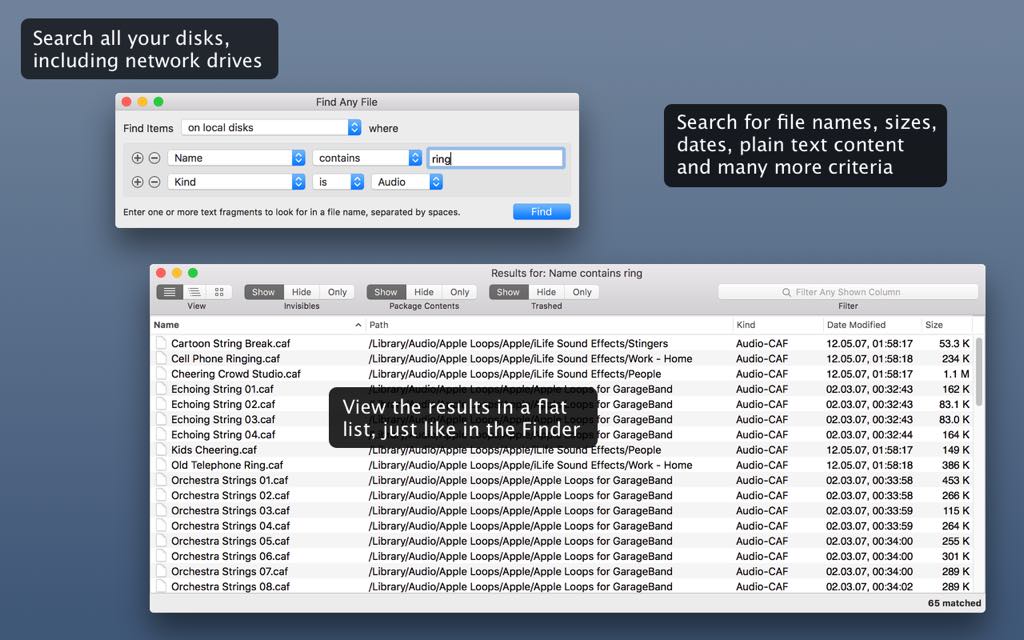
Unlike generic search tools, FAF gives you precision control over your search criteria. You can search by file name, extension, date ranges, file size, kind, tags, Finder comments, text content, file type codes, and even Unix-level attributes like owner ID and inode numbers. For users who need maximum flexibility, FAF includes expert-mode rules — advanced, hidden criteria that go far beyond what any standard search tool offers. Whether you are a casual Mac user who just wants to find a missing file, or a system administrator who needs to audit an entire server over SSH, FAF has the depth to match your needs.
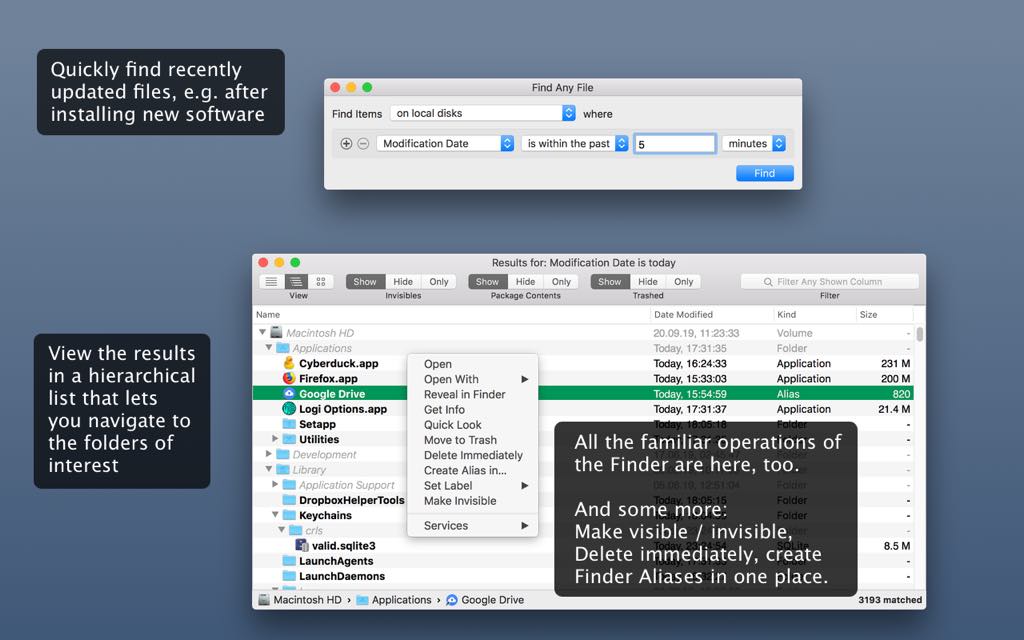
FAF is trusted by power users, developers, digital creatives, IT professionals, system administrators, and anyone who demands more from their Mac than Spotlight can deliver. Its combination of speed, precision, and reach makes it the most capable file search utility available for macOS today.
Key Benefits
Find Any File Mac App delivers real, tangible advantages that make it a must-have addition to any Mac user’s toolkit. Here is why thousands of macOS users rely on FAF every day:
- Find files Spotlight cannot: FAF reaches into network (NAS) volumes, hidden files, application bundles and packages, system and library folders, and other users’ directories — all places Spotlight deliberately ignores or cannot access.
- Root search mode for complete access: By activating FAF’s unique root mode (with admin password confirmation), you gain access to every file on every local volume, including files owned by other users — a capability no other consumer-grade search tool offers.
- Precise, multi-criteria searches: Build searches using combinations of rules — name, extension, date range, size, kind, tag, content, path, owner ID, and more — to zero in on exactly what you need without sifting through thousands of irrelevant results.
- Hierarchical results view: When a search returns hundreds or thousands of hits, FAF’s tree-view mode organizes results by folder structure, so you can immediately navigate to the folders that matter to you rather than scrolling through a disorganized flat list.
- Text content search in multiple formats: FAF searches text content inside plain text files, ZIP archives, Word (.docx), and Excel (.xlsx) files — and, when Spotlight is enabled as a supplement, it can also surface results from PDF documents.
- Save, reuse, and automate searches: Save your search criteria to .faf files, automate searches with AppleScript or JavaScript, integrate with Alfred, Keyboard Maestro, and PopClip, and use keyboard shortcuts to launch FAF instantly from any application.
- Pro-level speed on servers: With a Pro License, FAF uses SSH access to run searches directly on Linux, Unix, and NAS file servers — delivering results in seconds instead of minutes — and supports Windows file servers via integration with the Everything search tool.
- Manage files directly from results: Right from FAF’s results window, you can move to trash, delete immediately, rename, unlock locked files, hide or unhide items, copy paths in multiple formats, and more — without ever switching back to Finder.
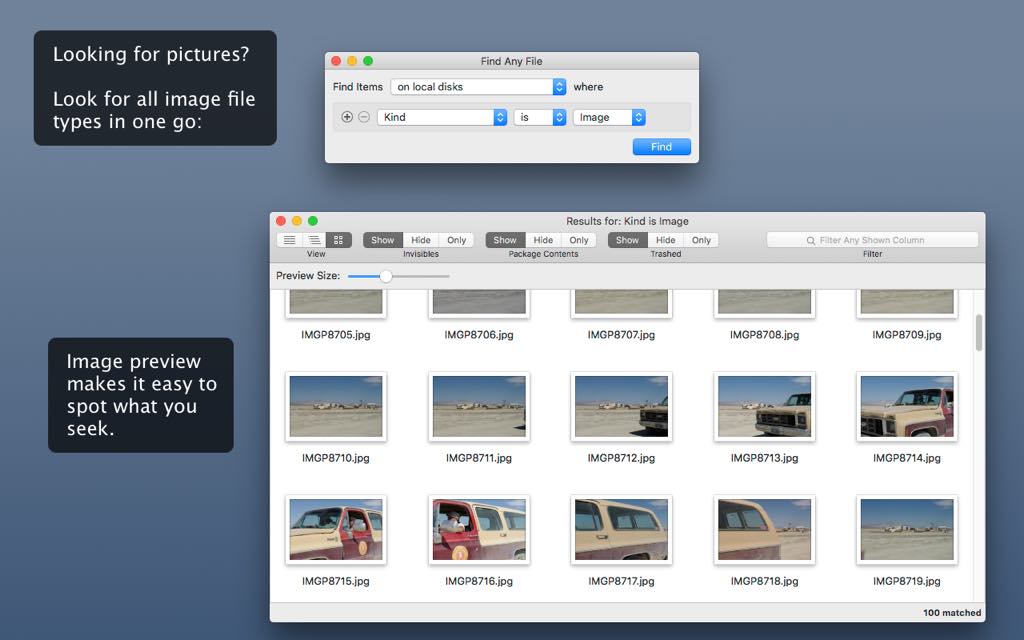
- Image preview built in: The image preview browser (introduced in version 1.9) lets you visually scan image results directly inside FAF, saving you the extra step of opening files in another application.
- Works with iCloud and cloud-stored files: FAF can identify cloud-only (dataless) files and alert you when content search is limited because files are not downloaded locally — keeping your search results accurate and transparent.


Features
Below is a thorough breakdown of every major capability that makes Find Any File an essential tool for macOS power users, professionals, and everyday users alike:
- Advanced File Search Engine: FAF performs a rigorous, direct-to-disk search that does not rely on Spotlight’s index, ensuring nothing is missed.
- Fast CatSearch (searchfs) mode: Uses Apple’s native fast volume search API for maximum speed on local Mac volumes.
- Slow (thorough) search mode: Falls back to a comprehensive directory-by-directory scan when fast search is unavailable or unreliable, such as on certain NAS systems.
- Root search mode: Restarts FAF with administrator privileges to access every file on local volumes, including system folders and other users’ home directories.
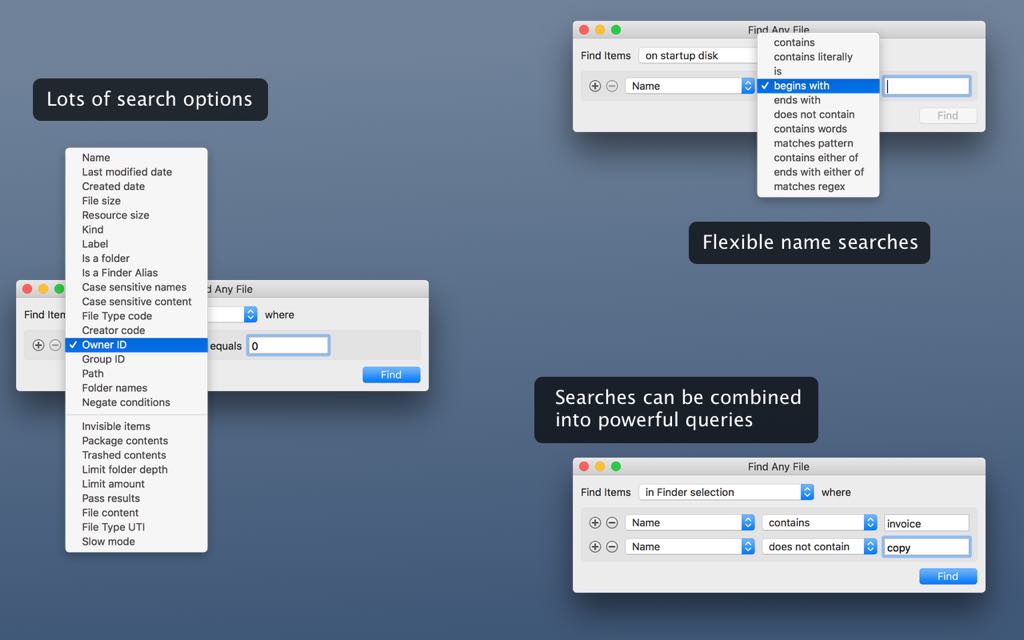
- Rich, Multi-Criteria Rule System: Build powerful searches by combining multiple rules — all of which must match for a file to appear in results.
- Name rules (contains, begins with, ends with, is, matches pattern, matches RegEx, and more): Fine-tune name matching with smart keyword logic, exact phrase matching, wildcard patterns, or full PCRE2 regular expressions.
- Date rules (last modified, created, last opened, added date): Search by any combination of date properties, with optional time precision via right-click.
- File size rule: Match files by their data fork size, supporting range-based searches by combining two size rules.
- Kind rule: Filter by pre-defined file categories including Image, Video, Audio, PDF, Application, Archive, Disk Image, Symlink, Alias, and many more.
- Tag and Label rules: Find files by their Finder Tags or classic label colors, including multi-tag matching with separate rule entries.
- Text content rule: Search inside file contents — plain text, UTF-8/UTF-16, and compressed ZIP files (.docx, .xlsx) — with optional case-sensitive matching.
- Path and Folder names rules: Match files by their full POSIX path or by any folder name in the directory hierarchy leading to the file.
- Comments rule: Search Finder comments as seen in the Info window, including pattern-based matching to find any commented file.
- Expert rules (hidden, option-key activated): Access advanced rules including Resource size, Added date, Owner ID, Group ID, File Type UTI, inode number, Hard Link count, Creator code, Script (Lua/JavaScript), Negate conditions, Case-sensitive content, Limit folder depth, Limit amount, Calculate folder sizes, Spotlight Results mode, Pass results to file, and Slow mode.
- Multiple Results View Modes: Switch between three distinct display formats depending on the size and nature of your results.
- Flat list view (⌘1): The standard linear list of all matching files, ideal for small result sets.
- Hierarchical tree view (⌘2): Organizes results by folder structure, with matching items shown in black/bold and enclosing folders in gray/italic for instant visual clarity.
- Icon preview view (⌘3): Displays results as thumbnails, perfect for visual media like photos and graphics.
- Results Filtering and Column Management: Narrow down large result sets without re-running the search.
- Filter input field: Type text to instantly reduce the visible results by name, kind, enclosing folder, or other columns.
- Customizable columns: Show or hide specific columns (name, date, size, kind, tags, etc.) by right-clicking column headers or via the View menu.
- Reset Column Widths: Instantly auto-fits all columns for clean, readable results.
- Highlight Found Names: Visually highlights the matching portion of file names in results when searching by partial name.
- File Operations from Results Window: Perform a wide range of file management actions directly from FAF without opening Finder.
- Move to Trash / Delete Immediately: Remove files safely or permanently, with FAF attempting to unlock protected files before deletion.
- Rename: Rename individual files directly from the results list.
- Unlock: Strips locks and ACLs from protected files so they can be moved, edited, or deleted.
- Make (in)visible: Hide or unhide files and folders (for items not starting with “.”).
- Copy Path (POSIX, URL, HFS, Terminal): Copy file paths in four formats for use in Terminal, AppleScript, Finder, or other tools.
- Create Alias in…: Generate Finder Aliases for multiple selected items into a folder of your choice.
- Quick Look (Space bar): Preview selected files instantly without opening them.
- Set Label / Tag: Apply classic label colors or Finder Tags to selected items.
- Search Scope Control: Precisely define where FAF searches to save time and avoid irrelevant results.
- Single disk or folder: Limit the search to one volume or a specific directory.
- Multiple disks/folders via drag & drop: Drop multiple volumes or folders onto the location menu to search them simultaneously, with Shift-key support for adding to an existing set.
- All disks: Search every mounted volume at once.
- Special Folders exclusions: Exclude specific folders or volumes (e.g., Time Machine backups) from all searches via the Special Folders settings window.
- iCloud folder exclusion: A dedicated button adds the entire iCloud folder to the exclusion list, since its path is otherwise difficult to locate manually.
- Save, Load, and Automate Searches: FAF’s search workflow integrates deeply with macOS automation tools.
- Save search criteria (.faf files): Save any configured search as a .faf file; double-clicking it re-runs the search instantly, or use it as a preset for repeated workflows.
- Save As Default Search: Saves your preferred rules and search location so they load automatically every time FAF launches.
- Save results to .paths files: Export the full list of found file paths for use in Terminal commands, other applications, or for reloading in FAF later.
- Merge search results: Hold Shift when clicking Find to add new results to an existing results window, enabling multi-search file set assembly.
- AppleScript and JavaScript automation: Since version 2.6, FAF supports full scripting — configure searches in JSON, run them, and query results programmatically.
- URL scheme (fafapp://): Launch FAF with pre-configured search parameters from Alfred, Keyboard Maestro, PopClip, or any URL-capable automation tool.
- Global keyboard shortcut (Hot Key): Assign a system-wide shortcut to open FAF instantly from any application, with optional login persistence.
- Pro License Features: A Pro License unlocks a set of powerful capabilities for professional and enterprise workflows.
- SSH-based server search (Linux/Unix/NAS): FAF connects to file servers via SSH and runs the Unix
findtool directly on the server — delivering results in seconds rather than the minutes required for network-based directory queries. - Windows file server search via Everything: Integrates with the Everything search tool’s HTTP service on Windows servers for near-instant results across shared network volumes.
- Faster local search with Unix
findtool: FAF uses the BSDfindutility (approximately 2× faster than other local search methods) automatically when a Pro license is active. - Synology and QNAP NAS optimization: FAF detects and applies special search settings for Synology Universal Search and QNAP Qsirch-compatible NAS devices, including Spotlight result integration for those platforms.
- SSH-based server search (Linux/Unix/NAS): FAF connects to file servers via SSH and runs the Unix
- Image Preview Browser: Built-in visual preview for image files found in search results, available since version 1.9, letting you visually browse and identify image files without opening a separate application.
- Integration with Third-Party Tools: FAF works alongside leading Mac productivity and developer tools.
- BBEdit integration: Open all found files in a single BBEdit window, or re-run a content search directly in BBEdit to locate text within files with line-level precision (requires BBEdit 14.1+ with Command Line Tools).
- Alfred, Keyboard Maestro, PopClip: Launch targeted FAF searches from these popular automation tools using the fafapp:// URL scheme.
- Keychain automation for root searches: Store your admin password in macOS Keychain under “FindAnyFile” to skip the password prompt every time you run a root-level search.
- Preferences and Customization: FAF offers both a standard Preferences window and an extensive set of hidden preferences for power users.
- Dim Color for tree view: Set a custom color for non-matching enclosing folders in hierarchical view to visually separate them from actual results.
- Show Results Early: Opens the Results window as files are found rather than waiting for the search to complete — ideal for long-running searches.
- Include Spotlight Results: Supplements FAF’s own search with Spotlight’s index to surface PDF content and speed up results on compatible NAS systems.
- Warn on cloud-only files: Alerts you when content search may be incomplete because files are cloud-only and not downloaded locally.
- Automatic update checks: Available in the direct-download version (not Mac App Store) for staying current with the latest FAF releases.
- Hidden preferences via Terminal: Dozens of additional preferences accessible through
defaults writecommands, documented on FAF’s dedicated hidden preferences page.
Requirements
- Operating System: Apple macOS (compatible with macOS 11 Big Sur and later for full toolbar icon support; compatible with earlier versions for core functionality)
- Platform: Apple Mac computers (Intel and Apple Silicon)
- Disk Access: Administrator password required for root search mode (local volumes only)
- Network: Network volumes accessible via standard macOS mounting (NAS, AFP, SMB); SSH access required for Pro server search feature
- Pro License Features: Requires SSH access to target servers for Linux/Unix/NAS Pro search; requires Everything app installed on Windows servers for Windows volume search
- Third-party integrations: BBEdit 14.1+ with Command Line Tools (for BBEdit integration); Alfred, Keyboard Maestro, or PopClip (for automation integration)
Downloads
Give Find Any File for Mac a full test run before committing to a purchase. FAF offers a free trial version that lets you put its core search capabilities through their paces on your own Mac, with your own files, on your own schedule — so you know exactly what you are getting before you buy.
Download the free trial edition of Find Any File directly from the official FAF website and start searching smarter today.
Run searches on local volumes, test the hierarchical view, try multi-criteria rules, and confirm for yourself that FAF finds files your Mac’s built-in tools have been missing all along.
GET NOW
Stop Letting Files Hide From You. Find Every File on Your Mac — Today.
Your Mac is hiding files from you right now. Files on your NAS drive. Files buried inside app bundles. Files in system folders Spotlight refuses to touch. Find Any File ends that — permanently. Get your full license now and gain complete control over every file on every volume you own.
Thanks for reading Find Any File Review & Enjoy the discount coupon. Please Report if Find Any File Discount Coupon/Deal/Giveaway has a problem such as expired, broken link, sold out, etc while the deal still exists.