

Giveaway – ThunderSoft Photo Gallery Creator 4.5.0: Free License Code | Interactive Photo Galleries – for Windows

Turn your photos and videos into stunning interactive galleries in minutes. Get ThunderSoft Photo Gallery Creator with a license key for free!
Free Full Verison!
ThunderSoft Photo Gallery Creator Review at a Glance
Are you looking for a fast and professional way to present your photographs? Tired of limited slideshow makers and non-interactive tools? For photographers, marketers, teachers, and designers alike, the ability to create dynamic and professional-looking galleries is no longer optional—it’s expected. Yet, finding a software solution that offers creative freedom, customization, and broad format support without requiring advanced technical skills can feel impossible.
This is exactly where ThunderSoft Photo Gallery Creator provides a practical solution.
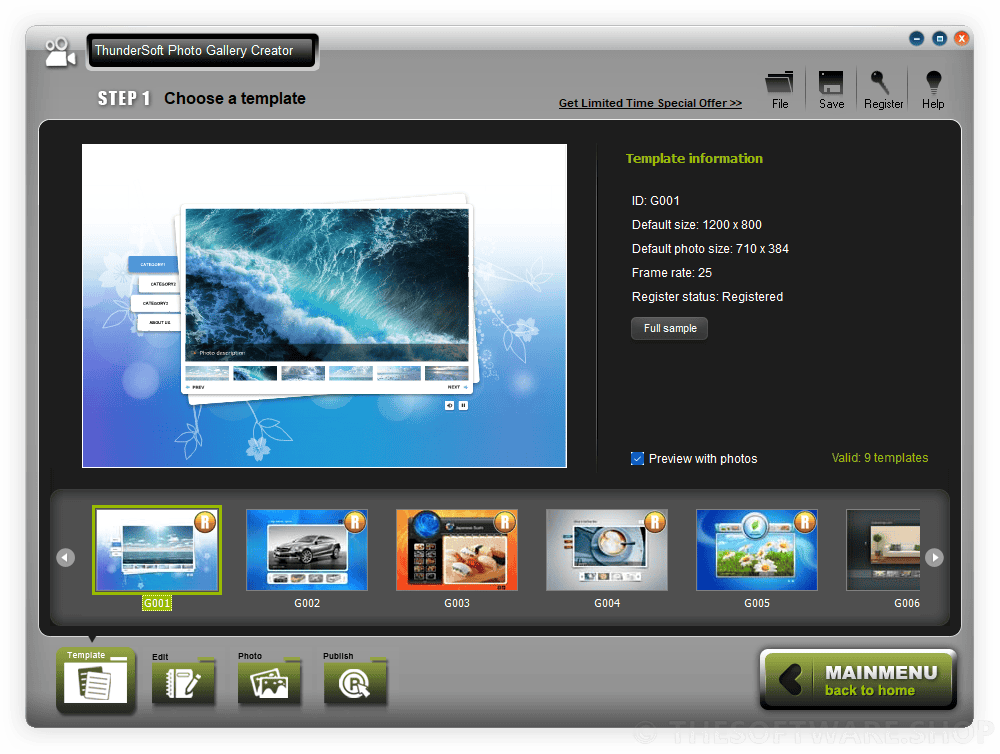
What is ThunderSoft Photo Gallery Creator
ThunderSoft Photo Gallery Creator is a powerful yet intuitive software that allows you to easily build highly customizable photo galleries using pre-designed templates and a wide range of transition effects. You can add background music, photo descriptions, and even videos to your gallery. Then, export the finished project as a video (MP4, AVI, MKV, FLV), HTML5 embed, screen saver, SWF file, or executable (EXE) format for sharing across platforms. It’s a complete tool tailored for both personal and commercial use.
Whether you’re creating a wedding slideshow, a corporate portfolio, an interactive marketing presentation, or a memory reel for loved ones, ThunderSoft Photo Gallery Creator simplifies the entire process while delivering professional results.
Why You’ll Love ThunderSoft Photo Gallery Creator
You’ll appreciate how ThunderSoft gives you complete creative control with minimal effort. The user-friendly interface is designed to help anyone build visually appealing, multimedia-rich galleries without programming or design expertise. With over 70 photo transition effects, customizable templates, video and music integration, and flexible publishing options, you can finally create galleries that are as unique and expressive as your content.
Most importantly, it respects your time. With drag-and-drop functionality, one-click previews, and detailed settings for transitions, music, and layout, ThunderSoft lets you build entire interactive presentations in just a few minutes.
Who Will Benefit from This Software?
ThunderSoft Photo Gallery Creator is ideal for:
- Photographers (amateur and professional) creating client albums
- Graphic designers building visual presentations
- Teachers and educators preparing lesson content
- Marketers and business owners showcasing products or services
- Artists sharing portfolios or exhibitions
- Families creating memory reels for birthdays, anniversaries, or memorials
Whether you’re building a wedding album, online catalog, art exhibit, or company profile, this tool delivers the flexibility and power you need.
Do you struggle to showcase your photos in a way that looks professional, modern, and engaging? Many people upload their pictures to social media or websites, but static images often fail to capture attention, especially for portfolios, events, vacations, or business presentations. You need a user‑friendly tool that lets you design interactive photo galleries without any coding, export them in multiple formats, and reach viewers on web browsers, tablets, and desktops.
ThunderSoft Photo Gallery Creator is one of the best software tools for creating interactive photo galleries without any technical skills.
ThunderSoft Photo Gallery Creator is a Windows‑based desktop application that lets you create ready‑to‑use interactive photo and video galleries. You import your images and clips, select or customize a professional template, set up transitions and effects, add background music and descriptions, and then publish the gallery in the format that fits your needs.
ThunderSoft Photo Gallery Creator provides pre‑designed professional templates, over 70 transition effects, and powerful publishing options so you can share your galleries as video files, HTML5 content, executables, screen savers, and SWF files. Whether you want to build a portfolio for clients, a wedding slideshow, or a travel montage, this software makes the process fast, flexible, and visually impressive.
For both personal and commercial use, ThunderSoft Photo Gallery Creator gives you full control over layout, transitions, background music, and descriptions, so your galleries are not only beautiful but also meaningful and easy to share. Keep reading to learn how this software helps you organize memories, boost your brand, and engage your audience across devices and platforms.
The software is designed for non‑technical users, so you do not need to know HTML, CSS, or programming. Everything is controlled through a simple step‑by‑step interface, guiding you from project creation to final export. You can produce galleries for websites, DVDs, email attachments, social media uploads, and even offline presentations on Windows PCs.
Key Benefits
ThunderSoft Photo Gallery Creator delivers several key benefits that make it valuable for both individuals and businesses:
- Save time and effort – Create polished slide shows and galleries in minutes instead of hours, thanks to ready‑to‑use templates and automatic transitions.
- Reach more viewers – Export galleries as HTML5 video that works on all major browsers, including iPad and iPhone, or as video files that can be uploaded anywhere.
- Professional look without design skills – Use professional templates and built‑in tools to make your galleries look polished and branded, even if you are not a designer.
- Flexible for any use case – Perfect for weddings, events, real estate, travel, education, portfolios, and marketing presentations.
- No coding required – Edit layouts, backgrounds, text, and buttons visually, without writing a single line of code.
- Multi‑format publishing – Publish your gallery as MP4, MKV, MOV, AVI, FLV videos, HTML5 web content, executable EXE files, SWF files, or screen savers.
- Interactive and engaging – Add descriptions, hyperlinks, and background music so viewers can explore your photos with more context and immersion.
- Supports both photos and videos – Mix images and clips in the same gallery, with smooth transitions between them.
These benefits make ThunderSoft Photo Gallery Creator a versatile tool for anyone who wants to present visual content in a more attractive and organized way.
Who Can Benefit from This Product?
ThunderSoft Photo Gallery Creator is ideal for:
- Photographers and videographers who want to showcase portfolios on websites and DVDs.
- Event planners and wedding professionals creating slideshow presentations for clients.
- Travelers and hobbyists organizing vacation photos and videos into stunning montages.
- Business owners and marketers building product galleries, property tours, or campaign visuals.
- Educators and trainers who need visual presentations for online or offline teaching.
- Web designers and bloggers looking for easy‑to‑embed galleries without writing code.
- Anyone with photos and videos who wants to preserve memories in an attractive, interactive format.
If you regularly share or present visual content, this software simplifies the process and improves the impact of your work.
Why Choose ThunderSoft Photo Gallery Creator?
ThunderSoft Photo Gallery Creator stands out because it combines professional templates, rich transitions, and multi‑format publishing in a single, simple interface. You do not need to be a developer or designer to create galleries that look modern and polished. The software supports Windows 11, 10, 8.1, 8, 7, Vista, and XP, so it runs on most Windows PCs, including older systems.
For individuals, it turns family albums, travel photos, and event videos into beautiful, shareable slideshows. For businesses and professionals, it helps create marketing presentations, project portfolios, real‑estate galleries, and event promotions that attract and engage visitors. The ability to export as HTML5, video, EXE, and SWF means you can use the same gallery in multiple contexts without starting over.
Features
Key Features of ThunderSoft Photo Gallery Creator:
- Professional Photo Gallery Templates – Ready-made templates designed to make your project look polished and professional in seconds.
- Custom Template Background and Control Buttons – Change background images and customize navigation buttons for a branded look.
- Over 70 Photo Transition Effects – Includes fade, zoom, slide, flip, and more for dynamic image changes between slides.
- Description for Every Photo & Video – Add text annotations or descriptions to provide context or tell a story.
- Supports Background Music – Upload and integrate music into your galleries for emotional or thematic impact.
- Publish as Video Files (MP4, MKV, MOV, AVI, FLV, etc.) – Export as widely compatible video files for use on social media, presentations, or media players.
- Publish as HTML5 Video – Create a mobile- and browser-friendly version that works across all major devices, including iPad and iPhone.
- Publish as Interactive Photo Gallery (EXE and SWF) – Make an interactive experience with executable or Flash-based gallery output.
- User-Friendly Workflow – Start from installation to completion with a clear step-by-step interface, perfect for beginners.
- Edit Templates Easily – Customize size, layout, background image, and add cliparts or text to personalize templates.
- Import Photos & Videos with Ease – Drag-and-drop functionality for media import, with per-slide transitions and descriptions.
- Hyperlink Support – Add clickable links to any photo or video in your gallery.
- Transition Effect Customization – Adjust every transition between slides for maximum control over visual style.
- Music and Audio Integration – Add songs or narration as background tracks directly in the publishing stage.
- Output Settings Customization – Set FPS, loop styles, photo quality, and preloaders for fine-tuned final results.
- Preview in Full Screen – Instantly preview your gallery before publishing to catch any necessary edits.
- Executable Gallery Output – Distribute as .exe files for offline use and interactive presentation.
- Screen Saver Output Support – Export your photo gallery as a Windows-compatible screen saver.
- SWF Output for Flash Players – Produce legacy-compatible Flash-based galleries for specific use cases.
- All Major Video Formats Supported – Choose from MP4, MKV, AVI, FLV, MOV, and more when exporting.
- Optimized for Web Embedding – Publish HTML5 video for seamless website integration and mobile viewing.
- Commercial Use Friendly – All output formats are available for personal and commercial projects.
- Interactive Control Buttons – Add play/pause, forward/back, volume and full screen options for viewer navigation.
- Cross-Platform Compatibility – Works on all major Windows OS platforms for broad accessibility.
Requirements
To run #THE SOFTWARE with optimum reliability and performance, your system should match the following requirements:
- Windows Vista/7/8/10/11 (32-bit or 64-bit)
- Minimum 1GHz processor
- 512MB RAM or more
- At least 100MB free disk space for installation
Downloads
Not sure yet? ThunderSoft Photo Gallery Creator offers a trial version so you can experience the features before committing. Test out the user interface, templates, and export options to see how easily it fits your creative workflow.
Make your memories memorable. Create professional photo galleries that captivate, inform, and inspire. ThunderSoft Photo Gallery Creator is available for immediate download. Don’t miss the opportunity to turn your images into interactive, multimedia masterpieces for both personal and commercial use.
BUY NOW
ThunderSoft Photo Gallery Creator is available for $29.99. But, you can now get ThunderSoft Photo Gallery Creator 4.5.0 full version with a license code for free in the Giveaway tab below. This offer is available for a limited time!

Nero AI Photo Tagger BEST SELLER

Icecream Slideshow Maker PRO: Lifetime License BEST SELLER

Ashampoo Photo Commander 19: Lifetime License (One-time Fee, No Time Limit) BEST SELLER

AnyMP4 Video Editor BEST OFFER

Fotosifter BEST SELLER

Roxio Creator NXT Pro 9 BEST SELLER

CyberLink PhotoDirector 365 BEST SELLER

Leawo DVD Creator GIVEAWAY

Movavi Video Suite 2025: Lifetime License BEST SELLER

AceThinker Wind Cut VIP: Lifeitme License BEST OFFER
ThunderSoft Photo Gallery Creator Giveaway
Available now: Free License Key for a Limited time!
To access the giveaway, kindly provide your email address. Please refrain from closing this page after signing in to receive instructions on how to access the offer at no cost.

NOTES:
– All prices shown here are in listed USD (United States Dollar).
– Such promotional programs are subject to change without notice, from time to time in our sole discretion.
– Data may vary based on different systems or computers.
Thanks for reading ThunderSoft Photo Gallery Creator Review & Enjoy the discount coupon. Please Report if ThunderSoft Photo Gallery Creator Discount Coupon/Deal/Giveaway has a problem such as expired, broken link, sold out, etc while the deal still exists.



![[KEY #2] Giveaway – UltraPic Pro: Free Activation Code | Instant Background Remover, Batch Processing, AI Backgrounds, Pro E-commerce Photo Editing Tool](https://thesoftware.shop/wp-content/uploads/thumbs_dir/UltraPic-Pro-Free-Credits-Activation-Code-Giveaway-rfw7nyk7hu4iw3lyks61674v7m1vsvlmyfi22fordk.png)
![[KEY #11] Giveaway – SoftSkin Photo Makeup 5.2: Free License Key | Full Version for Windows](https://thesoftware.shop/wp-content/uploads/thumbs_dir/SoftSkin-Photo-MakeUp-Review-Download-Discount-Coupon-rfoskhu0t1a270lx4y0mz4kv65gbyjvfaarwn2msgo.png)
![[KEY #4] Giveaway – Easy Photo Denoise 10.0: Free License Key | Full Version – for Windows](https://thesoftware.shop/wp-content/uploads/thumbs_dir/SoftOrbits-Easy-Photo-Denoise-Boxshot-rfosjkxo5u10wnxph1sp1uvqdnyhh58thrxwudzkig.jpg)

