

85% Off – Memory Booster: Lifetime License |

Revive Your sluggish Mac instantly! Tap one button to clear RAM clutter, track usage live, and kill memory hogs – secure the 85% discount at just $2.00 today and restore peak performance right away.
✔ Lifetime License. ✔ Free Product Updates ✔ 24×7 Customer Support
Memory Booster Review at a Glance
Mac users often face frustrating slowdowns when multiple apps run simultaneously, causing the system to swap memory to disk and grind to a halt during simple tasks like browsing or editing documents. Memory Booster for Mac solves this by providing tools to reclaim inactive RAM effortlessly, ensuring smooth operation without restarts or complex tweaks. This app targets the root cause of performance dips – inefficient memory allocation – delivering noticeable speed gains from the first use.
Memory Booster stands as a dedicated utility designed specifically for macOS, focusing on RAM optimization through intuitive controls and detailed analytics. It integrates seamlessly into daily workflows, appearing in the menu bar for constant oversight without disrupting your screen space. Users gain access to professional-grade insights that reveal exactly how memory distributes across apps, empowering informed decisions to maintain optimal system health.
Customers choose Memory Booster Mac App for its straightforward approach that delivers results without requiring technical expertise, making it ideal for creative professionals handling large files, developers testing resource-intensive code, multitaskers juggling dozens of tabs, and general users seeking reliable daily performance. Benefits extend to prolonged hardware lifespan by reducing thermal stress from constant swapping, alongside time savings from fewer force quits and reboots. Professionals benefit from exportable data for reports, while casual users appreciate the simplicity that keeps their Mac responsive during peak usage hours.
What is Memory Booster
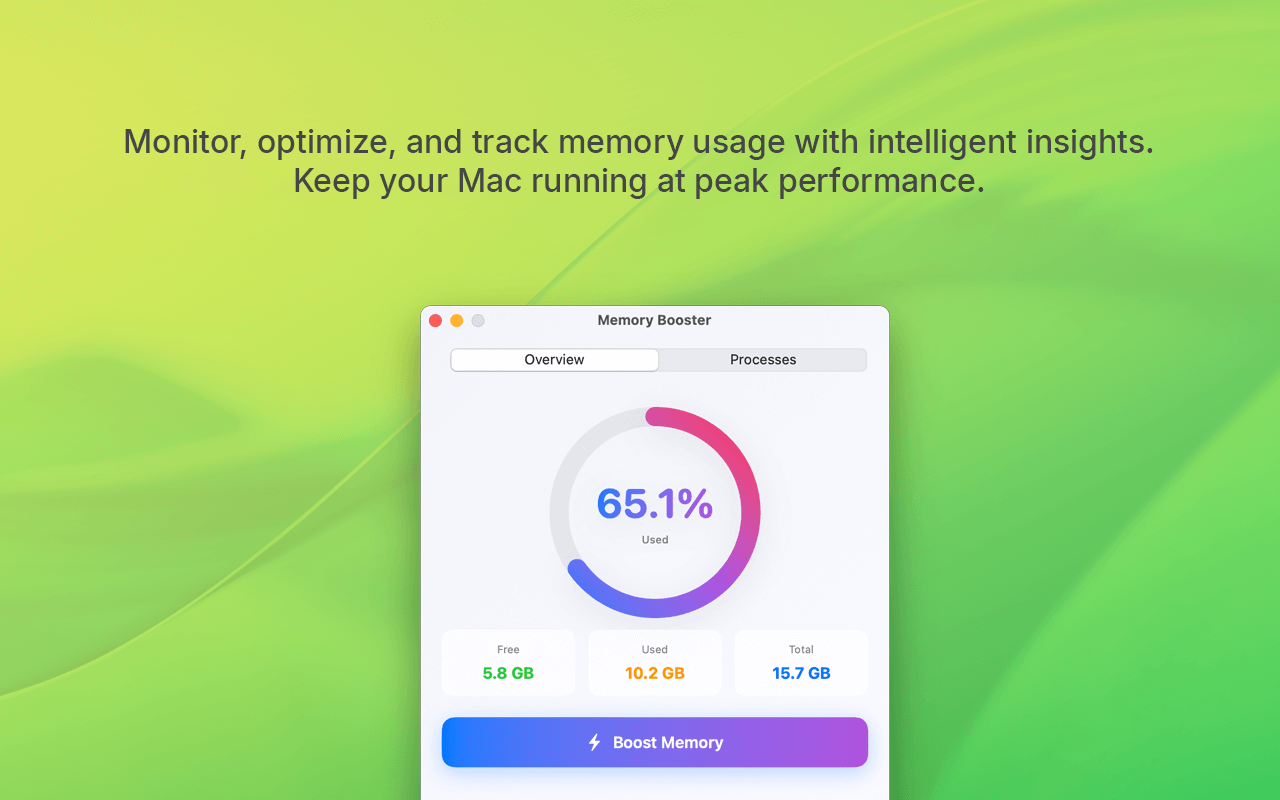
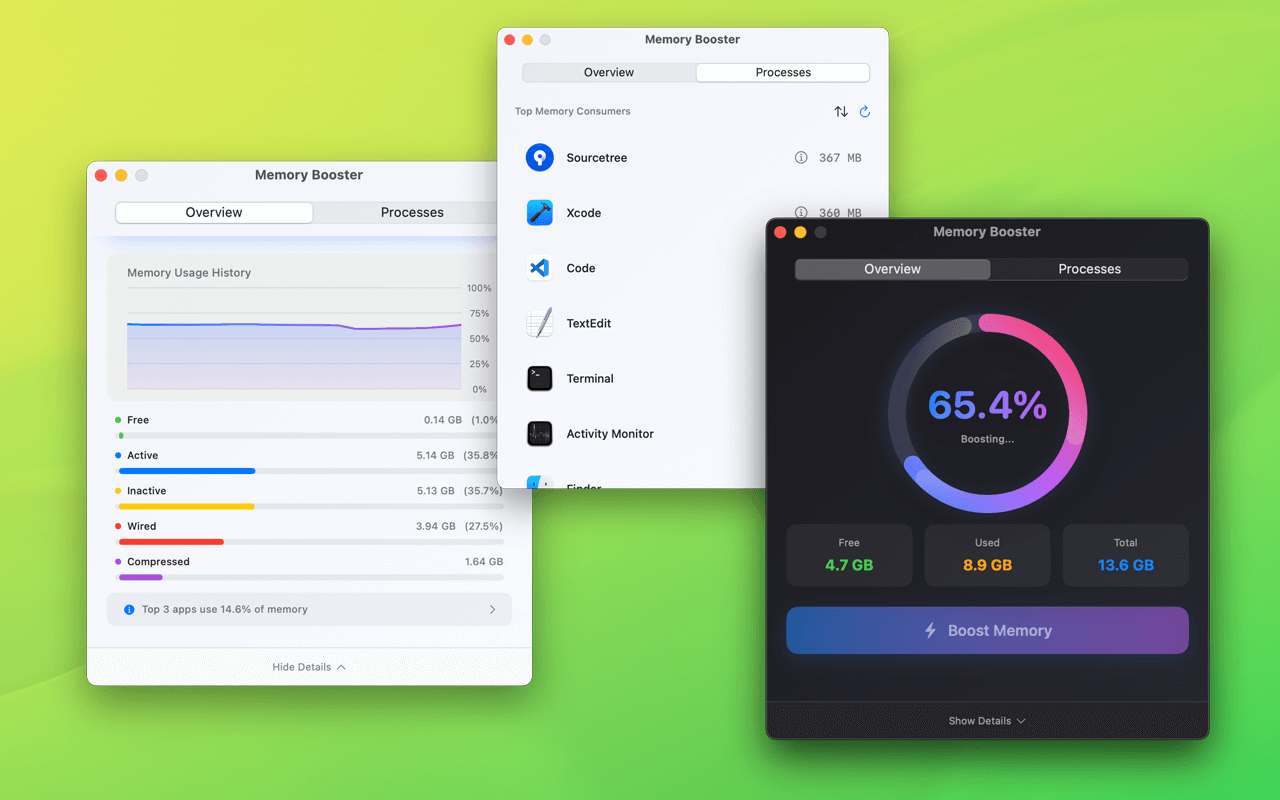
Memory Booster functions as a comprehensive RAM management tool tailored for modern Macs, enabling users to monitor, analyze, and optimize memory in real time. At its core, the app displays live charts breaking down memory categories such as free, active, wired, and compressed, giving a clear picture of system status at any moment. This visibility helps prevent bottlenecks before they impact productivity, with features built around macOS’s native memory handling to ensure safe, effective clearing without risking data loss or instability.
The app launches quickly and resides primarily in the menu bar, providing quick glances at pressure levels and one-tap actions. Its design emphasizes user control, from automated alerts to manual interventions, supporting everything from basic cleanup to in-depth process audits. Compatible with macOS 13.5 and later, including the latest macOS Tahoe, it performs reliably across Apple Silicon chips like M1, M2, M3, and M4 processors, adapting to hardware-specific memory behaviors for precise optimization.
Beyond surface-level cleaning, Memory Booster mac app offers layers of functionality that evolve with user needs. For instance, its process viewer not only lists apps by consumption but charts historical data, allowing pattern recognition over sessions. This depth transforms it from a simple booster into an ongoing system companion, particularly valuable on machines where RAM upgrades prove costly or impractical.
Key Benefits
Opting for Memory Booster for Mac brings immediate improvements to Mac responsiveness, as freeing inactive memory reduces reliance on slower virtual memory. Everyday tasks complete faster, with reduced lag in app switching and smoother video playback or rendering. Long-term, consistent use minimizes system-wide strain, potentially extending battery life on portables by optimizing power draw.
Creative workflows gain from pinpointing resource-heavy software, ensuring deadlines meet without interruptions. Developers track peaks during builds, avoiding crashes in testing environments. Businesses deploying multiple Macs benefit from standardized monitoring, simplifying IT oversight across fleets.
Features
Here is a detailed overview of the standout capabilities that position Memory Booster as an essential tool for maintaining top-tier Mac performance:
- One-Click Memory Boost: Instantly clears inactive memory with a single button press, featuring an animated gauge that visualizes reclaimed RAM for satisfying feedback.
- Rapid Execution: Processes cleanup in seconds, restoring available memory without app interruptions.
- Safe Clearing: Targets only compressible and inactive portions, preserving active data integrity.
- Real-Time Memory Tracking: Delivers beautiful live charts monitoring usage over time, with breakdowns for free, active, wired, and other categories.
- Historical Trends: Logs data for review, helping spot recurring patterns in daily usage.
- Visual Gauges: Intuitive displays show pressure levels at a glance, color-coded for quick assessment.
- Process-Level Insights: Reveals memory-hungry applications through per-process charts, averages, peaks, and one-click termination.
- Sorting Options: Arrange by current use, peaks, or averages to prioritize optimization targets.
- App Reveal: Links directly to Finder for deeper investigation or management.
- Menu Bar Convenience: Places essential controls and stats in the menu bar for at-a-glance monitoring and instant access.
- Quick Boost: Perform cleanups without launching the full interface.
- Compact Stats: View pressure, free RAM, and top consumers discreetly.
- Smart Alerts: Sends notifications when memory pressure rises, pinpointing top consuming processes automatically.
- Custom Thresholds: Adjust sensitivity to match workflow demands.
- Action Prompts: Suggests boosts or kills directly in notifications.
- Professional Analytics: Tracks physical, virtual, and compressed memory per process, with export options and pattern analysis.
- Data Export: Saves reports in standard formats for documentation or sharing.
- Peak Analysis: Identifies outliers for proactive management.
These elements combine to create a robust suite, where each feature supports the others for holistic RAM oversight. For example, tracking informs alerts, which trigger boosts, all accessible via the menu bar.
Requirements
Memory Booster runs smoothly on recent macOS versions and hardware:
- macOS 13.5 or later, fully supporting macOS Tahoe 26.0 and updates.
- Apple Silicon: Optimized for M1, M2, M3, M4 chips.
- Intel Macs: Compatible where supported by the OS.
- Minimum 4GB RAM recommended for effective monitoring.
- Standard internet for initial license validation.
Downloads
Download the free edition now via the link below to verify compatibility and experience immediate RAM improvements tailored to your Mac’s configuration.
Sample the power of Memory Booster Mac Mac App firsthand with the no-cost trial version, designed to demonstrate core functions like one-click boosts and basic tracking on your specific setup.
BUY NOW
Memory Booster normally lists at $12.99, yet this limited-time promotion slashes the price to an unbeatable $2.00 – that’s an 85% discount you won’t find elsewhere. This package ensures ongoing value, with no recurring fees or hidden costs, positioning your Macs for years of optimized performance.

" />
One-Click RAM Cleaner, Real-Time Memory Tracker, Process Optimizer, Menu Bar Monitor & Smart Alerts | Boost Speed on M1/M2/M3/M4 & macOS Tahoe
- Please Notes:
- You may be directed to the bundle page, but it is possible to purchase the software individually.
- If you're having difficulty locating the product on the bundle page, please utilize the browser's search feature.
- Get an additional $3 discount on all orders more that $30.
- LEGITIMATE: All apps are authentic and have original licenses obtained directly from the creators via contracts.
- INSTANT ACCESS: Fully activated macOS Apps & Windows Software with instant downloads & license key access.
- Number of devices: 2
- Minor Updates Included Only
- Lifetime License
Platforms: macOS
" />
One-Click RAM Cleaner, Real-Time Memory Tracker, Process Optimizer, Menu Bar Monitor & Smart Alerts | Boost Speed on M1/M2/M3/M4 & macOS Tahoe
- Number of devices: 2
- Minor Updates Included Only
- Lifetime License
Platforms: macOS

MacCleanse BEST OFFER
MacBooster 8 PRO: Lifetime License BEST SELLER

CleanMyMac X: 5-PC 1-Year License BEST SELLER

MacClean 3: Family License (Lifetime) BEST SELLER

Aiseesoft Mac Cleaner for mac OS X BEST OFFER
Memory Booster Mac App Giveaway
Unavailable at this moment!

To access the giveaway, kindly provide your email address. Please refrain from closing this page after signing in to receive instructions on how to access the offer at no cost.
NOTES:
– All prices shown here are in listed USD (United States Dollar).
– Such promotional programs are subject to change without notice, from time to time in our sole discretion.
– Data may vary based on different systems or computers.
Thanks for reading Memory Booster Review & Enjoy the discount coupon. Please Report if Memory Booster Discount Coupon/Deal/Giveaway has a problem such as expired, broken link, sold out, etc while the deal still exists.




![[GIVEAWAY #3] Giveaway – Wise Care 365 Pro v7.3.4: Lifetime License | Free Full Version Licensed Download – for Windows](https://thesoftware.shop/wp-content/uploads/thumbs_dir/Wise-Care-365-PRO-Review-Free-Download-Discount-Coupon-rfoske2o1p4wwkrdqwe4p5j0slyv3rghxs5ypysd5k.png)
![[NEW LINK #3] Giveaway – Glary Utilities 6 Professional: Free 3-PC 1-year License Code – for Windows](https://thesoftware.shop/wp-content/uploads/thumbs_dir/Glary-Utilities-Pro-boxshot-min-rfosjj1zs5yg9g0fs0zfwvct6w7r1r1ctimxvu2cuw.png)

