Giveaway – O&K Printer Viewer v2.9.4: Free Full Version | Advanced Print Job Debugging, Spool File Recovery, and Printer Data Analysis Tool – for Windows

Stop losing your unprinted documents and start recovering your critical spool files instantly with our comprehensive print management utility. Get a full version of O&K Printer Viewer for Free!
Free Full Version!
O&K Printer Viewer Review at a Glance
Have you ever sent a highly important document to your machine only to have the hardware fail, leaving your critical data trapped in an unreadable temporary spool file? Losing a massive print job due to a mechanical paper jam, a sudden network power outage, or a corrupted driver error is an incredibly frustrating problem for home users and network administrators alike. When a print queue crashes unexpectedly, the temporary files generated by the Windows operating system are usually completely impossible to read with standard office software. This technological limitation creates a severe roadblock for busy professionals who strictly need to maintain an accurate digital archive of printed materials or recover lost work without having to manually recreate the entire text document from scratch. The inability to naturally view these queued items often leads to wasted time, duplicated efforts, and significantly increased operational costs for any busy department.
O&K Printer Viewer serves as a highly specialized utility specifically engineered to solve this exact administrative problem by opening and viewing complex printer data files directly.
What is O&K Printer Viewer
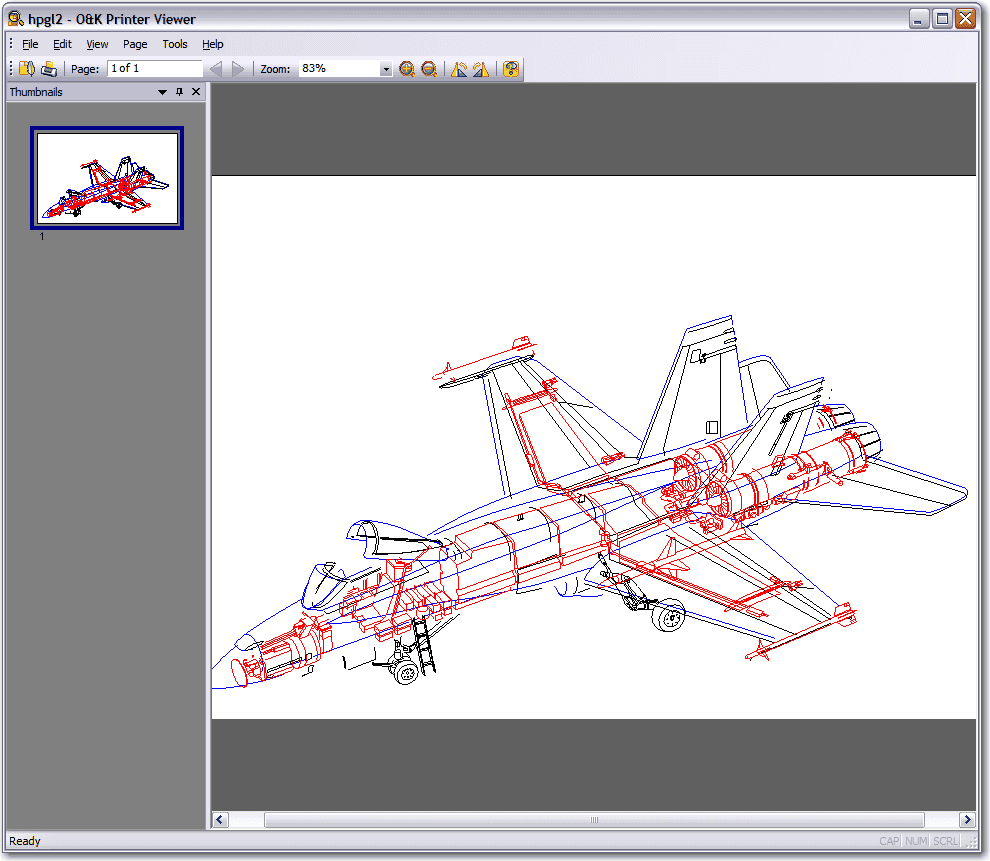
O&K Printer Viewer is fundamentally an advanced software utility meticulously created to intercept, read, and clearly display the internal data files continuously generated during the standard printing process. When you initially initiate a print command from any desktop application, your computer operating system automatically translates your visual document into a specific machine language that your specific physical hardware directly understands. This complex translation is temporarily stored on your local hard drive as a hidden spool file.
Normally, this cryptic file is immediately deleted the exact moment the printed paper leaves the machine, and the data hidden inside is completely unreadable to the human eye. This tool brilliantly functions as a visual translator for those obscure, temporary digital files, intercepting the raw data to perfectly reconstruct the visual layout of the entire page exactly as it would normally appear on physical paper.
Beyond simply viewing the raw data, the O&K Printer Viewer application powerfully acts as an independent conversion engine for your network environment. It rapidly takes the proprietary digital instructions meant strictly only for a specific brand of hardware and perfectly converts them into universally recognized image formats. This fantastic capability means you can easily take a file that was originally coded exclusively for a specialized thermal barcode label printer and quickly convert it into a standard Portable Network Graphics file.
It essentially frees your critical business documents from the strict limitations of the physical hardware, giving you total authoritative control over the raw data generated by your operating system. By utilizing this robust software program, administrators are effectively given a permanent window into the previously hidden inner workings of their local print queue, ending the mystery of lost pages forever.
Key Benefits
The numerous advantages provided by the O&K Printer Viewer application extend far beyond simple spool file viewing, offering daily users a comprehensive suite of tools specifically designed to maximize critical document retention and local hardware management.
By seamlessly implementing this robust software directly into your daily corporate workflow, you will immediately notice massive, significant improvements in your overall ability to track, audit, and successfully recover critical information that would otherwise be permanently discarded by your computer operating system. The program provides total transparency into the hardware queue, dramatically reducing the time spent resolving paper jams.
Below is a highly detailed breakdown of the specific, distinct advantages you will consistently experience when actively utilizing this powerful utility for your daily administrative network tasks.
- Total Data Recovery Protection thoroughly protects your vital business from accidental digital data loss by explicitly allowing you to extract complete text documents directly from the raw spool files, meaning a sudden hardware crash will absolutely never permanently destroy your important paperwork again.
- Comprehensive Print Job Auditing intelligently provides a perfectly clear visual record of absolutely everything sent to the hardware, allowing office managers to closely monitor physical resource usage, carefully track employee network activity, and effectively maintain strict corporate security protocols regarding highly sensitive company information.
- Massive Corporate Cost Reduction heavily lowers your monthly office expenses significantly because you can visually review the exact graphical layout of a raw spool file before physically committing it to physical paper, thereby completely eliminating wasted colored ink and expensive premium stationery caused by simple formatting errors.
- Universal File Format Translation generously gives you the highly unique administrative ability to accurately convert highly obscure, brand-specific machine printer languages into universally accepted computer file types like standard PDF and JPEG, making it incredibly easy to securely share the recovered data with external clients or remote colleagues who definitely do not own the exact same hardware.
- Advanced Technical System Troubleshooting actively assists seasoned IT administrators in rapidly diagnosing highly complex local network printing errors by clearly displaying the raw digital data stream, making it completely simple to quickly identify software driver conflicts or highly corrupted page description languages without ever requiring direct physical access to the affected machine.
The program natively supports loading raw spool files, which normally carry the .SPL extension, alongside a massive variety of other complex page description formats. By actively displaying the raw code as easily readable graphical images, this robust software functions as a vital bridge between your operating system’s background print spooler and your visual computer monitor. It reads the exact microscopic instructions sent to the physical hardware and immediately translates those machine instructions back into a visual layout that you can clearly review on your screen. This transparent visibility completely changes how network administrators interact with failed print jobs.
The primary advantage of utilizing this specialized software is the absolute administrative assurance that your printed data is never permanently lost to the digital void. You gain the unprecedented ability to visually view each document printed on your device long after the physical paper has been distributed to the office staff. Furthermore, the application allows you to efficiently print the document again directly from the recovered spool file, completely bypassing the tedious need to open the original authoring application. If you strongly prefer to digitize your corporate records, the tool gives you the incredible power to save the final output as a highly portable PDF document. You can also meticulously export the high-quality visuals into various graphic files, such as standard BMP, animated GIF, compressed JPEG, or detailed TIFF formats, ensuring maximum file compatibility with your existing digital archiving systems.
You should strictly choose O&K Printer Viewer because it consistently offers unparalleled compatibility with an incredibly extensive list of proprietary hardware languages. While competing applications might only read basic plain text files, this powerful utility smoothly processes complex page description languages like PCL5, HP-GL/2, PCL6, and Postscript. It perfectly decodes highly specialized rendering formats like GDI printing, EMF Spooled Files, Samsung Printer Language Color, XQX for Hewlett-Packard devices, Xerox GDI printing, Canon CPCA, and HBPL for Dell or Epson machines. This massive compatibility list definitively ensures that absolutely no matter what specific hardware brand you operate in your local office, the software will accurately render the spool files without annoying formatting errors or missing text blocks.
Dedicated IT professionals, corporate system administrators, and technical support personnel will undoubtedly find immense operational value in this application for deep print debugging and thorough print job analysis. When actively troubleshooting complex network printers, actually seeing the exact data stream sent to the physical machine significantly helps isolate software driver issues rapidly. Office managers and small business owners directly benefit by effortlessly maintaining a visual audit trail of all generated printed materials, strictly ensuring that expensive company resources are used appropriately. Even standard home computing users who frequently print long web pages or complex annual tax documents will deeply appreciate the incredible peace of mind that inherently comes from knowing they can easily retrieve a lost job without wasting their expensive ink cartridges and premium paper.
Features
Below is a highly comprehensive list of the specific key features that definitively make the O&K Printer Viewer software a truly valuable addition to your networking needs, carefully detailing the highly specific technical capabilities and file format compatibilities that clearly set this application far apart from basic standard document viewers. These strictly distinct software functions are meticulously engineered to constantly provide maximum administrative control over your local print queue, strictly ensuring you can successfully manage, securely convert, and accurately audit your daily digital files with absolute mathematical precision.
- Extensive Input Format Support – The powerful application effortlessly reads an incredibly wide variety of highly proprietary machine languages continuously used by the absolute most popular physical hardware manufacturers actively selling on the commercial market today.
- PCL and PostScript Decoding – The robust utility highly accurately processes complex PCL5, PCL6 (PCL XL), and detailed Postscript data files, securely ensuring that standard corporate office documents are perfectly rendered with absolutely perfect layout formatting and crisp typography.
- GDI and EMF Processing – The specialized program highly successfully loads GDI printing (ZjStream) and massive EMF Spooled Files, which are incredibly frequently utilized by the modern Windows operating system for rendering highly graphical, visually intense print jobs.
- Brand Specific Language Translation – The advanced tool completely comprehends highly unique machine formats including Samsung Printer Language Color, Xerox GDI printing, CPCA for Canon Common Peripheral Controlling Architecture, and complex HBPL for Dell, Epson, and Fuji-Xerox hardware devices.
- Specialized Hardware Device Support – The intelligent software even accurately interprets the obscure XQX language used by Hewlett-Packard LaserJet models, as well completely reading the TSC Printer Language utilized specifically by thermal transfer and direct thermal barcode label printers.
- Versatile Output File Conversion – The dynamic program carefully allows you to easily save the generated visual image of a printed document into a massive multitude of widely accepted digital computer formats for incredibly easy network sharing and permanent long-term archival storage.
- Universal Document Exporting Capabilities – You can securely export the perfectly recovered visual digital data directly into a standard PDF (Adobe Portable Document Format), which is the absolute global industry standard for highly secure, cross-platform document sharing.
- Scalable Vector Graphic Saving – The advanced software generously provides the useful option to cleanly save your visual output as an accurate EMF (Windows Metafile), strictly preserving the highly scalable vector graphics for further detailed editing in professional commercial design applications.
- Standard Digital Image Creation – Regular users have the fantastic ability to instantly generate a standard BMP (Windows Bitmap), an animated GIF (CompuServe GIF), a transparent PNG (Portable Network Graphics), a high-resolution TIFF (Tag Image File Format), or a highly compressed JPG (JPEG) file from absolutely any recovered print job.
- Direct Hardware Reprinting Capabilities – The versatile utility intelligently bypasses the annoying strict need for opening the original authoring software by directly allowing you to quickly send the loaded graphical spool file directly back to the physical hardware queue.
- Identical Physical Output Generation – Sending the recovered file directly back to the local queue mathematically guarantees that the newly printed physical paper page will visually look absolutely identically perfect to the original initial attempt, strictly preserving all original document layout instructions.
- Administrative Queue Management Control – The flexible application securely allows you to carefully manage the exact timing of the document reprint, meaning you can successfully pause a massive batch of sensitive documents and intelligently choose to physically print them strictly only when you are physically standing right next to the machine.
Requirements
To absolutely guarantee that the dynamic application correctly functions at maximum capacity and rapidly processes your massive spool files without encountering any noticeable system performance issues, your personal computer system must strictly meet the highly specific internal hardware and external software criteria explicitly detailed below. Actively verifying these highly technical system specifications will definitively ensure a completely smooth software installation process and highly reliable continuous operation when you officially begin successfully analyzing your critical corporate print data within your local office network.
- Supported Computer Operating Systems requires the proper installation of Windows XP, Windows 2000, Windows 2003, or absolutely any edition of Windows Vista, Windows 7, Windows 8, and Windows 10 to securely ensure the background system services can properly intercept the continuous queue data.
- Minimum Processor Speed strictly mandates a minimum requirement of a 1 GHz Intel or AMD computer processor to rapidly decode highly complex page description languages like PostScript and PCL without causing noticeable system latency.
- Internal System Memory firmly necessitates at least 512 MB of computer RAM, though 1 GB or significantly more is highly strongly recommended for busy users who actively plan to heavily process massive, multi-page highly graphical business documents.
- Available Storage Space definitely requires a strict minimum of 50 MB of completely available local hard drive space for the initial quick software installation, plus significant additional free space for permanently archiving the securely recovered PDF documents and graphic image files.
- Required Administrative Privileges strictly dictates that the local computer user account must actively have full administrative operating rights on the local host machine to correctly successfully install the highly specialized system port monitors strictly required to successfully capture the raw data files.
Downloads
Review how the O&K Printer Viewer software specifically works directly according to your exact personal administrative needs. Download the premium trial edition for absolutely free to deeply test the comprehensive software capabilities by securely clicking the digital download button provided exactly below.
This generous evaluation trial period heavily gives you the absolutely perfect risk-free opportunity to comprehensively evaluate the software’s rapid performance on your highly specific local network hardware before strictly making absolutely any permanent financial business commitment.
BUY NOW
O&K Printer Viewer is permanently available for exactly $299.95 for a completely full, comprehensive single-user software license. But, you can securely now get the full version of O&K Printer Viewer for free in the Giveaway tab below. This offer is available for a Limited Time!
CleverPrint GIVEAWAY
NovaPDF Professional BEST SELLER
BulkPrinter Pro: Lifetime License EXCLUSIVE

GreenCloud Printer Pro 7 EXCLUSIVE

Printer’s Apprentice BEST OFFER

Nero Burning ROM 2026 BEST OFFER

Vovsoft Print Multiple Web Pages GIVEAWAY

Publisher Plus for Mac BEST OFFER

Roxio Creator NXT Pro 9 BEST SELLER

ASCOMP PDF Imager Professional BEST OFFER
O&K Printer Viewer Free Key Giveaway
Available now: Free Full Version for a Limited time!
To access the giveaway, kindly provide your email address. Please refrain from closing this page after signing in to receive instructions on how to access the offer at no cost.

NOTES:
– All prices shown here are in listed USD (United States Dollar).
– Such promotional programs are subject to change without notice, from time to time in our sole discretion.
– Data may vary based on different systems or computers.
Thanks for reading O&K Printer Viewer Review & Enjoy the discount coupon. Please Report if O&K Printer Viewer Discount Coupon/Deal/Giveaway has a problem such as expired, broken link, sold out, etc while the deal still exists.