Giveaway – ThunderSoft Quick Video Encryptor: Free Registration Code | Batch Encrypt & Decrypt Video Files – for Windows

Protect Your Videos in One Click — Get the Full Version of ThunderSoft Quick Video Encryptor with a Free Registration Code!
Full Version!
BUY NOW
ThunderSoft Quick Video Encryptor is available at a $39.99 for a Lifetime License, but right now you can secure a full version copy of ThunderSoft Quick Video Encryptor with a Registration Code for FREE in the Giveawy tab below — giving you premium protection at a no of the cost. This offer will not last, so act before it expires.

Cryptbox 2026: Saver Subscription BEST OFFER

Drime Secure Cloud Storage BEST OFFER

FolderFort Cloud Storage Pro BEST OFFER

Wise Folder Hider Pro: 3 PCs / 1 Year BEST OFFER

Internxt Summer Sale – 85% Off Lifetime Secure Cloud Storage | 1TB to 5TB Private Backup Plans with VPN, Antivirus, 2FA & File Sharing | Zero-Knowledge Encryption BEST OFFER

ScreenVideo BEST OFFER

OysterVPN BEST OFFER

Koingo Data Guardian 7 BEST OFFER

VideoBoard WordPress Theme - for PC BEST SELLER

pCloud GIVEAWAY
ThunderSoft Quick Video Encryptor Giveaway
Available now: Free License Key For a Limited Time!

To access the giveaway, kindly provide your email address. Please refrain from closing this page after signing in to receive instructions on how to access the offer at no cost.

NOTES:
– All prices shown here are in listed USD (United States Dollar).
– Such promotional programs are subject to change without notice, from time to time in our sole discretion.
– Data may vary based on different systems or computers.
ThunderSoft Quick Video Encryptor Review at a Glance
Every day, millions of private video files sit completely exposed on hard drives, shared computers, and cloud storage platforms — and most people have no idea. You record a personal memory, a confidential business presentation, or a sensitive project, and you upload it to Google Drive or Dropbox thinking it is safe. But the truth is alarming: cloud platforms run automated scanning bots that analyze the content of every file you upload. Meanwhile, anyone who gains access to your device — a colleague, a family member, or a bad actor — can open and view your most private footage without any barrier whatsoever. The cost of doing nothing is not just embarrassment; it can mean lost intellectual property, violated privacy, and permanent damage to your personal or professional life. You need a fast, reliable, and simple solution that puts you back in control of your own video content — and that is exactly what ThunderSoft Quick Video Encryptor was built to do.
What Is ThunderSoft Quick Video Encryptor?
ThunderSoft Quick Video Encryptor is a lightweight, high-speed desktop utility for Windows that allows you to encrypt and decrypt video files with a single click. Developed by ThunderSoft, a trusted name in multimedia security software, this tool was engineered specifically for users who need to protect large volumes of video content quickly and without technical complexity.
Unlike complicated enterprise-grade security suites that require configuration expertise, this software strips the encryption process down to its absolute essentials: drag, drop, and click. The result is a protected file that no standard media player can open and no cloud-scanning bot can read.
The software works by applying an encryption key directly to your video files, converting them into a secured, unreadable format. The original file data is fully preserved — no quality is lost, no format conversion takes place — and the process can be completely reversed with a single decryption click when you need to access your files again.
You can process a single file or an entire folder containing thousands of videos simultaneously, making it the most efficient encryption solution available for high-volume personal and professional video libraries. Whether your files are stored locally, on external drives, or destined for cloud storage, ThunderSoft Quick Video Encryptor acts as your first and most essential line of defense.
Key Benefits
The advantages of using ThunderSoft Quick Video Encryptor extend far beyond simple file locking. This software was built to solve real, everyday privacy problems that affect both casual users and professionals alike. Here is why thousands of users rely on it to protect their most valuable digital assets:
- Protect your personal privacy by ensuring that sensitive footage — family videos, personal recordings, and private moments — cannot be accessed by anyone without your explicit authorization. Your private life stays entirely private, even on shared machines.
- Secure professional and confidential content such as business presentations, client footage, proprietary training materials, and unreleased creative projects. A single layer of encryption is the difference between confidential and compromised.
- Achieve true cloud storage sovereignty by encrypting your files before uploading them to platforms like Google Drive, Dropbox, or OneDrive. Once encrypted, the file appears as an unreadable data block to cloud scanning algorithms, ensuring your content is never reviewed, flagged, or analyzed by third-party systems.
- Save hours of manual work thanks to the batch processing engine. Instead of securing files one at a time, you can encrypt an entire folder containing thousands of videos in a single session — a workflow that would take hours in competing tools is reduced to minutes.
- Maintain full portability of your encrypted files. Once encrypted on one computer, your files remain securely locked when copied to any other device, USB drive, or cloud bucket. You can decrypt them on a completely different machine using the same encryption key, giving you total flexibility.
- Require no technical expertise to operate. The one-click interface is designed for everyone — from first-time users to seasoned IT professionals — ensuring that security is never sacrificed because of complexity.
Features
Below is a thorough breakdown of every capability packed into ThunderSoft Quick Video Encryptor. Each feature is engineered to deliver maximum protection with minimum friction, making this the most practical video encryption tool for both home and professional use:
- High-Speed Batch Encryption — Process thousands of video files in a single session with industry-leading encryption speed.
- Folder-Level Batch Processing — Point the software at any folder and encrypt every video file inside it automatically, with no need to select files individually.
- High-Throughput Engine — Optimized for large file sizes, including high-bitrate 4K and 8K video, without causing system slowdowns or crashes.
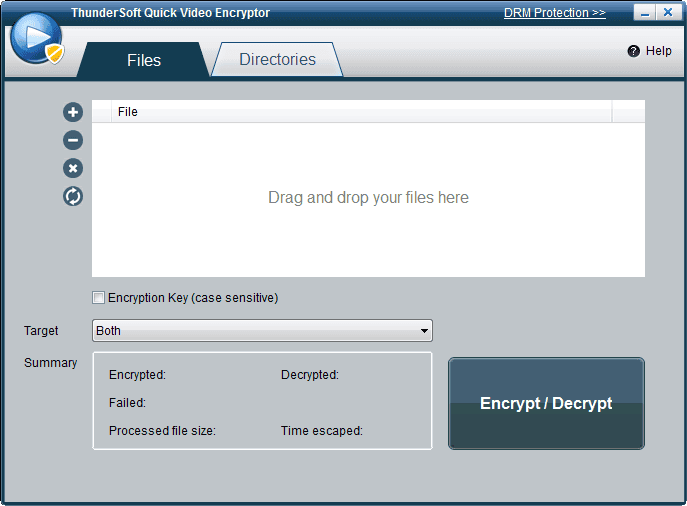
- One-Click Encrypt & Decrypt Workflow — A streamlined, two-step process: one click to encrypt, one click to fully reverse the encryption and restore the original file data.
- Instant Reversal — Decrypted files are restored to their exact original state with no data loss, no quality degradation, and no format alteration.
- Drag-and-Drop Interface — Simply drag your files or folders into the software window to begin — no complex setup menus or configuration wizards required.
- Custom Encryption Key Support — Protect your files with a personal encryption key that only you control.
- User-Defined Key — Set your own unique encryption key for each batch or session, ensuring that only authorized users with the correct key can decrypt the files.
- Key-Based Access Control — Files encrypted with your key cannot be opened without it, providing a reliable barrier against unauthorized access.
- Universal Video & Audio Format Support — Works with virtually every video and audio format in common use today.
- Video Format Compatibility — Supports MP4, AVI, MKV, WMV, MTS, RMVB, MXF, VOB, FLV, MPEG, TS, MOV, and many more.
- Audio Format Compatibility — Also encrypts audio files including MP3, AAC, AC3, OGG, WMA, and other popular audio formats, making it a versatile media security tool.
- Cloud Upload Privacy Protection — Encrypts video content before it reaches any cloud storage platform.
- Content Obfuscation — Converts readable video data into an unreadable encrypted format that bypasses automated content-scanning and metadata-analysis bots used by major cloud providers.
- Pre-Upload Encryption — Ensures the encryption process is completed locally before any file is shared or uploaded, keeping the unencrypted version of the file off third-party servers entirely.
- Full Cross-Device Portability — Encrypted files retain their protection regardless of where they are moved or stored.
- Device-Independent Encryption — Encrypted files can be copied to USB drives, external hard drives, or other computers and will remain fully locked until decrypted with the correct key.
- Cross-Machine Decryption — Files encrypted on one Windows computer can be decrypted on a completely separate Windows computer using the same key, enabling secure file transfers between devices.
- Encrypted File Status Detection — Instantly identify which files in your library are encrypted and which are not.
- Visual Shield Indicator — Drag your files into the software interface and a shield icon will appear next to any file that is currently encrypted, giving you an at-a-glance audit of your library’s protection status.
- Failure Reporting — If any files fail to encrypt (e.g., read-only files or files currently in use by a media player), the software generates a detailed failed-list log with specific error messages for each file.
- Local Processing Architecture — All encryption and decryption operations are performed entirely on your local machine.
- No Cloud Dependency — The software does not require an internet connection to function, and your files are never transmitted to any external server during the encryption process.
- Data Integrity Preservation — Because the process is local and non-destructive, original file data is fully preserved and recoverable through decryption at any time.
Requirements
Before installing ThunderSoft Quick Video Encryptor, please confirm that your system meets the following minimum requirements for optimal performance:
To run this software smoothly on your Windows machine, ensure your system is up to date and meets the specifications listed below:
- Operating System: Windows 11 / Windows 10 / Windows 8.1 / Windows 8 / Windows 7 / Vista / XP (32-bit or 64-bit)
- Processor: Intel or AMD processor, 1 GHz or faster recommended
- RAM: Minimum 512 MB RAM (2 GB or more recommended for batch processing large libraries)
- Hard Disk Space: Minimum 100 MB free disk space for installation; additional space required for encrypted file storage
- Internet Connection: Not required for core encryption/decryption functions
- Additional Software: No additional media players or dependencies required for core operation
Downloads
Ready to see ThunderSoft Quick Video Encryptor in action before committing to the full version?
Click the button below to get the free trial version and start protecting your video files today.
The trial edition gives you direct, hands-on access to the core encryption workflow so you can verify its speed, simplicity, and compatibility with your own video library before making any purchase decision. Put it through its paces on your actual files and experience firsthand how effortlessly it secures your content in just one click.
Thanks for reading ThunderSoft Quick Video Encryptor Review & Enjoy the discount coupon. Please Report if ThunderSoft Quick Video Encryptor Discount Coupon/Deal/Giveaway has a problem such as expired, broken link, sold out, etc while the deal still exists.