82% Off – Espionage: Lifetime License | AES-256 Folder Encryption – for macOS

Your sensitive folders deserve more than a lock — they deserve a decoy. Get Espionage with a Lifetime License at a 82% Discount now and safeguard what matters most.
✔ Lifetime License. ✔ Free Product Updates ✔ Customer Support
BUY NOW
Espionage is available at its standard retail price: $29.99, but right now you can secure your Espionage license at an exclusive discounted rate of up to 82% OFF. This pricing will not be available indefinitely — act now to lock in your savings before the offer expires.

AES-256 Folder Encryption with Plausible Deniability, scrypt Password Protection, Spotlight Integration & Backup Software Compatibility for macOS
- Please Notes:
- You may be directed to the bundle page, but it is possible to purchase the software individually.
- If you're having difficulty locating the product on the bundle page, please utilize the browser's search feature.
- Get an additional $3 discount on all orders more that $30.
- LEGITIMATE: All apps are authentic and have original licenses obtained directly from the creators via contracts.
- INSTANT ACCESS: Fully activated macOS Apps & Windows Software with instant downloads & license key access.
- Device Activation: 1 Device
- Major & Minor Updates Included
- Lifetime License
Platforms: Mac OS X
Commander One Pro BEST OFFER

ESET HOME Security Premium BEST OFFER
Sticky Password Premium 8: Lifetime Deals BEST SELLER
Drime Secure Cloud Storage BEST OFFER
Roxio Toast 20 Titanium BEST OFFER
Espionage (Lifetime License) Giveaway
Unavailable at this moment!

To access the giveaway, kindly provide your email address. Please refrain from closing this page after signing in to receive instructions on how to access the offer at no cost.
NOTES:
– All prices shown here are in listed USD (United States Dollar).
– Such promotional programs are subject to change without notice, from time to time in our sole discretion.
– Data may vary based on different systems or computers.
Espionage Review at a Glance
Most people believe that encrypting their data is enough to keep it safe. But what happens when you’re forced to hand over your password — whether by a coercive authority, a bad actor, or someone with physical access to your Mac? In that scenario, no amount of encryption will protect you. Standard encryption tools protect your data from unauthorized access, but they leave you completely vulnerable the moment someone demands your credentials under pressure. This is a critical gap in most data protection strategies, and it’s one that has been largely ignored by conventional encryption software — until now.
Espionage for Mac was built specifically to close that gap. It was designed for users who understand that true data protection means protecting your data even when you can’t protect your password. By combining state-of-the-art AES-256 encryption with a sophisticated plausible deniability system, Espionage gives you a level of data protection that goes far beyond anything a standard encryption tool can offer.
What Is Espionage?
Espionage is a Mac application that provides simple yet powerful folder encryption combined with the most advanced plausible deniability features available in consumer software today. Unlike generic encryption tools that simply lock your files behind a single password, Espionage is built around a multi-layered approach to data security that accounts for real-world threat scenarios — including coercion, forced disclosure, and physical access attacks.
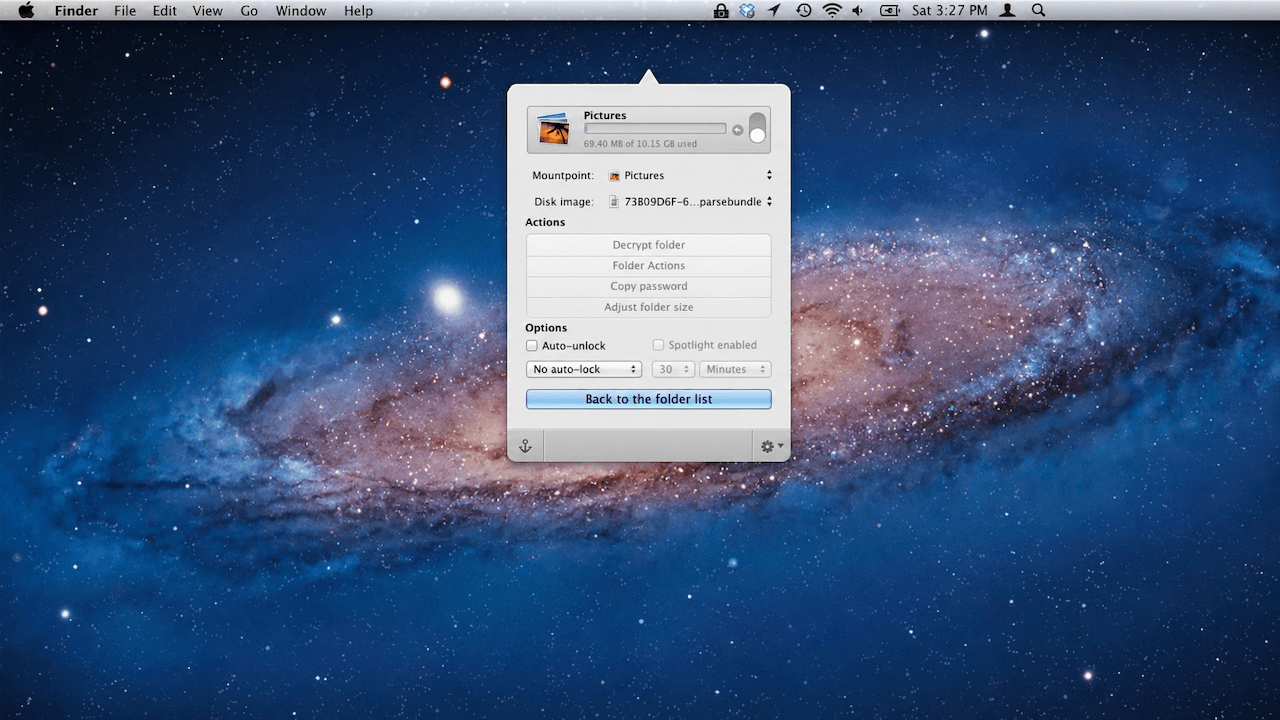
At its core, Espionage allows you to encrypt individual folders on your Mac and manage them conveniently from the system menubar. Each folder can be locked or unlocked with ease, and the app integrates smoothly with macOS features like Spotlight search, ensuring that your encrypted content stays invisible unless you explicitly choose to access it.
What truly sets Espionage apart is its plausible deniability architecture. The application supports multiple master passwords, with each password granting access to a completely isolated set of folders. This means that even if you’re compelled to reveal a password, you can provide one that only exposes a decoy set of data — keeping your truly sensitive information hidden and completely undetectable.
Espionage is built for macOS users who take their privacy seriously — professionals, journalists, researchers, legal practitioners, medical personnel, business owners, and anyone who handles sensitive information on a daily basis. The software has been designed to be approachable for everyday users while offering the kind of depth and transparency that security professionals demand.
Key Benefits
Espionage delivers a range of meaningful advantages that make it a standout choice for anyone seeking serious data protection on their Mac.
1. Protection Beyond the Password
Traditional encryption protects your data from people who don’t know your password. Espionage protects your data even from people who do know your password — or are forcing you to reveal it. The multi-master-password system means that each password unlocks a different, isolated layer of data. Anyone who obtains one password will only see what you want them to see.
2. Military-Grade Encryption as the Foundation
Espionage uses AES-256 encryption, the same standard used by governments and military organizations worldwide to protect classified information. This is not a marketing claim — AES-256 is a mathematically proven cipher that remains computationally infeasible to crack with today’s technology. Your files are protected at the highest level available in modern cryptography.
3. Superior Password Protection with scrypt
While most Mac apps rely on Apple’s built-in keychain for password storage — which has known vulnerabilities — Espionage uses scrypt, a memory-hard password hashing algorithm specifically designed to resist attacks from even the most powerful supercomputers and dedicated cracking hardware. This means your passwords are exponentially harder to crack compared to apps that use standard hashing methods.
4. Plausible Deniability at Every Layer
Each encrypted folder in Espionage can advertise completely different data depending on whether it is locked or unlocked. This dual-data capability means that a locked folder can appear to contain harmless, ordinary files, while the actual sensitive content remains hidden and inaccessible without the correct password. This is the gold standard of plausible deniability in consumer software.
5. Effortless Usability from the Menubar
Despite its powerful security features, Espionage is designed to be simple and accessible. You can lock, unlock, and manage all your encrypted folders directly from the macOS menubar, making it fast and intuitive to use in your daily workflow without disrupting your productivity.
6. Smart Spotlight Integration
Espionage is designed to work seamlessly with macOS Spotlight search. Folder contents only appear in Spotlight results when the folder is unlocked, keeping your encrypted data hidden from search results at all times when not in active use. You also have the option to prevent Spotlight indexing entirely for maximum discretion.
7. Compatibility with Backup and Sync Services
Espionage is engineered to work smoothly with popular backup and synchronization platforms including Apple Time Machine and Dropbox. This means you can maintain secure, encrypted backups of your sensitive data without sacrificing the convenience of your existing backup workflow.
8. Transparent Security with Source Code Access
Espionage’s developers understand that meaningful security requires transparency. Source code access is available to qualified security professionals for independent verification, allowing experts to confirm that the software performs exactly as claimed and contains no backdoors. No backdoors have been introduced into the software, and no requests to do so have ever been received or complied with.
9. Folder-Level Encryption for Flexible Organization
Unlike full-disk encryption tools that protect everything or nothing, Espionage lets you choose exactly which folders to encrypt. This gives you precise control over what’s protected and what remains easily accessible, keeping your workflow efficient while protecting only what truly needs protection.
10. Ideal for a Wide Range of Users
Espionage is the right tool for journalists protecting sources, legal professionals securing client files, medical practitioners safeguarding patient data, business owners protecting trade secrets, researchers handling sensitive study data, and privacy-conscious individuals who simply want to keep their personal information private.
Features
Below is a detailed breakdown of everything Espionage brings to your Mac, covering all the powerful capabilities that make it an indispensable tool for data protection:
- Encrypt Folders — Individual folder encryption with menubar access: Espionage lets you protect any folder on your Mac with strong encryption and manage all your encrypted folders from a convenient menubar interface.
- Per-Folder Encryption: Each folder is encrypted independently, giving you granular control over which data is protected.
- Menubar Management: Lock and unlock your folders instantly from the macOS menubar without opening a separate application window.
- Plausible Deniability — State-of-the-art multi-layer deniability system: Espionage offers the most advanced plausible deniability implementation available in a consumer Mac application.
- Multiple Master Passwords: Each master password unlocks a completely isolated set of folders, so revealing one password never exposes all your data.
- Dual-Appearance Folders: Every encrypted folder can display entirely different content depending on which password is used to access it, making it impossible for an observer to confirm that hidden data exists.
- AES-256 Encryption — Military-grade file protection: All encrypted data is secured using AES-256, the gold standard in symmetric encryption used by governments and security agencies worldwide.
- Default AES-256 Cipher: AES-256 is applied automatically to every encrypted folder, requiring no technical configuration from the user.
- No Backdoors: The developers have not introduced any backdoors into the encryption implementation, and the watch zone on their official page allows users to verify this publicly.
- scrypt Password Protection — Supercomputer-resistant password hashing: Instead of relying on macOS’s native keychain, Espionage uses scrypt to protect your master passwords against brute-force and dictionary attacks.
- Memory-Hard Algorithm: scrypt’s memory requirements make large-scale password cracking attacks prohibitively expensive even for well-resourced adversaries.
- Independent Password Storage: Your passwords are stored and managed by Espionage’s own secure system, not delegated to the OS X keychain.
- Folder Settings — Granular control over each encrypted folder: Each folder in Espionage has its own settings panel for managing behavior, maintenance, and access rules.
- Auto-Lock: Folders can be configured to lock automatically after a set period of inactivity, ensuring your data is never left exposed accidentally.
- Encrypted Data Maintenance: Built-in tools let you maintain the integrity and health of your encrypted containers directly from the settings panel.
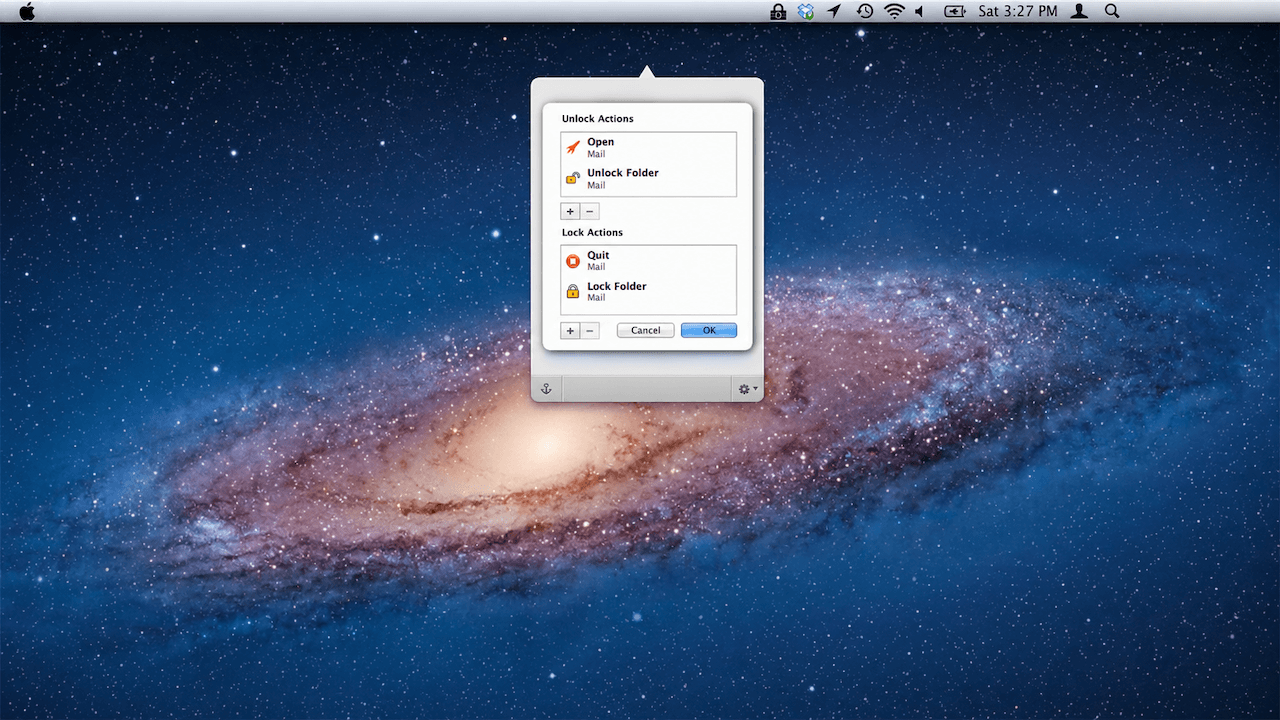
- Folder Actions — Streamlined automation for encrypted folders: Espionage supports folder actions that make working with encrypted data, including encrypted email, straightforward and non-disruptive.
- Email Encryption Integration: Encrypting your email data and related folders is handled gracefully by Espionage without requiring complex configuration.
- Automated Actions on Lock/Unlock: Assign actions to trigger automatically when a folder is locked or unlocked to fit your workflow.
- Spotlight Integration — Smart macOS search compatibility: Espionage is built to cooperate intelligently with macOS Spotlight, the system-wide search feature.
- Content Hidden When Locked: Folder contents do not appear in Spotlight results while the folder is locked, keeping sensitive data out of search results.
- Optional Full Exclusion: Users can configure Espionage to prevent Spotlight from indexing a folder’s contents entirely, even when unlocked.
- Backup and Sync Compatibility — Works with Time Machine and Dropbox: Espionage’s encrypted containers are designed to integrate cleanly with third-party backup and cloud synchronization tools.
- Time Machine Support: Encrypted folders back up efficiently with Apple Time Machine without disrupting the encryption.
- Dropbox and Online Backup: Espionage works with online backup and sync services, allowing you to maintain an encrypted off-site backup of your most sensitive data.
- Source Code Access for Security Professionals — Auditable, transparent security: Qualified security researchers and professionals can apply for access to Espionage’s source code to independently verify its security claims.
- Third-Party Auditing: Security experts can inspect the code to confirm the absence of backdoors and verify the correctness of the encryption implementation.
- Distributable Verified Builds: Approved professionals are permitted to distribute unmodified builds of Espionage they have compiled themselves, providing an independent distribution channel for users who require additional verification.
Requirements
- macOS (compatible version required — check developer’s site for the latest supported versions)
- Mac computer with standard storage configuration
- Internet connection for initial download and license activation
- Administrator privileges for installation
Downloads
Take Espionage Mac App for a complete test run before committing to a purchase. The trial edition gives you hands-on access to the core encryption and plausible deniability features so you can evaluate the software against your actual security needs in your own environment. No credit card is required, and no artificial limitations will rush your evaluation. Click the button below to download the free trial edition of Espionage and see firsthand how it fits into your daily workflow.
Thank you for reading the Espionage Mac App review, and enjoy the discount coupon. If you notice any issues with the Espionage Mac App discount coupon, deal, or giveaway—such as an expired offer, broken link, or sold‑out promotion—please let us know while the deal is still available.
Espionage Mac app, folder encryption Mac, AES-256 encryption software, plausible deniability Mac, Mac data protection, encrypt folders macOS, password protection Mac, scrypt encryption, macOS privacy software, secure folder Mac, data encryption tool, Mac security application, file encryption Mac, multiple master password, coercion-resistant encryption, Spotlight encryption Mac, Time Machine compatible encryption, Dropbox encrypted backup, Mac privacy app, sensitive data protection, folder lock Mac, encrypted folder software, no backdoor encryption, mac encryption utility, professional data security Mac


![[NEW KEY #17] Giveaway – IObit Protected Folder 1.3: Free License Code | Full Version – for Windows](https://thesoftware.shop/wp-content/uploads/thumbs_dir/IObit-Protected-Folder-Review-Discount-Coupon-Code-Giveaway-rfoslhjw0qmyg761cdgglvkdqska31t837kcvl5tw8.png)