
Giveaway – Vovsoft Speech to Subtitle Converter: Free License Key | Offline AI-Powered Audio & Video to SRT/VTT/TXT Transcription Tool – for Windows

Turn your audio and video files into perfectly synced subtitles in minutes. Get a full version of Vovsoft Speech to Subtitle Converter with a license key for FREE!
You can also get Vovsoft Speech to Subtitle Converter with a lifetime license that includes free updates and supprot at a discount of up to 81% OFF!
✔ Lifetime License. ✔ Free Product Updates ✔ Customer Support
BUY NOW
Vovsoft Speech to Subtitle Converter is available for $19 per license, for individuals and businesses looking to streamline their transcription workflow. Right now, you can secure this software using our exclusive limited-time discount of up to 81% OFF, giving you full access at a reduced cost before the offer expires.
When you purchase the premium license, you get:
- A full software license with no feature restrictions or trial limitations.
- Continued access to product updates, including improvements to transcription accuracy and new language support.
- Customer support to help resolve installation issues or answer usage questions.
- The ability to use the software without time limits, unlike the trial version.
Software Giveaway: Get the full version of Vovsoft Speech to Subtitle Converter v2.2 for free, including a license key, in the Giveaway tab below.

All VOVSOFT Programs Bundle - Get Universal license key for all Vovsoft applications
- Lifetime access to all VOVSOFT programs (103 software and counting)
- Lifetime license for all software with free updates
- Free support and instant activation of license key
- Full access to all features with no trial limitations or interruptions
- No ads while using the software
Platform: Windows

Offline AI-Powered Audio & Video to SRT/VTT/TXT Transcription Tool for Podcasts, Interviews, Lectures & YouTube Captions in 100+ Languages, Windows Compatible
- Lifetime license for 1 PC
- Lifetime free updates
- Commercial use allowed
- Instant activation license key via e-mail.
- No trial limitations.
- No nag screen, no ads.
Platform: Windows
Offline AI-Powered Audio & Video to SRT/VTT/TXT Transcription Tool for Podcasts, Interviews, Lectures & YouTube Captions in 100+ Languages, Windows Compatible
- Lifetime license for 5 PCs
- Lifetime free updates
- Commercial use allowed
- Instant activation license key via e-mail.
- No trial limitations.
- No nag screen, no ads.
Platform: Windows
Offline AI-Powered Audio & Video to SRT/VTT/TXT Transcription Tool for Podcasts, Interviews, Lectures & YouTube Captions in 100+ Languages, Windows Compatible
- Lifetime license for 10 PCs
- Lifetime free updates
- Commercial use allowed
- Instant activation license key via e-mail.
- No trial limitations.
- No nag screen, no ads.
Platform: Windows
Offline AI-Powered Audio & Video to SRT/VTT/TXT Transcription Tool for Podcasts, Interviews, Lectures & YouTube Captions in 100+ Languages, Windows Compatible
- Lifetime license for 30 PCs
- Lifetime free updates
- Commercial use allowed
- Instant activation license key via e-mail.
- No trial limitations.
- No nag screen, no ads.
Platform: Windows
Offline AI-Powered Audio & Video to SRT/VTT/TXT Transcription Tool for Podcasts, Interviews, Lectures & YouTube Captions in 100+ Languages, Windows Compatible
- Lifetime license for 100 PCs
- Lifetime free updates
- Commercial use allowed
- Instant activation license key via e-mail.
- No trial limitations.
- No nag screen, no ads.
Platform: Windows
VOVSOFT Text to MP3 Converter: Lifetime License BEST OFFER

Vovsoft Batch Audio Converter GIVEAWAY
Vovsoft Speech to Text Converter GIVEAWAY
SpeakMe BEST OFFER

VibeSonic Pro BEST OFFER

Vovsoft Audio to Lyrics Converter GIVEAWAY

MPKitX BEST OFFER
Vovsoft Podcast Downloader GIVEAWAY
Vovsoft Speech to Subtitle Converter Giveaway
Available now Free for a limited time!
To access the giveaway, kindly provide your email address. Please refrain from closing this page after signing in to receive instructions on how to access the offer at no cost.
NOTES:
– All prices shown here are in listed USD (United States Dollar).
– Such promotional programs are subject to change without notice, from time to time in our sole discretion.
– Data may vary based on different systems or computers.
Vovsoft Speech to Subtitle Converter Review at a Glance
If you’ve ever tried transcribing a podcast episode, a client interview, or a lecture recording by hand, you already know how painful it is. Manual transcription eats up hours, introduces typos, and pulls you away from higher-value work like editing or publishing. For content creators, marketers, educators, and video producers, this bottleneck slows down entire workflows and delays content from reaching an audience that’s waiting for it.
Vovsoft Speech to Subtitle Converter solves this problem by automating the entire transcription process using offline Whisper AI combined with FFmpeg for media handling. Rather than sending your files to a cloud service and waiting in a queue, the software runs the AI model directly on your machine, using your CPU and GPU to generate accurate, time-stamped subtitles in a fraction of the time manual work would take.
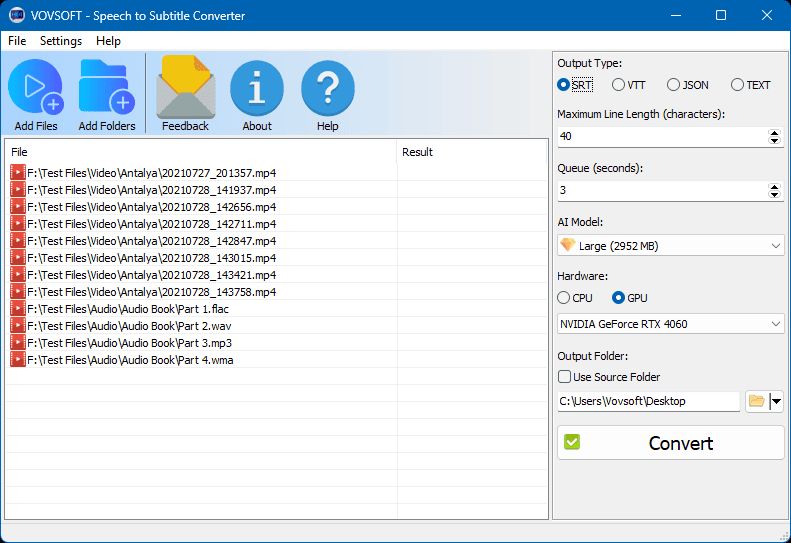
At its core, this is a desktop transcription utility built for Windows that converts spoken words from audio and video files into readable, synchronized text. It supports major audio formats such as MP3, FLAC, WAV, WMA, M4A, and OGG, along with video formats including MP4, WEBM, MKV, AVI, WMV, TS, and MOV. Whether you’re working with a raw voice memo or a fully edited video file, the software extracts the speech and produces subtitle files ready for immediate use.
The benefits extend well beyond simple time savings. Content creators can caption YouTube videos faster and reach wider, more accessible audiences. Podcasters can generate searchable transcripts for show notes or SEO purposes. Journalists and researchers can transcribe interviews without missing details buried in fast speech. Corporate teams can turn recorded meetings into text-based records for documentation and compliance. Because the tool supports over 100 languages, it’s equally useful for multilingual teams, international businesses, and educators working with non-English content.
Why choose this software over other options? Many transcription tools require an internet connection and send your files to third-party servers, raising privacy concerns for sensitive recordings like legal depositions, medical consultations, or confidential business meetings. Vovsoft’s approach keeps everything 100% offline, meaning your data never leaves your computer. Combined with support for four export formats and a large language library, it offers a level of flexibility and privacy that cloud-based alternatives simply can’t match.
Who benefits most from this tool? Video editors needing quick closed captions, YouTubers wanting VTT files for uploads, transcriptionists handling large volumes of audio, students transcribing lecture recordings, and businesses documenting internal meetings all find direct, practical use for this software. If your work involves converting speech into written text on any regular basis, this tool removes the most tedious part of that process.
Key Benefits
Before getting into the technical details, here’s a quick look at how this software directly improves your daily workflow and saves valuable time.
- Saves significant time: Automates transcription that would otherwise take hours of manual listening and typing.
- Protects your privacy: Processes all audio and video locally on your device with no cloud upload required.
- Works across formats: Handles both popular audio and video file types without needing separate conversion tools.
- Supports global content: Transcribes speech in over 100 languages, making it useful for international projects.
- Flexible output options: Exports to SRT, VTT, JSON, or TXT depending on your specific project needs.
- Uses your hardware efficiently: Takes advantage of both CPU and GPU for faster processing speeds.
- No subscription dependency: Runs as a standalone Windows application without relying on ongoing cloud service fees.
Key Features
Below is a comprehensive list of the key features that make the software a valuable addition to your content workflow:
- Audio to Subtitle Conversion: Transforms spoken audio files into synchronized, time-stamped subtitle text automatically.
- MP3 to Subtitle: Converts standard compressed audio recordings into readable subtitle files.
- FLAC to Subtitle: Processes lossless audio files while preserving transcription accuracy.
- WAV to Subtitle: Handles uncompressed audio commonly used in professional recording setups.
- OGG to Subtitle: Supports open-format audio files for broader compatibility.
- Video to Subtitle Conversion: Extracts speech directly from video files and generates matching subtitle timing.
- MP4 to Subtitle: Processes the most widely used video format for online and offline content.
- WEBM to Subtitle: Converts web-optimized video files into caption-ready text.
- MKV to Subtitle: Handles multi-track container files often used for high-quality video storage.
- AVI to Subtitle: Supports older but still widely used video file formats.
- Offline AI Processing: Runs Whisper AI locally without requiring an internet connection during transcription.
- CPU and GPU Utilization: Distributes processing load across available hardware for faster results.
- Local Data Security: Keeps all recordings and generated text stored only on your device.
- Multi-Language Transcription: Recognizes and transcribes speech across more than 100 supported languages.
- Wide Language Library: Covers major world languages including English, Spanish, Mandarin, Arabic, and Hindi.
- Regional Language Support: Includes less common languages such as Welsh, Maori, and Swahili.
- Multiple Export Formats: Provides flexibility in how transcribed text is saved and used afterward.
- SRT Export: Produces the universal subtitle format compatible with most video players.
- VTT Export: Generates the standard format required for YouTube and Zoom captioning.
- JSON Export: Outputs structured data suitable for developers building custom applications.
- TXT Export: Creates plain text files ideal for articles, notes, or documentation.
System Requirements
Before installing, check that your system meets the following basic requirements to ensure smooth performance.
- Operating System: Compatible with Windows 11 and Windows 10 (32-bit and 64-bit versions).
- Processing Hardware: Benefits from a capable CPU, with optional GPU acceleration for faster transcription.
- Storage Space: Requires sufficient free disk space for installation and temporary file processing.
- Media Files: Works with common audio and video formats listed in the supported formats section above.
Downloads
See how Vovsoft Speech to Subtitle Converter performs with your own audio and video files before committing to a purchase. Download the trial edition below to test transcription accuracy, export formats, and processing speed on your specific system.
or
Buy now, the price start from:
Thank you for reading Vovsoft Speech to Subtitle Converter review, and enjoy the discount coupon. If you notice any issues with Vovsoft Speech to Subtitle Converter discount coupon, deal, or giveaway—such as an expired offer, broken link, or sold‑out promotion—please let us know while the deal is still available.


![[NEW LINK #5] Giveaway – Audials Music 2026 SE: Free Lifetime License | Full Version – for Windows](https://thesoftware.shop/wp-content/uploads/thumbs_dir/Audials-Music-2026-Special-Edition-Review-Download-Free-Giveaway-rfy5w62nqt1wed8um44g6por66u091ewvwgo4935i0.png)


The license key is not working at this moment.
Hi John,
We just re-checked the license key, and it is still working correctly on our side.
Please make sure you copied and pasted the key exactly as provided, without any extra spaces.
links only go to paid versions
Please go to the Download section on this page to download the software.