Giveaway – SoftOrbits Auto Video Redaction Software: Free License Key | AI Face Blur, License Plate Blur, Body Cam, Dashcam and CCTV Footage Redaction – for Windows

Blur faces and license plates automatically, cut days of manual redaction down to hours, and get compliant video files ready for release. Get your SoftOrbits Auto Video Redaction license for FREE today!!
Free Full Version!
BUY NOW
SoftOrbits Auto Video Redaction Software is available for $29.99 / year. But, you can now get a fullv ersion of SoftOrbits Auto Video Redaction Software with a license key for free through the Giveaway tab below. This offer is available for a limited time!

Ashampoo Face Blur GIVEAWAY

ManyCam BEST SELLER
PCWinsoft Multiple Camera Monitor - for PC BEST OFFER
PDF Redactor Pro EXCLUSIVE

PDF Reader Pro BEST OFFER

MiniTool MovieMaker BEST OFFER

Abelssoft MovieCut BEST OFFER

VSDC Video Editor Pro: 2-PC 1-Year License BEST SELLER

EaseUS Video Editor PRO BEST OFFER

Movavi Video Suite 2025: Lifetime License BEST SELLER
SoftOrbits Auto Video Redaction Software Giveaway
Available Now: Free License Key For a Limited Time!
To access the giveaway, kindly provide your email address. Please refrain from closing this page after signing in to receive instructions on how to access the offer at no cost.
NOTES:
– All prices shown here are in listed USD (United States Dollar).
– Such promotional programs are subject to change without notice, from time to time in our sole discretion.
– Data may vary based on different systems or computers.
SoftOrbits Auto Video Redaction Software Review at a Glance
Anyone who has redacted a single body camera clip by hand knows the problem. Masking every face, head, and license plate frame by frame is slow, tiring, and easy to get wrong. One missed frame can expose a witness, a minor, or a patient. By one estimate, a 10-minute body-cam video can take 8 hours to redact manually (a 48:1 ratio, as reported for Eureka PD). Agencies also face public-records deadlines of 10 to 30 days, and a data-subject access request under GDPR must be answered within one month.
Cloud redaction services solve part of the speed problem but add another one. Many law enforcement agencies read the CJIS Security Policy conservatively. They avoid uploading criminal justice information to third-party servers, even certified ones. Teams are left choosing between slow manual work and a privacy risk.
SoftOrbits Auto Video Redaction Software removes that trade-off. It runs 100% offline on your Windows workstation. AI detects faces, heads, and license plates, and a built-in tracker follows them through the footage. You review the results, pick a mask style, and export a finished MP4 that is safe for public records responses, court evidence, and online publication.
What Is SoftOrbits Auto Video Redaction Software?
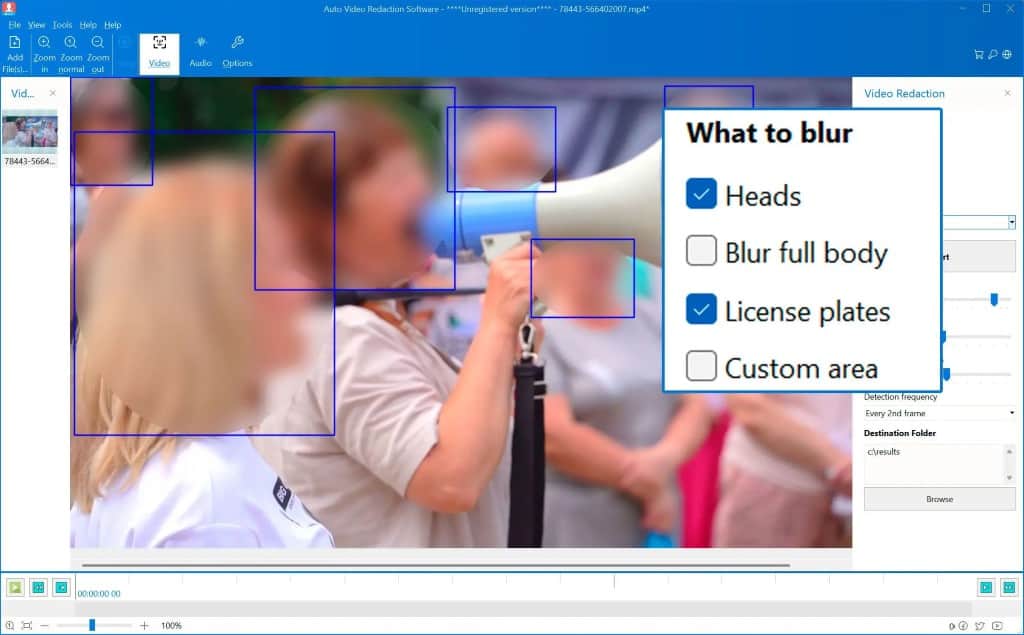
SoftOrbits Auto Video Redaction Software is a desktop application that removes personally identifiable information from video. It handles police body-worn camera (BWC) footage, interview-room recordings, dashcam clips, CCTV, and surveillance video. It uses AI to find faces, heads, and license plates, then applies a permanent mask that is burned into the exported pixels and cannot be reversed.
The program also tracks moving subjects. When the detector briefly loses a person or a plate, the built-in object tracker keeps the mask in place, so unblurred frames stay out of your export. You can also draw permanent redaction boxes over screens, badges, and on-camera documents. Audio is handled separately: you can beep or silence chosen segments to hide spoken names, addresses, or medical details.
The software loads MP4, MOV, AVI, MKV, WMV, FLV, MPG, TS, and other formats. It supports the H.264, H.265, VP9, and AV1 codecs common on body cameras and dashcams. Output is a standard MP4 with H.264 video and AAC audio that opens in any player or evidence-presentation system.
Why Choose SoftOrbits Auto Video Redaction Software?
Enterprise redaction platforms often require a vendor account, a cloud upload, and an ongoing subscription. SoftOrbits takes a different approach with a standard Windows installer and offline license activation. There are no browser logins, no API keys, and no vendor telemetry. Your evidence stays on your own machine and network.
The comparison below shows how it differs from typical enterprise options such as Veritone, CaseGuard, Axon, and SecureRedact, based on the product information provided.
| Area | Typical Enterprise Solutions | SoftOrbits Auto Video Redaction |
|---|---|---|
| Processing location | Cloud or SaaS, with footage uploaded to vendor servers | 100% on your workstation, with no upload |
| Detection coverage | Faces, plates, and screens; some add heads or full body | Faces, full heads at any angle, plates, and custom regions |
| Tracking | Per-frame detection or user-defined zones | Built-in tracker that fills detection gaps |
| Mask styles | Mostly blur only | Gaussian blur, pixelation, and solid black box |
| Batch work | Cloud queue limited by upload bandwidth | Local queue with no file-count ceiling |
| Audio | Varies by vendor | Beep or silence selected intervals |
| Deployment | Cloud accounts or subscriptions | Standard Windows installer, no vendor account |
Who Can Benefit From SoftOrbits Auto Video Redaction Software?
The software suits any team that shares video containing people. The groups below use it most.
- Police and law enforcement: Officers and records clerks load body-cam, dashcam, and interview-room footage and export clips ready for public release.
- Compliance and legal teams: Staff automate bulk FOIA redactions and DSAR-compliant exports, and anonymize patients, witnesses, and employees in depositions and incident clips.
- Security and surveillance operators: Teams anonymize retail, parking, transit, and campus camera footage before handing clips to insurers or police.
- Fleet managers and dashcam owners: Drivers mask every face and plate before sharing incident clips with insurers or posting them online.
- Journalists, researchers, and content creators: These users protect sources, witnesses, minors, and bystanders in field footage and city-walk videos.
- Schools and universities: Staff blur students, staff, and bystanders in classroom recordings and school-bus footage to meet FERPA obligations.
Key Benefits
The advantages below come from the software’s design: local processing, AI detection, and compliance-focused output. Each one addresses a specific pain point in the redaction workflow.
AI-Powered Detection of Faces, Heads, and License Plates
The detection engine does the repetitive work so your team does not have to. It reads each frame and flags the people and plates that need masking.
- Detects faces in any pose, including frontal, profile, tilted, or partially covered.
- Detects heads at any orientation, including back-of-head, helmets, hoods, and hats.
- Reads license plates on cars and motorcycles in dashcam, CCTV, and street-camera footage.
100% Offline, So Footage Never Leaves Your PC
Keeping evidence local removes a whole category of risk. The program needs no internet connection, so it works on air-gapped networks in evidence rooms and secure facilities. Evidence and patient recordings remain on your workstation, which suits agencies that avoid sending criminal justice information to third-party clouds.
Compliance-Ready Output for FOIA, DSAR, HIPAA, GDPR, and FERPA
Compliance is the main reason teams redact video, and the software covers five frameworks. FOIA covers US federal and state public-records laws with 10 to 30 day windows, including California AB 748, which requires critical-incident video within 45 days. DSAR covers GDPR Article 15 and the UK DPA, with a one-month deadline. HIPAA covers protected health information in telemedicine, surgical, and training video, with penalties that start at $45,000 per PHI disclosure. GDPR Article 17 covers the right to erasure, including video. FERPA requires redacting other students before disclosure to parents or agencies.
Gaussian blur and black-box masks are burned into the exported pixels and cannot be reversed. Audio needs its own attention. One documented case of a missed segment containing a patient name led to a $45,000 HIPAA fine plus $30,000 in legal fees, so the software lets you redact audio tracks independently.
Time Savings and Hardware Flexibility
SoftOrbits Auto Video Redaction Software is optimized for desktop CPUs, so a typical office PC or laptop is enough. The batch queue uses all CPU cores, so you can leave a full backlog running overnight. With static CCTV and a single subject, processing often finishes faster than you can review the result. For dynamic body-cam footage with several moving people, AI detection and tracking cut days of work to hours.
Key Features
The list below covers the main tools in the program and the sub-features inside each one.
- AI Detection Engine: Finds the people and plates that need masking without manual keyframing.
- Face Detection: Locates faces in frontal, profile, tilted, and partially covered poses.
- Head Detection: Catches heads from any angle, including helmets, hoods, hats, and back views.
- License Plate Detection: Reads plates on cars and motorcycles across dashcam, CCTV, and street footage.
- Full Body Option: Lets you choose full bodies for blurring when a face is not visible.
- Object Tracking: Keeps masks attached to moving subjects throughout the clip.
- Gap Bridging: Follows subjects through brief detection drops so no unblurred frames reach the export.
- Motion Following: Moves each mask with the person or plate as it travels across the frame.
- Custom Redaction Regions: Lets you hide anything the AI is not designed to find.
- Permanent Boxes: Lets you draw fixed boxes over screens, badges, and on-camera documents.
- Manual Review: Lets you check the AI results and adjust masks before export.
- Blur Style Options: Offers three mask looks for different disclosure needs.
- Gaussian Blur: Gives a natural look that preserves movement and context.
- Pixelation: Gives a clear, visible redaction while keeping the scene readable.
- Solid Black Box: Gives an unambiguous mask, preferred for court evidence and legal proceedings.
- Audio Redaction: Removes spoken identifiers that visual masks cannot hide.
- Beep Segments: Replaces selected audio intervals with a beep tone.
- Silence Segments: Mutes selected intervals to hide names, addresses, or medical conditions.
- Independent Control: Applies audio redaction separately from the visual masks.
- Wide Format Support: Opens the video types used by cameras and recording systems.
- Container Formats: Loads MP4, MOV, AVI, MKV, WMV, FLV, MPG, TS, and more.
- Codec Support: Handles H.264, H.265, VP9, and AV1 video.
- Standard Export: Saves a self-contained MP4 with H.264 video and AAC audio.
- Batch Processing: Handles large backlogs without constant attention.
- Local Queue: Runs files with no file-count ceiling and no upload bandwidth limit.
- Overnight Runs: Uses all CPU cores so long batches finish while you are away.
- Offline Security: Protects sensitive evidence by keeping everything local.
- No Internet Needed: Installs and runs without a connection on any Windows 10/11 workstation.
- Offline Activation: Activates the license with no browser logins, API keys, or telemetry.
- Air-Gapped Use: Works inside evidence rooms and secure facilities.
- Irreversible Output: Makes sure redacted information cannot be recovered.
- Burned-In Masks: Writes Gaussian blur and black-box masks into the exported pixels.
- Universal Playback: Opens in any standard player or evidence-presentation system.
How to Use the Software
The workflow has four steps, and most users finish a first clip within minutes.
- Add your video: Drag and drop files or use Add files.
- Choose what to redact: Select faces, heads, license plates, or full bodies, and draw custom boxes where needed.
- Choose a blur style: Pick Gaussian blur, pixelation, or a solid black box.
- Process and save: Click Start to save the redacted video to your destination folder.
Requirements
SoftOrbits Auto Video Redaction Software runs on ordinary office hardware. The list below gives the minimum system specifications.
- Operating system: Windows 11/10/8.1/8/7 (32/64 bit)
- Processor: Intel i3, AMD Ryzen 5 or above
- Memory: 4 GB of RAM or above
- Graphics: NVIDIA GeForce series 8 and 8M, Intel HD Graphics 2000, Quadro FX 4800, Quadro FX 5600, AMD Radeon R600, Mobility Radeon HD 4330, Mobility FirePro series, Radeon R5 M230 or higher, with up-to-date drivers
- Display: 1280 x 768 screen resolution, 32-bit color
- Storage: 1 GB of free hard disk space or above
Free to Try
See how SoftOrbits Auto Video Redaction Software handles your own body-cam, dashcam, or CCTV clips before you commit. Download the free trial by clicking the button below, then test face, head, and plate detection on a sample file at no cost.
or
Buy now, the price start from:
Thank you for reading SoftOrbits Auto Video Redaction Software review, and enjoy the discount coupon. If you notice any issues with SoftOrbits Auto Video Redaction Software discount coupon, deal, or giveaway—such as an expired offer, broken link, or sold‑out promotion—please let us know while the deal is still available.