81% Off – MacMobility: Lifetime License | Remote Mac Control App – for Mac

Take Control of Your Mac from Your iPhone or iPad – Get MacMobility at a 81% Discount Today and Automate Everything with a Single Tap!
✔ Lifetime License. ✔ Free Product Updates ✔ Customer Support
BUY NOW
MacMobility is available at $7.99, but right now you can get your MacMobility license at an exclusive discounted rate of up to 81% OFF. This deal will not last long, so secure your license before it expires.
When you purchase MacMobility, here is everything you receive:
- Access to the full automation library, virtual display, local AI scripting, Raycast integration, Apple Shortcuts support, and every feature listed above
- Full perpetual license for MacMobility on macOS
- Companion apps for iPhone and iPad included
- Priority customer support to help you get set up and troubleshoot any issues
- Free lifetime updates to ensure you always have access to the latest features and improvements

Remote Mac Control App | Launch Apps, Run Shortcuts, Automate Workflows, Virtual Display & AI-Powered Scripting
- Please Notes:
- You may be directed to the bundle page, but it is possible to purchase the software individually.
- If you're having difficulty locating the product on the bundle page, please utilize the browser's search feature.
- Get an additional $3 discount on all orders more that $30.
- LEGITIMATE: All apps are authentic and have original licenses obtained directly from the creators via contracts.
- INSTANT ACCESS: Fully activated macOS Apps & Windows Software with instant downloads & license key access.
- Device Activation: 1 Device
- A valid license is required to access full features.
- The license is for personal, non-transferable use unless otherwise stated.
- Unauthorized distribution or resale of MacMobility is prohibited.
- Updates may be delivered automatically or manually through official channels.
- Some updates may require a newer version of macOS or iOS.
- The developer is not liable for any data loss, damages, or interruptions.
- Features and functionality may change without prior notice.
- Major & Minor Updates Included
- Lifetime License
Platforms: Mac OS X

Ashampoo Backup Lite GIVEAWAY

SoftOrbits Photo Stamp Remover with AI: Lifetime License GIVEAWAY

SafeShare Premium EXCLUSIVE

Usenet.Farm BEST OFFER

Font Giveaway – The Perfect Mix Font Bundle: 70 Premium Fonts with Commercial License GIVEAWAY
![[Halloween] Audio Plugin Giveaway – AmpliTube SVX 2: Free Full Version | A Heavy-weight Bass Gear Collection for AmpliTube – as AU VST 2, VST 3, AAX for for Windows / Mac](https://thesoftware.shop/wp-content/uploads/thumbs_dir/AmpliTube-SVX-2-Review-Download-Discount-Sale-247kviy8y2o5uwhgry14vhbrjmonamfhii0z2lyzmk5w.png)
AmpliTube SVX 2 GIVEAWAY
![[ENDING SOON] Giveaway – AnyMP4 Video Repair: Free 1-year License Code | A Damaged-Video Fixer Tool – for Windows](https://thesoftware.shop/wp-content/uploads/thumbs_dir/ANYMP4-Video-Repair-Review-Download-Free-License-Key-Giveaway-258f506rgti3d7a98xxsyfcji96wu7aa4pst8f8bvv6c.jpg)
ANYMP4 Video Repair GIVEAWAY

$1 Only – The Stylish Script Font Bundle: 45 Premium Fonts by rotterlabstudio | Comercial License BEST OFFER

UniFab Video Converter Pro BEST OFFER

Vovsoft Desktop Diary GIVEAWAY

Ashampoo LocaLingo GIVEAWAY

Steganos Privacy Suite: 5-Device 1-Year License GIVEAWAY

OnlineTV Plus: Lifetime License BEST SELLER

CatchPulse / CatchPulse Pro BEST OFFER

Abelssoft GClean 2026: Saver Subscription BEST SELLER
MacMobility Giveaway
Unavailable at this moment!
To access the giveaway, kindly provide your email address. Please refrain from closing this page after signing in to receive instructions on how to access the offer at no cost.
NOTES:
– All prices shown here are in listed USD (United States Dollar).
– Such promotional programs are subject to change without notice, from time to time in our sole discretion.
– Data may vary based on different systems or computers.
MacMobility Review at a Glance
Every professional knows the frustration of being tethered to their desk just to perform simple tasks on their Mac. Whether you’re mid-presentation, live streaming, coding, or designing, the constant need to physically interact with your Mac breaks your focus and slows you down. You reach for your keyboard to trigger a shortcut, switch windows, or launch an app — and just like that, your momentum is gone. This is the problem MacMobility was built to solve.
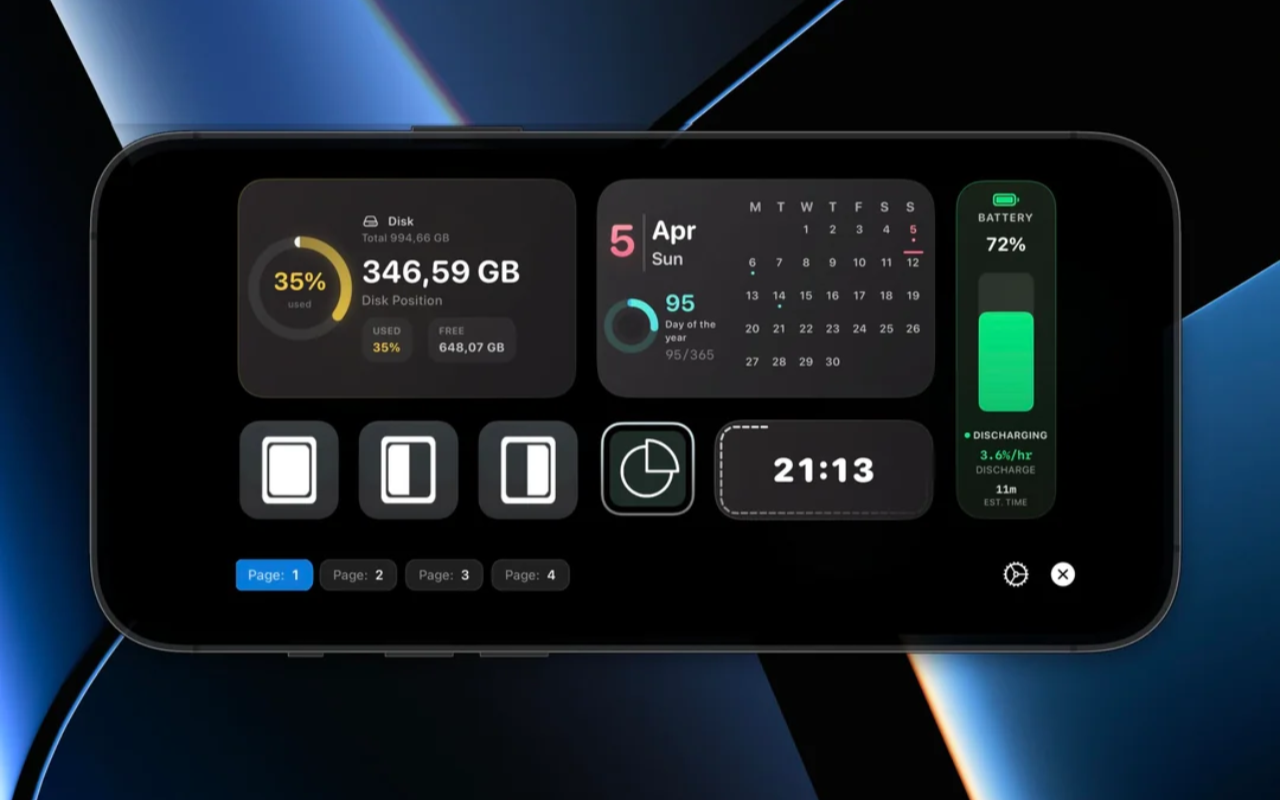
MacMobility is a powerful remote Mac control application that pairs your Mac with your iPhone or iPad through dedicated companion apps. It gives you the ability to launch Mac applications, trigger Apple Shortcuts, run AppleScripts, execute bash scripts, and control complex productivity workflows — all with a single tap on your mobile screen. It is not just a basic remote; it is a fully programmable, deeply customizable control hub that fits naturally into your daily setup.
Built for macOS 14 and newer, MacMobility is designed with both casual users and power users in mind. It connects seamlessly with your existing macOS ecosystem, integrating with tools you already rely on — including Apple Shortcuts, Raycast, and any application that supports AppleScript. It also breathes new life into older iPhones and iPads, letting you repurpose a device that might otherwise collect dust into a productive Mac controller.
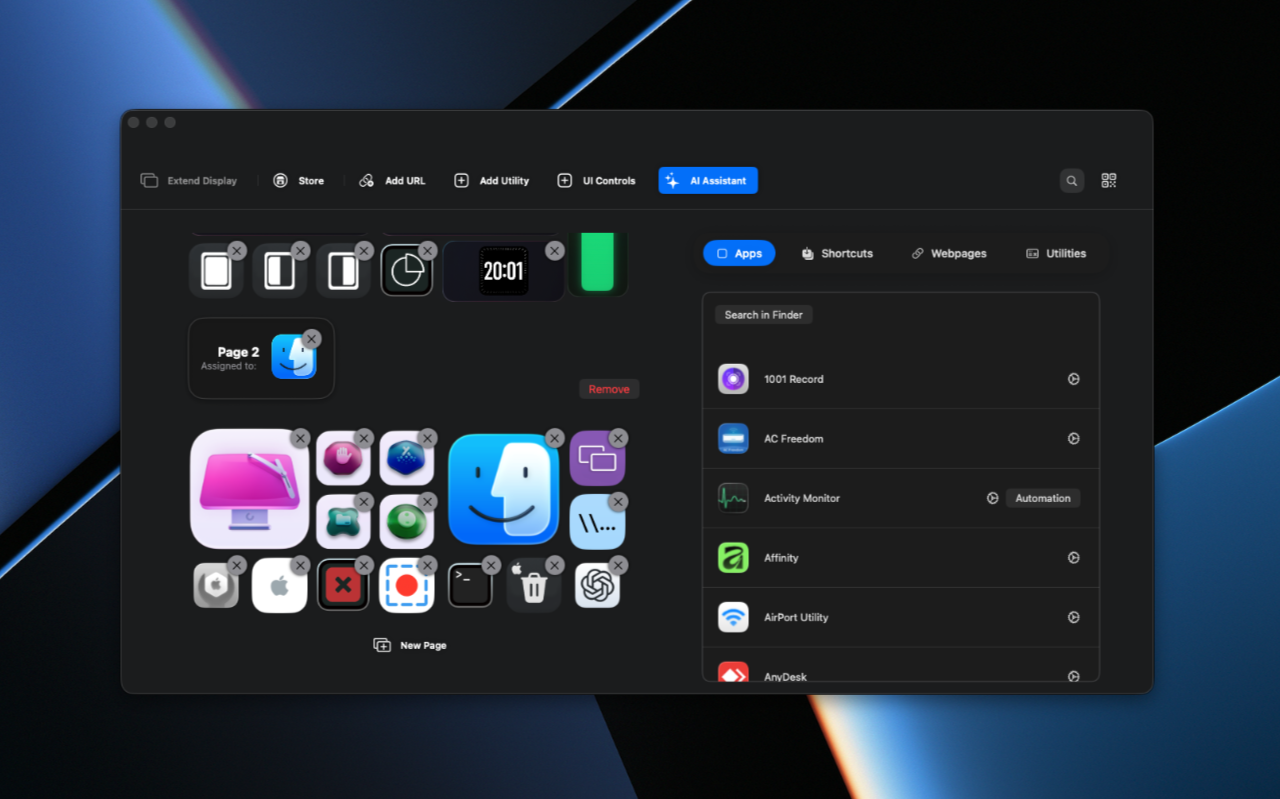
What is MacMobility?
MacMobility is a remote control application for macOS that works in tandem with companion apps for iPhone and iPad. At its core, it allows you to create customizable button layouts on your iOS or iPadOS device and map each button to a specific Mac action — from launching an app to running a multi-step automation workflow.
What sets MacMobility apart from basic remote desktop apps is its focus on action-based control. Rather than mirroring your entire screen, it gives you a clean, intentional interface built around the actions you perform most. You define what the buttons do, how they look, how they are arranged, and when they appear. The result is a personalized control surface that adapts to your workflow rather than forcing you to adapt to it.
MacMobility also includes a virtual display feature that works similarly to Apple’s Sidecar but without the iCloud account requirement, making it ideal for older devices or work setups where account switching is not practical. Combined with local AI model support for offline script generation, file conversion tools, quick action menus, and deep automation libraries, MacMobility is far more than a remote — it is an intelligent productivity extension for your Mac.
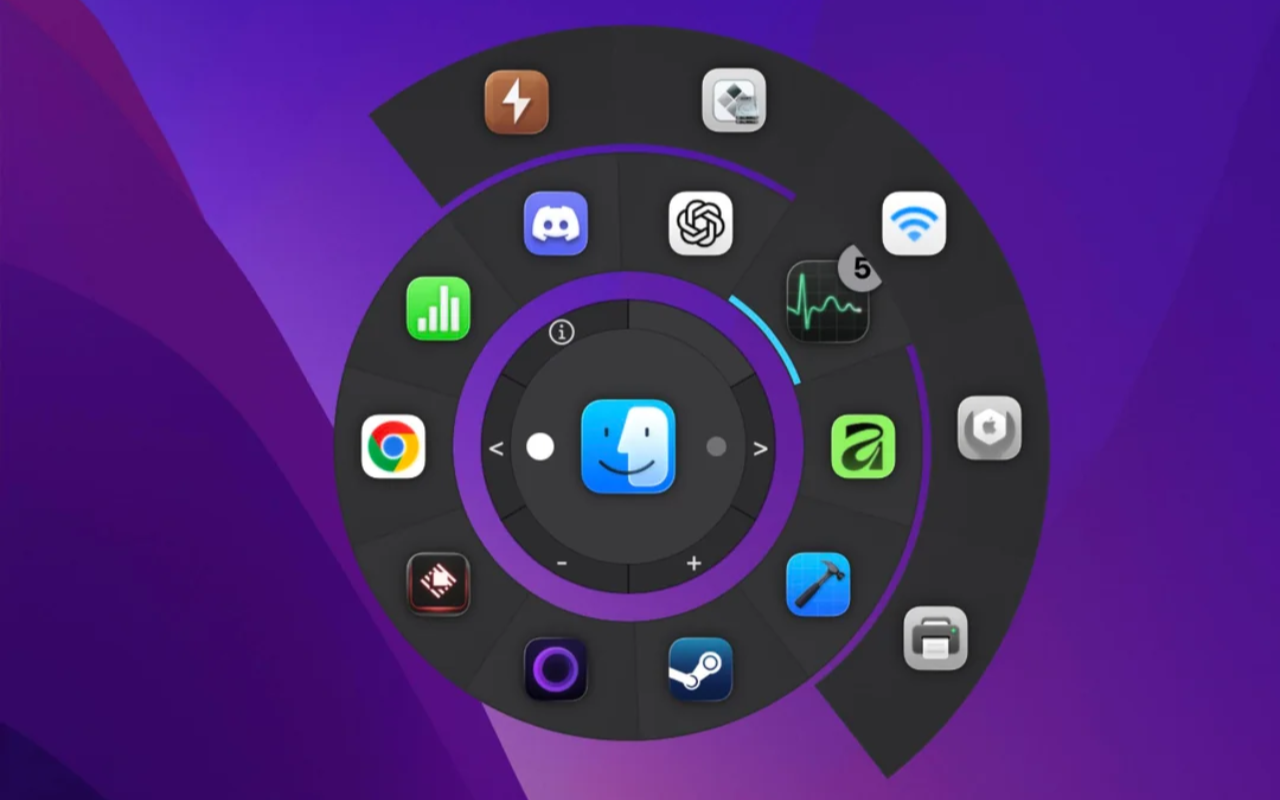
Streamers benefit from instant scene switching and media controls. Developers gain quick access to scripts and terminal commands. Creative professionals can trigger file conversions, launch design tools, and manage assets with one tap. Anyone who uses a Mac regularly will find ways to save time and reduce repetitive effort with MacMobility.
Key Benefits
MacMobility delivers real, measurable advantages that make your workday faster, smoother, and more organized. Here is why users across different industries rely on it:
- Reduced friction in daily workflows — Eliminate the need to constantly switch focus to your Mac for routine tasks. Trigger actions from your iPhone or iPad without interrupting what you are doing.
- Repurpose old devices — Give an old iPhone or iPad a productive second life as a dedicated Mac remote, saving you money on additional hardware.
- Deep integration with macOS tools — Native support for Apple Shortcuts, Raycast, and AppleScript means MacMobility fits into the ecosystem you already use rather than replacing it.
- AI-powered automation without cloud dependency — Local MLX model support lets you generate scripts and automation ideas offline, keeping your data private and your performance fast.
- Extended screen real estate — The virtual display feature gives you a second screen on your iOS device without requiring a matching iCloud account, making it more flexible than Sidecar.
- Touch-based Mac control — Use your finger to click, double-click, drag, drop, and scroll on your Mac through your iPhone or iPad, turning touch into a natural input method.
- Instant access to files, folders, and websites — Navigate your Mac’s file system and browser tabs from your mobile device in seconds.
- Automatic page switching per app — MacMobility detects which application is in focus and automatically switches to the relevant control page, keeping your most-needed tools always front and center.
- Affordable with consistent updates — Get a feature-rich application at an accessible price point, backed by regular updates that bring new capabilities over time.
Key Features
Below is a detailed breakdown of every core feature MacMobility offers, along with its sub-features, so you know exactly what you are getting:
- Smart Layout Design — An intuitive, clean interface built for maximum productivity with full control over layout organization.
- Customizable Grid System — Arrange buttons and controls in a flexible grid that adapts to your personal preferences and workflow needs.
- Multi-Page Support — Create multiple pages of controls and switch between them instantly, ideal for organizing separate workflows.
- Built-in Button Designs — Choose from pre-built button designs crafted for a wide range of styles and use cases.
- Virtual Display Support — Extend your Mac desktop using your iPhone or iPad as a second screen, functioning like Sidecar without iCloud account requirements.
- Touch Controls — Control your Mac with touch gestures including single click, double click, drag and drop, and scroll.
- Older Device Compatibility — Works on older iPads and iPhones that do not support native Sidecar.
- Local MLX LLM Model Support — Run advanced AI models directly on your Mac to generate AppleScripts, bash scripts, and automation ideas entirely offline.
- No Cloud Dependency — All AI processing happens locally, ensuring full privacy and fast performance.
- Instant Script Generation — Generate automation scripts on demand without relying on external services.
- Quick Action Menu — Access your most frequently used actions instantly using the CONTROL + OPTION + SPACE keyboard shortcut.
- Fully Customizable Menu — Add, remove, or reorder actions in the Quick Action Menu to match your most common tasks.
- One-Tap File and Folder Access — Browse and open folders and documents on your Mac directly from your iPhone or iPad.
- Custom Folder Buttons — Create dedicated buttons for your most-used folders and documents for instant access.
- Favorite Website Launcher — Create custom buttons to open websites with a single tap and let MacMobility auto-detect currently open tabs.
- Multi-Action Website Button — Automatically generates a button that launches all your preferred websites at once.
- Built-In File Conversion Tools — Convert popular iOS and iPadOS file formats directly from Finder without using third-party converters.
- Image and Video Conversion — Convert media files with a single tap; MacMobility detects file types automatically.
- Custom Conversion Buttons — Create tailored conversion buttons for specific file format combinations you use regularly.
- Automatic Page Switching — Assign a specific control page to each application, and MacMobility automatically switches to it when you bring that app into focus.
- Context-Aware Control — Always see the right set of controls for the app you are actively using, without any manual page navigation.
- Native Raycast Integration — Launch applications, execute scripts, and automate tasks directly through the Raycast interface.
- Seamless Workflow Integration — MacMobility controls are accessible natively within Raycast for a unified productivity experience.
- Apple Shortcuts Support — Trigger Apple Shortcuts directly from your iPhone or iPad through MacMobility buttons.
- Premade Shortcut Library — A curated selection of popular, ready-to-use shortcuts to get you started immediately.
- Automation Creation — Build custom automations triggered by a single button press using AppleScript, Apple Shortcuts, or bash scripts.
- Library of Premade Automations — Access a built-in collection of ready-made automations covering media playback, app launching, and complex task execution.
- Custom Automation Builder — Build your own automations from scratch using any scripting language supported by macOS.
- Old iOS Device Support — MacMobility is fully compatible with older iPhones and iPads, letting you repurpose legacy devices as dedicated Mac remotes.
- Endless Customization — Personalize every aspect of your workflow, including button placement, page layout, action assignments, and visual design.
- Custom Actions — Create entirely new actions using Apple Shortcuts or bash scripts for complete workflow freedom.
Requirements
- macOS 14 (Sonoma) or newer required on your Mac
- iPhone or iPad running a compatible version of iOS/iPadOS (companion app required)
- MacMobility Mac app and iOS/iPadOS companion app must both be installed
- Local MLX LLM features require Apple Silicon Mac
Downloads
Before committing to a purchase, put MacMobility through its paces at no cost. The free trial gives you a hands-on look at the full interface, the button customization system, and core remote control features so you can see firsthand how it fits into your daily routine. Click the button below to download the trial edition and start controlling your Mac from your iPhone or iPad today.
or
Buy now, the price start from:
Thank you for reading MacMobility review, and enjoy the discount coupon. If you notice any issues with the MacMobility discount coupon, deal, or giveaway—such as an expired offer, broken link, or sold‑out promotion—please let us know while the deal is still available.


![[SOLO KEY #2] Giveaway – AnyViewer 5 Solo Edition: Free License Key | A Comprehensive Remote Access, Remote Control, and Remote Support Software – for Windows](https://thesoftware.shop/wp-content/uploads/thumbs_dir/AnyViewer-Pro-review-download-Key-Giveaway-rfosm8t7ixo9sw2fx78n46oqyytxa9tfuyhfsm1evs.png)
![[NEW KEY #3] Giveaway – HT System Administrator 25.7: Free License Key | Control Computers and Block Unwanted Activities! – for Windows](https://thesoftware.shop/wp-content/uploads/thumbs_dir/HT-System-Administrator-rfosk2slroph197rkrilv8dhnzigje7pw8c4yn9388.png)