
Giveaway #4 – AI Photo Culling: Free License Key | First-pass Photo Sorting Application – for Windows

Stop wasting time scrolling through thousands of nearly identical vacation, wedding, or family photos just to find the best ones. Get AI Photo Culling with a FREE license key and sort through up to 10,000 photos in minutes—not weeks.
Free Full Version!
BUY NOW
AI Photo Culling normally costs $19.99, but you can get it for free with a license key in the Giveaway tab below. This is a limited-time offer, so be sure to claim yours before it expires!

Excire Foto 2025: Lifetime License BEST SELLER

89% Off – ON1 Photo RAW Mastery Bundle: The Complete Photo RAW 2026 Learning Kit BEST OFFER

Ashampoo Photo Organizer PRO 25: Lifetime Version BEST OFFER

On1 Photo RAW 2026 + 2027: Perpetual License BEST SELLER

Excire Search 2026: One-time payment, no subscription model BEST SELLER

PhotoSort: Full Version! BEST OFFER

Ashampoo Photo Commander 19: Lifetime License (One-time Fee, No Time Limit) BEST SELLER

Luminar BEST OFFER

FileSorter PRO BEST OFFER

Abelssoft File Organizer BEST OFFER

Duplicate Photos Fixer Pro BEST OFFER

Nero AI Photo Tagger BEST SELLER
AI Photo Culling Software Key Giveaway
Available now: Free License Key for a Limited Time!

To access the giveaway, kindly provide your email address. Please refrain from closing this page after signing in to receive instructions on how to access the offer at no cost.

NOTES:
– All prices shown here are in listed USD (United States Dollar).
– Such promotional programs are subject to change without notice, from time to time in our sole discretion.
– Data may vary based on different systems or computers.
AI Photo Culling Software Review at a Glance
Every photographer, parent, and casual phone shooter eventually hits the same wall: a memory card or phone gallery packed with thousands of shots and no realistic way to go through them one by one. A two-week trip can easily produce 3,000 frames, and six months later that folder is still sitting untouched because opening it feels like starting a part-time job. Closed eyes, camera shake, dark backlit faces, and eight near-identical bursts of the same jump or laugh all blend together, and manual sorting by hand can eat up an entire evening or more per shoot.
AI Photo Culling by SoftOrbits was built to remove that specific bottleneck.
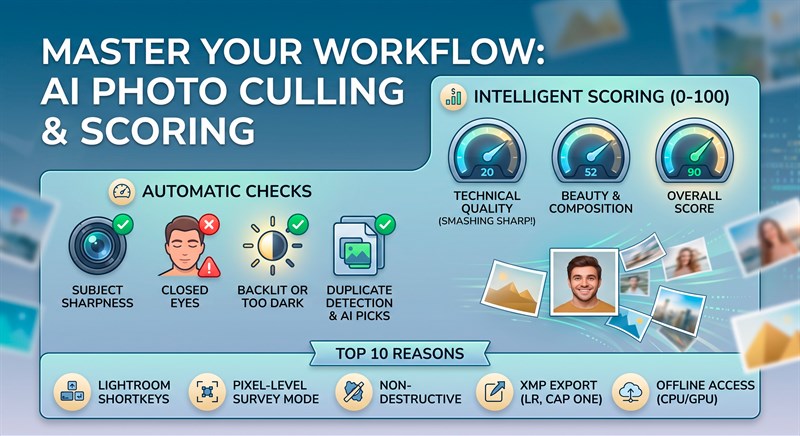
What is SoftOrbits AI Photo Culling Software
SoftOrbits AI Photo Culling is a dedicated first-pass sorting application, distinct from a full photo editor or catalog manager. Culling happens before editing: it is the step where you decide what to keep, what to reject, and what needs a second look, using the card or phone archive directly rather than a pre-built Lightroom or Capture One catalog. The program opens CR2, CR3, NEF, ARW, RAF, ORF, RW2, PEF, and plain DNG RAW formats directly, alongside HEIC/HEIF and everyday JPEG, PNG, and WebP files, covering more than 25 RAW formats from major camera brands including Canon, Nikon, Sony, Fujifilm, Olympus, Panasonic, and Pentax.
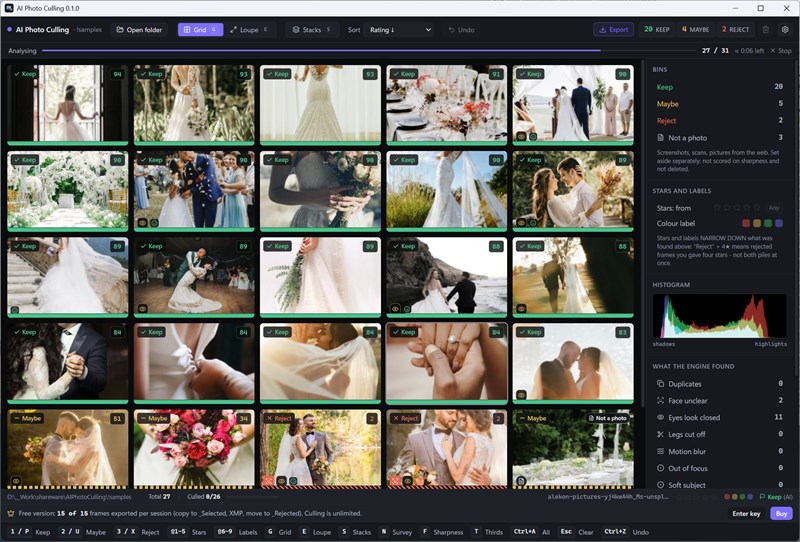
The core of the software is its rating engine. Each photo receives three separate scores — technical quality, beauty, and composition — which combine into one overall rating from 0 to 100. Technical problems always take priority in that calculation, so a blurred or badly exposed frame can never outrank a technically clean one purely because it looks prettier. This keeps the sort order honest: the frames that deserve a second look genuinely float to the top instead of being buried under a flattering but broken shot.
Near-duplicate bursts, the kind produced by holding the shutter down through a jump, a laugh, or a running child, are automatically folded into a single stack with a couple of standout candidates highlighted inside it. Instead of clicking through eight nearly identical frames, you step through a shortlist of two or three and pick the keeper yourself. HDR exposure brackets are recognized and protected from being swept up in a bulk reject, since those frames are supposed to look different from one another by design.
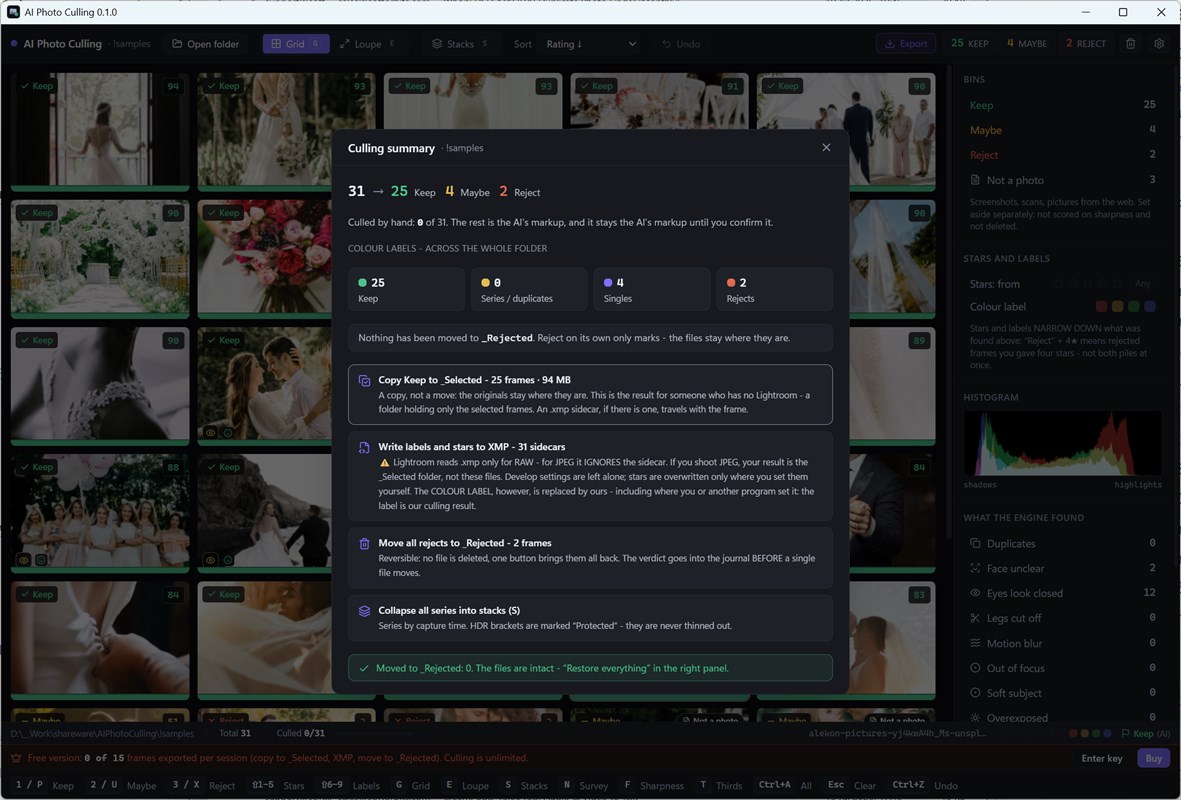
Nothing is ever permanently deleted by the software itself. A rejected photo is simply moved into a Rejected subfolder next to the originals when the session closes, and you are prompted twice before that folder can be removed entirely. Approved photos can be exported into a Selected subfolder, and star ratings or reject flags are written out as XMP sidecar files that stay compatible with professional editors like Lightroom or Capture One for the next stage of the workflow.
Key Benefits
The value of SoftOrbits AI Photo Culling comes down to time saved and decision fatigue removed, without giving up control over the final selection. Below is a breakdown of what that translates to in practice.
- Massive time savings on large photo batches. A 3,000-frame folder that would take an evening or longer to sort by hand can have its mechanical first pass completed automatically, cutting review time by as much as 70 percent.
- You keep final say on every photo. The AI ranks and flags, but nothing is rejected purely on looks or purely on a single detection signal; the actual keep-or-reject decision always belongs to you.
- Nothing is ever permanently lost. Rejected images move to a virtual folder rather than being deleted, and removing that folder requires two separate confirmations.
- Complete privacy during processing. Every photo stays on your PC throughout the scan. There is no upload step, no account creation, and no cloud dependency at any point.
- Works across mixed camera and phone sources. RAW files from a DSLR or mirrorless body and HEIC or JPEG files from a phone can sit in the same folder and be scored together in one pass.
- Reduces decision fatigue on bursts. Turning eight near-identical frames into one stack with a couple of flagged candidates means far fewer frames to actually compare side by side.
- Professional workflow compatibility. XMP sidecar files keep your star ratings and flags usable in the editing software you already rely on, so culling here does not lock you into a separate ecosystem.
It is a Windows desktop application that opens a folder of anywhere from 1,000 to 10,000 images, runs an automated pass across every frame, and returns a single 0-100 rating that blends technical quality, beauty, and composition into one number. Results appear in real time while the scan is still running, so there is no waiting for a full pass to finish before you start reviewing. The software reads RAW files straight from the memory card alongside HEIC and JPEG exports from a phone, so a mixed folder from a DSLR and a smartphone can be processed together in a single session.
What separates this tool from a simple blur detector is how carefully it avoids false rejections. A portrait shot wide open at f/1.4 with a soft, dreamy background is not flagged as a technical failure, because the sharpness check looks only at the subject, not the entire frame. Closed eyes and backlit faces are shown as reason icons next to a thumbnail, never as an automatic verdict, because face and eye detection is wrong often enough that the program refuses to let it delete anything on its own. Every single reject is a suggestion you can overrule with one keystroke.
Why choose this software? Because it solves the specific, measurable part of culling that genuinely wastes time, while leaving the part that requires judgment entirely in your hands. It does not try to decide which moment mattered emotionally. It removes the boring, repetitive scanning work: finding which of eight burst frames is sharp, which shots are dark or blown out, and which screenshots or scans do not belong in a photo folder at all. Everything runs locally on your PC. No photo is uploaded anywhere, no account is required, and nothing leaves your machine, which matters for anyone culling client work, family photos, or anything else they would rather not put in a cloud queue.
Who benefits from this tool? Travel and event photographers who come home with thousands of frames and no time to build a full catalog for a single trip. Parents trying to find the one clean shot of a toddler who will not sit still for a picture. Anyone with an old phone backup or external drive full of years of unsorted photos, screenshots, and duplicate bursts that need a first pass before real editing or printing even starts. If you have ever closed a folder of vacation photos because there were simply too many to look at, this is the tool built for that exact moment.
Features
Below is a comprehensive list of the key features that make the software a valuable addition to your photo workflow:
- Folder-based batch scanning: Point the program at a folder holding anywhere from 1,000 to 10,000 shots and let it review the entire batch in one session.
- Real-time scoring: Rated results appear on screen while the scan is still running, so review can start before the full folder has finished processing.
- Mixed-format intake: RAW files from a DSLR, HEIC images from a phone, and standard JPEGs can all be loaded into the same folder and processed together.
- Single 0-100 overall rating: Every frame gets one combined score built from three separate measurements, giving a fast way to sort a folder from best to worst.
- Technical quality score: Measures sharpness, exposure, and other camera-level factors, and always outweighs the other two scores in the final rating.
- Beauty and composition scores: Rate the aesthetic appeal and framing of a shot, but only after technical quality has been accounted for, so a good-looking but broken photo cannot rank above a clean one.
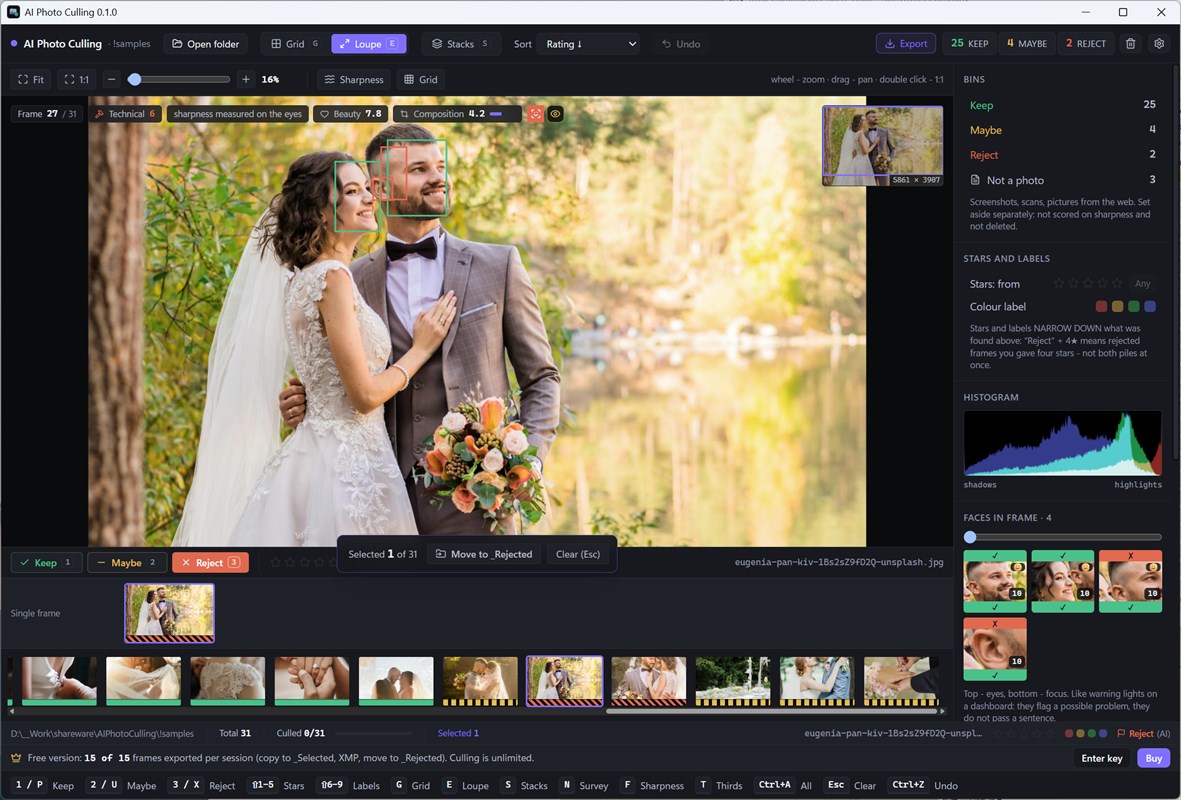
- Subject-focused sharpness detection: Sharpness is measured specifically on the subject rather than the whole frame, which protects intentionally soft backgrounds from being wrongly flagged.
- Wide-aperture portrait support: A portrait shot at a wide aperture with a blurred background is recognized as intentional rather than treated as a focus miss.
- Reason-based flagging system: Every flag on a thumbnail comes with a stated reason, such as camera shake, possibly closed eyes, or an underlit subject, rather than a silent, unexplained mark.
- Non-critical yellow icon flags: Softer issues are shown with a yellow icon that suggests a look rather than forcing a verdict, and any flag can be overridden.
- Series and burst grouping: Photos taken close together in time and appearance are automatically grouped into stacks instead of being shown as dozens of separate individual frames.
- HDR bracket protection: Exposure brackets captured for HDR merging are recognized as an intentional series and excluded from bulk reject actions.
- Backlighting and exposure analysis: The software distinguishes an underlit subject in front of a bright background from a photo that is simply too dark overall.
- Blown-highlight detection: Skin tones clipped to flat white are flagged for review, while a legitimately bright sunset behind a subject is correctly left alone.
- Non-photograph detection: Screenshots, scans, and other non-camera images are recognized and separated into a Maybe category instead of being scored alongside real photographs.
- Survey and Loupe comparison views: Frames can be compared side by side with synchronized zoom, or examined individually in a full-screen Loupe view for close inspection.
- Bulk action previews: Before any bulk action runs, the program shows exactly how many frames will be affected, and every action can be undone with Ctrl+Z.
- Lightroom-style keyboard shortcuts: Familiar hotkeys handle the entire workflow, including P and X for keep and reject, 1 through 5 for star ratings, and S to build a stack manually.
- Broad RAW format support: More than 25 RAW formats are read natively, including Canon CR2 and CR3, Nikon NEF, Sony ARW, Fujifilm RAF, Olympus ORF, Panasonic RW2, Pentax PEF, and plain DNG.
- XMP sidecar export: Keep and reject decisions along with star ratings are written to XMP sidecar files placed next to the originals, keeping compatibility with professional editing software.
- Non-destructive rejection: Rejected photos are moved to a Rejected subfolder rather than deleted, and the folder can only be removed after two separate confirmations.
- Fully offline processing: All analysis runs locally on the PC with no image upload, no account requirement, and no cloud storage step at any stage.
Requirements
The following system specifications are needed to run AI Photo Culling Software smoothly on a Windows PC.
- Operating system: Windows 11, 10, 8.1, 8, or 7 (32-bit or 64-bit)
- Processor: Intel i3, AMD Ryzen 5, or a comparable processor or above
- Memory: 4 GB of RAM or more
- Graphics card: NVIDIA GeForce series 8 and 8M, Intel HD Graphics 2000, Quadro FX 4800, Quadro FX 5600, AMD Radeon R600, Mobility Radeon HD 4330, Mobility FirePro series, Radeon R5 M230, or a higher-tier graphics card with current drivers
- Display: 1280 x 768 screen resolution at 32-bit color or higher
- Storage: 1 GB of free hard disk space or more, in addition to space needed for the photo library itself
Downloads
See how SoftOrbits AI Photo Culling handles your own photo library before spending a cent. Get the free edition below and run it against your busiest folder to see exactly how the scoring and stacking behave on your own images.
The free version scans an entire folder with no restriction on the analysis itself. Every check runs in full, every score shows its reason, series get stacked correctly, and both the Survey and Loupe views work exactly as they do in the paid edition. The only limit in the trial applies to exporting results out of the program: up to 15 photos per session can be moved into the _Selected or _Rejected subfolders, or saved as XMP sidecars, with all three export types drawing from that same shared limit. If a larger batch is selected for export, the free edition processes as many frames as remain within that 15-photo allowance rather than blocking the export outright.
or
Buy now, the price start from:
Thank you for reading SoftOrbits AI Photo Culling review, and enjoy the discount coupon. If you notice any issues with SoftOrbits AI Photo Culling Software discount coupon, deal, or giveaway—such as an expired offer, broken link, or sold‑out promotion—please let us know while the deal is still available.