Giveaway – ThunderSoft GIF Joiner 5.7.1: Free License Code | Merge Animated GIF Files – for Windows

Join Animated GIFs and Still Images Into One Smooth Loop in Seconds, With No Quality Loss. Get Your ThunderSoft GIF Joiner with a License Key For FREE!
Free Full Version 5.7.1
BUY NOW
ThunderSoft GIF Joiner is available for $14.99. But, you can now get a fullv ersion of ThunderSoft GIF Joiner 5.7.1 with a license key for free through the Giveaway tab below. This offer is available for a limited time!

Vovsoft Image Combiner GIVEAWAY

Vovsoft Merge Audio Files GIVEAWAY

PDF Combine GIVEAWAY

Vovsoft Spreadsheet Combiner GIVEAWAY

Vovsoft File Splitter And Joiner GIVEAWAY

Boilsoft Video Joiner GIVEAWAY

iTop Screen Recorder 7 PRO: Lifetime License BEST OFFER

iDealshare VideoGo: Lifetime License BEST OFFER

Boilsoft Video Splitter BEST OFFER
ThunderSoft GIF Joiner Key Giveaway
Available now: Free License Code for a Limited Time!
To access the giveaway, kindly provide your email address. Please refrain from closing this page after signing in to receive instructions on how to access the offer at no cost.
NOTES:
– All prices shown here are in listed USD (United States Dollar).
– Such promotional programs are subject to change without notice, from time to time in our sole discretion.
– Data may vary based on different systems or computers.
ThunderSoft GIF Joiner Review at a Glance
Anyone who creates social media posts, product demos, banner ads, or chat reactions knows the frustration of working with separate GIF clips. One short animation shows the product, another shows the price tag, and a third carries the call to action. Uploading them one by one breaks the flow of your message. Many general-purpose editors force you to re-render every frame, which often brings blurry colors, lost transparency, and slow export times. Heavy video software is also overkill when all you need is a single, merged animation.
ThunderSoft GIF Joiner solves this problem with a focused, lightweight approach. It is a handy Windows tool that joins animated GIF files into one output file. It also lets you add static images in JPG, PNG, and BMP formats to the same sequence. The program reads every frame from your original files, so the finished GIF keeps the sharpness and motion you started with.
The software suits marketers, e-commerce sellers, bloggers, teachers, designers, and casual users. Each of them can build a polished animated sequence without learning complicated timeline tools. You add your files, preview the frames, adjust timing and loops, and save. The whole process is quick and clear, even on older computers.
What Is ThunderSoft GIF Joiner?
ThunderSoft GIF Joiner is a desktop program for Windows that combines multiple animated GIF files into a single GIF. It works as a GIF merger and sequencer. You can place several GIFs in a chosen order, insert still pictures between them, and export one continuous animation.
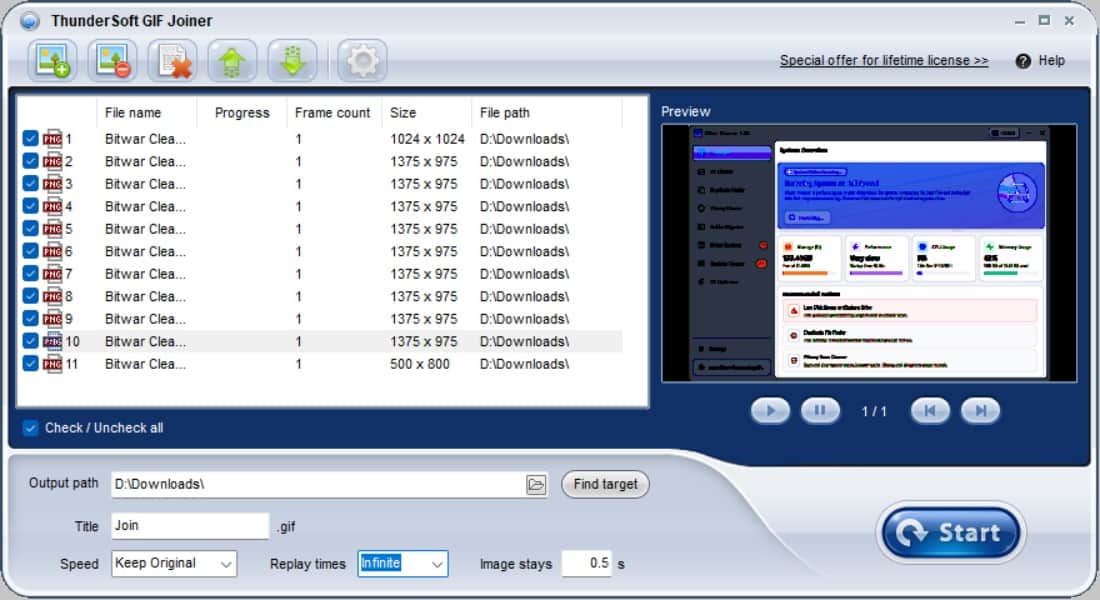
The program provides a frame-by-frame preview of each GIF. You can check every frame of an animation before you add it to your project. When you export, the software uses every frame from the original image to build the new file. It does not drop or resample frames, so the result stays faithful to the source.
Beyond simple joining, the tool offers practical controls. You can set how long a static image stays on screen, change the playback speed of a GIF, and choose how many times the final animation replays. It also keeps the original transparent effect of GIF files, which matters when you place animations over colored web backgrounds.
The software runs on a wide range of Windows versions, including Windows 11, 10, 8.1, 8, 7, Vista, and XP. That makes it a flexible choice for modern laptops and older office machines alike.
Key Benefits
ThunderSoft GIF Joiner gives you practical advantages at every step of GIF creation. The points below show how it saves time and protects the quality of your work.
- Faster content production: Merge several animations in one pass instead of editing each file separately, which shortens your workflow.
- Original image quality: Because every original frame is reused, your joined GIF looks as sharp as the source files.
- Flexible storytelling: Mix animated GIFs with JPG, PNG, and BMP images to build a complete visual message with an intro, a body, and a closing slide.
- Transparent backgrounds preserved: Keep the see-through areas of your GIFs so they blend cleanly into websites, presentations, and chat apps.
- Better timing control: Set how long still images appear and adjust GIF speed to match the rhythm of your content.
- Looping on your terms: Choose how many times the animation plays, from a single run to continuous repetition.
- Low learning curve: The simple interface lets new users finish a project in minutes without reading a long manual.
- Broad Windows compatibility: Use it on older and newer systems without upgrading your hardware.
Why Choose ThunderSoft GIF Joiner?
Many GIF tools bundle dozens of unrelated functions, which makes them heavy and slow. This product concentrates on one job and does it well. You get fast processing, faithful output, and straightforward controls in a single package.
The frame-by-frame preview also reduces trial and error. You see exactly what each animation contains before you merge it, so you avoid exporting a file only to find a flawed frame. For anyone who produces content on a schedule, this saves real time every week.
Who Can Benefit From It?
The program fits a wide audience, from professionals to hobbyists. The list below shows common users and how each one applies the tool.
- Digital marketers and agencies: Combine promotional animations into one ad or email banner.
- E-commerce sellers: Join product angles, price slides, and offer badges into a single listing animation.
- Bloggers and social media managers: Build looping posts and reaction clips for audiences on many platforms.
- Teachers and trainers: Create step-by-step visual guides that play as one animation.
- Designers and illustrators: Assemble animated portfolio pieces and sticker sequences.
- Gamers and streamers: Merge highlight GIFs and emotes into a longer animated clip.
- Everyday users: Combine family clips and photos into a shareable animated memory.
Features
Below is a comprehensive list of the key features that make ThunderSoft GIF Joiner a dependable addition to your creative toolkit:
- Multi-Format Joining: Combine animated and still files into one output animation.
- GIF Support: Add animated GIF files and merge them in the order you prefer.
- JPG Support: Insert JPEG photos as still slides between or around animations.
- PNG Support: Add PNG images, including graphics with clean edges and logos.
- BMP Support: Include bitmap images when your source material uses this format.
- Frame-by-Frame Preview: Inspect every frame of a GIF before you use it in a project.
- Single-Frame Viewing: Step through each frame to check details and spot flaws.
- Source Verification: Confirm that a file contains the animation you expect before merging.
- Fast Speed and No Quality Loss: Export joined GIFs quickly while keeping the original image quality.
- Original Frame Reuse: Build the output from every frame of the source GIF without recompression of that content.
- Quick Processing: Finish merging jobs in a short time, even with several files.
- Original Transparency Retention: Keep the transparent areas of your GIF files in the output.
- Clean Background Blending: Place the finished animation on any colored page without a visible box.
- Logo and Sticker Support: Preserve see-through edges on stickers, icons, and brand marks.
- Image Stay Time Setting: Decide how long each static image remains visible.
- Per-Image Duration: Give a title slide more time and a transition image less time.
- Readable Pacing: Allow viewers enough seconds to read text on a still slide.
- GIF Speed Adjustment: Change the playback speed of an animated GIF.
- Faster Playback: Speed up slow animations to create a lively, energetic feel.
- Slower Playback: Slow down quick animations so details are easy to follow.
- Replay Times Configuration: Control how many times the joined animation repeats.
- Fixed Repeat Count: Set a specific number of plays for formal presentations.
- Continuous Looping: Let the animation run endlessly for banners and social posts.
- Wide Windows Compatibility: Run the program on many Windows versions.
- Modern System Support: Use it on Windows 11, 10, 8.1, and 8.
- Legacy System Support: Keep working on Windows 7, Vista, and XP machines.
Requirements
The software is built to run on many computers, including older ones. The list below shows the supported operating systems.
- Operating System: Windows 11, Windows 10, Windows 8.1, Windows 8, Windows 7, Windows Vista, and Windows XP
- Supported Input Formats: GIF, JPG, PNG, and BMP
- Output Format: Animated GIF
Free to Try
Want to see how ThunderSoft GIF Joiner handles your own files? Test it with your real GIFs and images before you decide. Download the free trial edition by clicking the button below, and check the frame preview, speed control, and joining results on your own computer.
or
Buy now, the price start from:
Thank you for reading ThunderSoft GIF Joiner review, and enjoy the discount coupon. If you notice any issues with ThunderSoft GIF Joiner discount coupon, deal, or giveaway—such as an expired offer, broken link, or sold‑out promotion—please let us know while the deal is still available.