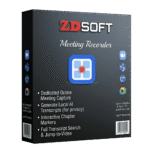
Giveaway – ZD Meeting Recorder: Free 1-year License Key | Screen Recorder with Local AI Transcription & Transcript Search – for Windows

Record Every Meeting, Find Any Moment Instantly — ZD Meeting Recorder Turns Long Sessions into Searchable Knowledge with Local AI Transcription. Get the Full version with a 1-year License Key For Free Now and Never Miss a Critical Detail Again.
Free Full Version
BUY NOW
ZD Meeting Recorder is normally priced at $39.00 for a one‑year license. For a limited time, you can get the full version free, including a 1‑year license key, through the Giveaway tab below. Don’t miss this limited‑time offer.
Indy GIVEAWAY

Fast Screen Recorder BEST OFFER
iTop Voicy Pro GIVEAWAY

PDNob PDF Editor BEST OFFER

SignageFlow BEST OFFER

iTop Screen Recorder 7 PRO: Lifetime License BEST OFFER

VSDC Video Editor Pro: 2-PC 1-Year License BEST SELLER
ClearCRM BEST OFFER

SurFlex Screen Recorder - Lifetime License BEST OFFER
EaseUS Video Editor PRO BEST OFFER
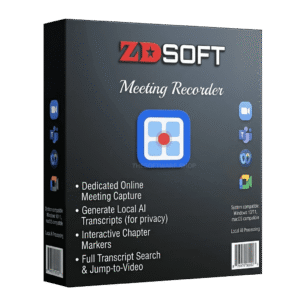
ZD Meeting Recorder Giveaway
Available now: Free 1-year License Key for a Limited Time!
To access the giveaway, kindly provide your email address. Please refrain from closing this page after signing in to receive instructions on how to access the offer at no cost.

NOTES:
– All prices shown here are in listed USD (United States Dollar).
– Such promotional programs are subject to change without notice, from time to time in our sole discretion.
– Data may vary based on different systems or computers.
ZD Meeting Recorder Review at a Glance
Every day, professionals, students, and trainers sit through hours of online meetings, lectures, and training sessions — only to lose critical details the moment the call ends. Scrolling through a two-hour recording to find one key decision, one instruction, or one answer wastes time and kills productivity. Traditional screen recorders capture the video but offer no smart way to retrieve what was actually said. ZD Meeting Recorder was built specifically to solve this problem, combining reliable session capture with local AI transcription, transcript search, and precise text-to-video navigation so that every recorded session becomes a practical, reusable knowledge asset.
What Is ZD Meeting Recorder?
ZD Meeting Recorder is a dedicated screen recorder designed specifically for online meetings, webinars, lectures, classes, and training sessions. Unlike general-purpose screen recorders that simply capture what is on screen, ZD Meeting Recorder goes further by adding an AI-powered transcription layer that runs entirely on your local machine — no cloud upload required, no third-party processing involved. The result is a complete workflow that covers capture, transcription, search, and editing in a single focused product.
The software allows users to record full sessions from any online meeting platform, including video calls, webinars, live lessons, and customer calls, using flexible source combinations such as full screen, application window, webcam, microphone, and system audio. Once recorded, the local AI engine generates a searchable transcript of the spoken content. Users can then search any word or phrase within the transcript and jump directly to the exact moment in the video where it was spoken — eliminating the need to manually scrub through long recordings.
ZD Meeting Recorder is best suited for online meetings, lectures, remote classes, team training sessions, customer calls, and any recorded knowledge base that needs fast, efficient review later. Whether you are a student revisiting a lecture, a trainer building a reusable course archive, a remote team capturing project decisions, or a support professional documenting customer interactions, this product provides a structured, privacy-aware solution for turning recordings into accessible reference material.
Key Benefits
Long recordings only deliver real value when their content can be retrieved quickly and used again. ZD Meeting Recorder is built around that principle, offering a set of core benefits that make it a practical productivity tool for work, study, and training environments — not just a recording utility.
- Reliable and complete session capture ensures you never miss critical discussions, instructions, or decisions during live meetings and classes, giving you a full replay-ready archive every time.
- Local AI transcription with privacy by design generates accurate transcripts entirely on your own machine, keeping sensitive meeting content under your control without relying on mandatory cloud processing or external servers.
- Transcript search and text-to-video navigation let you locate any spoken word or phrase instantly and jump directly to the exact point in the recording, making long sessions far more practical for revision and knowledge retrieval.
- Flexible recording source selection allows you to choose the right combination of full screen, application window, webcam, microphone, and system audio for each specific session type.
- Scheduled recording automation reduces manual operation for recurring standups, training sessions, and live lessons, keeping your archive complete even when you cannot attend in real time.
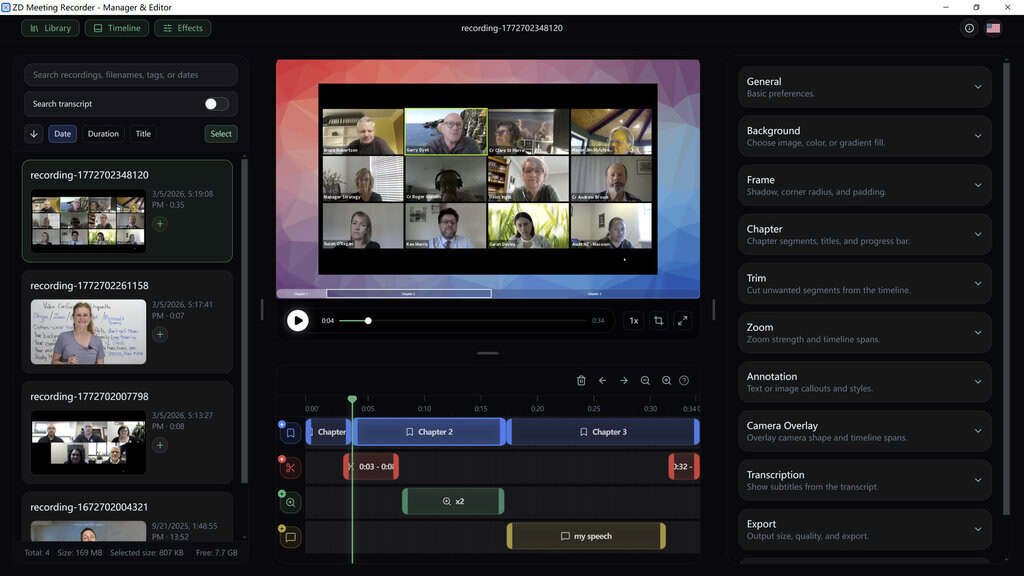
- Built-in editing tools — including trim, merge, zoom, chapters, subtitles, annotations, and camera overlays — let you repurpose raw recordings into polished training materials, onboarding clips, or internal documentation without needing a separate video editor.
- Standardized output across teams and devices ensures consistent recording quality, format, and storage behavior across departments, making it easy to build a dependable long-term archive pipeline.
- Strong fit for multiple use cases means students, educators, remote teams, trainers, support staff, and knowledge workers all benefit from a single focused tool rather than patching together multiple separate applications.
Features
Below is a thorough breakdown of every core capability built into ZD Meeting Recorder, along with the specific sub-features that give each area its practical value:
- Meeting-Optimized Screen Recording — Capture full online sessions with source flexibility designed specifically for meeting and class workflows.
- Full Screen Capture — Record the entire display to capture all on-screen content during live sessions.
- Application Window Capture — Focus recording on a specific meeting or class application without capturing unrelated screen areas.
- Webcam Overlay Recording — Include your camera feed as an overlay to add presenter context to the recording.
- Microphone and System Audio Capture — Record both your voice input and meeting platform audio simultaneously for a complete audio track.
- Flexible Source Combinations — Mix and match screen, webcam, microphone, and system audio to match the specific needs of each session type.
- Local AI Transcription Engine — Generate accurate text transcripts of recorded sessions entirely on your own device without sending data to external servers.
- On-Device Processing — All transcription computation runs locally, keeping sensitive meeting content within your own system.
- Privacy-by-Design Architecture — No mandatory cloud upload or third-party data handling is required at any stage of the transcription process.
- Automatic Transcript Generation — The AI produces a full text transcript of spoken content from the recorded audio track after each session.
- Transcript Search and Text-to-Video Navigation — Find specific spoken content within long recordings and jump directly to the corresponding video position.
- Keyword and Phrase Search — Enter any word or phrase to instantly locate every instance within the transcript.
- Exact Timeline Jump — Select any search result in the transcript to jump the video playback directly to that precise moment.
- Long Recording Retrieval — Makes multi-hour meeting recordings practical for revision, follow-up, and knowledge extraction without manual scrubbing.
- Scheduled and Automated Recording — Set recordings in advance so sessions are captured automatically without requiring manual intervention at start time.
- Recurring Schedule Support — Define repeating schedules for daily standups, weekly training sessions, or regular live lessons.
- Unattended Recording — Capture sessions even when you cannot be present at the start, keeping archives complete and consistent.
- Workflow Automation for Compliance and Knowledge Capture — Reduce manual steps in documentation, compliance recording, and support session archiving workflows.
- Built-In Video Editing Tools — Refine and repurpose raw recordings into clean, reusable assets without leaving the application.
- Trim — Remove unnecessary segments from the beginning, middle, or end of a recording to keep content focused.
- Merge — Combine multiple recording clips into a single continuous file for cohesive documentation or training assets.
- Zoom — Highlight specific areas of the screen within the recorded video to direct viewer attention during playback.
- Chapter Markers — Add navigation chapters to long recordings so viewers can jump directly to relevant sections.
- Subtitles — Embed subtitle text into the video for accessibility and clearer communication of spoken content.
- Annotations — Add on-screen text, shapes, or callouts to clarify key points within the recording.
- Camera Overlays — Position and resize webcam footage within the video frame to suit the intended output format.
- Consistent Team and Device Output — Maintain standardized recording quality and behavior across multiple users and machines.
- Output Format Standardization — Define consistent file format and quality settings to ensure uniform archives across your team.
- Cross-Device Predictability — Recording behavior remains consistent regardless of which team member or machine initiates the session.
- Long-Term Archive Pipeline — Build a reliable storage and retrieval system for accumulated meeting and training content over time.
Requirements
Your system must meet the following specifications to run ZD Meeting Recorder:
- Operating System: Microsoft Windows 8, 8.1, 10, or 11
- Processor: 2.0 GHz or faster CPU
- RAM: 2 GB or more
Downloads
Before committing to a purchase, putting the software through its paces in your actual workflow is the smartest move you can make.
Click the button below to get your free trial copy and see exactly how it fits your meeting and class recording needs.
Test ZD Meeting Recorder’s local AI transcription, transcript search, and recording tools hands-on with the free trial edition — no guesswork, no assumptions, just direct experience with the features that matter most to you.
Thanks for reading ZD Meeting Recorder Review & Enjoy the discount coupon. Please Report if ZD Meeting Recorder Discount Coupon/Deal/Giveaway has a problem such as expired, broken link, sold out, etc while the deal still exists.