
Giveaway – Cinch Tunarrange: Free License Key | Music Library Cleanup and Organization Software – for Windows

Clean Up Your Messy Music Library Before It Drives You Crazy — Get Cinch Tunarrange Pro with a License Key For Free Today!
Free Full Version!
BUY NOW
Cinch Tunarrange Pro, available for $35.95, unlocks full batch cleaning for your entire library, unlimited exports, and priority access to future updates.
For a limited time, you can get a Pro license for free through the Giveaway tab below. Act now before the offer ends.

Cinch Streaming Audio Recorder (Cinch Audio Recorder Pro) BEST OFFER
Abelssoft Recordify Plus BEST OFFER

Leawo Tunes Cleaner GIVEAWAY

Abelssoft Tagman: Perpetual License BEST OFFER

PlayerFab All-in-one BEST OFFER

Ashampoo Music Studio 12: Lifetime License BEST OFFER

Apowersoft Streaming Audio Recorder: Lifetime License BEST OFFER

VST Kenny G Bundle BEST OFFER

SOUND FORGE Audio Cleaning Lab 4: Perpetual License BEST SELLER

Roxio Creator NXT Pro 9 BEST SELLER
Cinch Tunarrange Pro Giveaway
Available now: Free License Key For a Limited Time!

To access the giveaway, kindly provide your email address. Please refrain from closing this page after signing in to receive instructions on how to access the offer at no cost.

NOTES:
– All prices shown here are in listed USD (United States Dollar).
– Such promotional programs are subject to change without notice, from time to time in our sole discretion.
– Data may vary based on different systems or computers.
Cinch Tunarrange Review at a Glance
If you’ve ever spent twenty minutes looking for a song you know you own, you understand the real cost of a messy music library. Missing tags, blurry or missing cover art, inconsistent filenames, and folders that don’t follow any logical structure turn a simple task—finding and playing a song—into a frustrating chore. Over time, as files get added from different sources (ripped CDs, downloads, transfers from old drives), the problem compounds. Duplicate tracks pile up, volume levels swing wildly between songs, and the entire collection starts to feel unmanageable.
Cinch Tunarrange was built specifically to solve this problem.
What Is Cinch Tunarrange
Cinch Tunarrange is a music library organization and metadata repair tool designed to clean up local audio collections without altering original files until you approve the changes. It is not a music player—it’s a dedicated cleanup and organization utility that works alongside whatever player or device you already use.
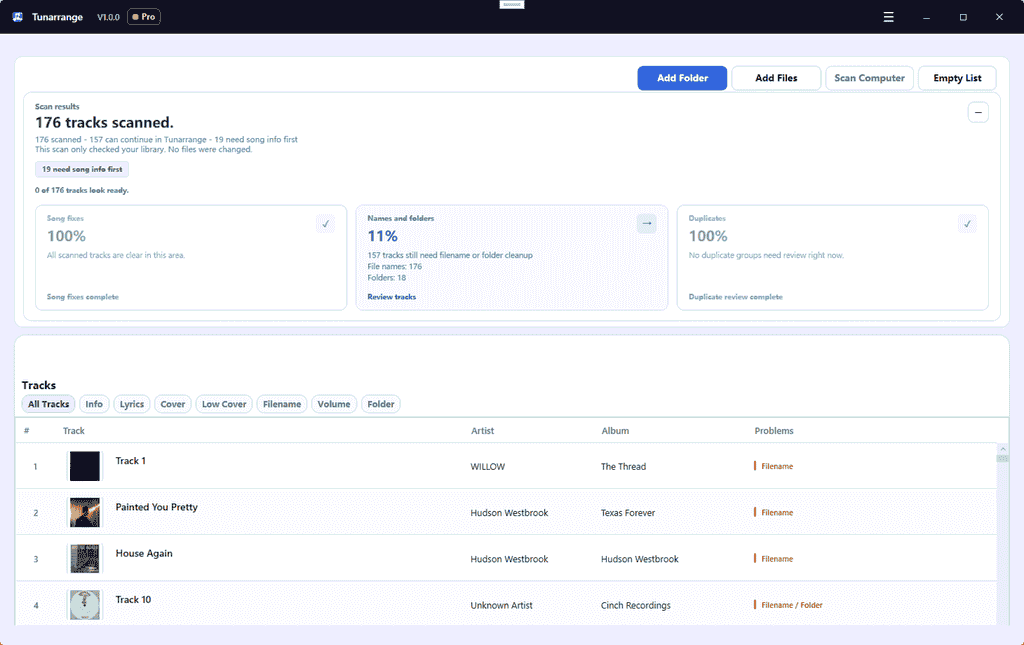
Tunarrange operates on a simple three-stage workflow: Find, Confirm, Export. First, it scans your chosen folder or entire library to detect messy metadata, missing artwork, absent lyrics, inconsistent filenames, duplicate tracks, and volume gaps. Second, it presents every proposed fix for review, so you can confirm, adjust, or skip changes before anything is written to disk. Third, once you’re satisfied, Tunarrange can export ordered WAV files, an album.cue file, and a README.txt—ideal for archiving or burner workflows—without modifying your original music files.
This structure makes Tunarrange suitable for both quick spot-fixes (cleaning up a single messy folder) and large-scale library overhauls (bringing an entire multi-thousand-track collection under one consistent naming and organization system).
It’s a local music library cleanup tool that scans your files, identifies exactly what’s broken, and gives you a clear, previewable plan to fix it—before anything is changed. Rather than blindly running a batch process and hoping for the best, Tunarrange shows you the “before and after” for every track, folder, and export file, so you stay in full control of your own collection.
The core purpose of Tunarrange is straightforward: turn a scattered, inconsistent music folder into a clean, searchable, well-organized library. It does this by tackling six common failure points—metadata, lyrics, cover art, filenames, folder structure, and volume consistency—all from a single workflow. Instead of jumping between five different apps to fix tags, rename files, hunt for artwork, and reorganize folders, you handle the entire process in one place.
Who benefits most from Tunarrange? Anyone with a local music collection built up over years—from ripped CDs, downloaded albums, or files copied across multiple computers and hard drives. This includes music collectors who care about metadata accuracy, home audio enthusiasts who burn CDs or maintain archival copies, DJs and playlist builders who need consistent, searchable libraries, and everyday listeners who are simply tired of a folder structure that no longer makes sense. If your music player shows blank album art, garbled artist names, or duplicate entries for the same song, Tunarrange is built for exactly that moment.
Why choose Tunarrange over manually fixing files or using a basic tag editor? Most tag editors handle metadata alone, leaving filenames, folder structure, duplicates, and volume levels untouched. Tunarrange addresses all of these issues together, and—critically—it never applies changes without a preview step first. You see the exact plan before a single tag is written, a file is renamed, or a folder is moved. That combination of comprehensive scope and preview-first safety is what sets it apart from tools that either do too little or change too much without asking.
The result is a library that doesn’t just look cleaner on the surface—it becomes genuinely easier to browse, search across devices, back up, and maintain going forward.
Key Benefits
Below are the main advantages Tunarrange brings to anyone managing a local music collection.
- Restores clarity to your library: Fixes missing titles, artists, albums, and other core details so songs are easy to identify at a glance.
- Improves visual consistency: Upgrades weak, missing, or undersized cover art so albums look complete and uniform across all your players.
- Eliminates naming chaos: Standardizes inconsistent or noisy filenames so files are easier to scan, sort, and search.
- Rebuilds logical folder structure: Moves misplaced files into proper artist/album folders based on your own organization rules.
- Protects original files: Every change is previewed first, and export features create compatible copies rather than overwriting your source material.
- Smooths playback experience: Identifies tracks missing loudness data so volume feels consistent from song to song.
- Scales from one folder to a full collection: Start small to build confidence, then apply the same cleanup rules across your entire library.
- Prepares files for physical media: Generates CD-ready WAV and CUE exports for burner and archive workflows without touching originals.
Below is a comprehensive list of the key features that make the software a valuable addition to your music management workflow:
Features
- Fast Scan: Quickly analyzes a folder or your entire library to surface exactly which songs have broken details, bad organization, or issues worth fixing first.
- Folder or full-library input: Add a specific folder, select individual files, or scan your whole computer for music.
- Issue filtering: Sort detected problems by Info, Lyrics, Cover, Filename, Volume, and Folder categories.
- Incomplete-library visibility: See at a glance what’s still making the collection feel unfinished or hard to trust.
- Preview First: Shows every proposed change before anything is written, renamed, or moved, so cleanup never feels like a gamble.
- Full preview coverage: Review tags, lyrics, artwork, filenames, and folder changes before confirming.
- Plan verification: Check the exact cleanup plan in detail before committing to any batch operation.
- Non-destructive duplicate review: Inspect duplicate files separately without them being automatically deleted.
- Manual and batch edit modes: Choose tighter, file-by-file control or apply changes across many tracks at once.
- Batch Clean: Applies one consistent, repeatable cleanup system across scattered albums and mismatched files.
- Consistent naming and folder rules: Reuse the same organization logic across future cleanup sessions.
- CD-ready export presets: Create ordered WAV files plus CUE output for archive and audio CD burner workflows.
- Overwrite protection: Cleanup output never replaces your existing original files.
- Undo support: Reverse the most recent repair or organization run if something doesn’t look right.
- Info Repair: Flags songs with incomplete title, artist, album, and other core metadata before the gaps spread confusion across the library.
- Lyrics Detection: Identifies tracks without embedded lyrics and lets you review fixes visually rather than guessing which files still need attention.
- Cover Art Repair: Catches missing, blurry, or undersized artwork and replaces it with better matches for a cleaner, more consistent look in your players.
- Filename Standardization: Previews inconsistent, noisy, or hard-to-scan filenames so you can normalize them before applying any changes.
- Folder Correction: Detects when files sit in the wrong folder relative to your artist, album, or custom organization rules.
- Volume Normalization Check: Identifies tracks missing loudness data so playback transitions feel smoother after cleanup.
- Export Compatible Copies: Generates ordered WAV files, an album.cue file, and a README.txt for Audio CD and CD-ready workflows, all without modifying your original music files.
Frequently Asked Questions
A few common questions come up before people try Tunarrange on their own library.
- What does Tunarrange actually fix? It repairs song details, artwork, filenames, folders, duplicates, and volume issues to turn a messy local library into one that’s easier to search, browse, and manage.
- Will Tunarrange change my files immediately? No. Every cleanup result is reviewed first, so nothing changes behind your back.
- Can I try it on one folder first? Yes. Start small, see how much cleaner that folder becomes, then apply the same workflow to the rest of your collection.
- Can Tunarrange prepare files for an audio CD? Yes. The Export Compatible Copies feature includes Audio CD and CD-ready WAV plus CUE presets, generating ordered WAV files, an album.cue file, and a README.txt without altering originals.
- Is Tunarrange a music player? No. It’s built specifically to clean, fix, and organize local music files rather than play them.
Requirements
- Windows or Mac computer with sufficient local storage for your music library and export files
- Local audio files in common formats (library scanning applies to files stored on your device)
- Available disk space for exported WAV, CUE, and README output when using Export Compatible Copies
Downloads
See how Cinch Tunarrange handles your own messy folder before committing to anything. Download the free trial edition below, point it at one problem folder, and preview exactly what a full cleanup would look like—no cost, no obligation.
or
Buy now, the price start from:
Thank you for reading Cinch Tunarrange review, and enjoy the discount coupon. If you notice any issues with Cinch Tunarrange discount coupon, deal, or giveaway—such as an expired offer, broken link, or sold‑out promotion—please let us know while the deal is still available.