
Giveaway – Minibin Lite: Free Full Version | Recycle-Bin System Tray – for Windows

Tired of Cluttered Taskbars and Bloated Utilities? Manage Your Windows Recycle Bin Instantly from the System Tray — Get Minibin Lite for Free Today and Experience True Native Performance!
Free Full Version!
BUY NOW
Minibin Lite 1.0 is available for $5.00. Today, you can get Minibin Lite 1.0 for free with this special promotion. This lightweight utility lets you manage the Windows Recycle Bin directly from the system tray. Download it now from the Giveaway tab below. This free offer is available for a limited time only, so don’t miss it.

Winstep Nexus Ultimate BEST OFFER
Ashampoo WinOptimizer Pro 29 BEST SELLER
O&O SafeErase 21 Professional: Perpetual License BEST OFFER

MiniTool Power Data Recovery BEST SELLER

Abelssoft Undeleter for Windows BEST OFFER
ASCOMP Cleaning Suite Professional BEST SELLER
iTop Data Recovery Pro BEST OFFER
EaseUS BitWiper Pro BEST OFFER

IObit Advanced SystemCare Ultimate 18 with Gift Bundle BEST SELLER

WashAndGo BEST SELLER
Glarysoft File Recovery Pro BEST OFFER
Minibin Lite Giveaway
Available now: Free Full Version for a Limited Time!
To access the giveaway, kindly provide your email address. Please refrain from closing this page after signing in to receive instructions on how to access the offer at no cost.
NOTES:
– All prices shown here are in listed USD (United States Dollar).
– Such promotional programs are subject to change without notice, from time to time in our sole discretion.
– Data may vary based on different systems or computers.
Minibin Lite Review at a Glance
Every Windows user has faced it — the Recycle Bin sits on your desktop, taking up space, and there is no clean, native way to manage it directly from the taskbar without opening extra windows or installing resource-heavy applications. Most third-party solutions designed to address this come with a significant cost: bloated memory consumption, dependency on external runtimes like Python or Electron, and background processes that slow down your system over time. For power users, developers, and everyday Windows users who value speed, cleanliness, and efficiency, these trade-offs are simply unacceptable. There has long been a gap in the market for a truly lightweight, native, and portable solution that handles this simple but frequently needed task without any of the overhead.
That gap is exactly what Minibin Lite was built to fill.

What is Minibin Lite?
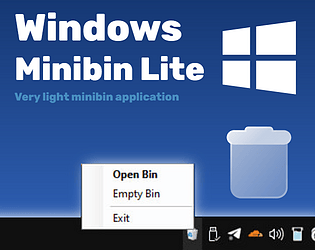
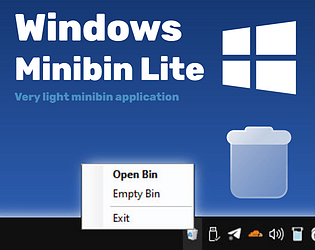
Minibin Lite is a lightweight system tray utility built specifically to manage the Windows Recycle Bin directly from the notification area (system tray) of your taskbar. It operates entirely in the background, without creating extra windows, without cluttering your taskbar with additional processes, and without requiring any third-party software installations. The program sits quietly in your system tray and gives you instant, one-click access to everything you need — from viewing the current state of your Recycle Bin to emptying it in seconds.
What makes Minibin Lite fundamentally different from other utilities is its hybrid architecture. The program is built using a C# wrapper that compiles into a clean, small executable file, combined with PowerShell Core running entirely under the hood to interact directly with native Windows system APIs through Shell.Application. All PowerShell functionality is baked directly into the binary EXE file, making the program both portable and secure — no external scripts, no loose files, and no installation required. You simply drop the EXE anywhere on your system, run it, and it works immediately.
This tool is designed for maximum performance and native integration. Because it relies on .NET and PowerShell components that are already loaded and present in any modern version of Windows — including Windows 7, Windows 10, and Windows 11 — Minibin Lite introduces virtually zero additional resource overhead to your system. The compiled EXE file is less than 10 KB in size, making it one of the most compact system utilities available for this purpose.
Key Benefits
Minibin Lite offers a practical, no-nonsense approach to Recycle Bin management that stands apart from everything else available. Here is why users who prioritize performance and simplicity consistently choose this tool:
- Minimal System Resource Usage is one of the most significant advantages Minibin Lite brings to the table. While Python-based utilities packaged with PyInstaller routinely consume 30 to 100 MB of RAM and ship with EXE files reaching 15 to 20 MB due to bundled libraries, Minibin Lite operates on a fundamentally different level. By leveraging .NET and PowerShell components that Windows has already loaded into memory, it adds almost nothing to your system’s resource footprint. For users running older hardware or simply those who prefer a lean, fast machine, this difference is immediately noticeable.
- True Portability Without Dependencies sets Minibin Lite apart from virtually every competing solution. Programs built on Python, Node.js, or Electron frameworks require users to either install a runtime environment or carry around a bloated EXE that bundles an entire interpreter. Minibin Lite has zero external dependencies. Everything the program needs is already present in any modern Windows installation. You can copy the EXE to a USB drive, move it to any Windows computer, and run it instantly — no setup, no installation wizard, no compatibility issues.
- Invisible, Distraction-Free Operation means that Minibin Lite never gets in your way. It runs entirely in the background, does not appear on your taskbar as an open window, and does not spawn extra visible processes. The only sign of its presence is the small, dynamic tray icon in your notification area — which itself updates in real time to reflect the current state of your Recycle Bin, showing you at a glance whether it is empty or contains files waiting to be deleted.
- Native Windows Integration ensures that Minibin Lite behaves exactly as a built-in Windows component would. Because it uses
Shell.Applicationthrough PowerShell to interact with system APIs, the Recycle Bin operations are executed natively, exactly as Windows itself would perform them. There is no custom file management logic, no risk of compatibility breaks after Windows updates, and no unusual system behavior. It simply works the way Windows works.
Who Benefits from Minibin Lite?
This tool is ideal for system administrators who manage multiple machines and need reliable, portable utilities. It is equally valuable for developers and power users who are conscious of RAM and CPU consumption. Office workers and everyday users who want a cleaner desktop without the Recycle Bin icon will find it indispensable. Anyone running Windows on older or resource-constrained hardware will especially appreciate how little Minibin Lite asks of the system while delivering complete, polished functionality.
Key Features
Below is a detailed breakdown of every core capability that makes Minibin Lite a uniquely powerful and efficient tool for Windows Recycle Bin management:
- Dynamic Icon Updates — The tray icon reflects the real-time state of the Recycle Bin automatically.
- Real-Time State Detection — Instantly detects and displays whether the Recycle Bin is empty or contains files.
- Visual Feedback Without Opening Windows — Provides at-a-glance status from the notification area with no extra clicks.
- One-Click Access — Left-clicking the tray icon opens the Recycle Bin immediately for quick browsing or file recovery.
- Context Menu for Quick Emptying — Right-clicking the tray icon reveals a context menu with a direct option to empty the Recycle Bin instantly.
- Minimal Interaction Required — Common Recycle Bin tasks are reduced to a single click, saving time and reducing workflow interruption.
- Background Operation — Runs completely invisibly without appearing on the taskbar or creating extra visible windows.
- No Taskbar Footprint — Does not appear as an active window in the taskbar, keeping your workspace clean.
- Silent Process Execution — Operates without any pop-ups, notifications, or visual disturbances during normal use.
- Embedded PowerShell Logic — All PowerShell functionality is compiled directly into the binary EXE file, removing any need for external scripts.
- Portable Single-File Executable — The entire program exists in one EXE file under 10 KB, ready to run from any location.
- Secure Execution Model — No loose script files means reduced exposure to external script tampering or modification.
- Hybrid C# and PowerShell Architecture — A compiled C# shell ensures hidden execution and correct display of metadata including icon, version, and description.
- Correct Icon and Version Metadata — The EXE displays proper program metadata as expected by Windows Explorer and system tools.
- Hidden Execution Mode — The C# wrapper ensures PowerShell runs without spawning visible console windows.
- Zero Dependencies — Requires no third-party runtime installations; all necessary components are native to Windows.
- Works on Windows 7, 10, and 11 — Compatible with all modern Windows versions out of the box without additional configuration.
- No Python, Node.js, or Electron Required — Unlike competing tools, there is no need to install or maintain any external runtime environment.
- Ultra-Compact File Size — The compiled EXE is less than 10 KB, orders of magnitude smaller than Python or Electron alternatives.
- Faster Load Times — Extremely small binary size means the program initializes almost instantly on any hardware.
- Ideal for USB and Portable Deployments — Easily carried on a flash drive and deployed to any Windows machine within seconds.
- Native Windows API Integration — Uses
Shell.Applicationthrough PowerShell to interact with the Windows shell at the system level.- System-Level Recycle Bin Control — Operations are executed through official Windows APIs, ensuring reliability and compatibility.
- No Custom File Management Logic — Relies entirely on Windows’ own internal mechanisms, reducing the risk of unexpected behavior.
System Requirements
Here are the minimum requirements needed to run Minibin Lite without any issues:
- Operating System: Windows 7, Windows 10, or Windows 11 (32-bit or 64-bit)
- Runtime: .NET Framework (pre-installed on all supported Windows versions) and Windows PowerShell (built into Windows)
- Disk Space: Less than 10 KB for the EXE file
- RAM: Minimal — uses only system components already loaded by Windows
- Additional Software: None — zero third-party dependencies required
- Internet Connection: Not required for operation
Free to Try
Take Minibin Lite for a spin before committing to anything. The best way to see just how fast, light, and seamlessly it fits into your daily workflow is to run it yourself on your own machine. Since the program is fully portable, you can place the EXE anywhere — your desktop, a folder, or a USB drive — and experience firsthand how effortlessly it integrates with your Windows system tray. Click the button below to download the free version of Minibin Lite and put it to the test with absolutely no risk, no installation, and no strings attached.
Thanks for reading Minibin Lite Review & Enjoy the discount coupon. Please Report if Minibin Lite Discount Coupon/Deal/Giveaway has a problem such as expired, broken link, sold out, etc while the deal still exists.



bundleware…loads game links as you try to install it. My Virus protection flaged it as malware
and quartined it,So i uninstall the exe. and what was able to install on my PC.
Use at own risk!!