
90% Off – Command-Tab Plus: Lifetime License | Keyboard-Centric Application & Window Switcher – for Mac

Switch Smarter. Work Faster. Take Control of Your Mac Workflow — Get Command-Tab Plus Lifetime at a 90% Discount Today!
✔ Lifetime License. ✔ Free Product Updates ✔ Customer Support
BUY NOW
Command-Tab Plus is available at a $29.99. Right now, you can secure your license at a discounted rate of up to 90% OFF – a significant saving from its regular price, but this deal is available for a limited time only and may expire without notice. Do not miss your chance to upgrade your Mac workflow at the best possible price.
When you purchase Command-Tab Plus, you receive:
- Apple Silicon optimized performance so your investment remains relevant as Mac hardware continues to advance
- Full lifetime license for your Mac, unlocking all premium features with no recurring fees
- All key features unlocked, including window switching, isolated Spaces, custom skins, hotkey configuration, and multi-monitor support
- Free future updates to ensure ongoing compatibility with new macOS versions, including future releases beyond Tahoe
- Dedicated developer support from Sergii Gerasimenko, the developer behind Command-Tab Plus

Keyboard-Centric Application & Window Switcher for Mac
- Please Notes:
- You may be directed to the bundle page, but it is possible to purchase the software individually.
- If you're having difficulty locating the product on the bundle page, please utilize the browser's search feature.
- Get an additional $3 discount on all orders more that $30.
- LEGITIMATE: All apps are authentic and have original licenses obtained directly from the creators via contracts.
- INSTANT ACCESS: Fully activated macOS Apps & Windows Software with instant downloads & license key access.
- Device Activation: 3 Devices
- Major & Minor Updates Included
- Lifetime License
Platforms: Mac

Substage Mac App BEST OFFER

Commander One Pro BEST OFFER

Application Wizard BEST OFFER

CleanBoard BEST OFFER

MacMobility BEST OFFER
Command-Tab Plus Giveaway
Unavailable at this moment!

To access the giveaway, kindly provide your email address. Please refrain from closing this page after signing in to receive instructions on how to access the offer at no cost.
NOTES:
– All prices shown here are in listed USD (United States Dollar).
– Such promotional programs are subject to change without notice, from time to time in our sole discretion.
– Data may vary based on different systems or computers.
Command-Tab Plus Review at a Glance
Managing dozens of open apps on your Mac shouldn’t feel like a chore. Every Mac user who juggles multiple applications knows the frustration: you press Command + Tab repeatedly, cycling through a long list of icons just to get to the one app you need. The process is slow, repetitive, and breaks your concentration. Command-Tab Plus was built to solve exactly this problem — replacing the default macOS Application Switcher with a smarter, faster, and fully customizable solution that puts you in complete control of your workflow.

What Is Command-Tab Plus?
Command-Tab Plus is a keyboard-centric application and window switcher for macOS, designed to replace the native macOS App Switcher with a more powerful and efficient alternative. Rather than cycling through every open app one key press at a time, Command-Tab Plus assigns numeric shortcuts to each open application, letting you jump directly to any app instantly. It is built natively for both Intel and Apple Silicon chips, requires macOS 11 (Big Sur) or later, and is fully compatible with the latest version of macOS Tahoe.
Command-Tab Plus is ideal for power users, developers, designers, writers, and anyone who works with multiple applications simultaneously and demands speed and precision in their workflow. Whether you manage creative tools, code editors, communication apps, or productivity suites, this switcher redefines how you navigate your Mac.
Key Benefits
Command-Tab Plus delivers real, measurable improvements to your daily Mac experience. Here is why thousands of Mac users have made the switch:
- Save time instantly by jumping to any open app using a single numeric keypress — no more cycling through irrelevant icons.
- Stay organized with isolated workspace views that show only the apps relevant to your current Space or display.
- Reduce visual clutter by automatically hiding inactive and background apps from the switcher.
- Switch between windows, not just apps, giving you precise control over what appears on your screen.
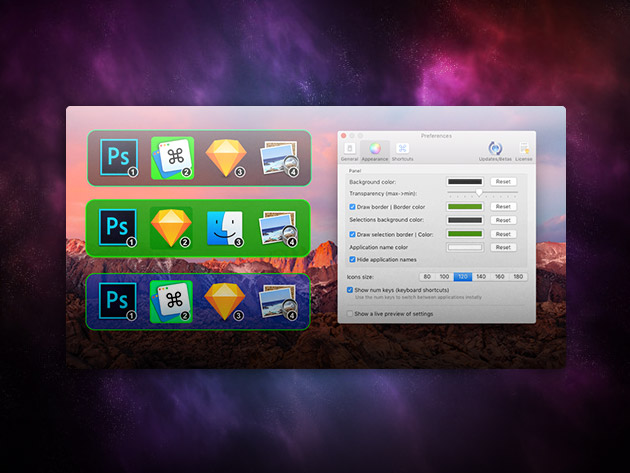
- Personalize your experience with over 30 built-in skins and a fully customizable appearance editor.
- Work your way with fully configurable hotkeys that match your personal keyboard habits.
- Future-proof performance with native Apple Silicon support ensuring blazing-fast speed on modern Macs.
Key Features
Below is a comprehensive breakdown of the standout capabilities that make Command-Tab Plus a must-have productivity tool for every serious Mac user:
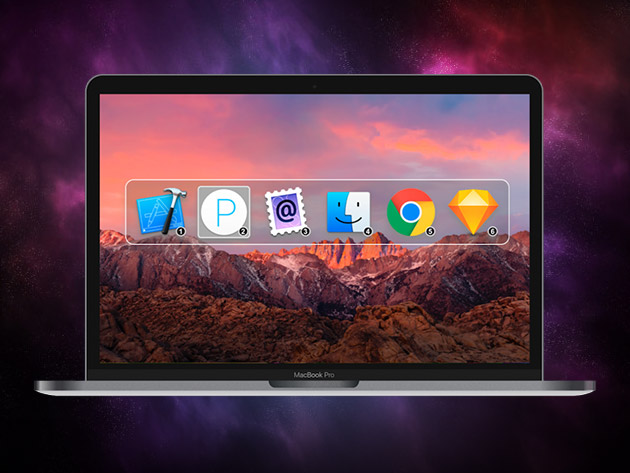
- Quick Digital App Switching — Press a number key (1–9) while the switcher is open to jump instantly to the corresponding app, eliminating repetitive tab presses.
- Numeric labels displayed under each app icon for at-a-glance identification
- Instant single-keystroke activation for any listed app
- Convenient Window Switcher — Beyond app switching, press Z or ~ within the switcher to access and switch between individual windows of the selected application.[^1_11]
- Scroll over an app icon to preview all open windows for that app
- Select specific windows directly from the switcher overlay
- Isolated Workspaces (Spaces Support) — By default, Command-Tab Plus displays only the apps running on the current Space or display, keeping your workspaces clean and separate.
- Prevents apps from other Spaces cluttering your current view
- Can be toggled off in settings if you prefer a global app view
- Hide Inactive Applications — The switcher automatically hides icons of apps that are hidden or inactive, so only the apps you are actively working with appear.
- Keeps the switcher list short and relevant
- Reduces decision fatigue when you have many background processes running
- Customizable Appearance — Choose from over 30 built-in skins or design your own custom look.
- Adjust icon size, transparency, and color themes
- Create a personalized visual style that fits your desktop aesthetic
- Customizable Hotkeys \& Filters — Assign any keyboard shortcut to trigger the switcher, including ⌘ + Tab, ⌥ + Tab, or any combination you prefer.
- Filter which applications appear in the switcher
- Set per-app behavior and filtering rules for a tailored experience
- Multiple Monitor Support — Fully compatible with multi-display setups, making it easy to manage and switch between apps across different screens.
- Recognizes active display context for smart app isolation
- Works seamlessly across extended and mirrored display configurations
- Native Apple Silicon \& Intel Support — Built from the ground up for both Apple Silicon (M-series) and Intel-based Macs, ensuring maximum speed and compatibility.
- No performance overhead or Rosetta translation required on M-series Macs
- Optimized binary for all supported hardware
Requirements
To run Command-Tab Plus on your Mac, ensure your system meets the following requirements:
- Operating System: macOS 11 (Big Sur) or later
- Compatibility: Fully compatible with macOS Tahoe (latest)
- Processor: Apple Silicon (M1 and later) or Intel Core processor
- Architecture: Universal Binary — native support for both chip families
Downloads
Curious about how Command-Tab Plus will fit into your daily Mac workflow? You can get started right away with a free version of Command-Tab Plus before committing to a purchase. The free edition gives you hands-on access to the core switching experience so you can test the digital shortcuts, explore the window switcher, and see firsthand how it outperforms the built-in macOS switcher. Click the button below to download and try Command-Tab Plus for free — no credit card required, no time pressure.
or
Buy now, the price start from:
Thank you for reading the Command-Tab Plus review, and enjoy the discount coupon. If you notice any issues with Command-Tab Plus discount coupon, deal, or giveaway—such as an expired offer, broken link, or sold‑out promotion—please let us know while the deal is still available.