Giveaway – SoftOrbits File Shredder – Disk Wipe Software: Free License Key | Permanent Data Eraser – for Windows

Erase files, free space and whole drives beyond recovery with 16 overwrite methods and a PDF proof of erasure. Get a full version of SoftOrbits File Shredder – Disk Wipe Software with a license Key for FREE today, before you sell, hand over or repair another PC!
Full Version!
BUY NOW
The regular price of SoftOrbits File Shredder – Disk Wipe Software is [$10.00/month]. Right now you can get a full version of SoftOrbits File Shredder – Disk Wipe Software with a lciesne keyf or free through the Giveaway tab below, and the offer runs for a limited time only.
EaseUS BitWiper Pro BEST OFFER
ASCOMP Secure Eraser Professional Edition BEST SELLER
Easy File Shredder BEST OFFER
Coolmuster Data Erasure GIVEAWAY
Qiling File Shredder GIVEAWAY
ForceDelete Pro BEST OFFER
MobiKin Eraser for Android: Lifetime License BEST OFFER

Coolmuster iOS Eraser: Lifetime License BEST OFFER
Coolmuster Android Eraser BEST OFFER
DriveScrubber BEST OFFER

Magoshare AweEraser (Mac): Lifetime License BEST OFFER
File Shredder – Disk Wipe Software Giveaway
Available now: Free Lciense Key for a Limited Time!
To access the giveaway, kindly provide your email address. Please refrain from closing this page after signing in to receive instructions on how to access the offer at no cost.
NOTES:
– All prices shown here are in listed USD (United States Dollar).
– Such promotional programs are subject to change without notice, from time to time in our sole discretion.
– Data may vary based on different systems or computers.
SoftOrbits File Shredder Review at a Glance
Pressing Delete and emptying the Recycle Bin feels final, but it is not. Windows only removes the entry that points to the file, and the bytes stay on the disk until another file happens to land on the same spot. That can take months, and a free recovery app can read the data back in the meantime. A quick format works the same way on a larger scale. Tax scans, client contracts and family photos can sit in the so-called empty space when a PC is sold, passed to a new employee or sent for repair.
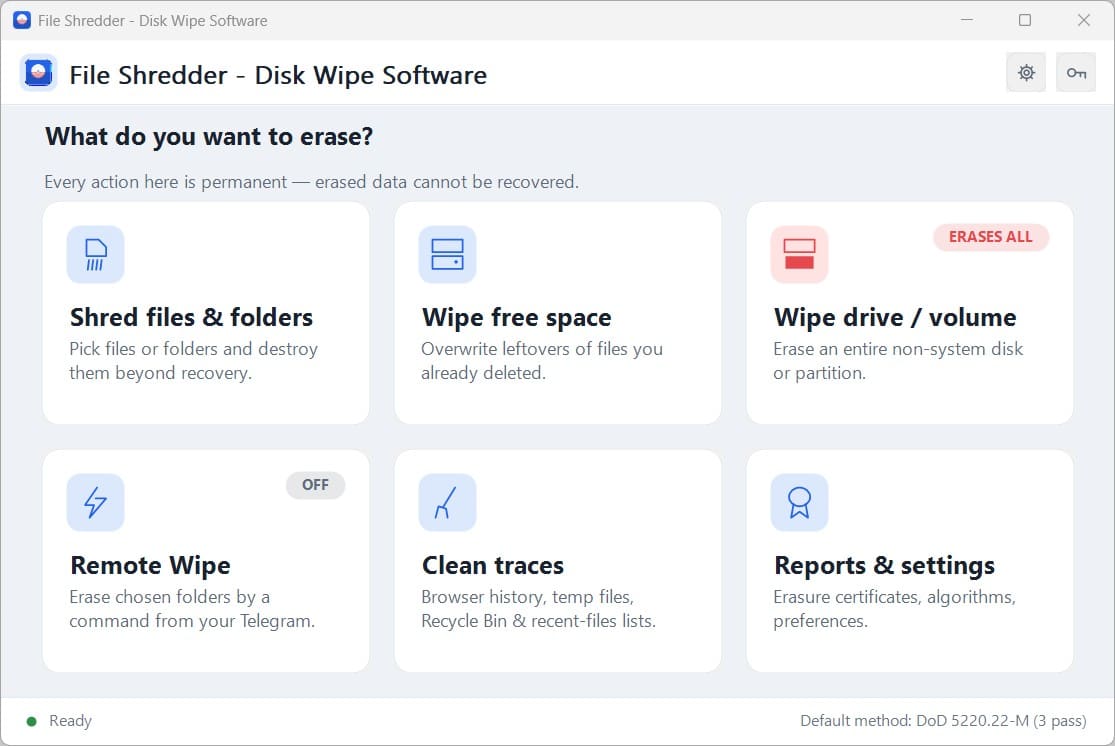
SoftOrbits File Shredder – Disk Wipe Software closes that gap. It writes zeros, random data or a named standard pattern over every byte a file used, and only then removes the entry. A later recovery scan on a hard drive sees the pattern instead of your document. You can shred single files and folders, wipe the free space of a drive, or erase an entire non-system volume sector by sector. Each run can end with a PDF Certificate of Data Erasure that you print or attach to a ticket.
What Is SoftOrbits File Shredder – Disk Wipe Software?
SoftOrbits File Shredder – Disk Wipe Software is a regular Windows desktop application for permanent data erasure. It runs on Windows 11 and 10, and the system requirements also list Windows 8.1, 8 and 7. You pick the targets, choose an overwrite method and press the button. You need no boot stick, no drill and no hex editor.
The program offers 16 erasure methods, from a single fast pass up to the 35 patterns of Gutmann. Zeroes and Random come with the free version, and the other 14 methods come with the full license. These include DoD 5220.22-M, the 7-pass DoD 5220.28-STD, German VSITR, British HMG IS5, NIST 800-88 Clear, Bruce Schneier, Pfitzner and a Custom method where you set the pattern and the number of passes.
The software also recognizes the type of drive before it writes anything. It checks whether the target is a rotating disk, an SSD or removable flash. On a hard drive, it confirms that overwriting destroys the old data. On SSD and flash, it tells you that overwriting is not reliable and points you to the device’s built-in Secure Erase or NVMe Sanitize.
Safety checks are built in. Windows, Program Files and ProgramData are refused, so a misplaced click cannot break the system. The system drive appears in the drive list but cannot be selected, because Windows cannot erase the drive it runs from. Before anything is touched, a confirmation dialog states the exact item count. There is no undo after that.
Why Choose SoftOrbits File Shredder?
Many erasure tools are either too basic to prove anything or priced for large enterprise jobs. This program sits between the two. It gives home users a simple way to remove private files for good. It gives small IT teams the paper trail they need, along with named standards that policies and clients ask for.
The tool also avoids false promises. It does not tell you that overwriting works on every drive. It checks the drive type and says plainly when a different method is the right one. The optional verify step reads every byte back and counts any mismatch as not erased, so you can trust the result instead of assuming it.
Who Can Benefit from This Software?
- Home users who plan to sell, donate or recycle a laptop and want old photo albums and documents gone.
- Freelancers and agencies that hold client contracts, invoices and creative files on their own machines.
- IT administrators who must document each drive wipe before reassigning or retiring hardware.
- Small business owners who hand PCs to new employees or send them for repair.
- Travelers and remote workers who want a way to erase protected folders if a laptop is lost or stolen.
- Privacy-conscious users who want browsing history, temp files and recent document lists cleared.
Key Benefits
The benefits below are grouped by what they solve in everyday use. Each one comes from a specific behavior of the program.
Permanent Removal You Can Prove
Standard deletion only forgets where a file was. The overwrite approach writes new bytes over the old ones, so a recovery scan on a hard drive sees the pattern instead of the file. The completion screen lists the passes, the elapsed time and any errors. You can save a PDF certificate wherever you choose, which gives you proof when a client, auditor or manager asks.
Sell the Laptop, Keep Your Privacy
A used PC can change hands with the previous owner’s photos still on the drive. The program overwrites Documents, Pictures and Downloads in place and leaves the operating system intact. The buyer receives a working PC, and you keep your private files private.
Simple Enough for Anyone
Pick the targets, choose a method and press Shred permanently. Files can be added with the + Add files and Add folder buttons or dragged onto the list. One tested run handled a folder with 20,000 files without a crash, so large jobs are no obstacle.
Methods Matched to Real Policies
For a modern hard drive, one pass is enough. NIST’s 2014 guidance said that a single overwrite with zeros defeats even lab recovery. When a policy or client names a standard, you can select it directly: DoD, VSITR, HMG IS5, NATO, Schneier and more. This saves time on routine jobs and still satisfies strict paperwork.
Lower Cost Than Enterprise Suites
Enterprise erasure suites are priced for much larger jobs. SoftOrbits File Shredder gives small teams the certificate and the standards without that scale of spending.
Protection After a Loss
The optional Remote Wipe feature connects to a Telegram bot that you create. If a laptop goes missing, you can send a command from your phone to erase the folders you chose in advance. It stays off until you switch it on, and the bot answers only your own chat ID.
Key Features
Below is the full set of capabilities that make this eraser a practical tool for private and professional use:
- Shred Files and Folders – Overwrites selected items permanently before removing their entries.
- Add and Drag – Adds items with the + Add files or Add folder buttons, or by dragging them onto the list.
- Large Batch Handling – Processed a folder of 20,000 files in a tested run without a crash.
- System Folder Protection – Refuses Windows, Program Files and ProgramData so a stray click cannot break the system.
- Wipe Free Space – Overwrites the empty part of a drive where deleted files can still sit.
- Current Files Untouched – Leaves your existing files exactly where they are.
- Non-System Drive Support – Works on every non-system drive, including USB ones.
- Erase Entire Volume – Clears a non-system partition or a whole secondary drive from start to end.
- Sector by Sector Overwrite – Writes over each sector in order, from the first to the last.
- Confirmation Checkbox – Stays grey until you tick “I understand this erases everything on the selected volume”.
- System Drive Lock – Shows the system drive in the list but blocks its selection.
- 16 Erasure Methods – Offers one quick pass up to Gutmann’s 35 patterns.
- Quick Single-Pass Group – Includes Zeroes, Random, GOST R 50739-95, NIST 800-88 Clear and HMG IS5 Baseline.
- Government and Military Group – Includes DoD 5220.22-M, DoD 5220.28-STD, US Army AR380-19, US Air Force 5020, German VSITR, HMG IS5 Enhanced and NATO.
- Schneier Method – Applies two fixed passes followed by five random passes.
- Gutmann and Pfitzner – Provides up to 35 and up to 33 passes for policies that request them by name.
- Custom Method – Lets you set the pattern and the number of passes yourself.
- Default Method Setting – Stores your preferred method in Settings.
- Drive Type Detection – Identifies the drive before any write begins.
- HDD Confirmation – Confirms that overwriting destroys old data on a rotating disk.
- SSD and Flash Guidance – Warns that overwriting is unreliable and points to Secure Erase or NVMe Sanitize.
- Verify After Erasing – Reads the data back to confirm the overwrite succeeded.
- Fresh Uncached Handle – Reads every byte through a new handle so cached data cannot hide a problem.
- Mismatch Counting – Counts any mismatch as not erased.
- PDF Certificate of Data Erasure – Produces a printable record at the end of each run.
- On by Default – Keeps the certificate option enabled unless you turn it off.
- Report Details – Shows the passes, the elapsed time and any errors.
- Save Anywhere – Saves the PDF to a location you choose.
- Clean Traces – Removes leftover activity data from the PC.
- System Traces – Clears Temp folders, the Recycle Bin, recent documents and jump lists.
- Browser History – Clears history in Chrome, Edge, Firefox, Brave, Opera and Vivaldi.
- Passwords and Cookies Kept – Leaves saved passwords and cookies in place.
- Open Browser Report – Names any open browser instead of quietly skipping it.
- Remote Wipe via Telegram – Erases chosen folders from your phone when a laptop is lost or stolen.
- Bot Setup – Connects with your bot token and chat ID, with a Test connection button.
- Status and Wipe Commands – Uses /status to report online state and folder count, and /wipe to erase them.
- Opt-In Activation – Stays off until you switch it on.
- Sender Check – Answers only your chat ID and checks the sender before reading message text.
- Password for /wipe – Adds an optional password requirement in case your Telegram account is compromised.
- Encrypted Token – Stores the token with Windows DPAPI on that PC only.
- Online Requirement – Delivers the command only while the laptop is online.
- Job Control and Logging – Keeps long runs visible and manageable.
- Pass-by-Pass Progress – Shows progress for each pass.
- Cancel Option – Stops a running job.
- Skipped Sector Log – Skips unreadable sectors and records them.
- Locked File Report – Reports files that are locked.
- Send Log to Support – Sends the log to the support team.
- Language Switch – Changes the interface language.
Supported Drives and Methods
The program works with a broad range of storage devices. Use the list below to confirm your hardware is covered:
- Internal hard drives (HDD)
- SSD and NVMe drives
- USB flash drives
- SD and memory cards
- External USB hard drives
Overwriting is dependable on rotating hard drives. For SSD and flash, the software advises using one pass and the device’s own Secure Erase or NVMe Sanitize.
Requirements
Check that your PC meets the following specifications before you install:
- Windows 11/10/8.1/8/7 (32/64 bit)
- Intel i3, AMD Ryzen 5 or above
- 4 GB of RAM or above
- A graphics card such as NVIDIA GeForce series 8 and 8M, Intel HD Graphics 2000, Quadro FX 4800, Quadro FX 5600, AMD Radeon R600, Mobility Radeon HD 4330, Mobility FirePro series, Radeon R5 M230 or higher, with up-to-date drivers
- 1280 × 768 screen resolution, 32-bit color
- 1 GB of free hard disk space or above
Free to Try
Test how SoftOrbits File Shredder – Disk Wipe Software behaves on your own files before you commit. The free version is available to download and includes the Zeroes and Random methods, so you can run a real shred and see the report. Click the button below to get the free edition.
or
Buy now, the price start from:
Thank you for reading SoftOrbits File Shredder – Disk Wipe Software review, and enjoy the discount coupon. If you notice any issues with SoftOrbits File Shredder – Disk Wipe Software discount coupon, deal, or giveaway—such as an expired offer, broken link, or sold‑out promotion—please let us know while the deal is still available.