
Giveaway #2 – ThunderSoft PC Optimizer: Free License Key | PC Cleaner & System Optimizer – for Windows

Make your PC running smoothly again—clean junk, fix errors, and reduce lag in minutes. Get ThunderSoft PC Optimizer with a License Key for free now!
Free Full Version!
ThunderSoft PC Optimizer Review at a Glance
A Windows PC can feel fast on day one, then slowly turn into a mess of temporary files, leftover installers, duplicate downloads, and background processes that keep eating RAM. That clutter causes “disk space low” warnings, slower boot times, random app crashes, and games that stutter or refuse to start—problems that feel endless if you try to fix them one setting at a time.
ThunderSoft PC Optimizer is an all-in-one PC cleaner and system optimizer built for routine maintenance on Windows 11/10. It helps you scan and remove system junk, identify large files that quietly consume storage, and locate duplicate files so you can reclaim space without guesswork. When performance slows down after hours of use, its memory tools help free unused RAM so your active work can stay responsive.
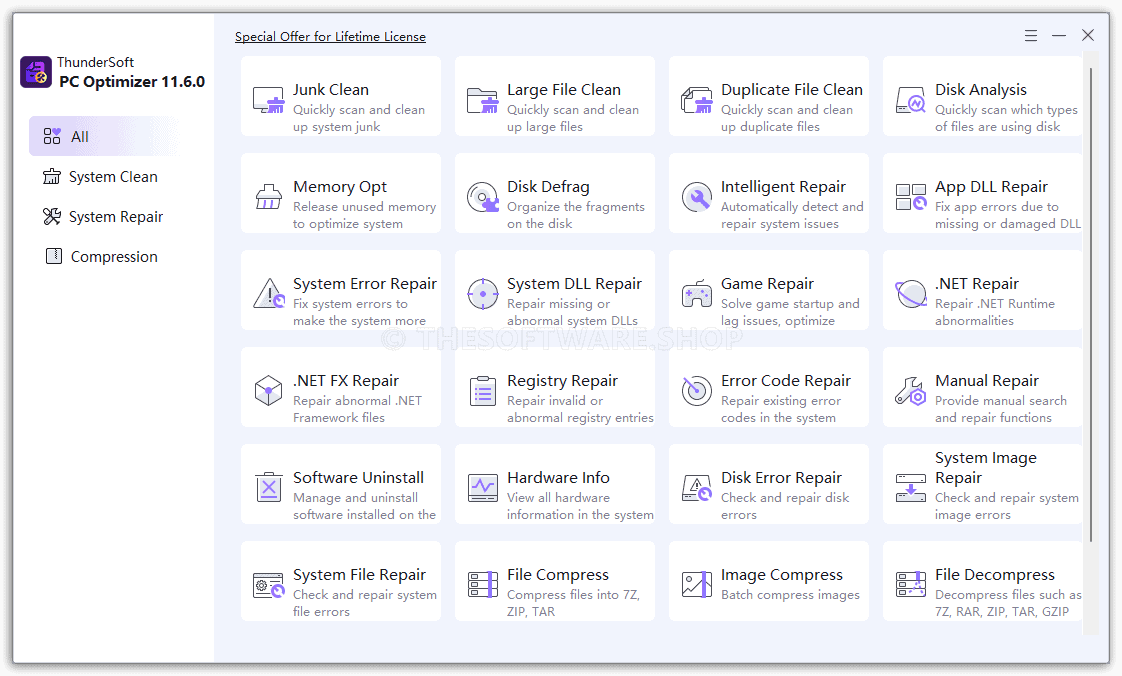
What is ThunderSoft PC Optimizer
ThunderSoft PC Optimizer is a Windows utility suite that combines cleaning, optimization, repair, compression, and recovery tools into one interface. It focuses on everyday issues like junk accumulation, duplicated files, memory waste, and common Windows errors that disrupt apps and games, helping you maintain a healthy PC without manual digging through system folders.
Performance problems are not only about storage and RAM—Windows errors can break normal app launches, cause missing DLL pop-ups, and lead to stability issues tied to registry entries or damaged components. ThunderSoft PC Optimizer includes repair utilities aimed at common Windows trouble spots, including missing or damaged DLL-related errors, .NET runtime/framework abnormalities, invalid registry entries, and disk/system file integrity issues. Instead of hunting forum posts and downloading random files, you can run targeted fixes from one place.
Gamers and power users also benefit when a system stays clean and consistent. If a game fails on startup or lags due to competing background activity, cleaning junk, organizing disk fragments, and reducing memory pressure can help reduce stutter and loading delays. ThunderSoft PC Optimizer brings these maintenance steps into a repeatable routine, so your PC stays ready for work, school, and play.
This software is a good fit for home users who want a “one dashboard” maintenance tool, students using laptops that slow down over the semester, professionals who rely on stable apps, and gamers who want fewer crashes and less lag. If you want practical tools that reduce cleanup time and make troubleshooting less intimidating, ThunderSoft PC Optimizer offers a balanced set of features built around speed, stability, and storage control.
Key Benefits
Here are the real-world outcomes people typically want from a maintenance suite, and how this software supports those goals with practical tools.
- Free up disk space by removing junk, large files, and duplicates
- Reduce slowdowns by releasing unused memory and improving system responsiveness
- Fix common Windows errors, including issues tied to missing or damaged DLL components
- Improve stability by repairing abnormal registry entries and addressing .NET issues
- Reduce game startup failures and lag by keeping the system cleaner and less congested
- Save time with centralized tools for cleanup, repair, and maintenance in one workflow
- Add convenience with built-in archive compression/decompression and image batch compression
- Improve resilience with recovery utilities and restore point creation for safer troubleshooting
Features
Below is a comprehensive list of the key features that make the software a valuable addition to your needs:
- System Clean – Cleans unnecessary files and optimizes storage to keep the system fast and organized.
- System Junk Cleanup – Scans and removes temporary files, cache, logs, and leftover system data.
- Large File Finder – Identifies oversized files that consume excessive disk space.
- Duplicate File Cleaner – Detects and removes duplicate files to free up storage safely.
- Disk Usage Analysis – Shows which file types and folders are using disk space.
- Memory Optimization – Releases unused RAM to improve system responsiveness.
- Disk Defragmentation – Reorganizes fragmented files to improve disk performance.
- Software Manager – Manages and uninstalls installed programs completely.
- Hardware Information – Displays detailed information about all system hardware components.
- System Repair – Fixes system errors to improve stability and prevent crashes.
- System Issue Detection – Scans the system for common Windows errors and misconfigurations.
- DLL Error Repair – Fixes application errors caused by missing or damaged DLL files.
- Game Error Fix – Resolves game startup failures and performance lag issues.
- .NET Repair – Repairs .NET Runtime and Framework errors affecting software compatibility.
- Registry Repair – Cleans and fixes invalid or broken registry entries.
- Disk and File System Repair – Checks and repairs disk errors and corrupted system files.
- System Image Repair – Restores damaged system image components.
- System Restore Management – Creates and restores system restore points for recovery.
- Compression – Reduces file size and manages compressed archives easily.
- File Compression – Compresses files into 7z, ZIP, and TAR formats.
- File Decompression – Extracts files from 7z, RAR, ZIP, TAR, and GZIP archives.
- Batch Image Compression – Compresses multiple images at once without manual processing.
- Data Recovery – Restores lost or deleted files from storage devices.
- Deleted File Recovery – Recovers files accidentally deleted from the PC.
- Lost File Recovery – Restores files lost due to system errors or disk issues.
Requirements
Before installing, confirm these basic requirements so the software runs properly on your system.
- Operating system: Windows 11, Windows 10
- Permissions: Administrator access recommended for repair and cleanup actions
- Storage: Sufficient free disk space for installation and scan results (varies by system)
- Internet: Optional, may be needed for updates or certain repair checks depending on your setup
Downloads
Try ThunderSoft PC Optimizer on your own PC to see how it fits your workflow and the types of issues it can detect on your system first. Get the Trial/Free edition (if offered by the publisher) by clicking the button below.
BUY NOW
ThunderSoft PC Optimizer is available for $29.99, and you may be able to get the ThunderSoft PC Optimizer full version with a license key for free on this listing for a limited time.

IObit Advanced SystemCare 19 PRO with Super Valur Pack: 6 Items included! BEST SELLER

GearUp VIP BEST OFFER

Ashampoo WinOptimizer 28: Lifetime License, 3 PCs BEST SELLER

PC Startup Master 4 PRO BEST OFFER

PC Services Optimizer 4 PRO: Lifetime License BEST SELLER

AVG TuneUp: 1 Year, 10 Devices BEST OFFER

IObit Advanced SystemCare Ultimate 18 with Gift Bundle BEST SELLER

Glary Utilities Pro BEST SELLER
PC Game Booster 7 Pro: 1 Year License, 1 PC BEST SELLER

SysTweak Advanced System Optimizer BEST SELLER
ThunderSoft PC Optimizer Giveaway
Available now: Free License Key For a Limited Time!

To access the giveaway, kindly provide your email address. Please refrain from closing this page after signing in to receive instructions on how to access the offer at no cost.

NOTES:
– All prices shown here are in listed USD (United States Dollar).
– Such promotional programs are subject to change without notice, from time to time in our sole discretion.
– Data may vary based on different systems or computers.
Thanks for reading ThunderSoft PC Optimizer Review & Enjoy the discount coupon. Please Report if ThunderSoft PC Optimizer Discount Coupon/Deal/Giveaway has a problem such as expired, broken link, sold out, etc while the deal still exists.