58% Off – PixelUp Pro: Lifetime License | AI Video Upscaler – for Windows

Restore Every Blurry Frame in Minutes. Get a full verison of PixelUp Pro with a lifetime license at a 58% Discount!
Full Version | Lifetime License | Free Lifetime Updates
BUY NOW
PixelUp Pro is available for $19.00. But, you can now get a full version of PixelUp Pro with a lifetime license that includes free updates and support at a 58% Discount! This offer is available for a limited time!

AI Video Upscaler and Local 8X Super-Resolution Software for 4K Video Enhancement, Offline Deep Learning Restoration, Batch Processing
- After you purchase PixelUp it may be used indefinitely.
- PixelUp is licensed per computer, and not per user.
- Each license allows installation on a single computer and a laptop.
- Transfer of a license to another owned computer is not allowed.
- Online license activation is required with a hardware footprint, and 1 installation per footprint.
- This promotion can be used to upgrade or extend an existing license.
- You can install/register the software at any time.
- License can be used for Commercial and Personal use.
- Upgrades to future versions of the software will be free for the lifetime of the product.
- Support is provided for the lifetime of the product.
- Prices do not necessarily include taxes, which will vary by country.
Platforms: Windows

Topaz Studio BEST OFFER
![[FLASH SALE] $50 Off – Topaz Video AI 7: Permanent License | AI-Powered Video Upscaler with 16K Resolution, Slo-Mo Frame Interpolation, Facial Recognition, Etc – for Windows](https://thesoftware.shop/wp-content/uploads/thumbs_dir/Topaz-Video-AI-Review-Download-Discount-Coupon-247kvlmusx363tqog5ww73ldx4mb4pjl1cn4v5msdwno.png)
Topaz Video AI 7 EXCLUSIVE

HitPaw Online BEST OFFER

Aiarty Video Enhancer GIVEAWAY
DVDFab Video Enhancer AI: Lifetime License BEST OFFER
Macxvideo AI GIVEAWAY

VideoProc Converter AI: Lifetime License BEST SELLER
VideoProc Converter AI: Lifetime License BEST SELLER

HitPaw VikPea BEST OFFER

Winxvideo AI BEST OFFER

OpenArt AI GIVEAWAY

ImagineArt EXCLUSIVE

Movavi Video Converter Premium 2020 (Windows / Mac OS) BEST SELLER

Movavi Video Suite 2025: Lifetime License BEST SELLER
PixelUp Pro Giveaway
Available now: Free License Key for a Limited Time!

To access the giveaway, kindly provide your email address. Please refrain from closing this page after signing in to receive instructions on how to access the offer at no cost.
NOTES:
– All prices shown here are in listed USD (United States Dollar).
– Such promotional programs are subject to change without notice, from time to time in our sole discretion.
– Data may vary based on different systems or computers.
PixelUp Pro Review at a Glance
Nearly every household and small business sits on a pile of video that looks worse every year: shaky camcorder tapes from the 1990s, early digital camera clips, ripped DVDs, old gameplay recordings, and downloaded files that were compressed within an inch of their life. Play any of that footage on a modern 4K television or laptop screen and the result is a soft, blocky, washed-out mess. The usual fix — stretching the frame with basic bicubic or bilinear scaling inside a video editor — only makes the smearing worse, because the software is guessing pixel values instead of rebuilding real detail. Waiting for cloud-based tools to finish a queue only adds another layer of frustration, since those services throttle upload speed, cap monthly minutes, and often return output that is still noticeably soft.
PixelUp Pro is a desktop video upscaling application built to solve exactly that problem.
What is PixelUp Pro
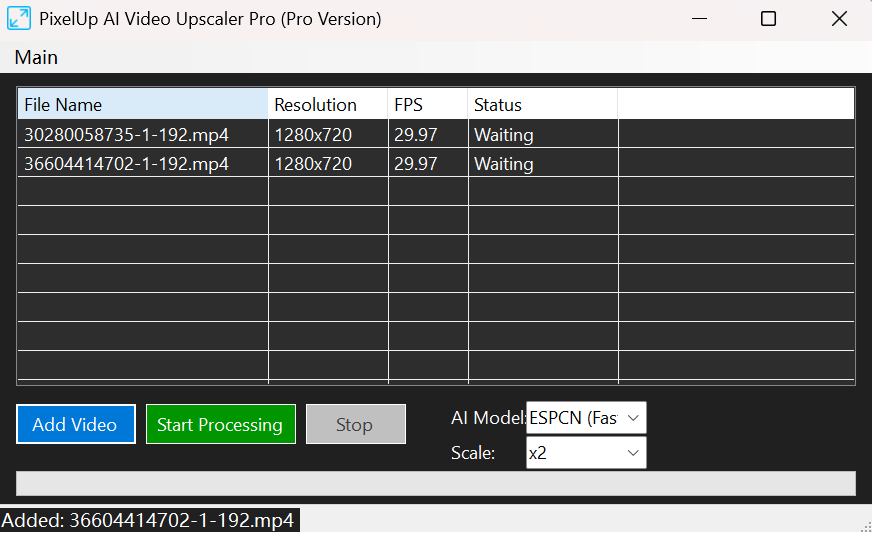
PixelUp Pro is a localized, offline video super-resolution utility that magnifies low-resolution footage using artificial intelligence instead of ordinary interpolation. It ships with three distinct convolutional neural network models — ESPCN, FSRCNN, and LapSRN — each tuned for a different balance of speed and detail recovery, letting you scale clips up to 8 times their original resolution while keeping edges sharp and motion blur under control.
The application detects your hardware automatically, routing the heavy computation to an NVIDIA CUDA graphics card when one is present, falling back to Vulkan acceleration on AMD or Intel graphics, and finally shifting to multi-threaded CPU processing if no compatible GPU is found. Every rendering pass happens on your own machine, with no account sign-up, no internet dependency, and no data ever leaving your storage drive. Once purchased, the perpetual license never expires and never asks for another payment, regardless of how many files you render or how many years you keep using it.
Key Benefits
Below is a list of the practical advantages that make PixelUp Pro worth adding to a video restoration or content production workflow.
- Sharper footage without re-shooting anything — old or low-quality clips gain real, reconstructed detail instead of a blurry stretch, so you never need to track down the original source again.
- Complete privacy over personal and client footage — since rendering happens locally, sensitive family videos or unreleased client edits never pass through a third-party server.
- Predictable, one-time cost — a single purchase replaces recurring credit packs and monthly subscription meters charged by cloud-based upscalers.
- Consistent performance regardless of internet quality — because processing is entirely local, a slow or unstable connection never interrupts a render.
- Time saved through automated batching — dragging an entire folder into the queue removes the need to babysit one file at a time.
- Audio that always matches the picture — the integrated synchronization pipeline keeps dialogue and sound effects locked to the restored video, so post-processing does not introduce new fixes to chase.
- Hardware flexibility across budgets — the software adapts to whatever graphics card or processor is installed, so upgrading later only speeds things up rather than requiring a new purchase.
Instead of stretching pixels, it runs your footage through a set of trained neural networks that recognize edges, textures, and motion patterns, then reconstruct the missing visual information frame by frame. The result is footage that looks like it was captured with better equipment in the first place, not footage that has simply been resized. Because the entire process runs locally on your own graphics card or processor, there is no upload queue, no data-sharing agreement to read through, and no recurring invoice waiting for you next month. Editors who have tried both approaches typically notice the difference immediately: fine textures like fabric weaves, foliage, and skin tones look reconstructed rather than smeared, and text on screen becomes legible again instead of a fuzzy blob.
Choosing PixelUp Pro over a browser-based upscaler comes down to control, cost, and consistency. Cloud tools throttle your resolution, cap your monthly minutes, and quietly collect your footage on remote servers you never see. PixelUp Pro keeps every frame on your hard drive, gives you a one-time purchase instead of a subscription meter, and lets you queue as many files as your storage allows. It suits video archivists digitizing family history, YouTube creators remastering older uploads, anime and retro-gaming fans restoring classic rips, and small production studios that need a dependable in-house tool instead of a per-render bill. Anyone who has ever winced at a grainy old clip on a big screen, or paid for a cloud upscaler that watermarked the finished file, is a strong candidate for this software.
Key Features
Below is a comprehensive list of the key features that make the software a valuable addition to your needs:
- Triple-Engine AI Matrix: combines ESPCN, FSRCNN, and LapSRN neural networks so you can pick the right balance of rendering speed and detail recovery for each project.
- ESPCN (Fast): reconstructs high-frequency detail directly in the low-resolution space for quick renders on tight deadlines.
- FSRCNN (Balanced): skips traditional bicubic pre-scaling to learn sharper mapping filters, giving a middle ground between speed and quality.
- LapSRN (High): builds resolution progressively through a pyramid structure, supporting extreme 2X, 4X, and 8X scaling for maximum texture recovery.
- Universal Hardware Acceleration: automatically searches for the fastest available processing path on the installed system.
- CUDA Detection: prioritizes NVIDIA graphics cards for the quickest tensor computation when one is available.
- Vulkan Fallback: routes work to AMD, Intel, or integrated GPUs through a low-overhead graphics API when no NVIDIA card is present.
- CPU Cascade: shifts to multi-threaded processor instructions automatically to prevent crashes or memory errors during demanding 8X jobs.
- Flexible Scaling and Batch Control: manages large restoration projects without constant manual attention.
- Drag-and-Drop Queue: loads an entire folder of clips at once instead of importing files individually.
- Per-File Profiles: allows different upscale targets and model choices for each item in the same batch.
- Lossless Audio Syncing: keeps sound perfectly aligned with picture through the entire restoration process.
- FFmpeg Demuxing: separates and preserves the original audio stream, including multitrack and surround sound data, before video processing begins.
- Timestamp-Accurate Remuxing: reinserts the preserved audio into the finished file with sample-accurate timing, regardless of frame rate.
- 100% Offline Architecture: keeps every stage of the render confined to the local machine.
- No Account Registration: opens and runs immediately after installation without creating a profile or logging in.
- Zero Cloud Dependency: continues rendering even if the internet connection drops, since nothing is ever uploaded.
- Perpetual Licensing Model: removes the recurring costs associated with most modern upscaling tools.
- Lifetime Access: a single purchase covers unlimited future use with no expiration date.
- No Watermarks: delivers finished renders without branding stamped over the footage.
Requirements
Before installing, check the specifications below to confirm your system meets the minimum requirements for smooth rendering.
- Operating System: Windows 10 or Windows 11 (64-bit).
- Processor: Quad-core CPU with AVX instruction set support recommended for CPU-fallback rendering.
- Memory: 8 GB RAM minimum, 16 GB or higher recommended for 4K and 8X jobs.
- Graphics Card: NVIDIA GPU with CUDA support recommended; AMD or Intel GPUs supported through Vulkan.
- Storage: At least 2 GB free space for installation, plus additional space for rendered output files.
- Dependencies: FFmpeg components are bundled with the installer; no separate download required.
Downloads
Test how PixelUp Pro handles your own footage before committing to a purchase. Get the free trial edition below and run a sample render on your own hardware to see the detail recovery, batch queue, and audio syncing in action firsthand, on a clip you already know well enough to judge the improvement.
or
Buy now, the price start from:
Thank you for reading PixelUp Pro review, and enjoy the discount coupon. If you notice any issues with the PixelUp Pro discount coupon, deal, or giveaway—such as an expired offer, broken link, or sold‑out promotion—please let us know while the deal is still available.